
1. Safety Instructions
Please read all safety instructions carefully before operating the appliance. Failure to follow these instructions may result in electric shock, fire, or injury.
- Ensure the power supply matches the voltage specified on the rating label.
- Do not operate the unit with a damaged power cord or plug.
- Keep the unit at least 50 cm away from walls or other objects to ensure proper ventilation.
- Do not insert objects into the air inlet or outlet.
- Do not use the unit in wet environments such as bathrooms or laundry rooms.
- Unplug the unit before cleaning or performing any maintenance.
- This appliance is not intended for use by persons (including children) with reduced physical, sensory or mental capabilities, or lack of experience and knowledge, unless they have been given supervision or instruction concerning use of the appliance by a person responsible for their safety.
2. Package Contents
Verify that all items listed below are present in the packaging.
- Portable Air Conditioner Unit
- Remote Control
- Exhaust Hose
- Window Sealing Kit (Adjustable window slider, exhaust hose adapter, window exhaust adapter)
- Drain Hose
- User Manual

Image: Included accessories for the Mistral MPAC1600R, showing the exhaust hose, window panel kit, and hose adapters.
3. Product Overview
Front View

Image: Front view of the Mistral MPAC1600R portable air conditioner, featuring its sleek black design and top control panel.
Side View

Image: Side view of the Mistral MPAC1600R portable air conditioner, highlighting its compact profile and side vents.
Rear View
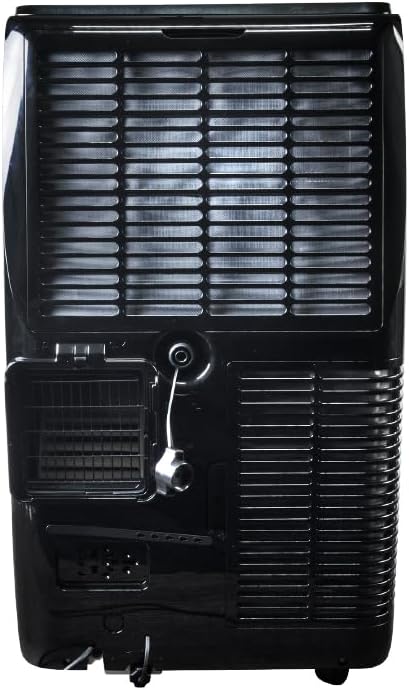
Image: Rear view of the Mistral MPAC1600R portable air conditioner, detailing the exhaust port, drainage outlet, and power connection.
Dimensions

Image: Diagram illustrating the dimensions of the Mistral MPAC1600R: 45 cm (width), 39.6 cm (depth), and 74.5 cm (height).
4. Setup and Installation
4.1 Unpacking
Carefully remove the air conditioner and all accessories from the packaging. Retain the packaging for future storage or transport.
4.2 Exhaust Hose Installation
- Screw the exhaust hose adapter onto one end of the exhaust hose.
- Attach the window exhaust adapter to the other end of the exhaust hose.
- Insert the exhaust hose adapter into the exhaust outlet on the rear of the air conditioner unit.
4.3 Window Kit Installation
- Adjust the window slider kit to fit your window opening.
- Secure the window slider kit in the window frame.
- Insert the window exhaust adapter (attached to the exhaust hose) into the opening of the window slider kit.
- Ensure the window is sealed around the kit to prevent air leakage.
4.4 Placement Considerations
- Place the unit on a flat, stable surface.
- Ensure there is at least 50 cm of clear space around the unit for proper airflow.
- Position the unit near a window for easy exhaust hose installation.
- Avoid placing the unit in direct sunlight or near heat sources.
5. Operating Instructions
5.1 Control Panel and Remote Control
The unit can be operated via the control panel on top of the unit or the included remote control. The remote control offers full functionality.
- Power Button: Turns the unit ON or OFF.
- Mode Button: Cycles through Cool, Dry, and Fan modes.
- Fan Speed Button: Adjusts fan speed (High, Medium, Low).
- Temperature Up/Down Buttons: Adjusts the desired temperature (18 to 32 °C).
- Timer Button: Sets the 24-hour ON/OFF timer.
- Sleep Mode Button: Activates or deactivates Sleep Mode.
- Smart Mode Button: Activates or deactivates Smart Mode.
- Turbo Mode Button: Activates or deactivates Turbo Mode.
- Child Lock Button: Locks the control panel to prevent accidental changes.
5.2 Modes of Operation
- Cool Mode: Provides cooling. Set desired temperature and fan speed.
- Dry Mode: Dehumidifies the room. Fan speed is fixed to low.
- Fan Mode: Circulates air without cooling. Select desired fan speed.
- Smart Mode: Automatically selects the optimal operating mode (Cool, Dry, or Fan) based on the room temperature.
- Turbo Mode: Operates at maximum cooling power and fan speed for rapid cooling.
- Sleep Mode: Gradually increases the set temperature by 1°C per hour for the first two hours, then maintains it, providing quieter operation for comfortable sleep.
5.3 Wi-Fi Connectivity and Smart Home Integration
The MPAC1600R features Wi-Fi connectivity, allowing control via a smartphone app and integration with smart home systems like Alexa and Google Home. Refer to the separate Wi-Fi setup guide for detailed instructions on connecting your device.
5.4 Child Lock Function
To activate the Child Lock, press and hold the Child Lock button on the control panel or remote control for 3 seconds. This will disable all other buttons. To deactivate, repeat the process.
6. Maintenance
Regular maintenance ensures optimal performance and extends the lifespan of your air conditioner.
6.1 Cleaning the Air Filter
The air filter should be cleaned every two weeks or more frequently depending on usage and air quality.
- Turn off and unplug the unit.
- Locate the air filter panel (usually on the rear or side).
- Remove the filter.
- Clean the filter with a vacuum cleaner or wash it with warm, soapy water.
- Rinse thoroughly and allow it to air dry completely before reinstalling.
6.2 Draining Water
The unit collects condensation during operation. When the internal water tank is full, the unit will stop and display an error code. Drain the water as follows:
- Turn off and unplug the unit.
- Place a shallow pan or container under the drain port at the bottom rear of the unit.
- Remove the drain plug.
- Allow all water to drain out.
- Replace the drain plug securely.
6.3 Storage
If storing the unit for an extended period:
- Drain all water completely.
- Clean the air filter.
- Run the unit in Fan mode for a few hours to dry the internal components.
- Unplug the power cord and coil it neatly.
- Store the unit in a dry, cool place, preferably in its original packaging.
7. Troubleshooting Guide
Before contacting customer support, refer to the following table for common issues and solutions.
| Problem | Possible Cause | Solution |
|---|---|---|
| Unit does not turn on | No power supply Power cord not plugged in Internal water tank full | Check power outlet Ensure power cord is securely plugged in Drain the water tank |
| No cooling or insufficient cooling | Air filter clogged Exhaust hose not properly installed Window not sealed Room too large Temperature setting too high | Clean the air filter Check exhaust hose connection and ensure it's not bent Seal window gaps Ensure unit is appropriate for room size Lower the set temperature |
| Unit is noisy | Unit not on a flat surface Air filter clogged Obstruction in fan | Place unit on a level surface Clean the air filter Check for and remove any obstructions |
| Water leakage | Drain plug loose Unit tilted Drain hose blocked | Ensure drain plug is secure Place unit on a level surface Check and clear any blockages in the drain hose |
8. Technical Specifications
| Feature | Specification |
|---|---|
| Model | MPAC1600R |
| Cooling Capacity | 16,000 BTU |
| Voltage | 220 Volts |
| Wattage | 1560 watts |
| Noise Level | 51 Decibels |
| Cooling Temperature Range | 18 to 32 °C |
| Modes | Cool, Dry, Fan, Smart, Turbo, Sleep |
| Fan Speeds | High, Medium, Low |
| Timer | 24 Hours |
| Special Features | UV Sterilisation, Wi-Fi (Alexa & Google Home compatible), Child Lock |
| Product Dimensions (L x W x H) | 45 x 39.6 x 74.5 cm |
| Weight | 33.3 kg |
| Form Factor | Portable |
9. Warranty and Customer Support
This Mistral Portable Air Conditioner is covered by a manufacturer's warranty. Please refer to the warranty card included in your package for specific terms and conditions, including the warranty period and coverage details.
For technical assistance, troubleshooting beyond this guide, or warranty claims, please contact Mistral customer support. Contact information can typically be found on the manufacturer's official website or on your purchase receipt.
When contacting support, please have your model number (MPAC1600R) and proof of purchase readily available.


