1. Important Safety Information
Please read this manual thoroughly before using the FACEIL BSX325 Wrist Blood Pressure Monitor. Retain this manual for future reference.
- This device is intended for adult home use to measure blood pressure and pulse rate. It is not intended for diagnosis or treatment of any medical condition.
- Consult your physician for interpretation of blood pressure measurements. Self-diagnosis and treatment based on measurements can be dangerous.
- Do not use this device on infants, children, or individuals unable to express consent.
- Avoid taking measurements in a moving vehicle, during exercise, or immediately after bathing or consuming alcohol/caffeine.
- If you experience discomfort during measurement, press the START/STOP button to stop the inflation immediately.
- Keep the device away from strong electromagnetic fields.
- Use only specified batteries or the provided USB cable.
2. Product Overview
The FACEIL BSX325 is an automatic wrist blood pressure monitor designed for convenient and accurate blood pressure and pulse rate measurement at home.
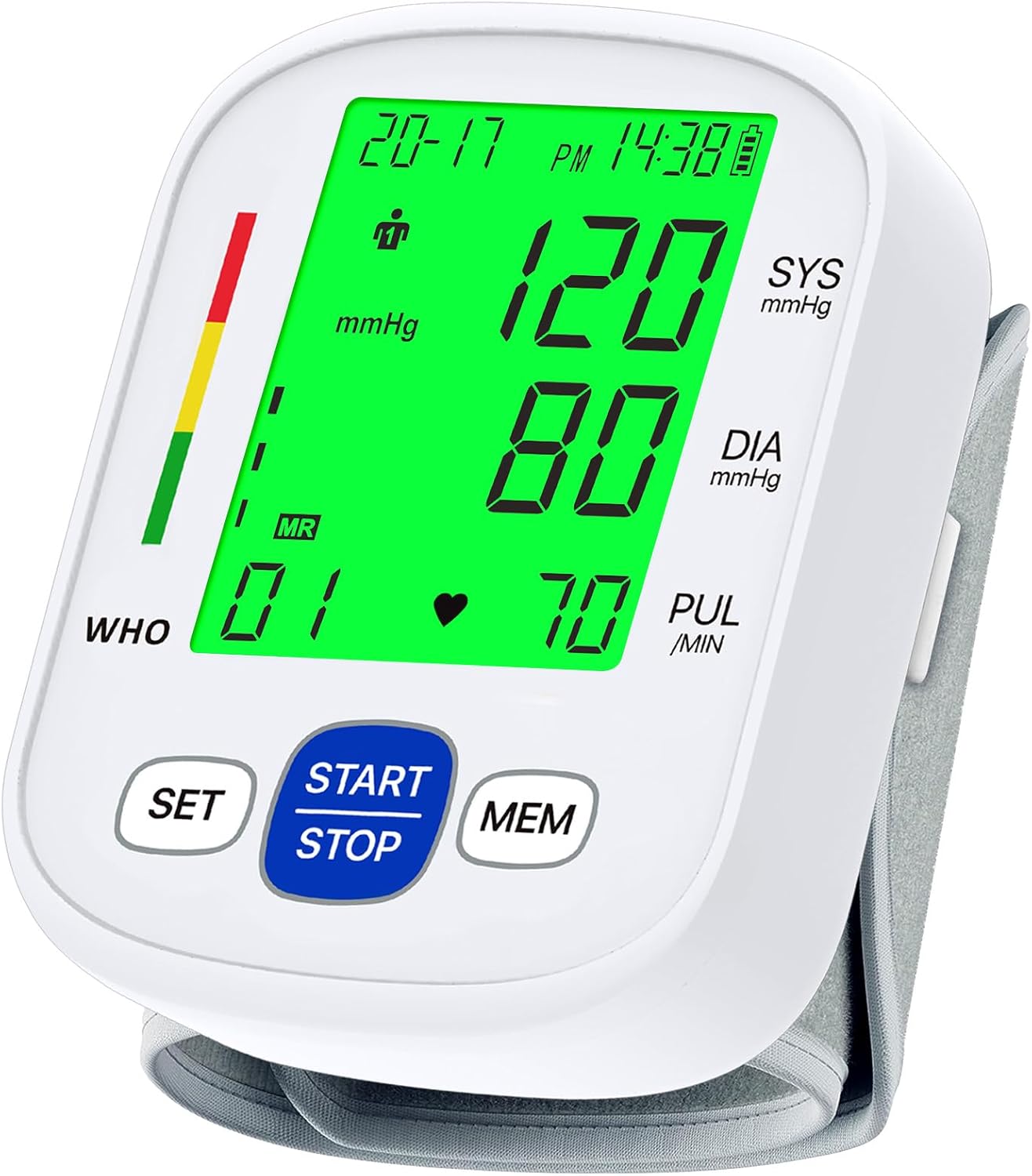
Image: The FACEIL BSX325 Wrist Blood Pressure Monitor with its digital display and wrist cuff.
2.1 Package Contents
Verify that all items are present in your package:
- 1 x Wrist Blood Pressure Monitor
- 1 x Storage Box
- 2 x AAA Batteries
- 1 x USB Cable
- 1 x User Manual (this document)

Image: Visual representation of the items included in the product package: monitor, storage box, batteries, USB cable, and user manual.
3. Display Introduction
The LCD display provides clear readings and indicators for various functions.

Image: Detailed diagram illustrating the various symbols and readings on the LCD display, including User ID, Systolic/Diastolic Blood Pressure, Pulse Rate, Memory Symbol, and WHO Blood Pressure Level Indicator.
- User ID Symbol: Indicates which user (1 or 2) is currently selected.
- Systolic (SYS) & Diastolic (DIA) Blood Pressure: Your blood pressure readings in mmHg.
- Pulse Rate (PUL): Your heart rate in beats per minute.
- Memory Symbol (MR): Appears when viewing stored measurements.
- WHO Indicator: A color-coded bar indicating your blood pressure level according to WHO guidelines.
- Battery Indicator: Shows remaining battery life.
- Date/Time: Displays the current date and time.
4. Setup
4.1 Power Supply
The monitor can be powered by either AAA batteries or a USB cable.
- Battery Installation: Open the battery compartment cover on the back of the device. Insert 2 AAA batteries, ensuring correct polarity (+/-). Close the cover securely.
- USB Power: Connect the provided USB cable to the monitor's USB port and the other end to a compatible USB power source (e.g., wall adapter, computer USB port).

Image: Illustration of the two power supply methods: 2 AAA batteries (included) and USB cable connection (included).
4.2 Setting Date and Time
Setting the correct date and time ensures accurate recording of your measurements.
- With the device off, press and hold the SET button for approximately 3 seconds until the year flashes.
- Press the MEM button to adjust the year. Press SET to confirm and move to the month.
- Repeat the process using MEM to adjust and SET to confirm for month, day, hour, and minute.
- Once all settings are confirmed, the device will exit setup mode.
5. Operating Instructions
5.1 Before Measurement
- Rest for at least 5 minutes before taking a measurement.
- Avoid eating, drinking alcohol or caffeine, smoking, or exercising for 30 minutes prior to measurement.
- Ensure your bladder is empty.
- Take measurements in a quiet environment.
5.2 Applying the Wrist Cuff
- Remove any tight clothing or accessories from your wrist.
- Wear the device around your bare wrist with your palm facing upwards. The display should be on the inside of your wrist.
- Ensure the distance between the device and your palm is approximately 1-2 cm.
- Fasten the cuff snugly but not too tightly. You should be able to insert one finger between the cuff and your wrist.

Image: Visual instructions for wearing the device (Step 1 & 2), maintaining correct posture (Step 3), and initiating measurement (Step 4).
5.3 Correct Measurement Posture
- Sit comfortably with your back supported and feet flat on the floor.
- Place your elbow on a table so that the monitor is at the same level as your heart.
- Relax your hand and keep it still.
5.4 Taking a Measurement
- Ensure the cuff is correctly applied and you are in the proper posture.
- Press the START/STOP button. The cuff will automatically inflate.
- Remain still and silent during the measurement.
- Once the measurement is complete (approximately 45 seconds), your systolic, diastolic, and pulse readings will be displayed. The device will automatically store the result.

Image: A user demonstrating the ease of wearing and operating the wrist blood pressure monitor by pressing the START/STOP button.
5.5 Selecting User (A/B)
The device supports two users, each with 99 memory slots.
- Before taking a measurement, press the SET button briefly to toggle between User 1 and User 2. The User ID symbol on the display will change accordingly.
- Ensure the correct user is selected before taking a measurement to store readings in the appropriate memory bank.

Image: Illustration demonstrating the 2-user support feature, showing separate memory banks for User A and User B.
6. Interpreting Your Results
Your blood pressure reading consists of two numbers: Systolic (the top number) and Diastolic (the bottom number). The pulse rate is also displayed.
- Systolic Pressure (SYS): The pressure when your heart beats, pumping blood.
- Diastolic Pressure (DIA): The pressure when your heart rests between beats.
- Pulse Rate (PUL): The number of times your heart beats per minute.
6.1 WHO Blood Pressure Classification
The monitor includes a WHO (World Health Organization) indicator bar to help classify your blood pressure readings. Consult your doctor for a professional interpretation.
| Category | Systolic (mmHg) | Diastolic (mmHg) |
|---|---|---|
| Normal Pressure | 90-120 | Below 80 |
| Middle High Pressure | 120-140 | 80-90 |
| High Pressure | 140-180 | 90-110 |
Image: The WHO blood pressure level indicator on the monitor's display, showing color-coded ranges for normal, middle high, and high pressure.
7. Memory Function
The FACEIL BSX325 stores up to 99 measurements for each of the two users, including date and time stamps.
- To view stored measurements, press the MEM button when the device is off.
- Each press of the MEM button will cycle through the stored readings from most recent to oldest.
- To exit memory mode, press the START/STOP button or wait for automatic power-off.
- To clear all memory for the currently selected user, press and hold the MEM button for 3 seconds while in memory recall mode. The display will show "CL" and then turn off, indicating memory has been cleared.
8. Maintenance and Storage
8.1 Cleaning
- Clean the monitor body and cuff with a soft, dry cloth.
- If necessary, use a cloth lightly dampened with water or a mild detergent, then wipe dry immediately.
- Do not use abrasive cleaners, solvents, or immerse the device in water.
8.2 Storage
- Store the device in its provided storage box to protect it from dust, moisture, and physical damage.
- Keep the monitor in a cool, dry place, away from direct sunlight and extreme temperatures.
- If the device will not be used for an extended period, remove the batteries to prevent leakage.
9. Troubleshooting
If you encounter issues with your monitor, refer to the table below for common problems and solutions.
| Problem | Possible Cause | Solution |
|---|---|---|
| No display when powered on | Batteries are dead or incorrectly inserted; USB cable not connected properly. | Replace batteries with new ones, ensuring correct polarity. Check USB cable connection. |
| Error message (e.g., "E-1", "E-2") | Cuff not applied correctly; movement during measurement; irregular pulse. | Re-apply cuff correctly. Remain still and silent. Consult a physician if irregular pulse persists. |
| Inaccurate readings | Incorrect cuff placement; improper posture; talking or moving during measurement; recent activity. | Review sections 5.2 and 5.3. Ensure proper preparation (section 5.1). Take multiple readings. |
| Cuff does not inflate | Air leakage; cuff not connected properly; low battery. | Check cuff for damage. Ensure cuff is securely attached. Replace batteries. |
10. Specifications
| Feature | Detail |
|---|---|
| Model Name | BSX325 |
| Brand | FACEIL |
| Measurement Method | Oscillometric |
| Measurement Range | Pressure: 0-299 mmHg; Pulse: 40-199 beats/minute |
| Accuracy | Pressure: ±3 mmHg; Pulse: ±5% of reading |
| Memory | 2 Users x 99 Sets |
| Cuff Size | Adjustable, 5.3"-7.67" (13.5-19.5 cm) |
| Power Source | 2 x AAA Batteries (included) or USB Cable (included) |
| Display Type | LCD |
| Item Weight | 268 g |
| Product Dimensions | 10L x 10W x 10Th Centimetres (approximate) |
| UPC | 710946701410 |
11. Warranty and Support
For warranty information or technical support, please refer to the documentation included with your purchase or contact the seller directly. Keep your purchase receipt as proof of purchase.


