
1. Introduction
This instruction manual provides detailed guidance for the assembly, operation, and maintenance of your ONKRON Mobile TV Stand TS2080 Black. This heavy-duty rolling TV stand is designed to support 60-120 inch screens with a maximum load capacity of 331 lbs and is compatible with VESA patterns from 200x200 to 1000x600. Please read this manual thoroughly before installation and use to ensure safe and correct operation.
2. Key Features
- Large Screen Compatibility: Supports televisions and interactive panels from 60 to 120 inches.
- High Load Capacity: Safely holds screens up to 331 lbs (TV max weight 265 lbs).
- VESA Compliance: Compatible with VESA mounting patterns ranging from 200x200mm to 1000x600mm.
- Height Adjustable: Screen height can be adjusted from 50.4 inches to 62.3 inches for optimal viewing.
- Mobile Design: Equipped with smooth-rolling, rubberized casters that feature a locking system for easy relocation and secure positioning.
- Integrated Shelving: Includes a main storage shelf with a 55 lbs capacity for accessories like laptops or soundbars, and a camera shelf with an 11 lbs capacity for webcams or PTZ cameras.
- Stable Construction: Robust alloy steel frame and reinforced wide legs provide enhanced stability.
3. Package Contents
Verify that all components listed below are present and undamaged before beginning assembly. If any parts are missing or damaged, please contact ONKRON customer support.

Figure 3.1: All components included in the ONKRON Mobile TV Stand TS2080 Black package, laid out on a grey surface. The image shows the main frame parts, TV mounting brackets, shelves, wheels, and various screws and tools.
The package includes:
- Main vertical columns
- Base legs (left and right)
- Horizontal support bar
- TV mounting brackets (2 pieces)
- Main accessory shelf
- Webcam/camera shelf
- Casters (4 pieces)
- Hardware kit (various screws, washers, spacers, wrenches)
- Instruction manual
4. Assembly Instructions
Assembly typically requires two people. Follow the steps carefully to ensure proper and safe installation.
4.1. Base Assembly
- Attach the casters to the base legs. Ensure they are securely tightened.
- Connect the two base legs using the horizontal support bar.
4.2. Column and TV Mount Assembly
- Secure the vertical columns to the assembled base.
- Attach the TV mounting plate to the vertical columns at your desired initial height.
- Install the TV mounting brackets onto the back of your television, ensuring they align with the VESA holes. Select appropriate screws and spacers from the hardware kit.
- Carefully lift the television and hook the TV mounting brackets onto the mounting plate on the stand. Secure the TV in place using the safety screws or locking mechanisms.

Figure 4.1: Side view of the ONKRON Mobile TV Stand TS2080 Black, illustrating its dimensions and stable base.

Figure 4.2: Key specifications for TV compatibility and stand features.
4.3. Shelf Installation
- Attach the main accessory shelf to the designated slots on the vertical columns.
- Install the webcam/camera shelf at the top of the vertical column, above the TV.
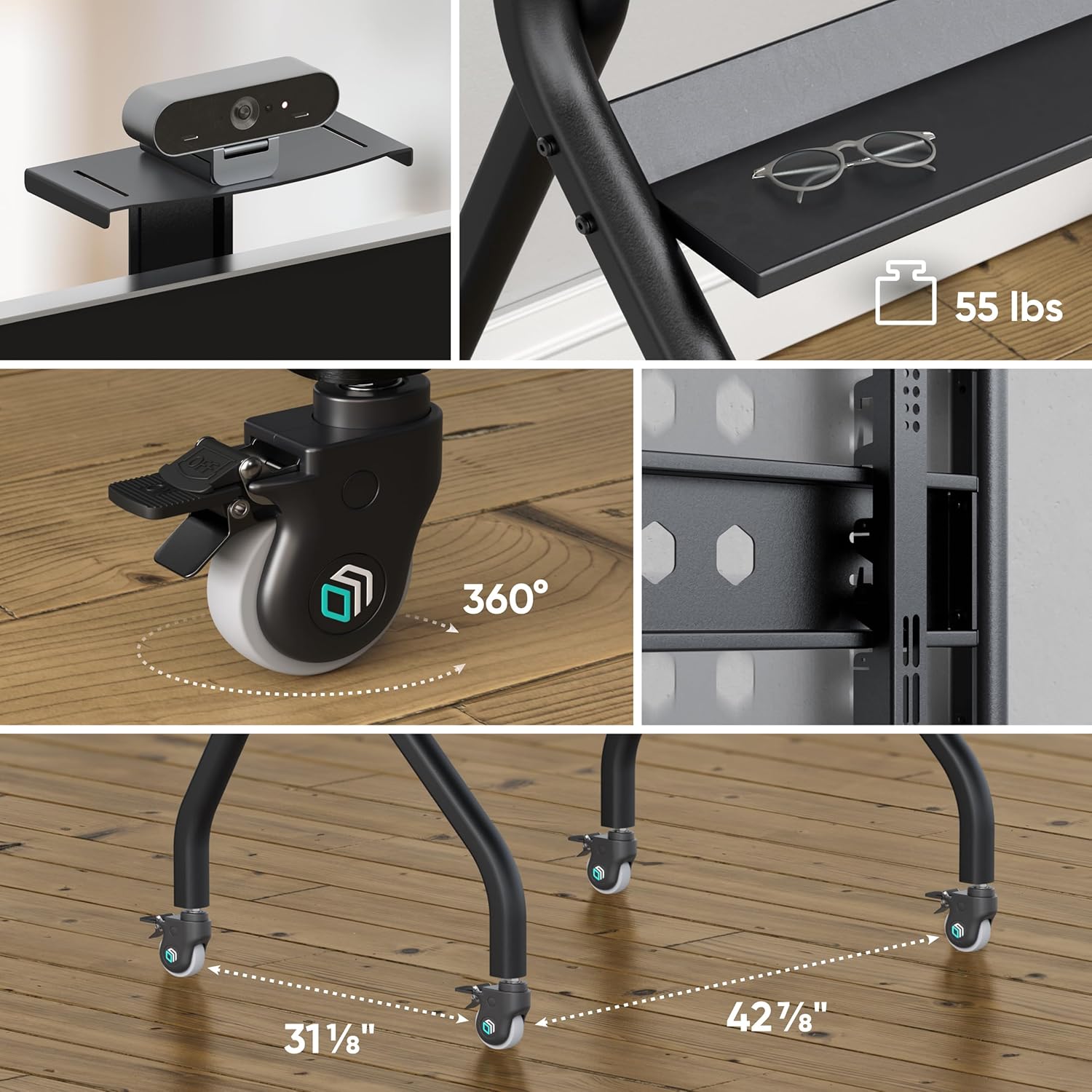
Figure 4.3: Detailed view of the webcam shelf, main accessory shelf, and locking casters.
4.4. Assembly Video Guide
Video 4.1: An official ONKRON promotional video for the TS2080 Mobile TV Stand, demonstrating its features, assembly process, and various applications in educational and office environments. The video highlights the stable base, VESA compatibility, height adjustment, and integrated shelves.
5. Operating Instructions
5.1. Adjusting Screen Height
The screen height can be adjusted by repositioning the TV mounting plate on the vertical columns. Ensure the TV is removed before adjusting the mounting plate. Securely fasten all bolts after adjustment.
5.2. Moving the Stand
To move the stand, unlock all four casters by disengaging their locking levers. Gently push the stand to its new location. Avoid sudden movements or pushing over uneven surfaces with a TV mounted.
5.3. Locking the Wheels
Once the stand is in its desired position, engage the locking levers on all four casters to prevent accidental movement and ensure stability.
6. Maintenance
- Regularly inspect all bolts and connections to ensure they remain tight. Retighten if necessary.
- Clean the stand with a soft, dry cloth. Avoid abrasive cleaners or solvents.
- Check casters periodically for smooth operation and ensure the locking mechanism functions correctly.
7. Troubleshooting
- Stand feels unstable: Ensure all assembly bolts are securely tightened. Verify the TV weight and VESA pattern are within the specified limits. Ensure the stand is on a flat, level surface.
- Wheels not locking/moving smoothly: Check for debris in the casters. Ensure the locking levers are fully engaged or disengaged.
- TV not level: Adjust the TV mounting brackets slightly to achieve a level screen.
8. Specifications
| Feature | Specification |
|---|---|
| Mounting Type | Floor Mount |
| Movement Type | Fixed (with mobile casters) |
| Brand | ONKRON |
| Material | Alloy Steel |
| Color | Black |
| Compatible Devices | Monitor, Television |
| Maximum Supported Screen Size | 120 Inches |
| Minimum Supported Screen Size | 60 Inches |
| Max Load Capacity | 331 lbs |
| VESA Compatibility | 200x200 - 1000x600 mm |
| Height Adjustment Range | 50.4" to 62.3" |
| Main Shelf Capacity | 55 lbs |
| Camera Shelf Capacity | 11 lbs |
9. Warranty and Support
The ONKRON Mobile TV Stand TS2080 Black comes with a 5-year manufacturer's warranty. For any questions regarding assembly, operation, or troubleshooting, please contact ONKRON customer support. Our specialists are available to assist you.
For further information or support, please visit the official ONKRON store: ONKRON Store


