
Pomya Pomyaxoarys0p39
Pomya Car MP5 Player User Manual
Model: Pomyaxoarys0p39
1. Introduction
This manual provides detailed instructions for the installation, operation, and maintenance of your Pomya Car MP5 Player. Please read this manual thoroughly before using the product to ensure proper function and safety. This multimedia player features a 7-inch HD retractable screen, Bluetooth connectivity, support for CarPlay and Android Auto, Mirror Link, and includes a backup camera for enhanced driving experience.
2. Product Overview
2.1 Key Features
- Smart Design: PD fast charging and Type C interface support fast charging for cell phones, and has a unique car steering wheel learning function.
- Support Functions: Support cell phone interconnection, for iOS CarPlay, for Android Auto, mirror link interconnection, reverse image, play video warning, etc.
- Reversing Image: Equipped with unique 12 LED reversing camera, bringing you a clearer night vision distance, making your daily reversing safer.
- Retractable Player: The retractable 7-inch car stereo player can be manually stretched as long as the car stereo mounting size matches the machine size.
- Bluetooth Music Player: Built-in microphone, you can answer or make calls, clear sound brings you excellent listening experience.
2.2 Panel Description
Familiarize yourself with the various buttons and ports on the front and rear panels of the MP5 player.

Image: Detailed diagram showing the front panel controls (power/mute, band switch, microphone, volume, multifunctional settings, USB charging, USB reader, Type-C interface, reset button) and rear panel connections (ISO plug, power/speaker, video out, audio input, reversing camera input, radio antenna jack).
3. Package Contents
Verify that all items listed below are included in your package:
- 1 x Car MP5 Player Host
- 2 x Power Cord
- 2 x Disassembly Piece
- 1 x Remote Control
- 1 x Reversing Video Cable
- 1 x Camera Assembly
- 1 x Camera Connection Cable
- 2 x Screw
- 1 x Host User Manual
- 1 x Camera User Manual

Image: An overview of the Car MP5 Player and all its included accessories, such as wiring harnesses, remote control, and the backup camera kit.
4. Specifications
Detailed technical specifications for the Car MP5 Player:
| Feature | Specification |
|---|---|
| System | WIN-CE system |
| Software Solution | C200S |
| Radio Frequency | FM 87.5-108.0MHz, 522-1620KHz |
| Bluetooth Version | BT5.1 |
| Display Resolution | 800x480 |
| Screen Size | 7 inches |
| Screen Expansion Mode | Manual |
| Operating Voltage | 12-14.4V |
| Power Output | 4x60W |
| Installation Size | Approx. 178x53mm (7x2.08in) |
| Face Shell Size | Approx. 175x50mm (6.88x1.96in) |
| Host Depth | Approx. 145mm (5.7in) |
| Cell Phone Connectivity | Support for MirrorLink, CarPlay, Android Auto |
| USB Ports | USB2.0 + PD fast charging + Type C charging |
| Audio Format Support | MP3/AAC/APE/OGG/M4A/RA/WAV |
| Video Format Support | H263/H264/H265/DIVX/AVI/FLV/MKV/MPEG/MP4/WMV9/VC/ASF/TS/QT |
| Image Format Support | JPEG/PNG/BMP/GIF/TIFF |
| Language Support | English, Chinese, Spanish, Portuguese, Russian, German, French, Polish, Turkish, Arabic, Hebrew, Italian, Czech |
| Remote Control Battery | 2xAAA batteries (not included) |
5. Installation
5.1 Dimensions
Ensure your car's dashboard opening matches the installation dimensions of the MP5 player.
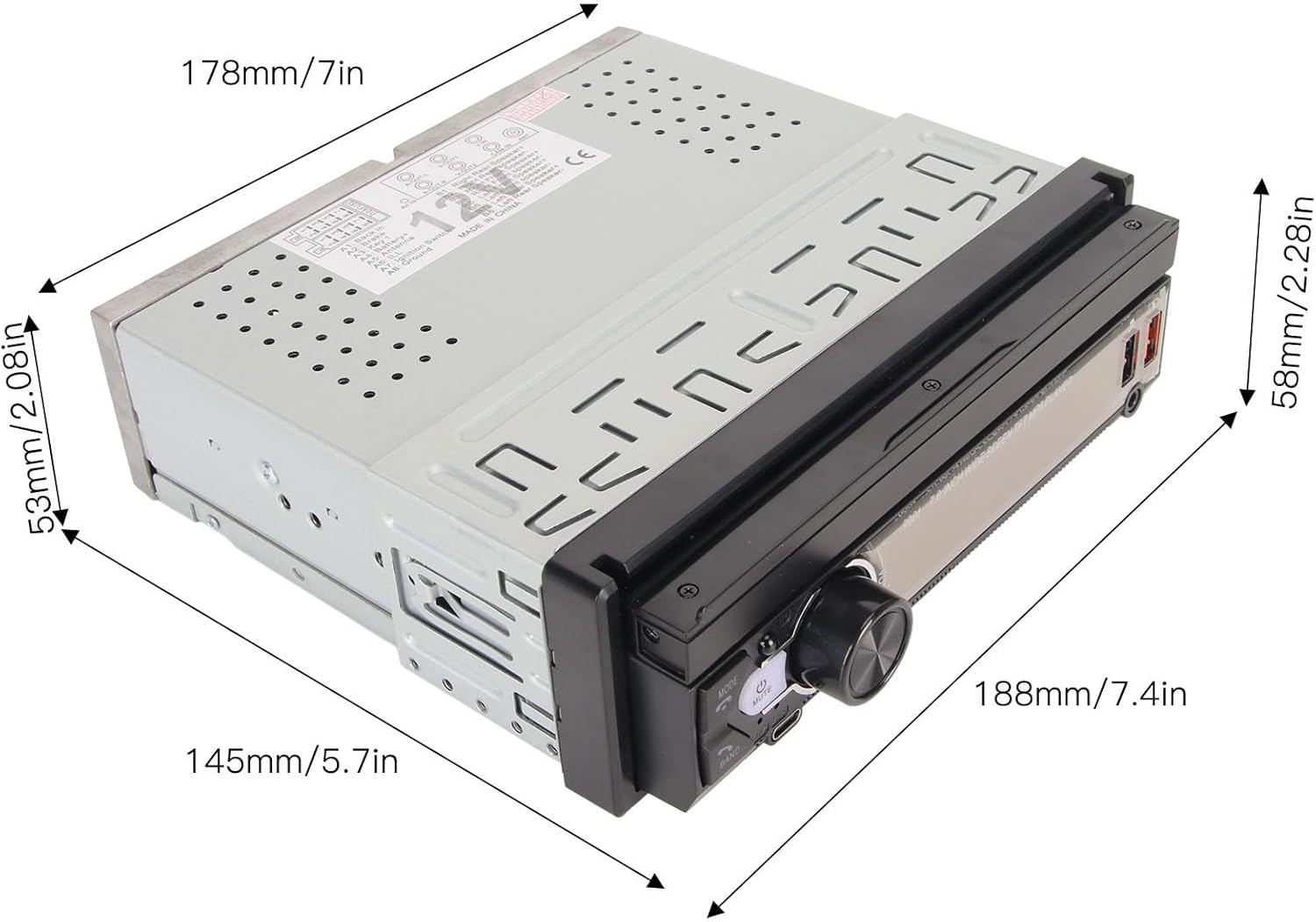
Image: Dimensional drawing of the Car MP5 Player, indicating its width (178mm/7in), height (53mm/2.08in), depth (145mm/5.7in), and the extended screen height (58mm/2.28in).
5.2 Wiring Diagram
Refer to the 'Panel Description' section (Image 2.2) for a visual guide to the rear panel connections. Connect the power cords, speaker wires, video input/output cables, and the radio antenna as indicated. Ensure all connections are secure before powering on the device.
5.3 Mounting the Unit
- Carefully slide the MP5 player into the car's dashboard opening until it clicks into place.
- Secure the unit using the provided screws or mounting brackets.
- Connect the backup camera and other external devices if applicable.
6. Operation Guide
6.1 Basic Controls
Upon powering on the device, the main interface will be displayed. Use the touch screen or physical buttons to navigate.

Image: The primary user interface of the Car MP5 Player, displaying a grid of application icons for various functions such as home, settings, phone, music, and navigation.
6.2 Bluetooth Connectivity
To connect your phone via Bluetooth:
- Go to the Bluetooth settings on the MP5 player.
- Enable Bluetooth on your mobile device and search for available devices.
- Select the MP5 player from the list (usually named 'CarBT' or similar) and pair.
- Once connected, you can play music and make/receive calls hands-free.
6.3 Smartphone Integration (CarPlay, Android Auto, Mirror Link)
Connect your smartphone via USB to enable CarPlay (for iOS), Android Auto (for Android), or Mirror Link functionality. This allows you to access compatible apps, navigation, and media directly from the player's screen.
6.4 Reversing Camera Function
When the vehicle is shifted into reverse gear, the screen will automatically display the view from the connected backup camera, providing parking assistance with guide lines.

Image: The Car MP5 Player's screen showing the live feed from the backup camera, complete with dynamic parking guidelines, as seen in a parking lot environment.
6.5 Steering Wheel Control
The unit supports learning functions for your car's steering wheel controls, allowing you to operate the player without taking your hands off the wheel.

Image: The Car MP5 Player's interface for configuring steering wheel controls, demonstrating how to map vehicle steering wheel buttons to player functions.
6.6 USB and Type-C Charging
The player is equipped with USB2.0 and Type-C ports that support PD fast charging for your mobile devices.
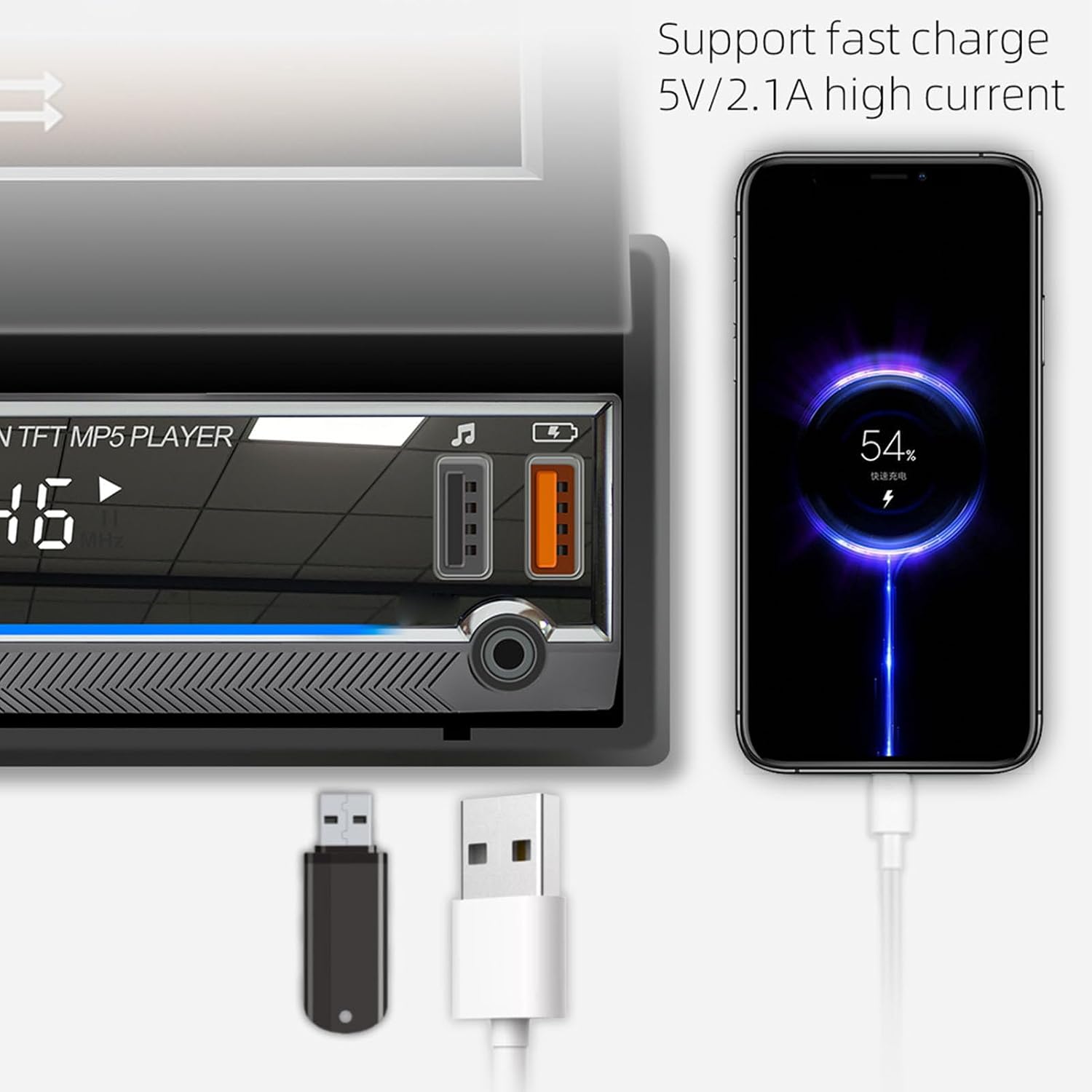
Image: A close-up view of the Car MP5 Player's front panel, highlighting the USB and Type-C ports, with a smartphone connected and actively fast charging.
6.7 Audio Input
Connect external audio sources via the AUX input port using a 3.5mm audio cable.

Image: The Car MP5 Player displaying 'NO SIGNAL' on its screen, while a smartphone is connected via an AUX cable to its audio input port, indicating external audio playback capability.
6.8 Car Location Feature
The player supports a 'Locate and Find the Car' function, which can help you find your parked vehicle using a connected smartphone application.

Image: The Car MP5 Player screen displaying instructions for its 'iCar Find' mobile app remote control feature, alongside a smartphone showing a map with a car's location marked.
7. Maintenance
To ensure the longevity and optimal performance of your Car MP5 Player, follow these maintenance guidelines:
- Cleaning: Use a soft, dry cloth to clean the screen and exterior. Avoid abrasive cleaners or solvents.
- Temperature: Do not expose the unit to extreme temperatures or direct sunlight for prolonged periods.
- Moisture: Keep the unit dry. Do not expose it to water or excessive humidity.
- Ventilation: Ensure proper ventilation around the unit to prevent overheating.
8. Troubleshooting
If you encounter issues with your Car MP5 Player, refer to the following common problems and solutions:
| Problem | Possible Cause | Solution |
|---|---|---|
| No power | Incorrect wiring; Blown fuse; Vehicle battery issue | Check power connections; Replace fuse; Check car battery |
| No sound | Speaker wires disconnected; Volume too low; Mute activated | Check speaker connections; Increase volume; Deactivate mute |
| Bluetooth not connecting | Bluetooth off on device/phone; Pairing issue | Ensure Bluetooth is on; Delete previous pairings and re-pair |
| Backup camera not displaying | Camera not connected; Incorrect wiring; Camera faulty | Check camera cable connection; Verify reverse trigger wire; Test camera |
| Screen unresponsive | System crash; Software glitch | Perform a soft reset (use the reset button if available); Power cycle the unit |
9. Warranty and Support
For warranty information and technical support, please refer to the documentation provided with your purchase or contact Pomya customer service through the official channels. Keep your proof of purchase for warranty claims.
Ask a question about this manual
Ask about setup, troubleshooting, compatibility, parts, safety, or missing instructions. Manuals+ will review the question and use this page’s manual context to help answer it.