1. Introduction
The Livoo TES255 is a multifunctional device that combines a Bluetooth speaker, a digital alarm clock, and a color-changing light. It is designed for convenience and versatility, offering features such as hands-free calling, a rechargeable battery, and a TF card slot for direct music playback.
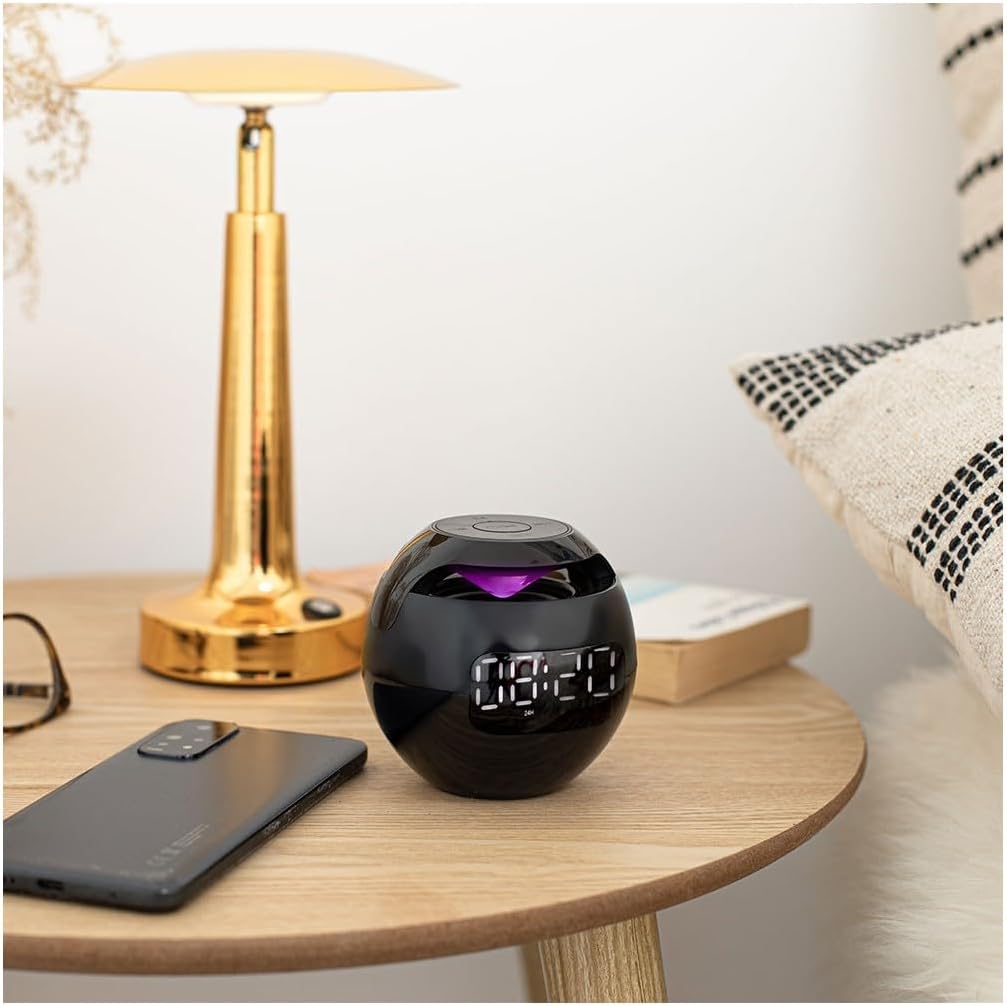
Image 1.1: The Livoo TES255 Bluetooth Speaker Alarm Clock positioned on a bedside table.
2. Safety Information
- Do not expose the device to extreme temperatures, direct sunlight, or high humidity.
- Avoid dropping or subjecting the device to strong impacts.
- Keep the device away from water and other liquids.
- Do not attempt to disassemble or repair the device yourself. Contact qualified service personnel.
- Use only the provided charging cable or a certified equivalent.
3. Package Contents
- Livoo TES255 Bluetooth Speaker Alarm Clock
- USB Charging Cable
- User Manual
4. Product Overview
4.1 Front Display

Image 4.1: Front view of the Livoo TES255, highlighting the digital time display and alarm indicators.
The front of the device features a clear digital display showing the current time. Alarm indicators (bell icons) are visible when alarms are set.
4.2 Control Panel

Image 4.2: Top view of the Livoo TES255, illustrating the control buttons.
- Power / Play / Pause Button: Press and hold to power on/off. Press to play/pause music or answer/end calls.
- M (Mode) Button: Press to switch between Bluetooth, TF card, and Clock modes.
- Previous Track / Volume Down Button: Press to go to the previous track. Press and hold to decrease volume.
- Next Track / Volume Up Button: Press to go to the next track. Press and hold to increase volume.
- SET Button: Press to enter time/alarm setting mode.
4.3 Ports

Image 4.3: Side view of the Livoo TES255, showing the Micro USB charging port and TF card slot.
- Micro USB Charging Port: For connecting the USB charging cable.
- TF Card Slot: For inserting a MicroSD (TF) card for music playback.
5. Setup
5.1 Charging the Device
The Livoo TES255 is equipped with a 1200 mAh rechargeable Li-ion battery. Before first use, fully charge the device. Connect the provided USB charging cable to the Micro USB port on the device and the other end to a USB power adapter (not included) or a computer's USB port. The charging indicator light will illuminate during charging and turn off when fully charged. A full charge provides up to 3 hours of continuous playback.
5.2 Power On/Off
Press and hold the Power / Play / Pause button for approximately 3 seconds to turn the device on or off.
5.3 Setting Time and Alarms
- In Clock mode, press the SET button to enter time setting mode. The hour digits will flash.
- Use the Previous Track / Volume Down and Next Track / Volume Up buttons to adjust the hour.
- Press SET again to move to minute adjustment. Adjust minutes using the volume buttons.
- Press SET again to set Alarm 1. The alarm hour digits will flash. Adjust as needed.
- Press SET again to set Alarm 1 minutes. Adjust as needed.
- Repeat the process for Alarm 2.
- Press SET one last time to exit setting mode.
- To activate/deactivate an alarm, short press the SET button when not in setting mode. The alarm icon will appear/disappear on the display.
6. Operating Instructions
6.1 Bluetooth Pairing
- Ensure the speaker is powered on.
- Press the M (Mode) button until the device enters Bluetooth mode (a voice prompt or indicator light may confirm this).
- On your smartphone or other Bluetooth-enabled device, enable Bluetooth and search for available devices.
- Select "TES255" from the list of devices to pair.
- Once paired, you will hear a confirmation sound, and you can now play audio through the speaker.
6.2 Music Playback
- Via Bluetooth: After successful pairing, play music from your connected device. Use the Play / Pause button to control playback. Use the Previous Track / Volume Down and Next Track / Volume Up buttons for track navigation and volume adjustment.
- Via TF Card: Insert a MicroSD (TF) card with MP3 audio files into the TF card slot. The device should automatically switch to TF card mode and begin playback. If not, press the M (Mode) button to select TF card mode. Use the same controls as Bluetooth for playback, track navigation, and volume.
6.3 Hands-Free Calling
When connected via Bluetooth to your smartphone, the integrated microphone allows for hands-free calling.
- Answer Call: Press the Power / Play / Pause button once to answer an incoming call.
- End Call: Press the Power / Play / Pause button once during a call to end it.
- Reject Call: Press and hold the Power / Play / Pause button for 2 seconds to reject an incoming call.
6.4 Color Changing Lights

Image 6.1: The Livoo TES255 showcasing its color-changing LED light feature.
The device features an integrated color-changing light. To activate or change the light mode, refer to the specific instructions in your device's quick start guide or experiment with short presses of the M (Mode) button or a dedicated light button if available (not explicitly detailed in provided data).
7. Maintenance
- Clean the device with a soft, dry cloth. Do not use abrasive cleaners or solvents.
- Avoid exposing the device to dust or dirt, which can affect performance.
- If storing the device for an extended period, charge it periodically to maintain battery health.
8. Troubleshooting
- Device does not power on: Ensure the battery is charged. Connect the charging cable and try again.
- No sound: Check the volume level on both the speaker and your connected device. Ensure the device is correctly paired via Bluetooth or that the TF card is properly inserted.
- Bluetooth connection issues: Ensure the speaker is in Bluetooth pairing mode. Make sure your device is within the effective range (typically 10 meters) and there are no obstructions. Try unpairing and re-pairing the device.
- Alarm not sounding: Verify that the alarm is set correctly and activated (alarm icon visible on display). Check the volume level.
9. Specifications
| Brand | Livoo |
| Model Number | TES255 |
| Color | Black |
| Dimensions (L x W x H) | 8.4 x 3.81 x 9 cm |
| Weight | 250 g |
| Material | Plastic |
| Battery | 1200 mAh Li-ion (Rechargeable) |
| Connectivity | Bluetooth |
| Special Features | Integrated microphone for hands-free calls, color-changing light, TF card slot, dual programmable alarms, digital display |
| Power Source | Battery Powered |
10. Warranty and Support
For warranty information and customer support, please refer to the documentation provided with your purchase or contact Livoo customer service directly. Keep your proof of purchase for warranty claims.


