
Balboa Water Group 54685KIT MVP260/VL260
Balboa Water Group MVP260/VL260 Topside Control Panel User Manual
Model: 54685KIT MVP260/VL260
Brand: Balboa Water Group
Introduction
This manual provides comprehensive instructions for the installation, operation, and maintenance of your Balboa Water Group 54685KIT MVP260/VL260 Topside Control Panel. This unit is designed to provide intuitive control over your hot tub's jets, temperature, and lighting functions. Please read this manual thoroughly before installation and operation to ensure proper use and longevity of your product.
Safety Information
Always observe the following safety precautions to reduce the risk of injury or damage:
- Electrical Safety: Installation should only be performed by a qualified electrician or spa technician. Ensure power to the spa is completely disconnected at the circuit breaker before beginning any installation or maintenance.
- Water and Electronics: Never expose the control panel or its connections to water during installation or when the spa is powered on. Ensure all connections are dry and secure.
- Proper Placement: Install the topside control panel in a location that is easily accessible but protected from direct impact or excessive moisture.
- Original Parts: Use only genuine Balboa Water Group replacement parts and accessories.
Package Contents
Verify that all items are present in your package:
- Balboa Water Group MVP260/VL260 Topside Control Panel with attached cable.
- Adhesive gasket/backing for mounting.

Image: The Balboa Water Group MVP260/VL260 topside control panel, showing the main control overlay, the clear light assembly with integrated cable, and the RJ45 connector. This image displays the complete kit as it would appear out of the box.
Installation
Follow these steps carefully for proper installation:
- Disconnect Power: Locate the main circuit breaker for your hot tub and turn it OFF. Verify that there is no power to the spa before proceeding.
- Remove Old Panel (if applicable): Carefully peel off the old topside control panel. Disconnect the cable from the spa pack. Note the routing of the cable for re-installation.
- Prepare Mounting Surface: Clean the area where the new topside panel will be mounted. Ensure it is dry, smooth, and free of debris or old adhesive residue.
- Connect Cable: Route the new topside control panel's cable through the designated opening in the spa shell. Connect the RJ45 plug firmly into the corresponding port on your spa's control pack. Ensure the connection clicks into place.
- Mount New Panel: Carefully peel the protective backing from the adhesive on the back of the new topside panel. Align the panel precisely with the opening and press firmly into place, ensuring a secure and watertight seal around the edges.
- Restore Power: Once the panel is securely mounted and all connections are verified, restore power to the hot tub at the circuit breaker.
- Test Functionality: Power on the spa and test all functions of the new topside control panel (Jets, Temp, Light) to ensure proper operation.
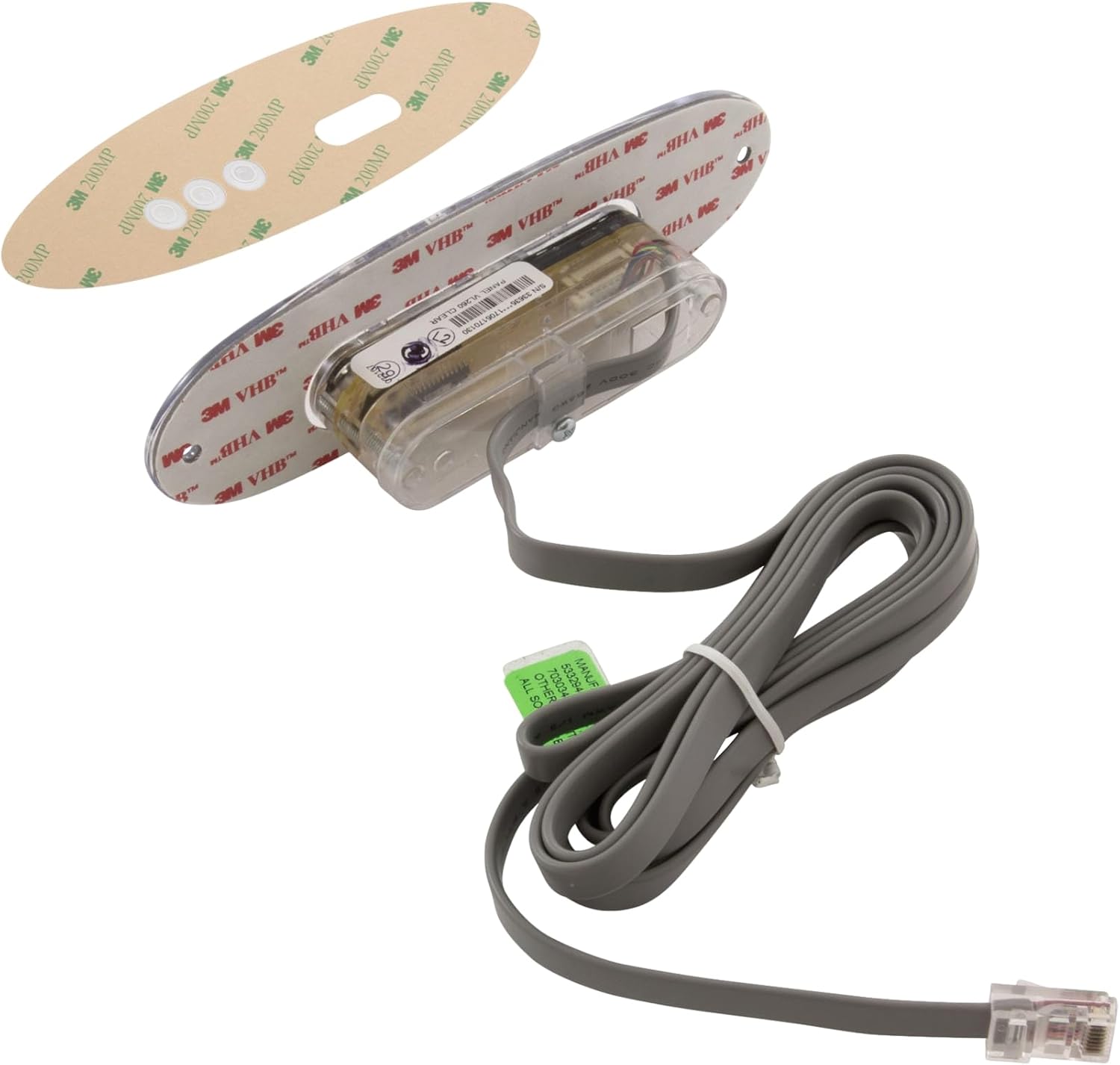
Image: The reverse side of the Balboa Water Group MVP260/VL260 topside control panel, showing the pre-applied 3M adhesive backing and the clear housing for the internal electronics and light assembly. This view is important for understanding how the panel mounts to the spa surface.
Operation
Your Balboa Water Group MVP260/VL260 topside control panel features three primary buttons for easy control of your hot tub's functions:

Image: A detailed view of the Balboa Water Group MVP260/VL260 topside control panel's face, highlighting the "JETS", "TEMP", and "LIGHT" buttons, along with the small digital display area. This image helps users identify the controls.
- Jets Button:
Press the JETS button to activate or cycle through the jet pumps. Multiple presses may cycle through different pump speeds (e.g., low, high) or activate additional pumps, depending on your spa's configuration. Press again to turn off the jets.
- Temp Button:
Press the TEMP button to display the current water temperature. Subsequent presses will allow you to adjust the set temperature. Use the up/down arrows (if present on your specific overlay, or repeated presses of TEMP) to increase or decrease the desired temperature. The display will show the set temperature briefly before returning to the current temperature.
- Light Button:
Press the LIGHT button to turn the spa lights on or off. Repeated presses may cycle through different light modes or colors, depending on your spa's lighting system.
Note: Specific functionality and display indicators may vary slightly based on the spa pack it is connected to. Refer to your spa's main control system manual for detailed operational modes.
Maintenance
Proper maintenance ensures the longevity and optimal performance of your topside control panel:
- Cleaning: Wipe the control panel surface regularly with a soft, damp cloth. Use only mild, non-abrasive cleaners. Avoid harsh chemicals, solvents, or abrasive pads, as these can damage the overlay and display.
- Inspect Seal: Periodically check the seal around the topside panel to ensure it remains watertight. If the seal appears compromised, it may need to be re-sealed or replaced to prevent water ingress into the spa's electronics.
- Cable Inspection: Occasionally inspect the cable for any signs of wear, kinks, or damage. Ensure it is not pinched or exposed to excessive heat.
Troubleshooting
If you encounter issues with your topside control panel, try the following solutions:
| Problem | Possible Cause | Solution |
|---|---|---|
| Panel is unresponsive or blank display. | No power to spa; loose cable connection; faulty panel. |
|
| Buttons do not respond. | Overlay damage; internal panel issue; spa pack communication error. |
|
| Incorrect temperature reading. | Faulty temperature sensor (usually in spa pack); communication issue. |
|
For complex issues or if troubleshooting steps do not resolve the problem, it is recommended to contact a certified spa technician or Balboa Water Group customer support.
Specifications
| Feature | Detail |
|---|---|
| Model Number | 54685KIT |
| Panel Type | MVP260/VL260 Topside Control Panel |
| Buttons | 3 (Jets, Temp, Light) |
| Compatibility | Compatible with Balboa VS/GS series spa control systems (check your spa pack for specific compatibility). |
| Connection Type | RJ45 (8-pin phone style connector) |
| Manufacturer | Balboa Water Group |
| Package Dimensions | 8 x 6 x 4 inches |
Warranty and Support
Balboa Water Group products are manufactured to high-quality standards. For information regarding warranty coverage, please refer to the warranty documentation provided with your original spa or contact Balboa Water Group directly. For technical support or replacement parts, please visit the official Balboa Water Group website or contact their customer service department.
Note: Unauthorized modifications or improper installation may void the product warranty.
Ask a question about this manual
Ask about setup, troubleshooting, compatibility, parts, safety, or missing instructions. Manuals+ will review the question and use this page’s manual context to help answer it.