
1. Introduction and Overview
The HOZO NeoRuler is an advanced 12-inch digital scale ruler designed for unparalleled precision and versatility in various measurement tasks. It integrates cutting-edge technology with robust construction to streamline your workflow, whether you're an architect, interior designer, civil engineer, or a dedicated DIY enthusiast.
- 93 Built-in Scales: Access a comprehensive library of scales for diverse applications, including US Imperial and Metric units.
- Infinite Customized Scales: Define and save unlimited custom scales to perfectly match any unique project requirements.
- Space Divider: Effortlessly divide any length into 2-12 equal sections with LED light indicators, eliminating complex calculations.
- Free MEAZOR APP via Bluetooth: Seamlessly transfer measured data to the companion app for further editing, drawing, and data tracking. Export files in DXF, PDF, or JPG formats.
- Modular Design: Compatible with 5 sets of modules (sold separately) for enhanced reading, drafting, and collecting capabilities, including transformation into a scale caliper.
- Durable & Portable: Constructed with high-pressure aluminum alloy and stainless steel, weighing 184g, and featuring a 1000mAh battery for daily use and portability.

Figure 1.1: The HOZO NeoRuler Digital Scale Ruler.

Figure 1.2: Key features of the NeoRuler.
2. Setup
2.1 Initial Charging
Before first use, ensure your NeoRuler is fully charged. Connect the device to a standard USB power source using the provided charging cable. The LCD display will indicate charging status. A full charge typically takes a few hours.
2.2 App Installation and Bluetooth Connection
- Download the MEAZOR APP 2.0 from the Google Play Store or Apple App Store.
- Ensure Bluetooth is enabled on your smartphone or tablet.
- Turn on the NeoRuler.
- Open the MEAZOR APP and follow the on-screen instructions to pair with your NeoRuler.

Figure 2.1: Download the MEAZOR APP for full functionality.
2.3 Attaching Accessories (Optional)
The NeoRuler supports various modular accessories (sold separately) such as the Neo Pointer, Neo Magnifier, and Pen Holders. To attach an accessory, align it with the designated slot on the ruler and gently slide it into place until it clicks securely.


Figure 2.2: Optional accessories: Neo Pointer and Neo Magnifier.
3. Operating Instructions
3.1 Basic Measurement
To take a measurement, simply slide the movable jaw along the ruler. The measurement will be displayed instantly on the LCD screen. For fine adjustments, use the precision roller located on the side of the movable jaw.

Figure 3.1: Using the NeoRuler for precise measurements.
3.2 Unit Conversion
The NeoRuler supports multiple units including decimal feet, feet-inches, decimal inches, yards, millimeters, meters, and kilometers. Switch between units directly on the device or via the MEAZOR APP.
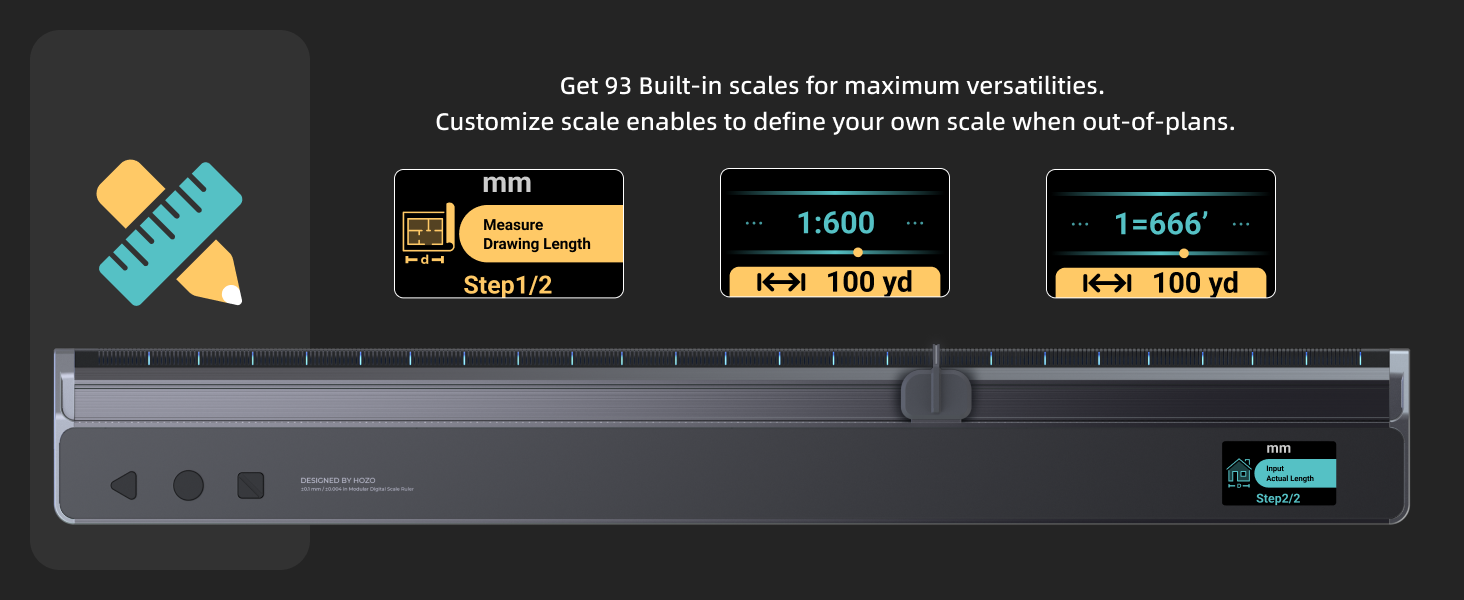
Figure 3.2: Seamless unit conversion on the NeoRuler.
3.3 Setting Custom Scales
To define a custom scale, use the MEAZOR APP. You can input a known distance from your drawing and the corresponding actual length. The app will calculate and apply the custom scale to your NeoRuler, allowing you to measure directly in the desired scaled units.

Figure 3.3: Customizing scales for specific projects.
3.4 Space Divider Function
The space divider function allows you to equally divide a measured length into 2 to 12 sections. Activate this feature on the NeoRuler, and the LED light indicator will guide you in marking the precise division points.

Figure 3.4: Using the space divider for accurate marking.
4. Maintenance
4.1 Cleaning
To maintain accuracy and smooth operation, regularly clean the NeoRuler. Use a soft, dry cloth to wipe down the aluminum and stainless steel surfaces. Avoid using abrasive cleaners or solvents. If working in dusty environments (e.g., woodworking), ensure the sliding mechanism is kept free of debris.
4.2 Battery Care
The NeoRuler is equipped with a 1000mAh Lithium Polymer battery. For optimal battery life, avoid fully discharging the device frequently. Recharge the battery when the low battery indicator appears on the LCD. Store the device in a cool, dry place when not in use for extended periods.
4.3 Lubrication (Advanced Users)
For exceptionally smooth sliding action, a very small drop of liquid Teflon lubricant can be applied to the internal slides of the main body. This is generally not required for regular use but can enhance the feel for users desiring maximum fluidity.
5. Troubleshooting
5.1 Inaccurate Measurements or Loss of Calibration
- Recalibration: If measurements appear inaccurate or the device loses calibration, perform a manual recalibration. Refer to the MEAZOR APP or the official user guide for detailed recalibration steps.
- Clean Sliding Mechanism: Ensure no dust, dirt, or debris is obstructing the sliding mechanism. Clean as per Section 4.1.
- Stable Surface: Always use the NeoRuler on a flat, stable surface to ensure consistent and accurate readings.
5.2 Bluetooth Connection Issues
- Ensure Device is On: Verify the NeoRuler is powered on and has sufficient battery.
- Bluetooth Enabled: Confirm Bluetooth is active on your mobile device.
- Restart App/Device: Close and reopen the MEAZOR APP, or restart both your mobile device and the NeoRuler.
- Proximity: Ensure the NeoRuler is within close proximity to your mobile device for a stable connection.
5.3 Device Not Powering On
- Charge Battery: Connect the NeoRuler to a power source and allow it to charge for at least 30 minutes before attempting to power it on again.
- Check Cable/Adapter: Ensure the charging cable and power adapter are functioning correctly.
6. Specifications
| Feature | Detail |
|---|---|
| Model Number | N01 |
| Product Dimensions | 13.58 x 2.28 x 0.04 inches (13.6"L x 2.3"W) |
| Item Weight | 11.6 ounces |
| Material | Aluminum Alloy, Stainless Steel |
| Color | Aluminum |
| Measurement Accuracy | ±0.004 inch (±0.1mm) under 1:1 mode |
| Display Style | LCD |
| Battery Type | 1 Lithium Polymer (1000mAh, included) |
| Connectivity | Bluetooth |
| Built-in Scales | 93 (US Imperial, Metric) |

Figure 6.1: Detailed list of 93 built-in scales.
7. Warranty and Support
7.1 Warranty Information
The HOZO NeoRuler comes with a 1-year limited warranty provided by HOZO. This warranty covers manufacturing defects and ensures the product meets its specified performance standards under normal use. Please retain your proof of purchase for warranty claims.
7.2 Customer Support
For further assistance, technical support, or inquiries regarding your NeoRuler, please refer to the following resources:
- Official User Guide (PDF): Download User Guide
- MEAZOR APP: The app provides in-depth tutorials and guides for advanced features.
- HOZO Store: Visit the official HOZO store on Amazon for product information and contact options: HOZO Design Store