
Introduction
Thank you for choosing the AboveTEK TS-388B Tablet Stand Holder. This adjustable stand is designed to provide versatile and stable support for your tablets and smartphones, enhancing your viewing experience whether at a desk, bedside, or in other settings. Please read this manual carefully to ensure proper installation and operation.
What's in the Box
- Adjustable Long Arm Clamp Mount
- DSLR Camera Adapter
- Allen Key
- User Manual (this document)
Setup Instructions
1. Attaching the Clamp Mount
Identify a suitable surface for mounting, such as a desk or bed frame, with a thickness between 0.39 inches (10mm) and 2.95 inches (75mm). Place the C-clamp onto the edge of the surface. Turn the screw knob clockwise until the clamp is securely fastened. Ensure the anti-slip silicone padding is in contact with the surface to prevent movement and protect furniture.

The C-clamp securely attaches to surfaces up to 2.95 inches thick.
2. Attaching Your Device
The device holder is designed to accommodate devices ranging from 4.7 inches to 13.5 inches. Gently pull apart the spring-loaded grips of the holder and insert your tablet or smartphone. Ensure the device is centered and held firmly by the grips.

Insert your device into the spring-loaded holder.
3. Adjusting Arm Tension
The stand features multiple adjustable joints. If the arm feels too loose or too tight, use the included Allen key to adjust the tension. Turn clockwise to increase tension for a firmer hold, or counter-clockwise to decrease tension for easier movement. Adjust each joint as needed to achieve your desired flexibility and stability.

Use the Allen key to fine-tune arm tension for optimal performance.
Operating Instructions
1. Positioning Your Device
The stand features four adjustable joints: one 255° joint, one 305° joint, and two 360° rotating joints. These allow for extensive multi-angle positioning. Adjust the arm segments and the device holder to achieve your preferred viewing angle and height. The 360° rotation at the device holder allows for easy switching between portrait and landscape modes.

Utilize the multiple joints for precise positioning and viewing angles.
2. Wide Device Compatibility
This stand is compatible with a broad range of devices, including iPads (10th/9th Gen, Pro 12.9/10.5, Air 5th/4th, Mini 6th/5th/4th), Samsung Galaxy Tabs, Surface Pro 9/8/7, MatePad Air 11.5, and iPhones (15/14/13/12/11 Pro Max). The adjustable bracket accommodates devices with widths between 5.1 inches (13cm) and 8.8 inches (22cm).
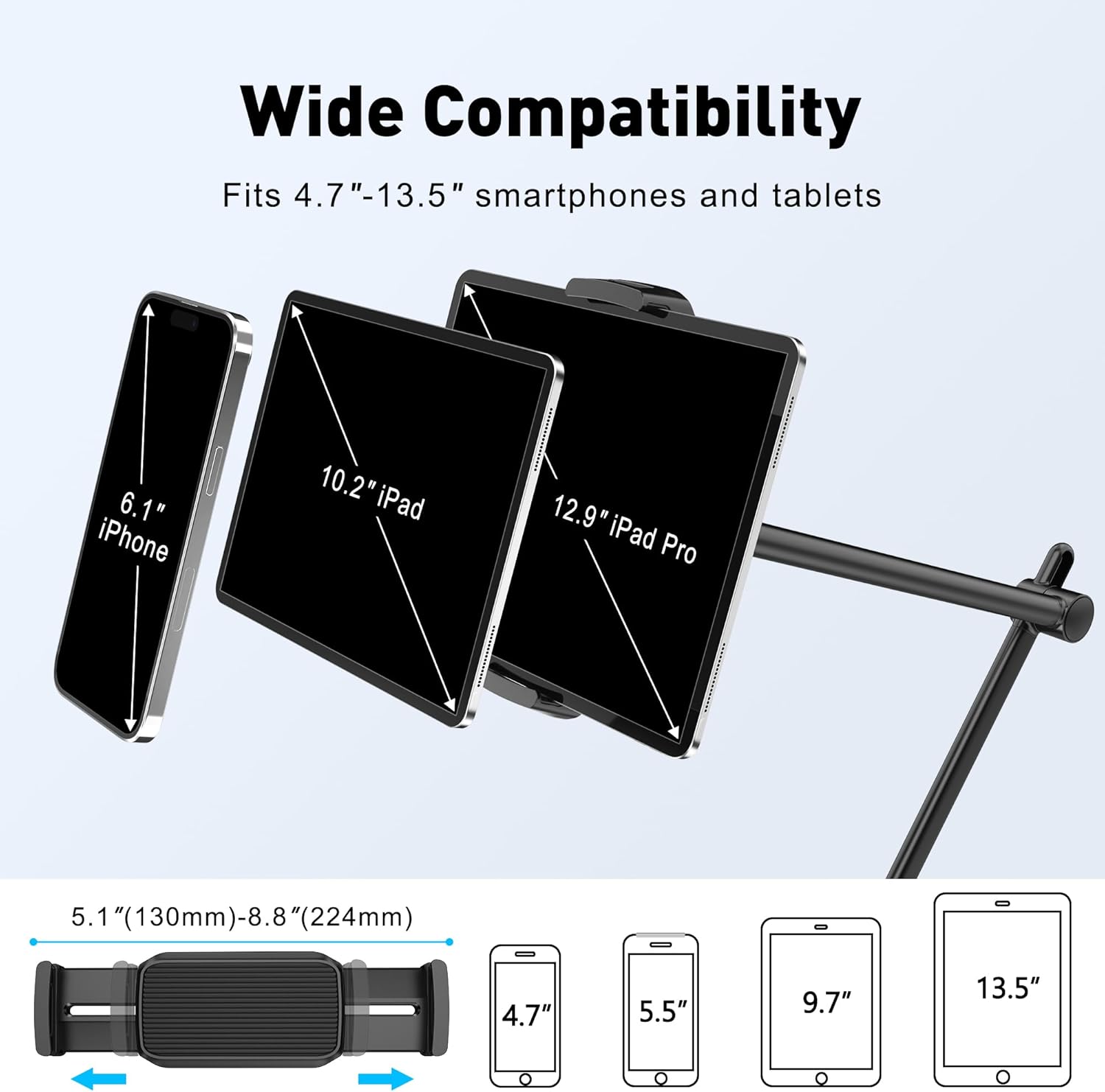
The stand supports devices from 4.7 to 13.5 inches.
3. Using the DSLR Camera Adapter
The stand includes a universal 1/4" screw adapter, allowing you to attach other devices such as webcams, cameras, GoPros, projectors, or ring lights. Simply remove the tablet holder and screw on the DSLR camera adapter to expand the stand's functionality for content creation or professional setups.

The included DSLR adapter allows for versatile use with cameras and other accessories.
Product Demonstration Video
Watch a detailed demonstration of the AboveTEK Premium Tablet Stand Holder's features and adjustability.
Maintenance
To ensure the longevity and optimal performance of your AboveTEK Tablet Stand Holder, follow these maintenance guidelines:
- Cleaning: Wipe the stand with a soft, damp cloth. Avoid using abrasive cleaners or solvents that could damage the finish.
- Joint Tension: Periodically check the tension of the adjustable joints. If you notice any sagging or excessive looseness, use the provided Allen key to tighten the screws as described in the Setup section. Do not overtighten.
- Clamp Security: Ensure the C-clamp remains securely fastened to your mounting surface. Re-tighten if necessary to maintain stability.
Troubleshooting
1. Stand Sags or Does Not Hold Position
This is typically due to insufficient tension in the arm joints. Use the included Allen key to tighten the screws at each adjustable joint. Turn the screws clockwise incrementally until the desired stiffness is achieved. Test the stand's ability to hold your device at various angles after each adjustment.
2. Device Holder Feels Loose
Ensure your device is properly centered within the spring-loaded grips. The grips are designed to hold devices with widths between 5.1 inches (13cm) and 8.8 inches (22cm). If your device is outside this range, it may not be securely held. Check for any obstructions or debris in the grips.
3. Clamp Does Not Stay Secure
Verify that the mounting surface thickness is within the specified range of 0.39 inches (10mm) to 2.95 inches (75mm). Ensure the clamp screw is fully tightened and the anti-slip padding is correctly positioned. Avoid mounting on surfaces that are too thin, too thick, or have an uneven edge.
Specifications
| Feature | Detail |
|---|---|
| Brand | AboveTEK |
| Model Name | TS-388B |
| Color | Black |
| Material Composition | Aluminum Alloy, Iron, ABS |
| Compatible Devices | 4.7"-13.5" Tablets & Phones (e.g., iPads, Samsung Galaxy Tabs, Surface Pro, iPhones) |
| Adjustable Bracket Width | 5.1''-8.8'' (13-22cm) |
| Arm Length | Up to 27 inches (686mm) |
| Adjustable Joints | 1x255°, 1x305°, 2x360° |
| Mounting Type | C-Clamp (Tabletop) |
| Max Clamp Thickness | 2.95 inches (75mm) |
| Item Weight | 1.13 Kilograms |
| Special Features | Universal 1/4" screw for camera adapter, Anti-slip padding |
Warranty Information
The AboveTEK TS-388B Tablet Stand Holder comes with a 24-month warranty from the date of purchase. This warranty covers manufacturing defects and material flaws under normal use. Please retain your proof of purchase for warranty claims. The warranty does not cover damage caused by misuse, accidents, unauthorized modifications, or normal wear and tear.
Support
For further assistance, technical support, or warranty inquiries, please visit the official AboveTEK store or contact our customer service team through the platform where you purchased the product. You can find more information and contact details on the AboveTEK Brand Store.