
ESR iPhone 15 B-Clear Black
ESR iPhone 15 Case User Manual
Model: iPhone 15 B-Clear Black
Introduction
This manual provides detailed instructions for the proper use, installation, and maintenance of your ESR iPhone 15 Case. Designed for optimal protection and enhanced functionality, this case features MagSafe compatibility and a built-in Stash Stand. Please read this manual thoroughly to ensure the best experience with your product.
Compatibility
This ESR case is specifically designed for the iPhone 15. It is not compatible with iPhone 15 Plus, iPhone 15 Pro, or iPhone 15 Pro Max models. Ensure your device is an iPhone 15 before attempting installation.

Figure 1: This image illustrates that the ESR case is exclusively designed for the iPhone 15. It highlights the correct phone model with a green checkmark and explicitly states incompatibility with iPhone 15 Plus, iPhone 15 Pro, and iPhone 15 Pro Max models using red 'X' marks.
Key Features
- MagSafe Compatibility: Features powerful built-in magnets (1,500 g holding force) for secure attachment to MagSafe accessories and efficient wireless charging.
- Adjustable Stash Stand: A robust zinc-alloy stand integrated around the camera frame, providing stable, hands-free viewing in various orientations. Lab-tested for over 3,000 uses.
- Military-Grade Protection: Equipped with shock-absorbing Air Guard corners, raised screen edges, and a Camera Guard for enhanced protection against drops, bumps, and scratches, meeting MIL-STD-810H 516.8 standards.
- Scratch-Resistant Back Cover: Designed to resist scratches and maintain clarity over time.

Figure 2: This image demonstrates the military-grade protection features of the case, highlighting the reinforced Air Guard corners designed to absorb shock from impacts. A military-grade protection badge is visible, indicating compliance with MIL-STD-810H 516.8 standards.

Figure 3: This image illustrates the durability of the built-in stash stand, emphasizing its robust zinc-alloy construction and its ability to withstand over 3,000 uses based on internal testing. It shows the stand in various stages of opening and closing.
Setup and Installation
- Clean Your Device: Before installing the case, ensure your iPhone 15 is clean and free of dust, smudges, or debris. Use a soft, lint-free cloth for cleaning.
- Align the Case: Gently align the top edge of your iPhone 15 with the top edge of the ESR case.
- Insert the Device: Carefully push your iPhone 15 into the case, ensuring all corners and edges are securely seated within the case's protective frame. Apply even pressure to avoid damaging your device or the case.
- Verify Fit: Once installed, check that all buttons (power, volume) are accessible and functional, and that the charging port and speakers are unobstructed.

Figure 4: This image displays the ESR iPhone 15 case from various angles, showcasing its design and fit. It provides a visual reference for how the case encases the phone, highlighting the precise cutouts and integrated features.
Operating Instructions
Using the Stash Stand
The integrated Stash Stand allows for convenient hands-free viewing. To deploy the stand, gently pull the metal ring positioned around the camera module outwards until it clicks into place. The stand can be adjusted to various angles for optimal viewing in both portrait and landscape orientations.

Figure 5: This image illustrates the Stash Stand in both its concealed (closed) and versatile (open) positions. It highlights the patented design and how the stand provides hands-free viewing while remaining discreet when not in use.

Figure 6: This image showcases the multi-functional capabilities of the Stash Stand, demonstrating its use for watching and charging, browsing, and carrying the phone securely. It highlights the stand's versatility for different user needs.
MagSafe Functionality
The case features powerful built-in magnets that align perfectly with MagSafe chargers and accessories. Simply place your MagSafe-compatible charger or accessory onto the back of the case for a secure and efficient connection. The thinner back design of the case facilitates faster wireless charging compared to standard cases.
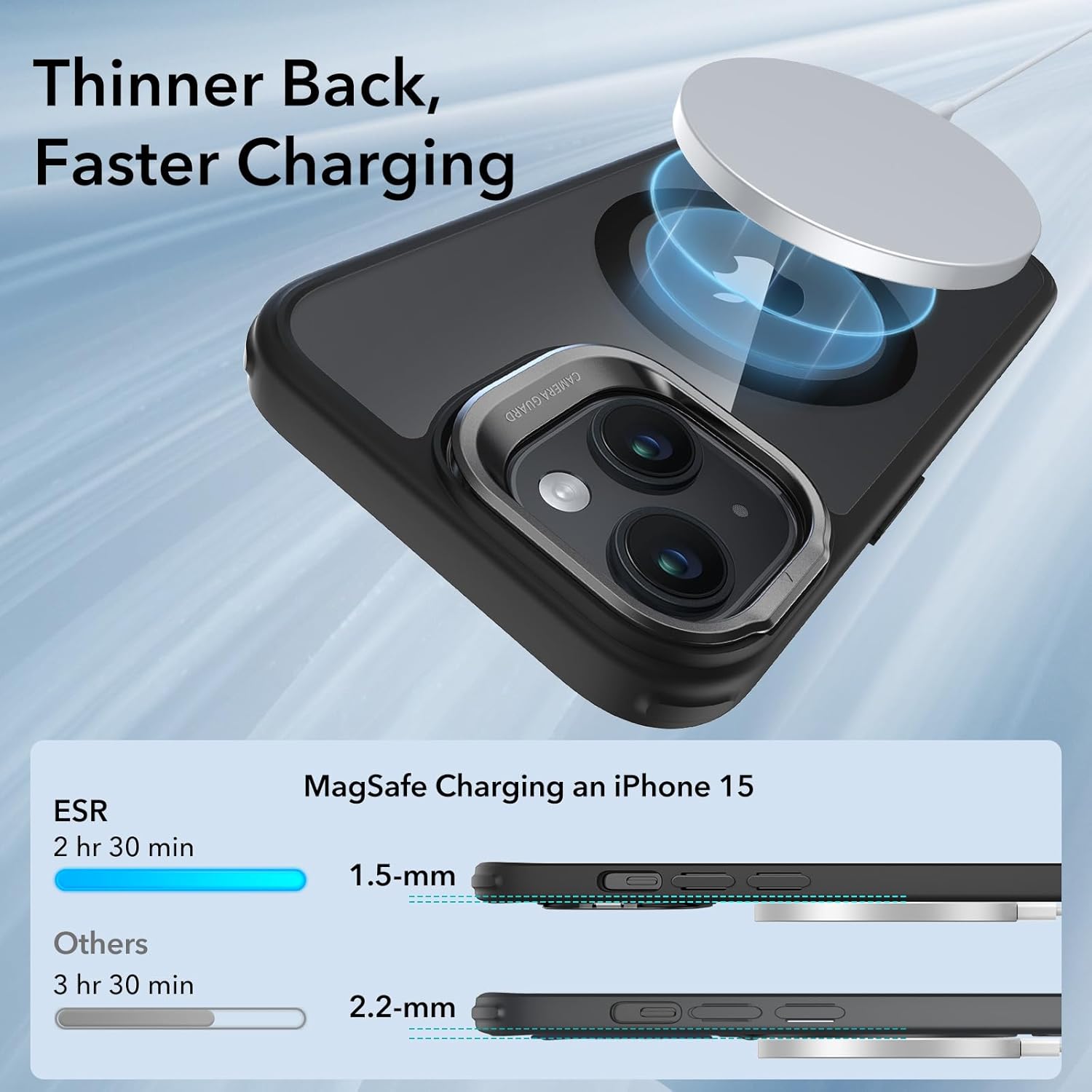
Figure 7: This image demonstrates the benefit of the case's thinner back, which allows for faster MagSafe charging. It compares the charging time and case thickness of the ESR case with other cases, showing a 1.5mm thickness for ESR versus 2.2mm for others, resulting in quicker charging.

Figure 8: This image highlights the strong magnetic lock provided by the high-grade N52M magnets within the case. It shows the phone securely attached to a MagSafe car mount, indicating a magnetic strength of 1,500 gf for ESR with Stash Stand, compared to 1,200 gf for other ring stands.
Maintenance
To maintain the appearance and functionality of your ESR iPhone 15 Case, follow these guidelines:
- Cleaning: Wipe the case regularly with a soft, damp cloth. For stubborn dirt, a mild soap solution can be used, followed by wiping with a clean, damp cloth and air drying. Avoid harsh chemicals or abrasive cleaners, as these can damage the case material.
- Avoid Extreme Temperatures: Do not expose the case to extreme heat or cold, as this may affect its material integrity and performance.
- Inspect Regularly: Periodically inspect the case for any signs of wear or damage, especially around the edges and the Stash Stand mechanism, to ensure continued protection.
Troubleshooting
| Issue | Possible Cause | Solution |
|---|---|---|
| Case does not fit iPhone 15 | Incorrect phone model. | Verify your phone is an iPhone 15. This case is not compatible with Plus, Pro, or Pro Max models. |
| MagSafe accessories do not attach securely | Misalignment or foreign objects. | Ensure the MagSafe accessory is properly aligned with the magnetic ring on the case. Remove any debris between the case and the accessory. |
| Stash Stand feels loose or does not stay open | Wear and tear or excessive force. | The stand is tested for over 3,000 uses. If it becomes loose prematurely, contact customer support. Avoid applying excessive force when opening or closing. |
| Case appears yellowed over time | Natural material degradation. | Clear cases may exhibit slight yellowing over extended periods due to UV exposure and natural material properties. This is normal and does not affect protective performance. |
Specifications
- Model: iPhone 15 B-Clear Black
- Material: Zinc Alloy + Polycarbonate
- Dimensions: 0.39 x 0.39 x 0.39 inches (Product Dimensions)
- Item Weight: 1.41 ounces
- Compatibility: iPhone 15 only
- Special Features: MagSafe Compatible, Built-in Stash Stand, Military-Grade Protection (MIL-STD-810H 516.8), Scratch-Resistant Back
Warranty and Support
ESR provides a comprehensive 12-month protection plan for this product. Additionally, lifetime support is available to assist with any inquiries or issues you may encounter. For personalized help, detailed setup videos, and frequently asked questions (FAQs), please visit the official ESR support website or contact our customer service team.
For further assistance, please refer to the contact information provided on the ESR official website or your purchase documentation.
Related documentsiPhone 15 B-Clear Black


Ask a question about this manual
Ask about setup, troubleshooting, compatibility, parts, safety, or missing instructions. Manuals+ will review the question and use this page’s manual context to help answer it.