
1. Introduction
Thank you for purchasing the Aramox Portable Electric Cooler Box. This manual provides essential information for the safe and efficient operation, maintenance, and troubleshooting of your new mini fridge. Please read this manual thoroughly before using the product and retain it for future reference.
2. Safety Information
To ensure safe operation and prevent damage, please observe the following safety precautions:
- Electrical Safety: Use only the specified USB power source. Do not expose the unit to water or excessive moisture. Disconnect power before cleaning or maintenance.
- Ventilation: Ensure adequate ventilation around the unit. Do not block the air vents.
- Placement: Place the unit on a stable, flat surface. Avoid direct sunlight or heat sources.
- Handling: Do not drop or subject the unit to strong impacts.
- Children: Keep out of reach of children.
- Cleaning: Use a soft, damp cloth for cleaning. Do not use abrasive cleaners or solvents.
3. Product Overview
The Aramox Portable Electric Cooler Box is a versatile device designed for both cooling and warming beverages, ideal for use in cars, trucks, RVs, boats, and during outdoor travel. Its compact design and USB power make it highly portable and convenient.
Key Features:
- Quick Cooling: Achieves a temperature reduction to 8.5 degrees Celsius within 5 minutes.
- Portable Design: Compact and lightweight, perfect for on-the-go use.
- USB Powered: Easy plug-and-play functionality via any standard USB port. No batteries or drivers required.
- Cooler & Warmer Functionality: Capable of both cooling beverages and keeping them warm.
- Durable Construction: Built to meet standard specifications with fine workmanship and wear-resistance for a longer service life.
Components:

Figure 3.1: Front view of the Aramox Portable Electric Cooler Box, showing the main unit, attached USB power cable, and inline power switch.
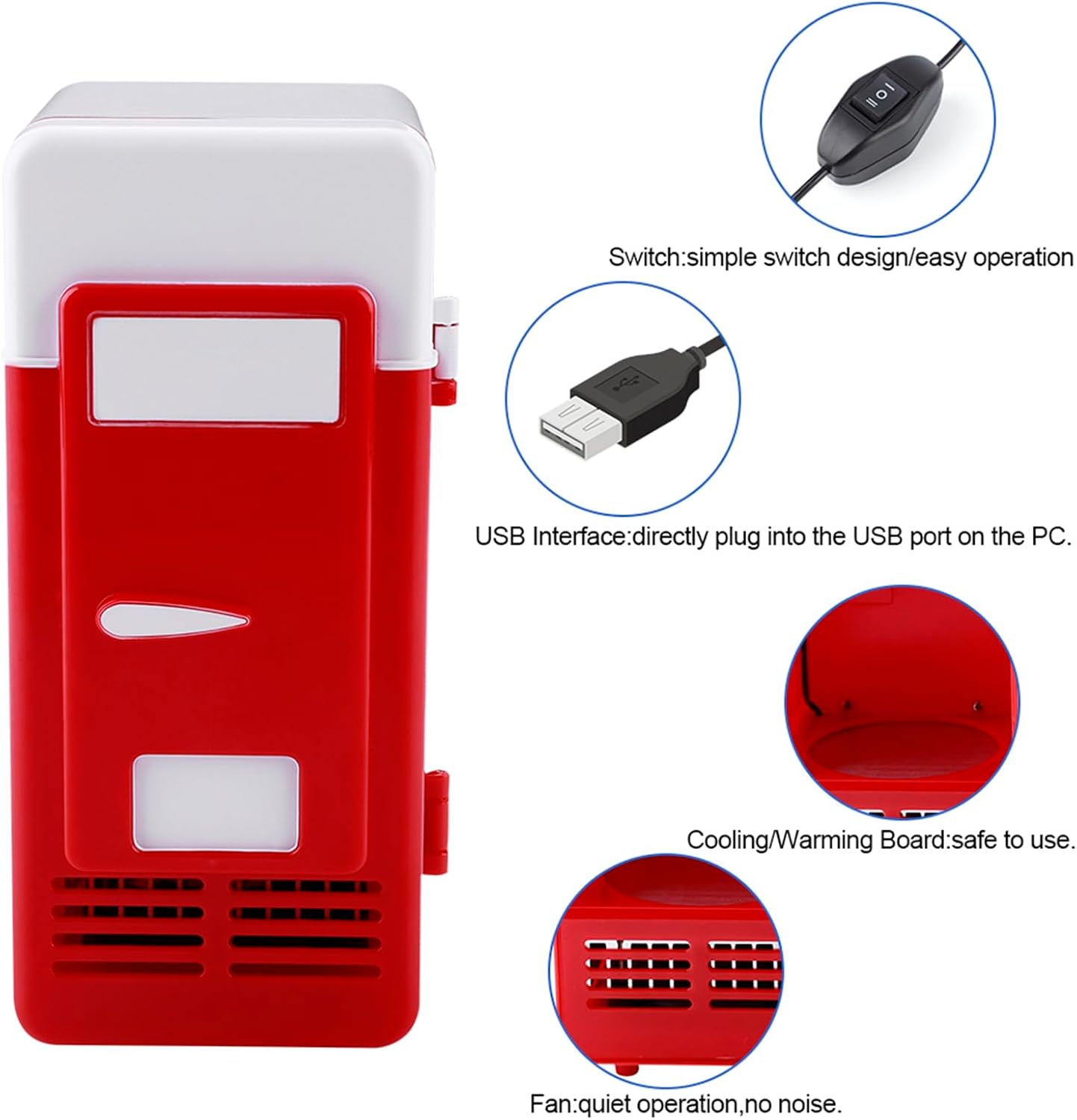
Figure 3.2: Detailed view of key components including the simple switch design, USB interface for direct PC plug-in, the internal cooling/warming board, and the quiet operation fan.
- Power Switch: Simple inline switch for easy operation.
- USB Interface: Standard USB-A connector for power input.
- Cooling/Warming Board: Internal component responsible for temperature regulation.
- Fan: Located at the bottom, ensures quiet operation and efficient heat dissipation.
4. Setup
Follow these steps for initial setup of your portable cooler box:
- Unpack: Carefully remove the cooler box from its packaging.
- Inspect: Check the unit for any signs of damage during transit.
- Placement: Place the cooler box on a stable, flat surface. Ensure there is sufficient space around the unit for proper ventilation, especially around the fan area at the bottom.
- Connect Power: Plug the USB cable into a compatible USB power source (e.g., car USB port, power bank, laptop USB port, or a USB wall adapter).

Figure 4.1: The mini fridge is suitable for various environments including car interiors, offices, homes, and hotels, highlighting its versatile application ranges.
5. Operating Instructions
The Aramox Portable Electric Cooler Box offers both cooling and warming functions. The operation is straightforward using the inline switch.
- Power On: Once the USB cable is connected to a power source, locate the inline switch on the cable.
- Select Mode:
- Slide the switch to the "I" position for Cooling Mode. The unit will begin to cool its interior. For optimal cooling, allow 5 minutes for the temperature to drop significantly.
- Slide the switch to the "II" position for Warming Mode. The unit will begin to warm its interior.
- Insert Items: Place your beverages or small items inside the cooler box. Ensure items do not block the internal cooling/warming plate or fan.
- Power Off: Slide the switch to the "O" position to turn off the unit. Disconnect the USB cable from the power source when not in use for extended periods.
Note: The cooling and warming functions are designed for maintaining temperatures of pre-chilled or pre-heated items, or for gradually changing the temperature of small items. For best results, place already cold beverages inside for cooling, or warm beverages for warming.
6. Maintenance and Care
Proper maintenance ensures the longevity and optimal performance of your Aramox Portable Electric Cooler Box.
- Cleaning:
- Before cleaning, ensure the unit is turned off and disconnected from the power source.
- Wipe the exterior and interior surfaces with a soft, damp cloth.
- Do not use harsh chemicals, abrasive cleaners, or solvents, as these can damage the finish.
- Ensure the unit is completely dry before reconnecting power.
- Ventilation: Regularly check that the air vents at the bottom are clear of dust and debris to ensure proper airflow and prevent overheating.
- Storage: When not in use for extended periods, store the cooler box in a cool, dry place, away from direct sunlight and extreme temperatures.
7. Troubleshooting
If you encounter issues with your Aramox Portable Electric Cooler Box, refer to the following common problems and solutions:
| Problem | Possible Cause | Solution |
|---|---|---|
| Unit does not turn on. | No power supply; USB cable not properly connected; Switch is in "O" (off) position. | Ensure USB cable is securely plugged into a working USB port. Check the inline switch is in "I" or "II" position. Try a different USB power source. |
| Cooling/Warming not effective. | Vents blocked; Unit overloaded; Ambient temperature too high/low; Items not pre-chilled/heated. | Ensure vents are clear. Do not overfill the unit. Note that performance is affected by ambient temperature. For best results, use with pre-chilled or pre-heated items. |
| Unusual noise from fan. | Fan obstructed by dust or debris. | Disconnect power and gently clean the fan area to remove any obstructions. |
If the problem persists after attempting these solutions, please contact customer support.
8. Specifications
Detailed technical specifications for the Aramox Portable Electric Cooler Box:
- Model Name: Aramoxtmqv14isgw-01
- Brand: Aramox
- Color: Red
- Product Dimensions: 3.54"D x 7.64"W x 3.54"H (approx. 9 x 19.4 x 9 cm)
- Item Weight: 1.02 pounds (approx. 0.46 kg)
- Special Feature: Portable
- Installation Type: Freestanding
- Defrost System: Automatic
- Finish Type: Matte
- Door Material Type: Plastic
- Form Factor: Compact
- ASIN: B0CC1BYGS5
- First Available Date: July 17, 2023

Figure 8.1: Product dimensions, illustrating the compact size of the cooler box.
9. Warranty and Support
Aramox is committed to providing quality products. For any inquiries or support needs regarding your Portable Electric Cooler Box, please contact the seller or manufacturer directly.
- Manufacturer: Aramox
- Seller: Dweekiy d1 (as per product listing)
- Return Policy: This product is eligible for a 30-day refund/replacement policy from the date of purchase.
- Extended Protection: Optional 2-Year and 3-Year Protection Plans may be available for purchase separately. Please refer to the product listing for details on these plans.
For the most up-to-date support information, please visit the official Aramox store on Amazon or contact the seller through your purchase platform.