
Introduction
Thank you for purchasing the Joc H011UR Portable Digital Radio with MP3 Player. This device combines a digital FM radio with an MP3 player, offering versatile audio entertainment in a compact and portable design. Please read this manual carefully before use to ensure proper operation and to maximize your listening experience.

Image: Joc H011UR Portable Digital Radio with MP3 Player, red color, showing front panel with display and buttons, next to its packaging box.
Safety Information
- Do not expose the device to rain, moisture, or extreme temperatures.
- Avoid dropping or subjecting the device to strong impacts.
- Do not disassemble or attempt to repair the device yourself. Refer to qualified service personnel.
- Keep the device away from strong magnetic fields.
- Use only the specified charging cable and battery type.
Product Overview
Familiarize yourself with the components and controls of your Joc H011UR radio.

Image: Close-up view of the Joc H011UR radio's front panel, highlighting the digital display, mode button (M), playback controls (previous, play/pause, next), and numeric keypad (0-9).
Front Panel Controls:
- Display Screen: Shows frequency, track number, and time.
- M (Mode) Button: Switches between FM radio and MP3 player modes.
- Playback Controls:
- ◀◀ (Previous/Rewind): Short press for previous track/station, long press for rewind.
- ►▌▌ (Play/Pause): Plays or pauses MP3s, auto-scans in FM mode.
- ▶▶ (Next/Fast Forward): Short press for next track/station, long press for fast forward.
- Numeric Keypad (0-9): Direct input for FM frequencies or MP3 track numbers.
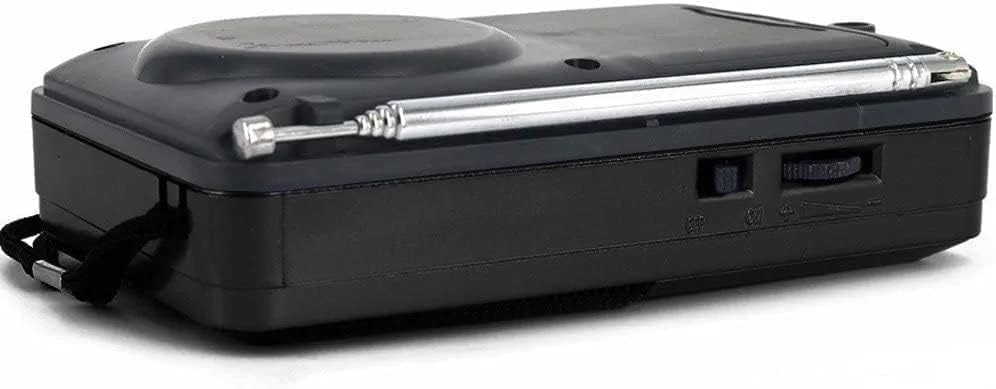
Image: Side view of the Joc H011UR radio, showing the power switch and volume knob.
Side Controls:
- Power Switch (ON/OFF): Turns the device on or off.
- Volume Knob: Adjusts the audio output level.
- Antenna: Extend for better FM reception.

Image: Back view of the Joc H011UR radio, showing the battery compartment cover and lanyard attachment point.
Rear Panel:
- Battery Compartment: Houses the rechargeable battery.
- Lanyard Attachment: For carrying convenience.
Setup
1. Battery Installation
- Locate the battery compartment on the back of the radio.
- Slide open the battery compartment cover.
- Insert the provided rechargeable battery, ensuring the correct polarity (+/-) as indicated inside the compartment.
- Close the battery compartment cover securely.

Image: Joc H011UR radio with its included rechargeable battery and USB charging cable.
2. Charging the Battery
- Connect the small end of the USB charging cable to the charging port on the radio.
- Connect the larger end of the USB cable to a compatible USB power adapter (not always included) or a computer's USB port.
- The charging indicator light (if present) will illuminate during charging and turn off or change color when fully charged.
- Allow approximately 2-3 hours for a full charge.
Operating Instructions
1. Power On/Off
- To turn on the radio, slide the Power Switch to the "ON" position.
- To turn off the radio, slide the Power Switch to the "OFF" position.
2. Adjusting Volume
- Rotate the Volume Knob on the side of the device clockwise to increase volume and counter-clockwise to decrease volume.
3. FM Radio Mode
- Ensure the radio is powered on.
- Press the M (Mode) button until "FM" or the FM frequency is displayed.
- Auto Scan: Long press the ►▌▌ (Play/Pause) button to automatically scan and save available FM stations.
- Manual Tuning:
- Use the ◀◀ (Previous) and ▶▶ (Next) buttons to navigate through saved stations or fine-tune the frequency.
- Alternatively, use the Numeric Keypad to directly enter an FM frequency (e.g., 98.5).
- Extend the antenna for optimal reception.
4. MP3 Player Mode (USB/TF Card)
- Insert a USB flash drive or a TF (MicroSD) card containing MP3 audio files into the respective slot.
- Press the M (Mode) button until the display indicates MP3 mode (e.g., "USB" or "TF").
- The device will automatically start playing the first MP3 file.
- Use the ◀◀ (Previous) and ▶▶ (Next) buttons to skip tracks.
- Use the ►▌▌ (Play/Pause) button to pause or resume playback.
- To select a specific track, use the Numeric Keypad to enter the track number.
5. Auxiliary Input (If Available)
- Connect an external audio device (e.g., smartphone, tablet) to the radio's auxiliary input port using a 3.5mm audio cable (not included).
- Press the M (Mode) button until "AUX" mode is selected.
- Control playback from your external device.
Maintenance
Cleaning
- Wipe the device with a soft, dry cloth.
- Do not use abrasive cleaners, waxes, or solvents.
Battery Care
- To prolong battery life, avoid fully discharging the battery frequently.
- If the device will not be used for an extended period, charge it periodically to maintain battery health.
- Replace the battery if its performance significantly degrades.
Troubleshooting
| Problem | Possible Cause | Solution |
|---|---|---|
| No power | Battery is discharged or incorrectly installed. | Charge the battery. Ensure battery is inserted with correct polarity. |
| Poor FM reception | Antenna not extended, weak signal, interference. | Fully extend the antenna. Move to a location with better signal. Avoid sources of interference. |
| No sound from MP3 player | Volume too low, incorrect mode, corrupted files, no media inserted. | Increase volume. Ensure correct mode (USB/TF). Check if USB/TF card is inserted correctly and contains valid MP3 files. |
| Buttons unresponsive | Temporary software glitch. | Turn the device off and then on again. |
Specifications
| Brand | Joc |
| Model | H011UR |
| Type | Portable Digital Radio with MP3 Player |
| Material | Plastic |
| Tuner Technology | FM |
| Radio Bands Supported | FM |
| Power Source | Battery Powered |
| Connectivity Technology | Auxiliary |
| Special Features | Portable |
| Product Dimensions | 25 x 18 x 3 cm |
| Item Weight | 184 Grams |
| Included Components | Power Adapter (charging cable) |
Warranty and Support
Specific warranty information is not provided with this product. For support or warranty inquiries, please refer to the retailer where the product was purchased or contact the manufacturer directly through their official channels.