
1. Introduction
Thank you for choosing the Fit GHNC-140S Treadmill. This manual provides essential information for the safe assembly, operation, and maintenance of your new fitness equipment. Please read this manual thoroughly before using the treadmill and keep it for future reference.
The Fit GHNC-140S is a multi-program electric treadmill designed for full-body exercise, stimulating blood circulation for an enjoyable workout. It features 24 slimming programs and manual speed control. The treadmill also includes a body fat measurement function and an LCD touch screen that displays speed, distance, calories, and heart rate. Powered by a 1.5 HP AC motor, it can operate continuously for up to 3 hours. It is easily foldable with wheels for convenient transport and features 3 manual incline levels, a USB port, a safety lock system, and a rubber cushioning system for comfort.
2. Important Safety Information
To reduce the risk of serious injury, read all important precautions and instructions in this manual before using the treadmill. The manufacturer assumes no responsibility for personal injury or property damage sustained by or through the use of this product.
- Always consult with a physician before starting any exercise program.
- Keep children and pets away from the treadmill at all times.
- Place the treadmill on a level surface with at least 2 meters of clear space behind it and 0.6 meters on each side.
- Wear appropriate exercise clothing and athletic shoes. Do not wear loose clothing that could get caught in the treadmill.
- The treadmill is designed for home use only. Do not use it in any commercial, rental, or institutional setting.
- Always attach the safety key clip to your clothing before beginning your workout. If the safety key is removed, the treadmill will stop.
- Do not operate the treadmill if it has a damaged power cord or plug, or if it is not working properly.
- Keep the power cord away from heated surfaces.
- Do not use the treadmill outdoors or in areas of high humidity.
- Maximum user weight capacity is 130 kg.
3. Setup and Assembly
Assembly is required for this treadmill. Please follow the instructions provided in the included tool kit and user manual for detailed steps. Ensure all components are present and undamaged before beginning assembly.
3.1 Unpacking
Carefully remove all components from the packaging. Place them on a clear, flat surface. Verify that all parts listed in the user manual are present.
3.2 Placement
Position the treadmill on a firm, level surface. Ensure adequate clearance around the unit for safe operation and access. The recommended dimensions for placement are 156 cm (Depth) x 65 cm (Width) x 135 cm (Height).

Figure 3.2.1: Treadmill dimensions for proper placement. The unit measures 156 cm in depth, 65 cm in width, and 135 cm in height.
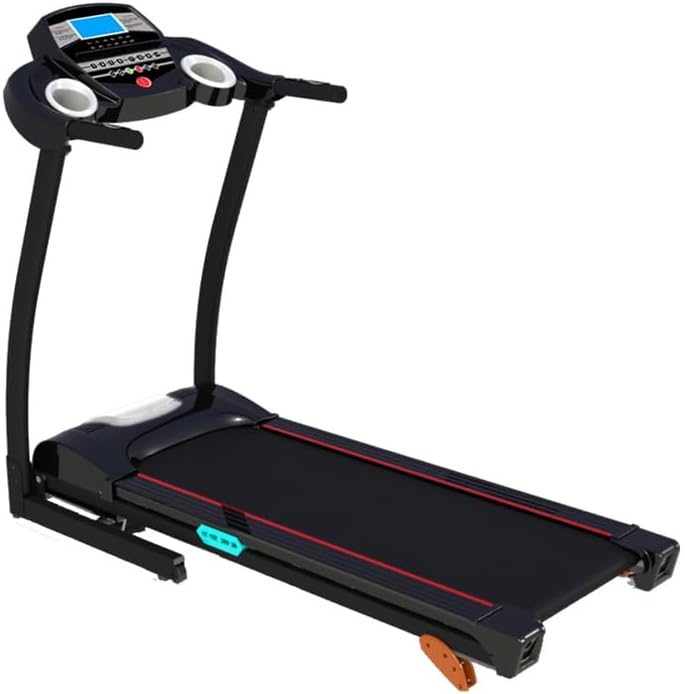
Figure 3.2.2: Overall view of the Fit GHNC-140S treadmill, highlighting its design and integrated transport wheels for easy relocation.
3.3 Connecting Power
Plug the power cord into a grounded electrical outlet. Ensure the power switch on the treadmill is in the OFF position before plugging it in.
4. Operating Instructions
Familiarize yourself with the control panel and features before starting your workout.
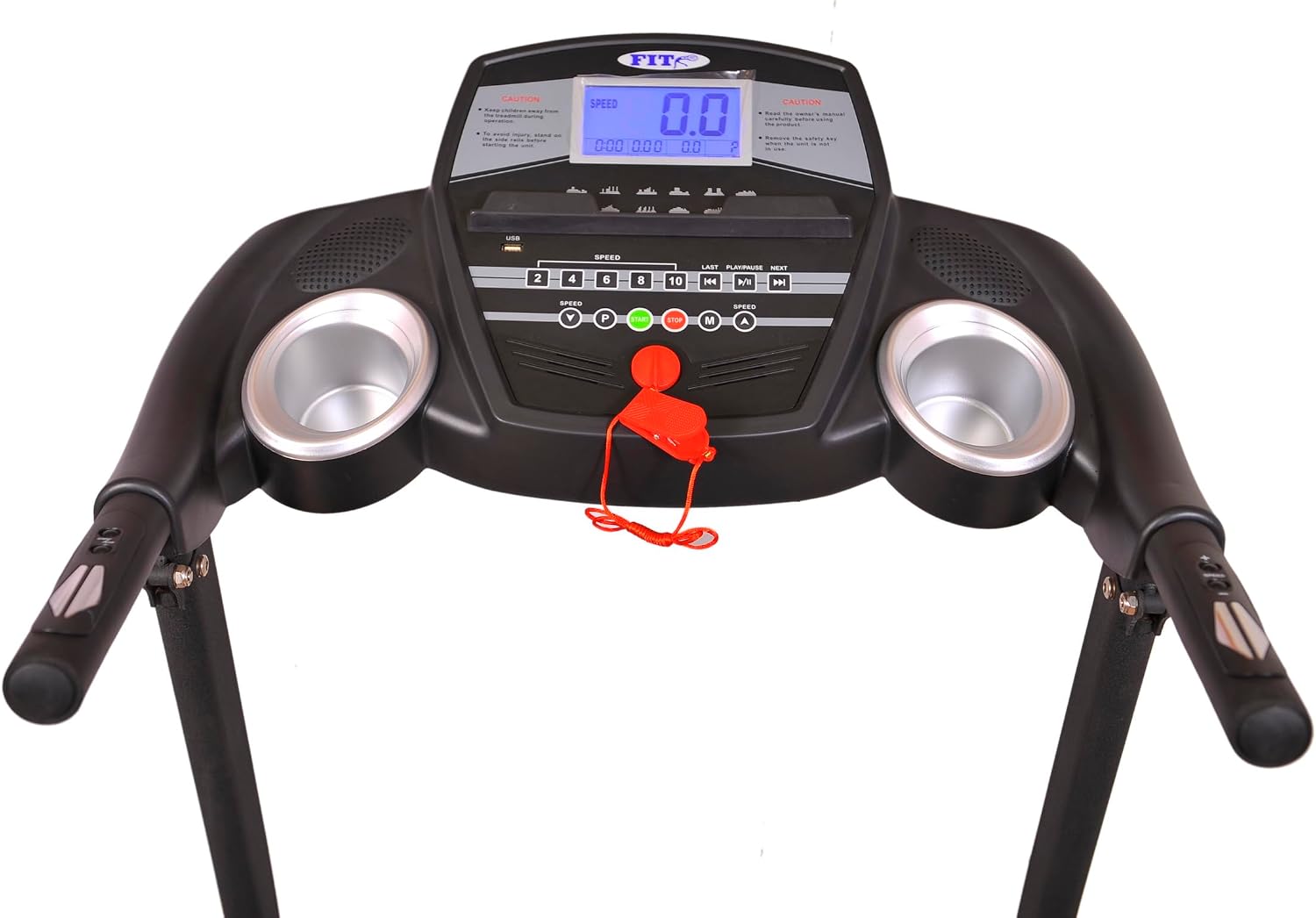
Figure 4.1: The treadmill console, featuring the blue backlit LCD display and various control buttons for speed, programs, and data display.
4.1 Console Features
- LCD Display: Shows Time, Speed, Distance, Calories Burned, and Heart Rate. The display is blue backlit for clear visibility.
- Speed Control: Adjust speed from 0.8 km/h to 14.0 km/h using the '+' and '-' buttons on the console or handlebars.
- Programs: Select from 24 pre-set workout programs designed for various fitness goals, including slimming.
- Pulse Grips: Integrated sensors on the handlebars measure your heart rate.
- USB Port: For connecting compatible devices.

Figure 4.1.1: Right handlebar controls for adjusting speed during your workout.

Figure 4.1.2: Left handlebar controls for starting and stopping the treadmill.
4.2 Starting a Workout
- Ensure the treadmill is plugged in and the power switch is ON.
- Stand on the side rails of the treadmill.
- Attach the safety key clip to your clothing and insert the safety key into its designated slot on the console.
- Press the 'START' button on the console or left handlebar. The belt will begin to move at a low speed.
- Carefully step onto the moving belt.
- Adjust the speed using the '+' or '-' buttons to your desired level.
- To select a program, press the 'PROGRAM' button and cycle through the 24 available options.
4.3 Adjusting Incline
The Fit GHNC-140S features 3 manual incline levels. To adjust the incline, you must stop the treadmill and manually adjust the incline mechanism located at the rear of the running deck. Refer to the assembly instructions for detailed steps on adjusting the manual incline.
4.4 Stopping a Workout
To stop the treadmill, press the 'STOP' button on the console or left handlebar. The belt will gradually slow down and stop. Alternatively, pull the safety key to immediately stop the treadmill in an emergency.
5. Maintenance
Regular maintenance ensures the longevity and optimal performance of your treadmill.
- Cleaning: Wipe down the treadmill surfaces with a damp cloth after each use. Avoid abrasive cleaners or solvents.
- Belt Lubrication: The running belt requires periodic lubrication to reduce friction and wear. Refer to the detailed instructions in your user manual for the correct lubrication procedure and frequency.
- Belt Tension and Alignment: Check the running belt tension and alignment regularly. Adjust as needed according to the user manual to prevent slipping or excessive wear.
- Motor Cover: Periodically remove the motor cover and vacuum any dust or debris that may have accumulated. Ensure the treadmill is unplugged before performing this task.
- Storage: The treadmill is foldable for easy storage. To fold, lift the running deck until it locks into place. Use the integrated wheels to move the folded treadmill.

Figure 5.1: The Fit GHNC-140S treadmill in its folded position, demonstrating its compact storage capability and the folding mechanism.
6. Troubleshooting
If you encounter issues with your treadmill, refer to the following common problems and solutions.
| Problem | Possible Cause | Solution |
|---|---|---|
| Treadmill does not start | Power cord not plugged in; Power switch off; Safety key not inserted | Check power connection; Turn power switch ON; Insert safety key fully |
| Running belt slips | Belt too loose; Belt worn out | Adjust belt tension (refer to manual); Contact customer support for replacement |
| Unusual noise from motor | Loose components; Motor issues | Check for loose screws; Contact customer support |
| Display not working | Loose cable connection; Console malfunction | Check console cable connections; Contact customer support |
For problems not listed here or if solutions do not resolve the issue, please contact customer support.
7. Specifications
Detailed technical specifications for the Fit GHNC-140S Treadmill.
| Feature | Detail |
|---|---|
| Brand Name | Fit |
| Model Number | GHNC-140S |
| Product Type | Treadmill |
| Color | Black |
| Product Grade | Home |
| Product Dimensions (D x W x H) | 156 cm x 65 cm x 135 cm |
| Item Weight | 46 Kilograms |
| Materials | Alloy Steel, Polyvinyl Chloride (PVC) |
| Maximum Speed | 14 Kilometers per hour |
| Special Features | Foldable, Shock Absorber, Heart Rate Monitor, Equipped with Wheels, Manual Incline |
| Recommended Uses | Running, Exercise, Fitness |
| Target Audience | Adult, Youth |
| Maximum Horsepower | 1.5 HP |
| Maximum Incline Rate | 3 (Manual) |
| Display Type | LCD (Blue Backlit) |
| Power Source | Corded Electric |
| Connectivity Technology | USB |
| Meter Type | Time, Calories Burned, Distance, Speed |
| Maximum Weight Recommendation | 130 Kilograms |
| Number of Programs | 24 |
| Running Surface Length | 1220 Millimeters |
| Included Components | User Manual, Tool Kit, Meter, Safety Key, Treadmill Frame |
| Product Benefits | Weight Loss Support |
| Assembly Required | Yes |
| GTIN / UPC | 744343453160 |
| ASIN | B0CBZJV4QZ |
8. Warranty and Support
The Fit GHNC-140S Treadmill comes with a One Year Warranty from the date of purchase. This warranty covers manufacturing defects and workmanship under normal use and service.
For warranty claims, technical support, or inquiries regarding parts and service, please refer to the contact information provided with your purchase documentation or visit the official Fit website.


