Introduction
This manual provides detailed instructions for the proper setup, operation, and maintenance of your Skechers Women's Tennyson Digital Watch, model SR2115. Please read this manual thoroughly to ensure correct usage and to maximize the lifespan of your watch.
Product Overview
The Skechers Tennyson Digital Watch features a durable silicone strap, a rose gold-tone metal bezel, and a clear digital display. It includes functions such as a chronograph, 12/24-hour format, dual time, calendar, daily alarm, and backlight.
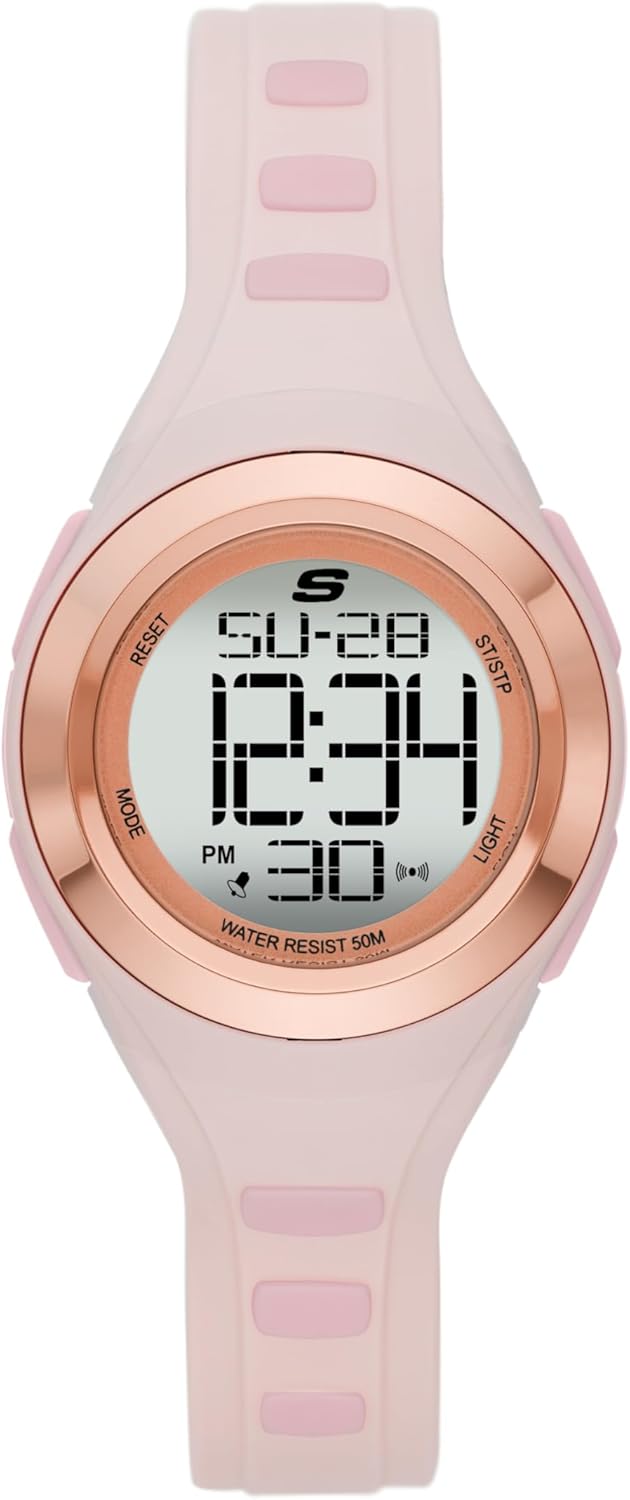
Image 1: Front view of the Skechers Tennyson Digital Watch, displaying the time, date, and various icons.

Image 2: Side view of the watch, highlighting the control buttons on the right side of the case.

Image 3: The Skechers Tennyson Digital Watch as it appears when worn on a wrist.

Image 4: A detailed diagram illustrating the various features and button functions of the watch. Buttons are labeled: RESET (top left), MODE (bottom left), ST/STP (top right), and LIGHT (bottom right).
Package Contents
- Skechers Women's Tennyson Digital Watch (Model SR2115)
- Instruction Manual (this document)
- Warranty Information

Image 5: The Skechers Tennyson Digital Watch presented in its original retail packaging.
Setup and Initial Configuration
Setting Time and Date
- From the normal time display, press the MODE button repeatedly until the time setting mode is activated. Digits (e.g., seconds, hours, minutes) will begin to flash.
- Press the RESET button to cycle through the settings: seconds, hour, minute, month, date, day of the week.
- While a digit is flashing, press the ST/STP button to adjust the value. Hold ST/STP to advance rapidly.
- Once all settings are correct, press the MODE button to exit the setting mode and return to the normal time display.
12/24 Hour Format Selection
During the time setting process, when the hour digits are flashing, pressing the ST/STP button will toggle between 12-hour (with AM/PM indicator) and 24-hour formats.
Operating Instructions
Using the Chronograph (Stopwatch)
- From the normal time display, press the MODE button once to enter Chronograph mode. The display will show '00:00:00'.
- Press the ST/STP button to start the stopwatch.
- Press ST/STP again to stop the stopwatch.
- While the stopwatch is stopped, press the RESET button to clear the time back to '00:00:00'.
- Press the MODE button to return to the normal time display.
Setting and Using the Alarm
- From the normal time display, press the MODE button twice to enter Alarm mode. The alarm time will be displayed, and the hour digits may flash.
- Press the RESET button to select between hour and minute settings.
- Press the ST/STP button to adjust the flashing digit.
- Once the desired alarm time is set, press MODE to confirm.
- In Alarm mode, press the ST/STP button to toggle the alarm ON or OFF. An alarm icon will appear on the display when the alarm is active.
- When the alarm sounds, press any button to silence it.
Hourly Chime
In Alarm mode, pressing the RESET button after setting the alarm time (or pressing MODE to cycle past the alarm setting) may allow you to toggle the hourly chime ON/OFF using the ST/STP button. An icon (often a bell or speaker) will indicate if the hourly chime is active.
Using the Backlight
Press the LIGHT button (bottom right) to illuminate the display for a few seconds, improving visibility in low-light conditions.
Dual Time Function
Your watch supports a dual time function, allowing you to track a second time zone. To access and set the dual time:
- From the normal time display, press the MODE button three times to enter Dual Time mode.
- The hour digits for the second time zone will flash. Use the ST/STP button to adjust the hour.
- Press the RESET button to select the minute digits, then use ST/STP to adjust.
- Press MODE to exit Dual Time setting.
Maintenance and Care
Water Resistance
This watch is water resistant up to 50 meters (5 ATM). This means it is suitable for showering and swimming in shallow water. It is not recommended for diving or high-impact water sports. Do not operate buttons while the watch is submerged in water.
Cleaning
- Wipe the watch case and strap with a soft, damp cloth.
- Avoid using harsh chemicals, solvents, or abrasive cleaners, as these can damage the watch's finish or materials.
- For silicone straps, regular cleaning helps prevent discoloration and maintain flexibility.
Battery Replacement
The watch uses a Lithium Ion battery. When the display dims or functions become erratic, it may be time for a battery replacement. It is recommended to have the battery replaced by a qualified watch technician to ensure proper sealing and water resistance.
Troubleshooting
| Problem | Possible Cause | Solution |
|---|---|---|
| Display is blank or dim | Low battery | Replace battery. |
| Time is incorrect | Time needs to be set | Refer to 'Setting Time and Date' section. |
| Buttons are unresponsive | Watch may be in a locked mode or malfunction | Try pressing all buttons firmly. If issue persists, contact support. |
| Water inside display | Water resistance compromised | Stop using the watch immediately and seek professional repair. |
Specifications
- Model Number: SR2115
- Case Diameter: 33mm
- Band Width: 14mm
- Movement: Digital Quartz
- Display: Digital
- Crystal: Mineral
- Case Material: Polycarbonate
- Band Material: Polyurethane (Silicone)
- Water Resistance: 50 meters (5 ATM)
- Battery: 1 Lithium Ion battery (included)
- Package Dimensions: 10.3 x 7.9 x 7.5 cm
- Weight: 145 g

Image 6: A general case size guide for round watches, illustrating various diameters and thicknesses for reference.
Warranty and Support
Your Skechers Tennyson Digital Watch is covered by a manufacturer's warranty. Please refer to the warranty card included in your package for specific terms, conditions, and duration. For technical support, service, or warranty claims, please contact Skechers customer service through their official website or the retailer where the product was purchased.


