
1. Important Safety Information
Please read this manual thoroughly before installation and operation. Keep this manual for future reference. Improper installation or operation may cause serious injury or property damage.
- Professional Installation Required: This unit requires professional installation by a qualified HVAC technician. Attempting self-installation without proper training and tools can lead to electric shock, fire, water leakage, or other hazards.
- Electrical Safety: Ensure the power supply matches the unit's requirements (220V). Do not operate with damaged power cords or plugs. Always disconnect power before servicing.
- Refrigerant Handling: This unit contains R-410A refrigerant. Handling of refrigerant should only be performed by certified personnel.
- Clearance: Maintain adequate clearance around both indoor and outdoor units for proper airflow and maintenance.
- Children and Pets: Keep children and pets away from the unit during operation and maintenance.
2. Product Overview
The ApooDr AES Series Mini Split Air Conditioner is a ductless inverter system designed for efficient cooling and heating. This 18,000 BTU unit features a 19 SEER2 rating, a heat pump function, and Wi-Fi connectivity for smart control.
Key Components:
- Indoor Air Handler
- Outdoor Condenser
- Remote Control
- 16 ft Line Set (for installation)
- Installation and User Manual
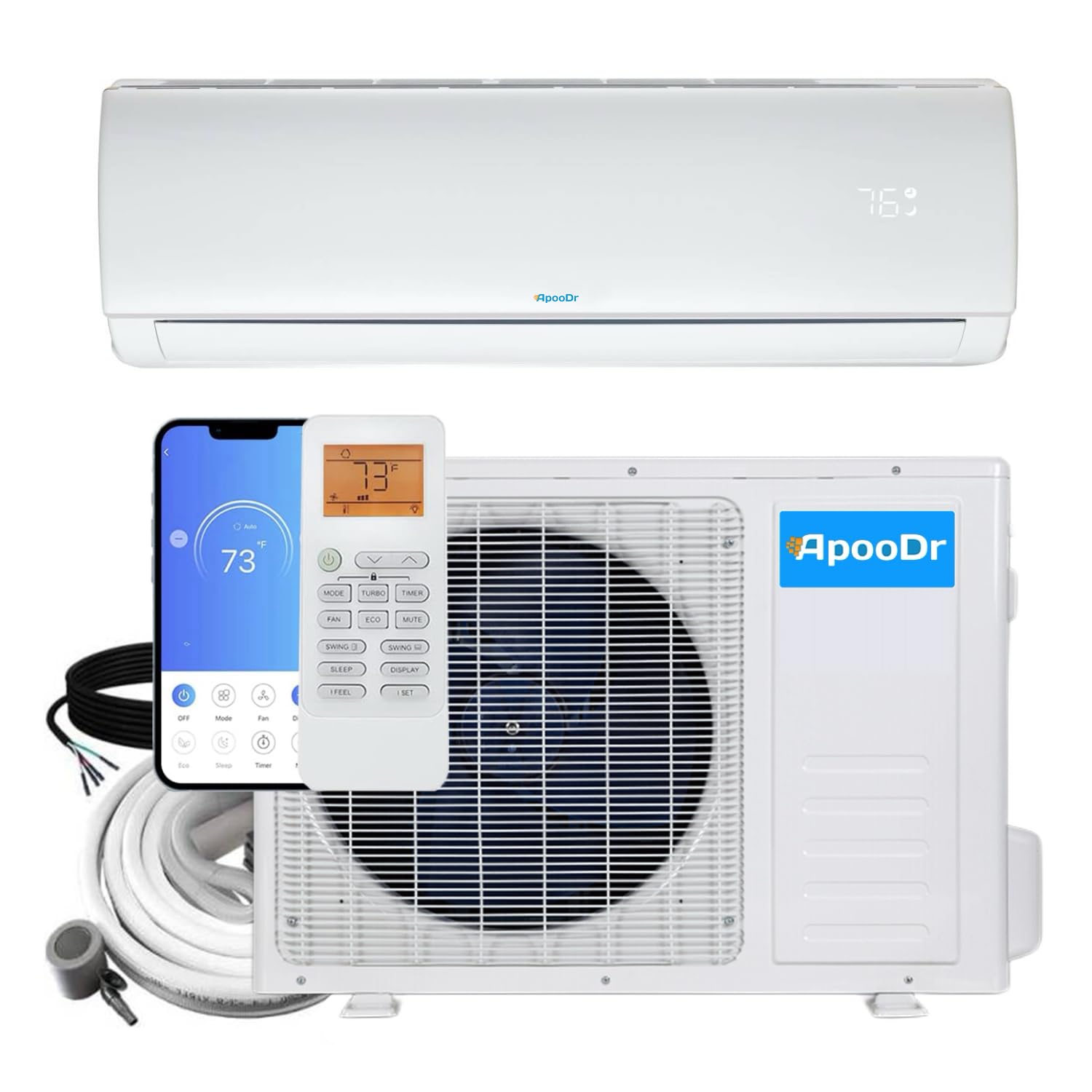
Figure 2.1: Overview of the ApooDr Mini Split Air Conditioner system, showing both indoor and outdoor units.
3. Setup and Installation
Important: Installation of this mini split system must be performed by a certified HVAC professional. This ensures proper function, safety, and warranty validity.
3.1 Pre-Installation Checks:
- Verify power supply (220V).
- Ensure adequate space for both indoor and outdoor units.
- Confirm the 16 ft line set is sufficient for the desired distance between units.
3.2 Wi-Fi Setup:
The unit is Wi-Fi enabled, allowing control via a smartphone app and voice commands through Alexa. Refer to the separate Wi-Fi setup guide included with your unit for detailed instructions on connecting to your home network and integrating with smart home systems.

Figure 3.1: The mini split unit supports Wi-Fi control via a smartphone app and AI voice control, indicated by a USB-WIFI dongle and a smart speaker icon.
4. Operating Instructions
The ApooDr Mini Split offers various modes and features for optimal comfort. All functions can be controlled via the included remote control.
4.1 Remote Control Functions:
The remote control allows you to adjust temperature, fan speed, operating mode, and other settings. The unit's digital display shows the current temperature.
- ON/OFF: Powers the unit on or off.
- MODE: Cycles through operating modes (Cool, Heat, Fan, Dry, Auto).
- TEMP +/-: Adjusts the desired temperature.
- FAN: Changes fan speed (Auto, Low, Medium, High).
- SWING: Activates or deactivates the automatic louver swing for air distribution.
- SLEEP: Optimizes settings for comfortable sleep.
- TURBO: Provides rapid cooling or heating.
- CLEAN: Initiates the self-cleaning function.
- LED: Turns the display LED on or off.
- FOLLOW ME: Activates a sensor in the remote to measure temperature at its location.
4.2 Air Distribution:
The unit features advanced air supply patterns for enhanced comfort:
- Cooling Mode: Shower-style air supply directs cool air downwards.
- Heating Mode: Blanket-style air supply directs warm air along the floor.

Figure 4.1: The indoor unit distributes air differently based on the operating mode: shower-style for cooling and blanket-style for heating.
4.3 Performance Capabilities:
This inverter system provides robust performance across a wide range of outdoor temperatures:
- Strong Cooling: Effective cooling up to 140°F (60°C) ambient temperature.
- Strong Heating: Reliable heating down to -13°F (-25°C) ambient temperature.

Figure 4.2: The unit maintains strong cooling performance even at high ambient temperatures (e.g., 131°F) and strong heating performance in low ambient temperatures (e.g., -13°F).
4.4 Quiet Operation:
The unit is designed for quiet operation, with indoor noise levels as low as 31 dB and outdoor noise levels at 52 dB.

Figure 4.3: The unit operates quietly, with noise levels as low as 22dB, and offers multiple vertical and horizontal air blow types for precise air distribution.
5. Maintenance
Regular maintenance ensures optimal performance and longevity of your mini split system.
5.1 Self-Cleaning and Sterilization:
The unit features a 133°F (56°C) high-temperature self-cleaning and sterilization function. This process involves frosting, defrosting, high-temperature drying, and sterilization to inhibit bacterial growth.

Figure 5.1: The self-cleaning process includes frosting, defrosting, high-temperature drying, and 133°F sterilization, which has been tested to achieve up to 93.18% bacterial killing rate.
5.2 Filter Cleaning:
Clean the air filters regularly (every 2-4 weeks, depending on usage) to maintain airflow and efficiency. Refer to the detailed instructions in the full manual for filter removal and cleaning procedures.
5.3 Professional Servicing:
Schedule annual professional maintenance to check refrigerant levels, clean coils, and inspect all components for optimal performance and to prevent potential issues.
6. Troubleshooting
If you encounter issues with your unit, refer to the following common troubleshooting steps. For complex problems, contact a qualified technician.
| Problem | Possible Cause | Solution |
|---|---|---|
| Unit does not turn on | No power, remote control batteries dead, circuit breaker tripped. | Check power supply, replace remote batteries, reset circuit breaker. |
| Insufficient cooling/heating | Dirty air filters, blocked outdoor unit, incorrect mode setting, low refrigerant. | Clean filters, clear obstructions, select correct mode, contact technician for refrigerant check. |
| Unusual noise | Loose parts, fan obstruction, refrigerant flow noise (normal). | Inspect for loose parts, remove obstructions, consult manual for normal operating sounds. |
| Water leakage | Clogged drain pipe, improper installation. | Clear drain pipe, contact professional for inspection. |
| Wi-Fi connectivity issues | Router issues, incorrect Wi-Fi settings, app malfunction. | Restart router, reconfigure Wi-Fi settings in app, reinstall app. |
7. Specifications
| Feature | Specification |
|---|---|
| Brand | ApooDr |
| Model Number | AES19-18H1B |
| Capacity | 18,000 BTU (1.5 Tons) |
| SEER Rating | 19.0 |
| Voltage | 220 Volts |
| Wattage | 1800 watts |
| Item Weight | 110 pounds |
| Product Dimensions | 8.66"D x 39.76"W x 12.4"H |
| Noise Level (Indoor) | 31 Decibels |
| Installation Type | Split System |
| Refrigerant | Pre-Charged R-410A |
| Special Features | 4 Way Swing, Dehumidifier, Fast Cooling, Inverter Compressor, WiFi Enabled |
| Included Components | Indoor unit, outdoor unit, remote control, line set, Installation and User Manual |
8. Warranty and Support
For warranty information, technical support, or service requests, please refer to the warranty card included with your product or contact ApooDr customer service. Ensure you have your model number (AES19-18H1B) and purchase date available when contacting support.


