
Dyson AM07
Dyson Cool™ Tower Fan AM07 User Manual
Model: AM07 | Brand: Dyson
1. Introduction
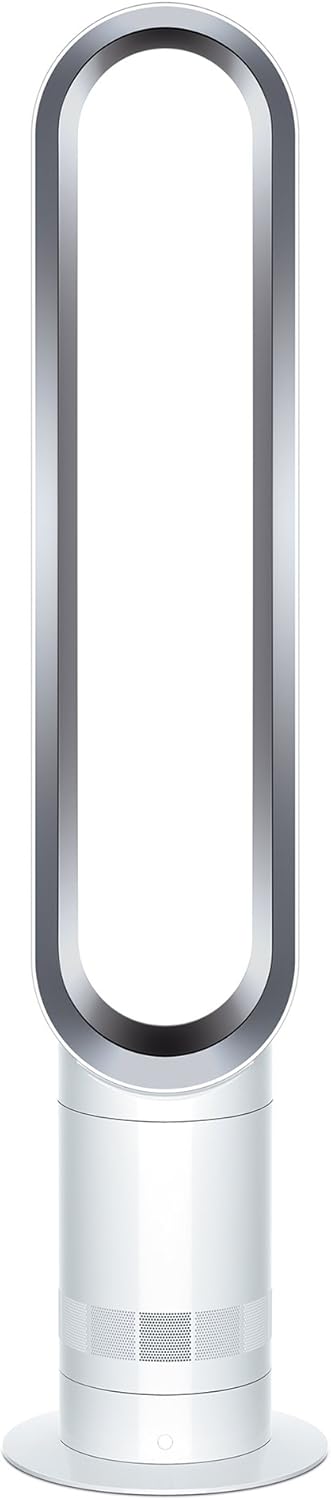
The Dyson Cool™ Tower Fan AM07 is designed to amplify surrounding air, providing a smooth, uninterrupted stream of airflow for effective cooling. Its bladeless design ensures safety and ease of cleaning, making it a versatile addition to any living space.
Key Features:
- Air Multiplier technology for powerful, smooth airflow.
- 10 precise airflow settings for customized cooling.
- Curved and magnetized remote control for convenient storage.
- Sleep timer programmable from 15 minutes to 9 hours.
- Smooth 70° oscillation to direct airflow around the room.
2. Setup
The Dyson Cool™ Tower Fan AM07 is designed for easy assembly. Follow these steps for initial setup:
- Unpack all components from the box. Ensure all parts are present: the main fan unit, the base, and the remote control.
- Place the main fan unit securely onto the base. It should click into place.
- Connect the power cord to the fan unit and then plug it into a suitable electrical outlet.
- The remote control is magnetized and can be stored neatly on top of the fan unit for easy access.
Setup Video:
3. Operating Instructions
The Dyson Cool™ Tower Fan AM07 offers intuitive controls for personalized comfort.
Power On/Off:
- Press the power button on the remote control or on the base of the fan to turn the unit on or off.
Adjusting Airflow:
- Use the '+' and '-' buttons on the remote to cycle through 10 precise airflow settings.
Oscillation:
- Press the oscillation button on the remote to activate or deactivate the smooth 70° oscillation feature, directing airflow across the room.
Sleep Timer:
- The sleep timer can be programmed to turn off the fan after pre-set intervals, ranging from 15 minutes to 9 hours. Use the timer button on the remote to set your desired duration.
Product Overview Video:
4. Maintenance
Regular maintenance ensures optimal performance and longevity of your Dyson Cool™ Tower Fan AM07.
Cleaning Instructions:
- Always unplug the fan from the power outlet before cleaning.
- Wipe the surfaces of the fan with a soft, damp cloth. Do not use detergents or polishes.
- For thorough cleaning, refer to the "Hand Wash" care instructions mentioned in the product specifications.
- Ensure the air intake holes on the base are free from dust and debris to maintain efficient airflow.
5. Troubleshooting
If you encounter issues with your Dyson Cool™ Tower Fan AM07, refer to the common problems and solutions below:
| Problem | Possible Cause | Solution |
|---|---|---|
| Fan not turning on. | No power supply or loose connection. | Ensure the power cord is securely plugged into the fan and the wall outlet. Check the power outlet with another device. |
| Reduced airflow or unusual noise. | Dust accumulation in air intake or internal components. | Clean the air intake holes on the base. Refer to the Maintenance section for detailed cleaning instructions. |
| Oscillation not working. | Internal mechanism issue or obstruction. | Ensure the fan is on a stable, flat surface. If the issue persists, contact Dyson customer support. |
| Remote control not responding. | Low or dead batteries. | Replace the batteries in the remote control. Ensure there are no obstructions between the remote and the fan. |
For persistent issues not covered here, please contact Dyson customer support.
6. Specifications
| Feature | Detail |
|---|---|
| Brand | Dyson |
| Model Name | AM07 |
| Item Model Number | 464818-01 |
| Color | White/ Silver |
| Product Dimensions | 7.48"D x 7.48"W x 39.65"H |
| Item Weight | 6.25 Pounds |
| Power Source | Corded Electric |
| Voltage | 120 Volts (AC) |
| Wattage | 1000 Watts |
| Number of Power Levels | 3 (Note: Feature bullets mention 10 precise airflow settings, this might refer to fan speed levels) |
| Special Feature | Adjustable Tilt, Bladeless, Oscillating |
| Control Method | Remote |
| Indoor/Outdoor Usage | Indoor |
| Care Instructions | Hand Wash |
| Assembly Required | No |
| UPC | 885609031699 |
7. Warranty and Support
Dyson products are known for their quality and come with manufacturer support.
Manufacturer Warranty:
Specific warranty details are typically provided with your product documentation. Please refer to the warranty card included in your product packaging for terms and conditions.
Protection Plans:
Extended protection plans may be available for purchase. For details on 3-Year, 4-Year, or Complete Protect plans, please refer to the product listing or contact your retailer.
Customer Support:
For technical assistance, troubleshooting, or warranty claims, please contact Dyson customer support directly. Visit the official Dyson website for contact information and support resources.
Related documentsAM07


Ask a question about this manual
Ask about setup, troubleshooting, compatibility, parts, safety, or missing instructions. Manuals+ will review the question and use this page’s manual context to help answer it.