
KAIY C36
KAIY Bluetooth 5.3 Receiver User Manual
Model: C36 | Brand: KAIY
1. Introduction
The KAIY Bluetooth 5.3 Receiver is designed to upgrade your legacy audio setup, transforming vintage home stereos, car speakers, or old-school receivers into Bluetooth-ready powerhouses. This plug-and-play adapter allows you to stream music wirelessly from your phone, tablet, or laptop to any wired audio system, breathing new life into classic setups without sacrificing nostalgia.
Video: KAIY Bluetooth 5.3 Receiver for Home Stereo - An overview of the product's capabilities and design.

Image: The KAIY Bluetooth Receiver seamlessly integrates with existing stereo systems, allowing wireless audio streaming.
2. What's in the Box
Upon opening your KAIY Bluetooth 5.3 Receiver package, you should find the following items:
- Bluetooth Receiver Adapter (Model C36)
- Type-C Power Cable
- 3.5mm Audio Cable
- Optical Digital Audio Cable
- RCA Output Cable
- User Guide (this manual)

Image: All included accessories for connecting your KAIY Bluetooth Receiver to various audio systems.
3. Product Overview
Front Panel

Image: Detailed view of the receiver's front panel, highlighting the multifunction knob, mode switch, USB port, and display screen.
- Multifunction Knob: Controls volume, power on/off (long press), and playback (short press for play/pause).
- Mode Switch Button: Toggles between different input modes (Bluetooth, USB).
- Next Song / Previous Song Buttons: Navigates tracks during playback.
- USB Flash Drive Port: For direct music playback from a USB drive.
- Display Screen: Shows volume levels, playback mode, and connection status.
Rear Panel

Image: Detailed view of the receiver's rear panel, showing the RCA, Optical, AUX, and DC-5V power input ports.
- RCA Output (L/R): Connects to stereo systems, amplifiers, or powered speakers via RCA cables.
- SPDIF (Optical) Output: Connects to audio systems with an optical input for digital audio transmission.
- AUX (3.5mm) Output: Connects to devices with a 3.5mm auxiliary input.
- DC-5V (Type-C) Power Input: Connects to a power source using the provided Type-C cable.
- Antenna: For stable Bluetooth signal reception.
4. Setup
Setting up your KAIY Bluetooth Receiver is a simple three-step process:
- Plug: Insert the Type-C power cable into the DC-5V port on the receiver and connect the other end to a 5V/2A USB power adapter (not included). Then, connect the appropriate audio cable (RCA, Optical, or 3.5mm AUX) from the receiver's output to your stereo system or speakers.
- Power On: Long press the multifunction knob on the receiver to power it on. The LCD display will light up.
- Pair: Turn on Bluetooth on your smartphone, tablet, or other audio device. Search for "C36" in the list of available Bluetooth devices and select it to pair. Once connected, the display will indicate a successful connection.
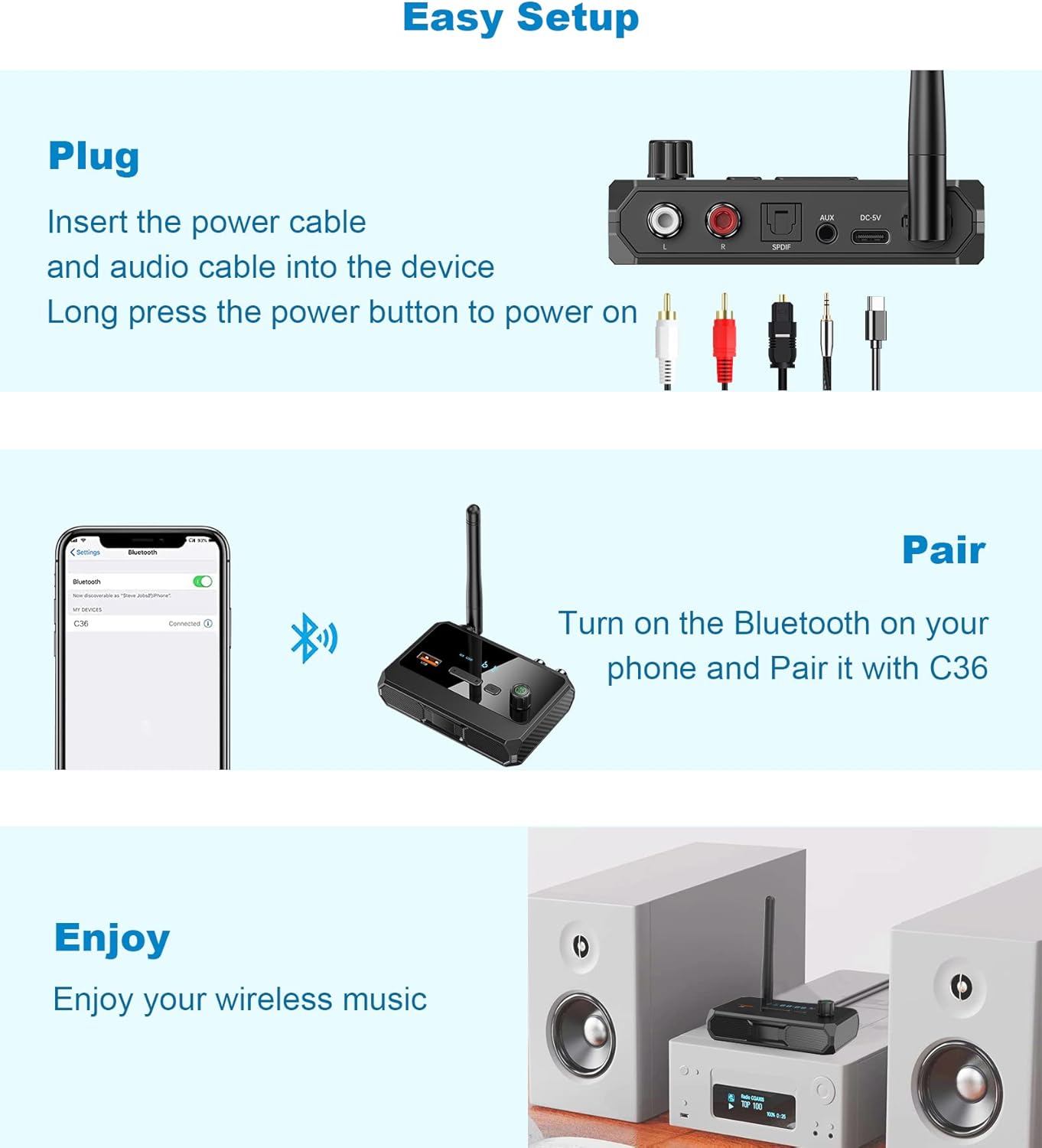
Image: Visual guide to the quick and easy setup process for the KAIY Bluetooth Receiver.
Video: RCA Bluetooth Adapter Function - Demonstrates the connection process and basic functionality.
5. Operating Instructions
Bluetooth Pairing
After initial setup, the receiver will automatically attempt to reconnect to the last paired device when powered on. If you wish to pair a new device, ensure the receiver is in Bluetooth mode (indicated on the LCD display) and then search for "C36" on your new device's Bluetooth settings.

Image: Confirming Bluetooth connection on a mobile device to the KAIY receiver.
USB Playback
The KAIY receiver supports direct music playback from a USB flash drive. Simply insert your USB drive into the USB port on the front panel. The receiver will automatically switch to USB mode and begin playing music. Use the 'Next Song' and 'Previous Song' buttons to navigate tracks.

Image: The receiver's USB port allows for direct playback of music from a flash drive.
Mode Switching
Press the 'M' (Mode Switch) button on the front panel to cycle through available input modes (Bluetooth, USB).
Volume Control
Rotate the multifunction knob clockwise to increase volume and counter-clockwise to decrease volume. The current volume level will be displayed on the LCD screen.
6. Key Features
- Bluetooth 5.3: Experience stable connectivity with faster pairing, stronger signals, and minimal audio delay. Ideal for parties, workouts, or relaxing at home without tangled wires.
- Universal Connectivity: Features 3-in-1 outputs including RCA, AUX (3.5mm), and Optical ports, compatible with 99% of speakers, amplifiers, and projectors.
- USB Flash Drive Support: Play music audio directly from a USB drive, offering an alternative to Bluetooth streaming.
- Immersive HiFi Stereo Sound: Powered by advanced wireless codecs, enjoy studio-quality audio with crisp highs, deep bass, and zero distortion.
- Smart LCD Display: An intuitive LCD screen shows volume levels, playback mode, and connection status at a glance, allowing direct adjustments on the adapter.
- Multi-Room Audio: Sync multiple speakers via AUX/RCA/Optical cables for consistent whole-home audio.
- Automatic Reconnection: Once paired, the receiver auto-connects to your last device when powered on for hassle-free music enjoyment.

Image: The KAIY Bluetooth Receiver enables high-quality wireless music streaming to your home stereo.

Image: Enjoy stable wireless connection and move freely within a 33-foot range without loss of connection.
7. Specifications
| Brand | KAIY |
| Model Number | C36 |
| Product Dimensions | 1.8 x 3 x 3.54 inches |
| Item Weight | 3.87 ounces |
| Wireless Communication Technologies | Bluetooth 5.3 |
| Connectivity Technologies | RCA, Bluetooth, Auxiliary (3.5mm), USB, Optical Digital |
| Power Source | Corded Electric (Type-C) |
| Material | Plastic, Metal |
| Color | Black |
8. Maintenance
To ensure the longevity and optimal performance of your KAIY Bluetooth Receiver, please follow these maintenance guidelines:
- Cleaning: Use a soft, dry cloth to clean the device. Do not use liquid cleaners or aerosol sprays.
- Power Supply: Always ensure the device is powered via the provided Type-C cable and a compatible 5V/2A USB power adapter. Do not attempt to use the device without proper power.
- Placement: Place the receiver on a stable, flat surface away from direct sunlight, heat sources, and excessive moisture. Ensure adequate ventilation.
- Handling: Handle the device with care. Avoid dropping or subjecting it to strong impacts.
- Storage: If storing the device for an extended period, disconnect it from power and store it in a cool, dry place.
- Compatibility: Use with compatible wired speakers and amplifiers only.
9. Troubleshooting
If you encounter any issues while using your KAIY Bluetooth Receiver, please refer to the following common problems and solutions:
- No Power:
- Ensure the Type-C power cable is securely connected to both the receiver and a working 5V/2A USB power adapter.
- Verify the power outlet or USB port is functional.
- Cannot Pair via Bluetooth:
- Make sure the receiver is in Bluetooth mode (check the LCD display).
- Ensure Bluetooth is enabled on your source device (smartphone, tablet).
- Move your source device closer to the receiver (within 33 feet).
- Clear the Bluetooth pairing list on your source device and try pairing again.
- Restart both the receiver and your source device.
- No Sound Output:
- Check if the correct audio cable (RCA, Optical, or 3.5mm AUX) is securely connected between the receiver and your audio system.
- Ensure your audio system (stereo, speakers) is turned on and set to the correct input source corresponding to the receiver's connection.
- Adjust the volume on both the receiver and your audio system.
- If using USB playback, ensure the USB drive contains compatible audio files and is properly inserted.
- Sound Quality Issues (Distortion, Static):
- Ensure the receiver is not too close to other electronic devices that may cause interference.
- Check the audio cables for any damage or loose connections.
- Reduce the distance between the source device and the receiver.
10. Warranty & Support
KAIY products are designed and manufactured to the highest quality standards. For information regarding warranty coverage, technical support, or customer service, please refer to the contact details provided on the product packaging or visit the official KAIY website. Please retain your proof of purchase for any warranty claims.
Ask a question about this manual
Ask about setup, troubleshooting, compatibility, parts, safety, or missing instructions. Manuals+ will review the question and use this page’s manual context to help answer it.