
1. Product Overview
The Ariete 1452/01 is a fully automatic coffee machine designed to deliver a variety of coffee beverages with ease. It features an integrated grinder, milk frother, and an intuitive LED display for personalized settings.
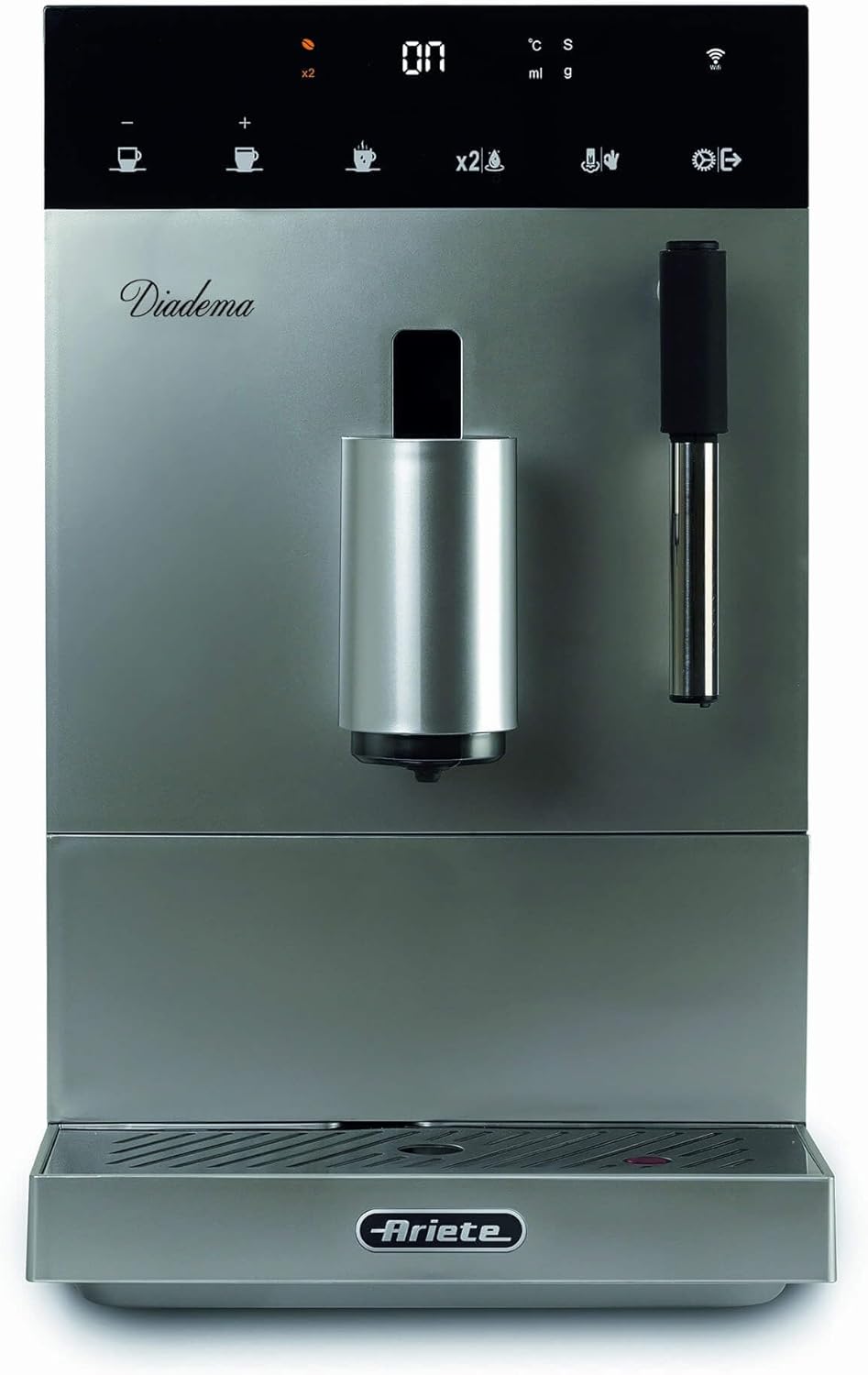
Image 1: Front view of the Ariete 1452/01 Automatic Coffee Machine, showcasing its sleek design and main dispensing area.
Key Features:
- One-Touch Operation: Prepare your favorite coffee with a single click using the LED display.
- Versatile Beverages: Enjoy Espresso, Americano, and hot water.
- Creamy Cappuccino: Utilize the integrated milk frother for rich, creamy cappuccinos.
- Adjustable Spout: Accommodates various cup sizes, from small espresso cups to tall mugs.
- Programmable Settings: Customize coffee strength, water volume, and temperature.

Image 2: The Ariete 1452/01 coffee machine on a kitchen counter, displaying a range of prepared coffee beverages.
2. Setup
2.1 Unpacking
- Carefully remove the coffee machine and all accessories from the packaging.
- Remove any protective films or packaging materials from the appliance.
- Place the machine on a stable, level surface away from heat sources and water.
2.2 First Use and Priming
- Fill the water tank with fresh, cold water up to the MAX level.
- Place an empty container under the coffee spout and the hot water/steam nozzle.
- Plug the machine into a grounded power outlet (220V).
- Turn on the machine. The machine will perform an initial rinse cycle. Follow any on-screen prompts.
- Discard the water from the container. The machine is now primed.
2.3 Filling the Coffee Bean Container
- Open the lid of the coffee bean container located on top of the machine.
- Pour fresh coffee beans into the container. Do not overfill.
- Close the lid securely to maintain bean freshness.
3. Operating Instructions
The Ariete 1452/01 features an intuitive LED display for easy operation.

Image 3: Close-up view of the Ariete 1452/01's LED control panel, showing various beverage selection icons.
3.1 Basic Coffee Preparation (Espresso/Americano)
- Ensure the water tank is filled and the coffee bean container has sufficient beans.
- Place a cup under the coffee spout.
- Select your desired coffee type (Espresso or Americano) from the LED display.
- The machine will automatically grind the beans, brew, and dispense the coffee.
- The machine will indicate when brewing is complete.

Image 4: The Ariete 1452/01 coffee machine actively dispensing a stream of coffee into a clear glass cup.
3.2 Using the Milk Frother for Cappuccino
- Prepare an espresso shot as described above.
- Fill a milk frothing pitcher with cold milk (dairy or non-dairy).
- Position the steam wand into the milk, just below the surface.
- Activate the steam function on the LED display.
- Move the pitcher up and down to create foam. Once desired foam is achieved, turn off the steam.
- Pour the frothed milk over your espresso to create a cappuccino.
3.3 Hot Water Function
- Place a cup under the hot water spout (usually the steam wand).
- Select the hot water function from the LED display.
- The machine will dispense hot water. Turn off the function when the desired amount is reached.
3.4 Adjusting Settings
The LED display allows for customization of your coffee:
- Coffee Strength: Adjust the amount of coffee ground per serving.
- Water Volume: Customize the water quantity for a shorter or longer drink.
- Temperature: Select your preferred brewing temperature.
- Refer to the on-screen menu for detailed instructions on navigating and saving your preferred settings.
4. Maintenance
Regular cleaning and maintenance ensure optimal performance and longevity of your Ariete coffee machine.
4.1 Daily Cleaning
- Drip Tray: Empty and rinse the drip tray daily to prevent overflow and bacterial growth.
- Coffee Grounds Container: Empty the used coffee grounds container when prompted by the machine or daily. Rinse with water.
- Milk Frother: After each use, wipe the steam wand with a damp cloth to remove milk residue. Purge the wand briefly to clear any internal blockages.
4.2 Weekly Cleaning
- Water Tank: Remove and thoroughly clean the water tank with mild detergent and rinse well.
- Coffee Spout: Clean the coffee spout with a damp cloth to remove any coffee splashes.
4.3 Monthly Maintenance
- Infuser Unit: The internal infuser unit should be cleaned at least once a month. Remove the infuser (refer to the machine's specific instructions for removal), rinse it under lukewarm water, and wipe with a cloth. Allow it to air dry before reinserting.
4.4 Descaling
The machine will indicate when descaling is required. Use a suitable descaling solution designed for coffee machines and follow the instructions provided with the descaler or on the machine's display.
5. Troubleshooting
This section addresses common issues you might encounter with your Ariete 1452/01 coffee machine.
| Problem | Possible Cause | Solution |
|---|---|---|
| No coffee dispensed | Water tank empty; coffee beans empty; brewing unit blocked. | Refill water tank; refill coffee beans; clean the brewing unit. |
| Coffee is too weak | Grind setting too coarse; insufficient coffee dose; descaling needed. | Adjust grind to finer setting; increase coffee strength setting; perform descaling. |
| Machine leaks water | Drip tray full; water tank not correctly inserted; internal component issue. | Empty drip tray; ensure water tank is seated properly; contact customer support if issue persists. |
| Milk frother not producing foam | Steam wand blocked; milk not cold enough; incorrect milk type. | Clean steam wand thoroughly; use cold milk; try different milk types. |
| Error message on display | Specific machine fault. | Refer to the machine's display for the specific error code and consult the full manual or contact support. |
6. Specifications
| Feature | Detail |
|---|---|
| Brand | Ariete |
| Model Number | 1452/01 |
| Color | Silver |
| Product Dimensions | 19 x 32 x 39.5 cm |
| Item Weight | 7 Kilograms |
| Water Tank Capacity | 1 Liter |
| Power / Wattage | 1350 Watts |
| Voltage | 220 Volts |
| Material | Stainless Steel |
| Automatic Shutoff | Yes |
| Special Features | Milk Frother, Programmable |
| Coffee Machine Type | Espresso Machine |
| Recommended Uses | Cafe-style beverages |
| Specific Uses | Espresso, Iced Coffee, Cappuccino, Latte, Mocha |
7. Warranty and Support
Your Ariete 1452/01 Automatic Coffee Machine comes with a manufacturer's warranty. Please refer to the warranty card included in your product packaging for specific terms and conditions, including the warranty period and coverage details.
Customer Support:
For technical assistance, troubleshooting beyond this manual, or warranty claims, please contact Ariete customer support. Contact details can typically be found on the manufacturer's website or in the product documentation.
Please retain your proof of purchase for any warranty claims.


