
THINKSCALE TK1-200
THINKSCALE TK1-200 Mini Pocket Digital Scale User Manual
Model: TK1-200 | Brand: THINKSCALE
1. Introduction
Thank you for choosing the THINKSCALE TK1-200 Mini Pocket Digital Scale. This precision instrument is designed for accurate weighing of various small items, including jewelry, medicine, coffee, and herbs. With a maximum capacity of 200g and a precision of 0.01g, it offers reliable measurements for a wide range of applications. This manual provides detailed instructions for proper setup, operation, maintenance, and troubleshooting to ensure optimal performance and longevity of your scale.

Image: The THINKSCALE TK1-200 Mini Pocket Digital Scale, showcasing its compact design, stainless steel platform, LCD display, control buttons, and the included 50g calibration weight and AAA batteries.

Image: An infographic highlighting key features of the THINKSCALE Digital Pocket Scale, such as 6 unit conversions, tare function, auto-off, LCD display, 200g capacity with 0.01g increments, low battery indicator, and the inclusion of a calibration weight and AAA batteries.
2. Package Contents
Please verify that all items are present and in good condition upon opening the package:
- THINKSCALE TK1-200 Mini Pocket Digital Scale
- 50g Calibration Weight
- 2 x AAA Batteries
- User Manual (this document)
3. Setup
3.1 Battery Installation
The scale requires 2 AAA batteries (included). Follow these steps to install them:
- Open the battery compartment cover located on the underside of the scale.
- Insert the 2 AAA batteries, ensuring the correct polarity (+/-) as indicated inside the compartment.
- Close the battery compartment cover securely.
3.2 Initial Power On
After installing the batteries, place the scale on a flat, stable, and vibration-free surface. Press the [ON/OFF] button to turn on the scale. The LCD display will illuminate and show "0.00g" when ready for use.
4. Operating Instructions
4.1 Power On/Off
- To turn on: Press the [ON/OFF] button.
- To turn off: Press and hold the [ON/OFF] button for a few seconds until the display turns off. The scale also features an auto-off function to conserve battery life if left idle for a period.
4.2 Unit Conversion
The scale supports 6 different measurement units. To switch between units:
- Press the [M] (MODE) button repeatedly to cycle through the available units: g (grams), oz (ounces), ozt (troy ounces), dwt (pennyweights), ct (carats), and gn (grains).
- The selected unit will be displayed on the LCD screen.

Image: The scale's LCD display showing the various unit conversions available: g, oz, gn, ozt, ct, and dwt.

Image: A visual representation of the six weighing modes supported by the scale: grams (g), ounces (oz), troy ounces (ozt), pennyweights (dwt), carats (ct), and grains (gn).
4.3 Tare Function
The tare function allows you to subtract the weight of a container, so you can measure only the net weight of the contents. Follow these steps:
- Turn on the scale and wait for it to display "0.00g".
- Place the empty container on the center of the weighing platform. The display will show the container's weight.
- Press the [T] (TARE) button. The display will reset to "0.00g".
- Place the items you wish to weigh into the container. The display will now show only the net weight of the items.

Image: A step-by-step visual guide demonstrating the tare function: turning on the scale, placing an empty container, pressing the 'T' button to zero out the container's weight, and then adding items to get their net weight.
4.4 Calibration
Calibration ensures the accuracy of your scale. It is recommended to calibrate the scale periodically or if you suspect inaccurate readings. A 50g calibration weight is included.
- Turn on the scale.
- Press and hold the [M] (MODE) button until the display shows "CAL".
- Press the [M] (MODE) button again. The display will flash "50.00" (or the required calibration weight).
- Carefully place the 50g calibration weight on the center of the weighing platform.
- Wait for the display to show "PASS" and then return to normal weighing mode. Calibration is complete.

Image: A four-step visual guide illustrating the calibration process: initiating calibration by holding the MODE button, confirming the calibration weight, placing the 50g weight on the platform, and observing the 'PASS' confirmation.
4.5 Weighing
To weigh items:
- Ensure the scale is on a flat, stable surface and displays "0.00g".
- Place the item(s) to be weighed gently on the center of the stainless steel weighing platform.
- Read the weight displayed on the LCD screen.

Image: The digital scale accurately weighing loose tobacco, illustrating its high precision with a maximum capacity of 200g and increments of 0.01g.

Image: A person in a laboratory setting using the THINKSCALE digital pocket scale to weigh a small amount of white powder, highlighting its suitability for precise measurements in scientific or medical contexts.
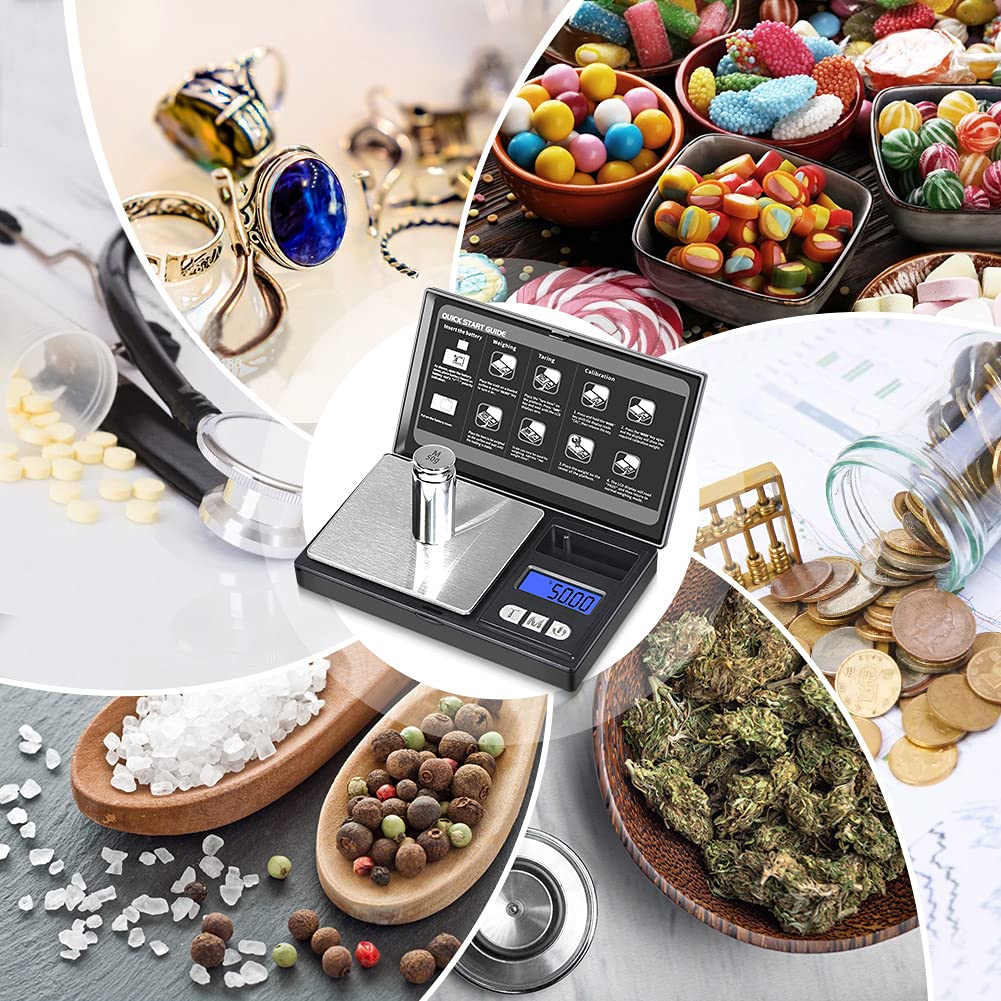
Image: A collage showcasing the versatility of the THINKSCALE digital scale, with examples of it being used to weigh jewelry, medicine, coffee, and herbs.

Image: The THINKSCALE 200g Digital Jewelry Scale in use, demonstrating its capability to weigh various small items such as coins, jewelry, and capsules, highlighting its utility for different weighing needs from medicine to jewelry.
5. Maintenance
5.1 Cleaning
The stainless steel platform is easy to clean. To maintain the scale's appearance and functionality:
- Wipe the platform and the scale's exterior with a soft, damp cloth.
- Do not use abrasive cleaners or immerse the scale in water.
- Ensure the scale is completely dry before storage or next use.

Image: A hand cleaning the stainless steel weighing platform of the THINKSCALE digital scale with a soft yellow cloth, illustrating the ease of maintenance.
5.2 Storage
When not in use, store the scale in a clean, dry place. The flip cover design helps protect the weighing platform and display from scratches and dust.

Image: The THINKSCALE portable pocket scale, highlighting its compact dimensions (5.04" x 3.07" x 0.83") and demonstrating its portability by showing it fitting into a pocket and a small bag.

Image: A person demonstrating the compact size of the THINKSCALE digital pocket scale by easily placing it into a pant pocket.
6. Troubleshooting
If you encounter issues with your scale, please refer to the following common problems and solutions:
| Problem | Possible Cause | Solution |
|---|---|---|
| Display shows "Lo" | Low battery power. | Replace the AAA batteries. |
| Display shows "O-Ld" | Overload. The weight on the platform exceeds the maximum capacity (200g). | Remove the excess weight immediately to prevent damage. |
| Inaccurate readings | Scale is not on a stable surface, needs calibration, or is affected by drafts/vibrations. | Place the scale on a firm, level, and stable surface. Perform calibration (refer to Section 4.4). Avoid using in drafty areas. |
| Scale does not turn on | Batteries are incorrectly installed or depleted. | Check battery polarity. Replace batteries if necessary. |
7. Specifications
| Feature | Detail |
|---|---|
| Model Number | TK1-200 |
| Capacity | 200g |
| Accuracy | 0.01g |
| Units | g, oz, ozt, dwt, ct, gn |
| Display Type | LCD with Backlit Display |
| Power Source | 2 x AAA Batteries (included) |
| Product Dimensions | 5.03 x 3.03 x 0.74 inches |
| Item Weight | 6.74 ounces |
| Platform Material | Stainless Steel |
| Body Material | High Quality ABS Plastic |
| Special Features | Tare Function, Calibration, Auto-Off, Flip Cover Protection |
8. Warranty and Support
THINKSCALE offers a 10-year warranty for this product, ensuring long-term reliability and customer satisfaction. For any questions, technical assistance, or warranty claims, please contact THINKSCALE customer support. Lifetime support is provided for all THINKSCALE products.
For further assistance, please visit the official THINKSCALE store on Amazon: THINKSCALE Store
Ask a question about this manual
Ask about setup, troubleshooting, compatibility, parts, safety, or missing instructions. Manuals+ will review the question and use this page’s manual context to help answer it.