
1. Safety Information
Please read and understand all instructions before using this product. Failure to follow all instructions may result in hazardous radiation exposure, electric shock, fire, or bodily injury.
1.1 Laser Safety
This device emits a Class II laser. Do not stare directly into the laser beam. Avoid direct eye exposure. Do not aim the laser beam at people or animals. Laser radiation can cause eye damage.
- Laser Type: Class II
- Output Power: <1mW
- Wavelength: 635nm
1.2 General Safety Precautions
- Keep the device away from children.
- Do not use the device in explosive environments.
- Avoid exposing the device to extreme temperatures or humidity.
- Do not attempt to disassemble or modify the device.
2. Package Contents
Verify that all items are present and in good condition upon unpacking.
- Inkerma DM-262 Bilateral Laser Distance Meter
- Rechargeable Lithium Battery (pre-installed)
- User Manual
- Hand Strap
- Carrying Bag
- Type-C Charge Cable

Figure 2.1: Accessories included with the Inkerma DM-262.
3. Device Overview and Setup
3.1 Device Features
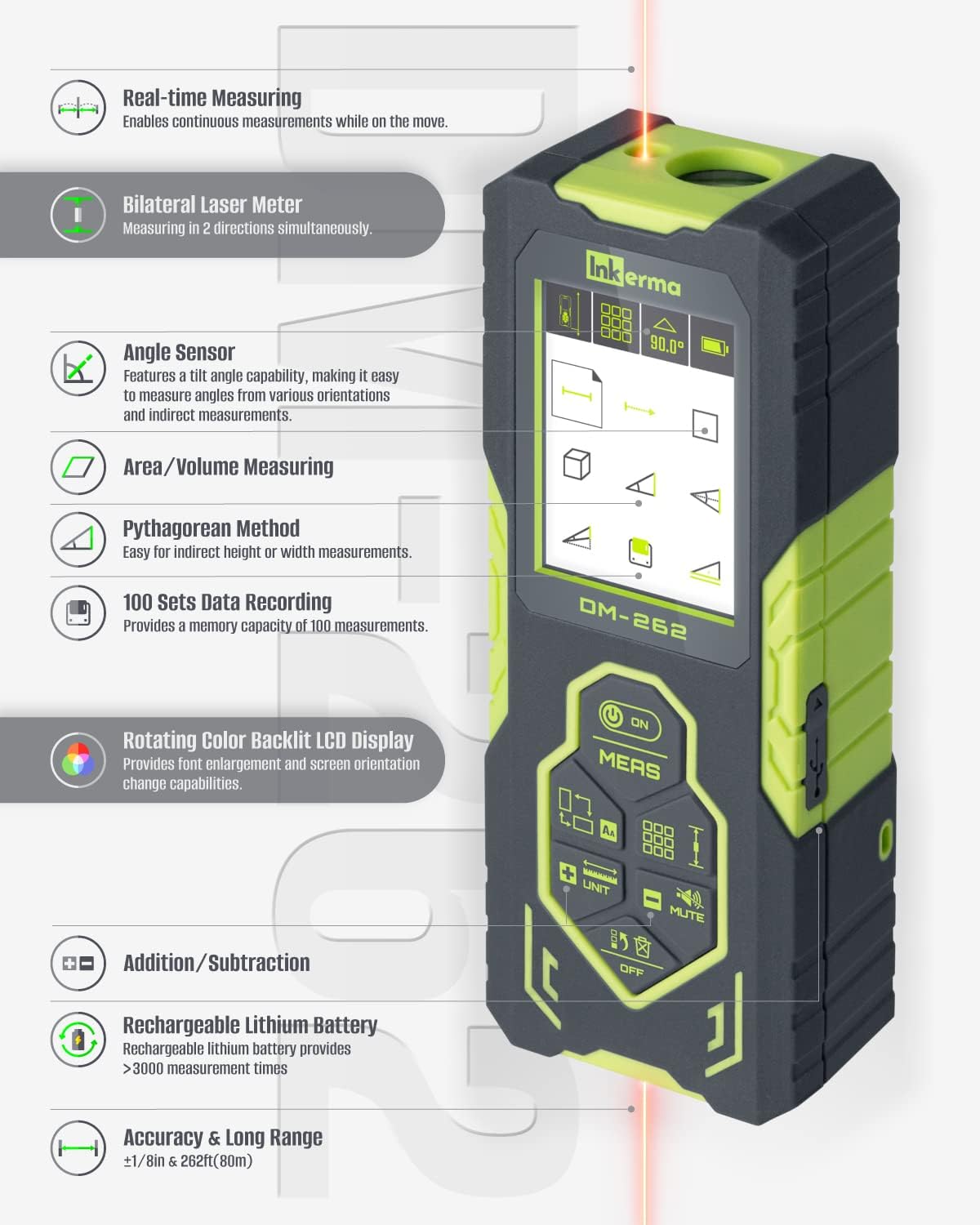
Figure 3.1: Overview of the Inkerma DM-262's key features.
3.2 Button Layout

Figure 3.2: Detailed button layout and functions.
3.3 Charging the Device
The DM-262 is equipped with a rechargeable 1000mAh lithium battery. Use the provided Type-C charge cable to connect the device to a USB power source. The battery indicator on the display will show charging status.

Figure 3.3: USB-C charging port and battery status.
3.4 Power On/Off
- To power on: Short press the ON/MEAS button.
- To power off: Long press the OFF button. The device will automatically power off after 150 seconds of inactivity to conserve battery.
4. Operating Instructions
4.1 Unit Switching
Short press the UNIT button to cycle through measurement units: meters (m), inches (in), and feet (ft). Long press the UNIT button to switch between decimal feet, feet with fractions, and metric units.
4.2 Screen Orientation and Font Enlargement
The color backlit LCD display supports screen rotation for optimal viewing angles. It also features font enlargement for improved readability.

Figure 4.1: Color Backlit LCD Display features.
4.3 Measurement Modes
Press the MODE button to cycle through the available measurement functions:
- Single Distance Measurement: Measures the distance from the device to a single target.
- Real-time Measuring: Provides continuous distance updates as you move the device.
- Bilateral Laser Measurement: Utilizes two lasers to measure distances in two directions simultaneously, allowing measurement from a central point.
- Area Measurement: Calculates the area of a surface by taking two measurements (length and width).
- Volume Measurement: Calculates the volume of a space by taking three measurements (length, width, and height).
- Pythagorean Method: For indirect height or width measurements using the Pythagorean theorem.
- Angle Sensor: Measures tilt angles and assists with indirect measurements.
- Addition/Subtraction: Add or subtract measurements.

Figure 4.2: Two-Way vs. One-Way Laser Measurement.

Figure 4.3: Angle Sensor in operation.
4.4 Data Recording
The device can store up to 100 sets of measurement data. Use the arrow buttons to navigate through stored measurements.
5. Maintenance
- Clean the device with a soft, damp cloth. Do not use harsh chemicals or abrasive cleaners.
- Store the device in its carrying bag in a dry, dust-free environment when not in use.
- Avoid dropping the device, as it is made of plastic and can be damaged.
6. Troubleshooting
| Error Code | Reason | Solution |
|---|---|---|
| Low Battery | Battery is low. | Charge the device. |
| Out of Range | Target is too far or too close. | Measure within the specified range (0.05m to 80m). |
| Signal Too Weak | Target surface has low reflectivity or is too bright. | Use a target plate or measure in a less bright environment. |
| Error | Internal device error. | Restart the device. If the problem persists, contact support. |
7. Specifications
| Feature | Specification |
|---|---|
| Measuring Range | 0.05m - 80m (262ft) |
| Accuracy | ±1/8 Inch |
| Battery Type | Rechargeable Lithium (1000mAh) |
| Measurements per Charge | >3000 times |
| Laser Class | Class II, <1mW |
| Water Resistance | IP54 (Waterproof) |
| Material | Plastic |
| Item Weight | 122 Grams |
| Product Dimensions | 4.76"L x 1.85"W x 1.06"H |
8. Warranty and Support
The Inkerma DM-262 comes with a 3-year warranty. For any product inquiries, technical assistance, or warranty claims, please contact the Inkerma Professional Team for lifetime support.
