
Mayer MMIWD30-SF
Mayer 3L Instant Heating Water Dispenser MMIWD30-SF User Manual
Model: MMIWD30-SF
1. Product Overview
The Mayer 3L Instant Heating Water Dispenser MMIWD30-SF is designed to provide hot water quickly and conveniently. Featuring an ultrafiltration filter, it ensures clean and great-tasting water. Its compact design and installation-free operation make it suitable for various kitchen setups.

Figure 1: Mayer 3L Instant Heating Water Dispenser (Overall View)
This image shows the complete water dispenser unit in Seafoam Green, highlighting its compact form factor and the integrated water tank with a handle.
Key Features:
- Installation-free operation with detachable water tank.
- Quick hot water dispense in approximately 5 seconds.
- Sensor touch control panel with LED display.
- 3 preset cup size water volumes: 200ml, 350ml, and 500ml.
- 5 preset water temperatures: 25°C, 45°C, 65°C, 85°C, and 99°C, with 1°C interval precise temperature control.
- Ultrafiltration filter for removal of chlorine, heavy metals, bacteria, and other contaminants.
- Instant heating technology for energy efficiency.
- Child lock safety feature.
- Detachable drip tray for easy cleaning.
- Compact design to save counter space.
- Low water level refilling reminder indicator.
- Boil dry and overheating protection.
- Non-slip feet for stability.
2. Safety Instructions
Please read all safety instructions carefully before using the appliance to prevent injury or damage.
- Always place the dispenser on a stable, flat, and heat-resistant surface.
- Do not immerse the appliance, cord, or plug in water or any other liquid.
- Keep out of reach of children. The child lock feature should always be engaged when not in use, especially in households with children.
- Do not operate the appliance if the power cord or plug is damaged, or if the appliance malfunctions or has been damaged in any manner.
- Use only clean, potable water in the water tank.
- Do not fill the water tank beyond the maximum fill line.
- Avoid touching hot surfaces. Use handles or knobs.
- Unplug the dispenser from the power outlet when not in use and before cleaning.
- Ensure proper ventilation around the appliance.
- Do not use abrasive cleaners or scouring pads to clean the appliance.
- This appliance is for household use only. Do not use outdoors.
3. Components
Familiarize yourself with the main components of your Mayer Instant Heating Water Dispenser:
- Main Unit: Houses the heating element, control panel, and water outlet.
- Detachable Water Tank: For holding water, includes a handle for easy refilling.
- Ultrafiltration Filter: Located inside the water tank, purifies incoming water.
- Drip Tray: Collects any spills or drips from the water outlet.
- Control Panel: Sensor touch buttons and LED display for operation.
- Water Outlet: Where dispensed water comes out.
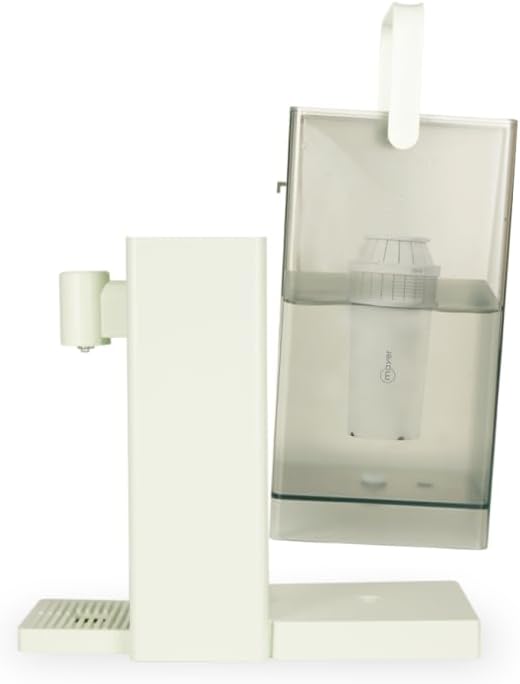
Figure 2: Detachable Water Tank and Filter
This image illustrates the water dispenser with its detachable water tank tilted, clearly showing the ultrafiltration filter installed within the tank.
4. Setup
- Unpack: Carefully remove all packaging materials from the dispenser.
- Placement: Place the dispenser on a dry, stable, and level surface, away from direct sunlight and heat sources. Ensure there is adequate space around the unit for ventilation.
- Clean Components: Before first use, wash the detachable water tank and drip tray with mild detergent and rinse thoroughly. Wipe the exterior of the main unit with a damp cloth.
- Install Filter: Insert the ultrafiltration filter into its designated slot within the water tank. Ensure it is securely seated.
- Fill Water Tank: Remove the water tank from the main unit. Fill it with clean, potable water up to the MAX fill line. Do not overfill.
- Attach Water Tank: Place the filled water tank back onto the main unit, ensuring it is properly aligned and seated.
- Initial Flush: Plug the power cord into a grounded electrical outlet. Dispense at least 500ml of water at 99°C (boiling temperature) to flush the internal system before first use. Discard this water. Repeat this process 2-3 times to ensure thorough cleaning and filter activation.
5. Operating Instructions

Figure 3: Control Panel and Water Outlet
This image provides a clear front view of the water dispenser, highlighting the sensor touch control panel with its LED display and the water outlet.
- Power On: Plug the dispenser into a suitable power outlet. The LED display will illuminate.
- Unlock (Child Lock): The dispenser features a child lock for safety. To unlock, press and hold the child lock button (usually indicated by a lock icon) for a few seconds until the lock indicator on the display disappears. The child lock automatically re-engages after a period of inactivity.
- Select Temperature: Use the temperature selection buttons (often '+' and '-' or dedicated temperature icons) to cycle through the available temperature options: 25°C, 45°C, 65°C, 85°C, and 99°C. The selected temperature will be shown on the LED display. You can fine-tune the temperature in 1°C intervals within the preset ranges.
- Select Volume: Use the volume selection buttons to choose your desired water volume: 200ml, 350ml, or 500ml. The selected volume will be displayed.
- Dispense Water: Place a cup or container under the water outlet. Press the "Dispense" button (often indicated by a water drop icon or "Start"). The dispenser will instantly heat and dispense the selected volume of water at the chosen temperature.
- Stop Dispensing: To stop dispensing water before the selected volume is reached, press the "Dispense" button again.
- Low Water Level Reminder: If the water level in the tank is too low, an indicator light or message will appear on the display. Refill the water tank as described in the Setup section.
6. Maintenance
Regular cleaning and maintenance will ensure the longevity and optimal performance of your water dispenser.
6.1. Cleaning the Drip Tray
- The drip tray is detachable for easy cleaning.
- Pull the drip tray forward to remove it.
- Empty any collected water and wash the tray with warm, soapy water.
- Rinse thoroughly and dry before reattaching.
6.2. Cleaning the Water Tank
- Remove the water tank from the main unit.
- Remove the filter from the tank.
- Wash the tank with mild detergent and a soft brush or sponge.
- Rinse thoroughly with clean water to remove all soap residue.
- Dry completely before reassembling.
6.3. Filter Replacement
- The ultrafiltration filter should be replaced periodically, typically every 3-6 months, depending on water quality and usage.
- Refer to the filter's specific instructions for replacement.
- Always use genuine Mayer replacement filters to ensure proper filtration and appliance function.
6.4. Descaling
Over time, mineral deposits (limescale) can build up inside the heating elements, especially in areas with hard water. Descaling is recommended every 1-3 months.
- Unplug the appliance and ensure it is cool.
- Prepare a descaling solution (e.g., white vinegar diluted with water, or a commercial descaling agent suitable for water dispensers).
- Pour the solution into the water tank.
- Run a few cycles of hot water (e.g., 99°C) to allow the solution to circulate through the system.
- After descaling, rinse the tank and run several cycles of clean water to flush out any descaling solution residue.
- Always follow the instructions on your chosen descaling agent.
7. Troubleshooting
If you encounter any issues with your water dispenser, please refer to the following common problems and solutions:
| Problem | Possible Cause | Solution |
|---|---|---|
| Dispenser does not power on. | Not plugged in; power outlet issue; power cord damage. | Ensure the power cord is securely plugged into a working outlet. Check the circuit breaker. If the cord is damaged, contact customer support. |
| No water dispensed. | Water tank empty; water tank not properly seated; child lock engaged. | Refill the water tank. Ensure the water tank is correctly placed. Unlock the child lock. |
| Water is not hot enough. | Incorrect temperature setting; limescale buildup. | Verify the temperature setting on the display. Perform descaling if necessary. |
| Water tastes unusual. | New filter; filter needs replacement; tank not clean. | Perform initial flush for new filters. Replace the filter if it's old. Clean the water tank thoroughly. |
| Low water level indicator stays on after refilling. | Water tank not properly seated; sensor issue. | Remove and re-seat the water tank firmly. If the issue persists, contact customer support. |
If the problem persists after trying these solutions, please contact Mayer customer support.
8. Specifications
| Brand: | Mayer |
| Model: | MMIWD30-SF |
| Capacity: | 3 Liters |
| Voltage: | 220 Volts |
| Power Source: | Corded Electric |
| Dimensions (Package): | 33.6 x 33.2 x 18 cm |
| Item Weight: | 1.06 kg |
| Special Features: | Child lock safety feature, Compact design, Detachable drip tray, Instant heating technology, Ultrafiltration filter. |
9. Warranty and Support
For warranty information and customer support, please refer to the warranty card included with your product or visit the official Mayer website. Keep your purchase receipt as proof of purchase for warranty claims.
For technical assistance or service inquiries, please contact Mayer customer service through their official channels.
Related documentsMMIWD30-SF

Ask a question about this manual
Ask about setup, troubleshooting, compatibility, parts, safety, or missing instructions. Manuals+ will review the question and use this page’s manual context to help answer it.