
Mayer MMAP30D-SF
Mayer 3L Digital Air Pot MMAP30D-SF User Manual
Model: MMAP30D-SF | Brand: Mayer
Introduction
Thank you for purchasing the Mayer 3L Digital Air Pot MMAP30D-SF. This manual provides important information regarding the safe operation, maintenance, and troubleshooting of your appliance. Please read it thoroughly before use and retain it for future reference.
Important Safety Instructions
When using electrical appliances, basic safety precautions should always be followed to reduce the risk of fire, electric shock, and injury to persons, including the following:
- Read all instructions before using the appliance.
- Do not touch hot surfaces. Use handles or knobs.
- To protect against electrical hazards, do not immerse cord, plugs, or the appliance in water or other liquid.
- Close supervision is necessary when any appliance is used by or near children.
- Unplug from outlet when not in use and before cleaning. Allow to cool before putting on or taking off parts, and before cleaning the appliance.
- Do not operate any appliance with a damaged cord or plug, or after the appliance malfunctions or has been damaged in any manner.
- The use of accessory attachments not recommended by the appliance manufacturer may result in fire, electric shock, or injury to persons.
- Do not use outdoors.
- Do not let cord hang over edge of table or counter, or touch hot surfaces.
- Do not place on or near a hot gas or electric burner, or in a heated oven.
- Always attach plug to appliance first, then plug cord into the wall outlet. To disconnect, turn any control to "off", then remove plug from wall outlet.
- Do not use appliance for other than intended use.
- Extreme caution must be used when moving an appliance containing hot water.
- This appliance is for household use only.
Product Overview
The Mayer 3L Digital Air Pot is designed for efficient water heating and temperature maintenance. Key features include:
- 3 functions: Boil, Dechlorinate, and Keep Warm.
- Sensor touch control panel with LED display for easy operation.
- Triple layer wall construction for excellent insulation and scald protection.
- SUS304 food-grade stainless steel inner pot.
- Automatic keep warm function after boiling.
- 12 adjustable keep warm temperatures between 25°C and 90°C.
- Manual dispensing system.
- Detachable lid for convenient refilling and cleaning.
- Built-in exterior light for visibility in low-light conditions.
- Child lock safety feature.
- Overheating and boil-dry protection.
- Integrated handle for easy portability.
- Non-slip feet for stability.

Figure 1: Front view of the Mayer 3L Digital Air Pot, showcasing the control panel and dispensing spout.
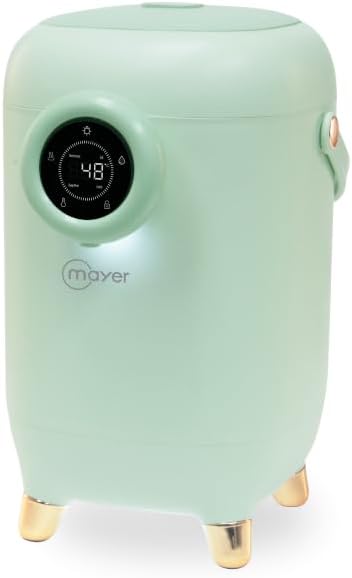
Figure 2: Side view of the Mayer 3L Digital Air Pot, highlighting its compact design and handle.
Setup
- Unpacking: Carefully remove the air pot from its packaging. Retain packaging for future transport or storage.
- Initial Cleaning: Before first use, clean the inner pot and detachable lid with warm soapy water. Rinse thoroughly and dry. Do not immerse the main body of the air pot in water.
- Placement: Place the air pot on a stable, flat, heat-resistant surface, away from direct sunlight and heat sources. Ensure adequate ventilation around the unit.
- Power Connection: Ensure the voltage of your power supply matches the appliance's rating (220 Volts). Plug the power cord into a grounded electrical outlet.
Operating Instructions
Filling the Water Tank
- Ensure the air pot is unplugged.
- Press the lid release button (if applicable) or gently lift the detachable lid.
- Fill the inner pot with clean water up to the MAX fill line. Do not overfill.
- Securely close the lid.
Boiling Water
- Plug in the air pot. The LED display will illuminate.
- Press the "Boil" button (or equivalent on the touch panel). The appliance will begin heating the water to boiling point.
- Once boiling is complete, the air pot will automatically switch to the "Keep Warm" function.
Dechlorinate Function
This function helps reduce chlorine content in tap water.
- Fill the air pot with water.
- Press the "Dechlorinate" button (or equivalent). The appliance will boil the water for an extended period to allow chlorine to evaporate.
- After the dechlorinating cycle, the air pot will automatically switch to "Keep Warm".
Keep Warm Function and Temperature Adjustment
The air pot automatically keeps water warm after boiling. You can adjust the target temperature.
- While in "Keep Warm" mode, use the temperature adjustment buttons (e.g., "+" and "-") on the touch panel.
- Select your desired temperature between 25°C and 90°C. The LED display will show the current and target temperatures.
- The appliance will maintain the selected temperature.
Dispensing Water
The air pot features a manual dispensing system.
- Place a cup or container under the dispensing spout.
- Press and hold the "Dispense" button (or pump the manual lever, if applicable) to release hot water.
- Release the button/lever to stop dispensing.
Child Lock Safety Feature
To prevent accidental dispensing, the air pot is equipped with a child lock.
- To activate/deactivate the child lock, press and hold the "Child Lock" button (or indicated icon) for a few seconds.
- When activated, dispensing will be disabled until the lock is released.
Care and Maintenance
Cleaning
- Always unplug the air pot and allow it to cool completely before cleaning.
- Exterior: Wipe the exterior with a soft, damp cloth. Do not use abrasive cleaners or immerse the main unit in water.
- Inner Pot: The SUS304 stainless steel inner pot can be cleaned with a soft sponge and mild dish soap. Rinse thoroughly.
- Detachable Lid: The lid can be detached for easier cleaning. Wash with warm soapy water, rinse, and dry completely before reattaching.
Descaling
Mineral deposits (limescale) can build up over time, affecting performance. Descale regularly, especially in hard water areas.
- Fill the air pot with a mixture of water and white vinegar (e.g., 1 part vinegar to 2 parts water) or a commercial descaling solution according to product instructions.
- Boil the solution. For stubborn deposits, let it soak for an hour or more (do not boil again with descaling solution).
- Empty the solution and rinse the inner pot several times with fresh water to remove any residue and odor.
- Perform a fresh water boil cycle and discard the water before using the air pot for beverages.
Troubleshooting
| Problem | Possible Cause | Solution |
|---|---|---|
| Appliance does not turn on. | Not plugged in; power outage; faulty outlet. | Ensure power cord is securely plugged in. Check circuit breaker. Try a different outlet. |
| Water not boiling or heating slowly. | Limescale buildup; insufficient water. | Descale the inner pot. Ensure water level is above the minimum mark. |
| Water dispensing is weak or blocked. | Child lock activated; dispensing mechanism clogged; low water level. | Deactivate child lock. Clean the dispensing spout. Refill water. |
| Unusual odor or taste in water. | New appliance odor; limescale buildup; improper cleaning. | Perform several boil-and-discard cycles with fresh water. Descale the unit. Clean thoroughly. |
| LED display not working correctly. | Temporary electrical glitch. | Unplug the appliance for a few minutes, then plug it back in. If the issue persists, contact customer support. |
Specifications
| Feature | Detail |
|---|---|
| Brand | Mayer |
| Model | MMAP30D-SF |
| Capacity | 3 Liters |
| Voltage | 220 Volts |
| Material | SUS304 Stainless Steel (Inner Pot) |
| Dimensions (L x W x H) | 20.7 cm x 25.3 cm x 34.2 cm |
| Special Features | Boil, Dechlorinate, Keep Warm functions, Sensor touch control, LED display, 12 adjustable keep warm temperatures (25-90°C), Child lock, Overheating & boil-dry protection. |
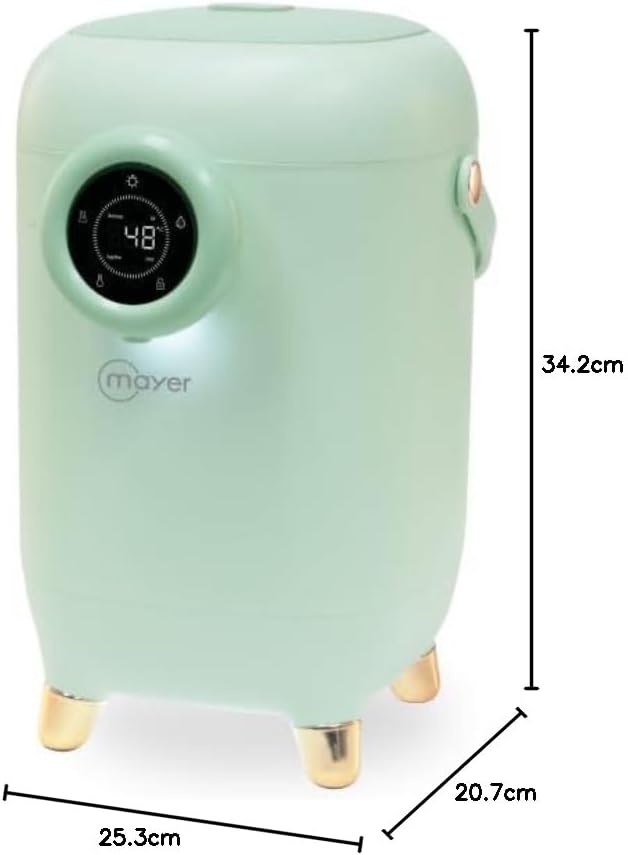
Figure 3: Dimensional diagram of the Mayer 3L Digital Air Pot, showing length, width, and height measurements.
Warranty and Support
For warranty information or technical support, please refer to the warranty card included with your product or contact Mayer customer service. Keep your purchase receipt as proof of purchase.
Mayer Customer Service: Please visit the official Mayer website for contact details and support resources.
Related documentsMMAP30D-SF

Ask a question about this manual
Ask about setup, troubleshooting, compatibility, parts, safety, or missing instructions. Manuals+ will review the question and use this page’s manual context to help answer it.