1. Introduction
This user manual provides detailed instructions for the setup, operation, and maintenance of your BINNIFA 2.0ch Sound Bar. Please read this manual thoroughly before using the product to ensure proper functionality and safety. This sound bar is designed to enhance your television's audio experience with clear, dynamic sound and versatile connectivity options.
2. Safety Information
To reduce the risk of electric shock, fire, or damage to the unit, please observe the following safety precautions:
- Do not expose this appliance to rain or moisture.
- Do not place objects filled with liquids, such as vases, on the apparatus.
- Ensure proper ventilation; do not block any ventilation openings.
- Do not install near any heat sources such as radiators, heat registers, stoves, or other apparatus (including amplifiers) that produce heat.
- Protect the power cord from being walked on or pinched.
- Only use attachments/accessories specified by the manufacturer.
- Unplug this apparatus during lightning storms or when unused for long periods of time.
- Refer all servicing to qualified service personnel.
3. Package Contents
Verify that all items listed below are included in your package:
- BINNIFA Soundbar
- Remote Controller
- Power Adapter
- Optical Audio Cable
- 3.5mm AUX Audio Cable
- Wall Mount Kit
- User Manual (this document)
4. Product Features
The BINNIFA 2.0ch Sound Bar offers a range of features designed to enhance your audio experience:
- Enhanced Sound Quality: Equipped with four high-quality full-range speakers and advanced DSP technology for clear, dynamic, and layered sound.
- Bluetooth 5.3 Connectivity: Seamless wireless connection to your Bluetooth-enabled devices.
- Multiple Wired Inputs: Supports HDMI (ARC), Optical, and 3.5mm AUX connections for versatile compatibility.
- Space-Saving Design: Compact and wall-mountable design to fit various home setups.
- Easy Control: Operate via the included remote control or integrated touch buttons.
- LED Indicator: Provides visual feedback on the current operating mode.
- Durable Construction: Features a wooden soundbar for improved acoustics and aesthetics.
5. Controls and Connections
5.1. Soundbar Controls

Image: The BINNIFA soundbar shown with its remote control, highlighting the sleek design and control options.
The soundbar features touch-sensitive controls on its top panel for basic functions, and a full-featured remote control for comprehensive operation.
5.2. Rear Panel Connections
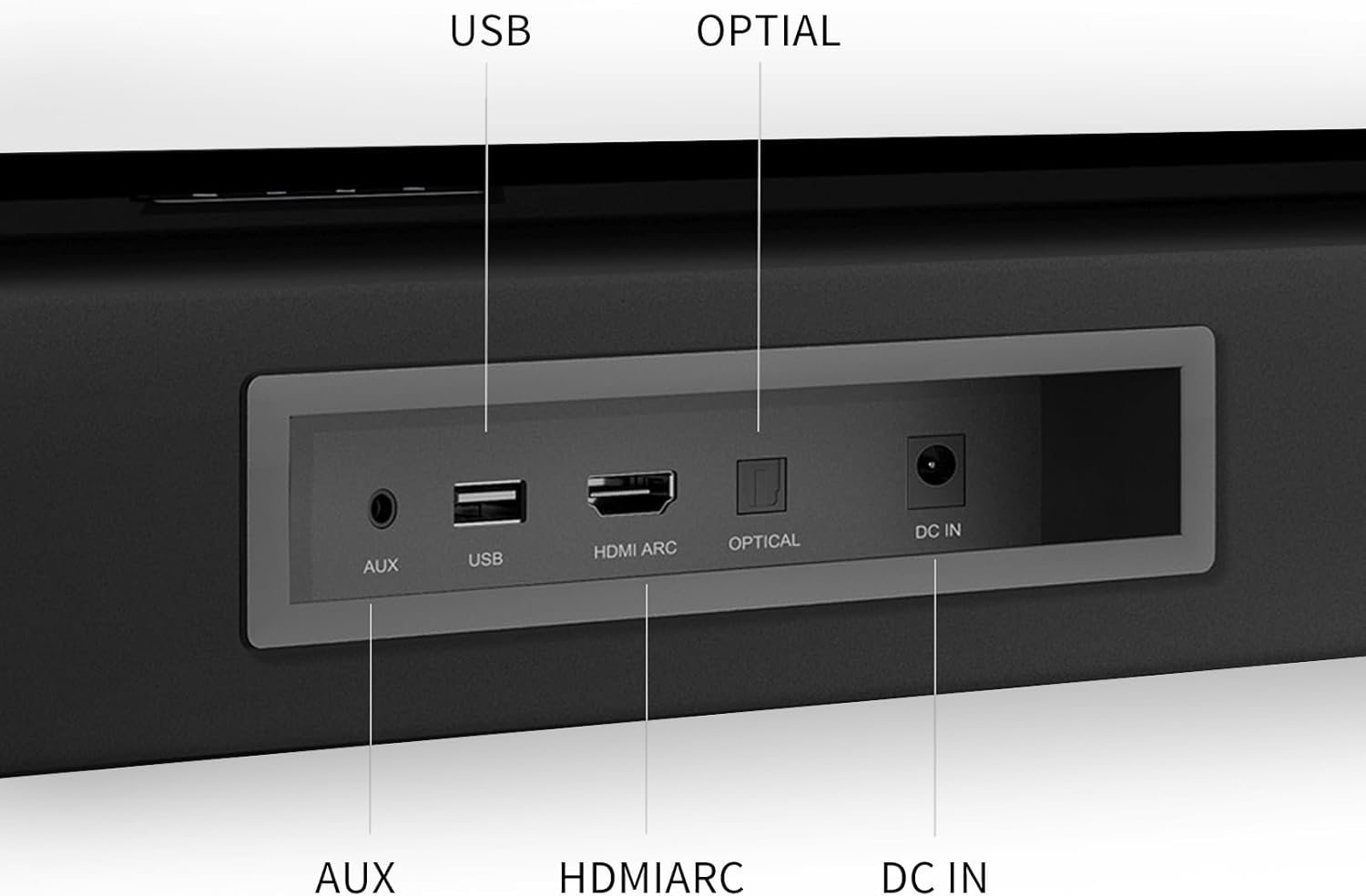
Image: Close-up of the soundbar's rear panel, detailing the AUX, USB, HDMI ARC, Optical, and DC IN ports.
- AUX (3.5mm): For connecting devices with a 3.5mm audio output.
- USB: For playing audio files from a USB drive.
- HDMI ARC: For connecting to a TV that supports Audio Return Channel, allowing audio to be sent from the TV to the soundbar via a single HDMI cable.
- OPTICAL: For connecting to devices with an optical digital audio output.
- DC IN: For connecting the power adapter.
6. Setup
6.1. Placement
The soundbar can be placed on a flat surface in front of your TV or mounted on the wall. For optimal sound, ensure there are no obstructions in front of the soundbar.

Image: The soundbar positioned on a TV stand beneath a television, demonstrating a typical setup.
6.2. Connecting to TV
Choose one of the following connection methods:
- HDMI ARC (Recommended): Connect an HDMI cable from the soundbar's HDMI ARC port to your TV's HDMI ARC port. This allows for high-quality audio and TV remote control of the soundbar volume.
- Optical: Connect an optical cable from the soundbar's OPTICAL port to your TV's optical digital audio output.
- AUX (3.5mm): Connect a 3.5mm audio cable from the soundbar's AUX port to your TV's audio output (headphone jack or dedicated AUX out).
Important: When using HDMI ARC or Optical connections, you may need to adjust your TV's audio settings to output PCM format. Refer to your TV's user manual for specific instructions.

Image: A visual guide illustrating how to set TV audio output to PCM for HDMI ARC and Optical connections.
6.3. Power Connection
Connect the power adapter to the DC IN port on the soundbar, then plug the adapter into a wall outlet.
7. Operating Instructions
7.1. Power On/Off
Press the Power button on the remote control or the touch panel to turn the soundbar on or off.
7.2. Input Selection
Press the "Input" button on the remote control or the touch panel repeatedly to cycle through the available input modes: Bluetooth, AUX, USB, HDMI ARC, Optical. The LED indicator on the soundbar will change color to indicate the selected mode.

Image: Diagram showing the LED indicator colors corresponding to Bluetooth (blue), AUX (green), Optical (yellow), and HDMI ARC (purple) input modes.
7.3. Bluetooth Pairing
- Switch the soundbar to Bluetooth mode. The LED indicator will flash blue, indicating it's in pairing mode.
- On your device (smartphone, tablet, etc.), enable Bluetooth and search for "BINNIFA Soundbar".
- Select the soundbar from the list of available devices to pair. Once connected, the LED indicator will turn solid blue.

Image: A hand holding a smartphone displaying a music app, with the soundbar visible below a TV, illustrating Bluetooth connectivity.
7.4. Sound Modes
Use the remote control to select different sound modes (e.g., Movie, Music, News) to optimize audio for various content types.
7.5. Volume Control
Adjust the volume using the Volume Up/Down buttons on the remote control or the soundbar's touch panel.
Video: A short demonstration of the soundbar's audio output while playing content from a TV. This video shows the soundbar in action, providing a visual and auditory example of its performance.
8. Maintenance
To ensure the longevity and optimal performance of your soundbar, follow these maintenance guidelines:
- Cleaning: Use a soft, dry cloth to clean the surface of the soundbar. Do not use liquid cleaners or aerosol sprays.
- Ventilation: Keep the ventilation openings clear of dust and debris.
- Storage: If storing the soundbar for an extended period, disconnect it from power and store it in a cool, dry place.
- Avoid Extreme Conditions: Do not expose the soundbar to extreme temperatures, humidity, or direct sunlight.
9. Troubleshooting
| Problem | Possible Cause | Solution |
|---|---|---|
| No Sound |
|
|
| Bluetooth Disconnection |
|
|
| Remote Control Not Working |
|
|
10. Specifications
| Feature | Detail |
|---|---|
| Model Name | Live-1T |
| Speaker Type | Soundbar |
| Material | Wood |
| Color | Black |
| Product Dimensions (L x W x H) | 29"D x 3.3"W x 2.6"H |
| Item Weight | 5.3 Pounds |
| Speaker Maximum Output Power | 120 Watts |
| Surround Sound Channel Configuration | 2.0 |
| Connectivity Technology | Bluetooth, HDMI ARC, Optical, AUX, USB |
| Bluetooth Version | 5.3 |
| Bluetooth Range | 10 Meters |
| Control Method | Remote, Touch Buttons |
| Recommended Uses | For Surround Sound Systems, For Televisions, For Smartphones or Tablets |
| Compatible Devices | Projector, Gaming Console, Television, Desktop, Home Theater |
11. Warranty and Support
BINNIFA provides a lifetime warranty for this soundbar, ensuring long-term reliability and customer satisfaction. For any questions, technical assistance, or warranty claims, please contact BINNIFA customer support. Our team is available to provide support within two days.
Please refer to the contact information provided on the product packaging or the official BINNIFA website for the most up-to-date support channels.


