
1. Introduction
This manual provides instructions for the Kircuit Part 4 Microwave Light Bulb, a replacement component designed for specific Whirlpool microwave ovens. This bulb illuminates the microwave interior, allowing visibility during operation. Please read these instructions carefully before installation.
2. Safety Information
- Always disconnect power to the microwave oven at the circuit breaker or by unplugging it before attempting any installation or maintenance. Failure to do so can result in electric shock or serious injury.
- Microwave ovens contain high-voltage components. If you are not comfortable working with electrical appliances, it is recommended to seek assistance from a qualified technician.
- Ensure the replacement bulb matches the specifications required by your microwave model.
- Handle the bulb carefully to avoid breakage.
3. Compatibility
This Kircuit Part 4 Microwave Light Bulb is compatible with a wide range of Whirlpool microwave models. Please verify your specific model number against the list below:
- WMH1162XVB2
- WMH1162XVD2
- WMH1162XVQ2
- WMH1162XVS2
- WMH1163XVB0
- WMH1163XVB1
- WMH1163XVD0
- WMH1163XVD1
- WMH1163XVQ0
- WMH1163XVQ1
- WMH1163XVS0
- WMH1163XVS1
- WMH1164XVS2
- WMH1164XVS3
- WMH1164XWS0
- WMH1164XWS1
- WMH2175XVB1
- WMH2175XVB2
- WMH2175XVB3
- WMH2175XVQ1
- WMH2175XVQ2
- WMH2175XVQ3
- WMH2175XVS1
- WMH2175XVS2
- WMH2175XVS3
- WMH2175XVT1
- WMH2175XVT2
- WMH2175XVT3
- WMH32517AB0
- WMH32517AB1
- WMH32517AB2
- WMH32517AS0
- WMH32517AS1
- WMH32517AS2
- WMH32517AT0
- WMH32517AT1
- WMH32517AT2
- WMH32517AW0
- WMH32517AW1
- WMH32517AW2
4. Installation (Replacement)
Follow these steps to replace the microwave light bulb:
- Disconnect Power: Unplug the microwave oven from the electrical outlet or turn off the power at the circuit breaker. This is a critical safety step.
- Locate the Bulb: Depending on your microwave model, the light bulb may be located inside the microwave cavity, behind a vent grille, or accessible from the top or side panel. Consult your microwave's original user manual if you have difficulty locating it.
- Remove Cover (if applicable): If the bulb is behind a protective cover (e.g., a glass lens or metal grille), carefully remove it. This may involve unscrewing small screws or prying off clips.
- Remove Old Bulb: Gently unscrew the old bulb counter-clockwise. If the bulb is broken, use pliers to carefully remove the base.
- Install New Bulb: Screw the new Kircuit replacement bulb clockwise until it is snug. Do not overtighten.
- Replace Cover: Reattach any protective covers or grilles that were removed in Step 3.
- Reconnect Power: Plug the microwave back into the electrical outlet or restore power at the circuit breaker.
- Test: Turn on the microwave light to ensure the new bulb is functioning correctly.
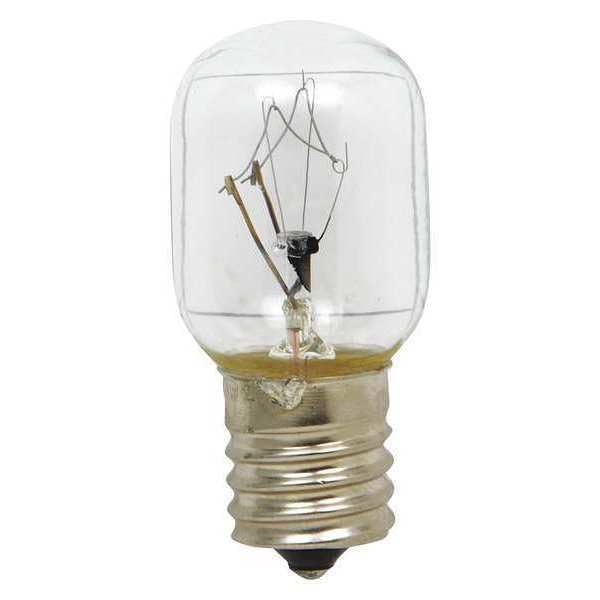
Image showing the Kircuit replacement microwave light bulb, a small, clear bulb with a screw-in base, ready for installation.
5. Maintenance
The microwave light bulb is a consumable part and does not require routine maintenance other than replacement when it burns out. Follow the installation instructions provided in Section 4 for proper replacement.
6. Troubleshooting
If the new light bulb does not illuminate after installation, consider the following:
- No Power: Ensure the microwave oven is properly plugged in and that the circuit breaker has not tripped.
- Loose Connection: Carefully disconnect power again and ensure the bulb is screwed in tightly.
- Incorrect Bulb Type: Verify that the Kircuit Part 4 bulb is the correct type and wattage for your specific microwave model.
- Defective Bulb: Although rare, a new bulb can sometimes be defective. If possible, test with another compatible bulb.
- Internal Microwave Issue: If all else fails, there might be an issue with the microwave's internal wiring or light socket. In this case, it is recommended to contact a qualified appliance technician.
7. Specifications
| Brand | Kircuit |
| Part Type | Microwave Light Bulb (Part 4) |
| Unit Count | 1.0 Count |
| Compatibility | Refer to Section 3 for a comprehensive list of compatible Whirlpool microwave models. |
8. Warranty and Support
For specific warranty information or technical support regarding this Kircuit replacement part, please refer to the product listing on Amazon or contact the seller, EPtech, directly. Keep your purchase receipt for warranty claims.