
1. Introduction
This manual provides detailed instructions for the safe and effective operation of your FEELWORLD F6 Pro 5.5 Inch Camera Field Monitor. Please read this manual thoroughly before using the product and retain it for future reference.
2. Safety Information
- Do not expose the monitor to rain or moisture to prevent fire or shock hazards.
- Avoid placing the monitor in direct sunlight or near heat sources.
- Use only the specified power adapters and batteries.
- Do not attempt to disassemble or modify the monitor. Refer all servicing to qualified personnel.
- Keep the monitor away from strong magnetic fields.
3. Package Contents
Verify that all items are present in your package:
- FEELWORLD F6 Pro Monitor
- Sunshade
- Tilt Arm
- Disassemble Wrench
- Carry Case
- Mini HDMI Cable
- Battery (integrated with USB-C charging port)
- User Manual (this document)

Image: Contents of the FEELWORLD F6 Pro package, including the monitor, cables, battery, sunshade, tilt arm, and carry case.
4. Product Overview
4.1 Front View

Image: Front view of the FEELWORLD F6 Pro monitor, showcasing the 5.5-inch touchscreen display.
4.2 Rear View and Ports

Image: Rear view of the FEELWORLD F6 Pro monitor, showing the battery plate and mounting points.

Image: Close-up of the FEELWORLD F6 Pro's side, highlighting the HDMI input/output ports, DC IN (Type-C), and DC OUT 8.4V.
The monitor features 4K HDMI input and output, a DC 5V Type-C power input, and an 8.4V DC output for powering cameras or accessories.
Video: An official product video demonstrating the key features and functionality of the FEELWORLD F6 Pro monitor.
5. Setup
5.1 Battery Installation
The F6 Pro uses an NP-F series battery. Align the battery with the battery plate on the rear of the monitor and slide it into place until it clicks securely.
5.2 Mounting the Monitor (Tilt Arm)
Attach the included tilt arm to the monitor's 1/4"-20 screw hole and then mount it onto your camera's hot shoe or cold shoe mount. The tilt arm allows for 360-degree rotation for flexible viewing angles.

Image: The FEELWORLD F6 Pro monitor mounted on a camera using the included tilt arm, demonstrating its adjustable positioning.
5.3 Connecting to a Camera (HDMI)
Use the provided Mini HDMI cable to connect your camera's HDMI output to the monitor's HDMI IN port. The monitor supports 4K HDMI signals up to 4K 60 FPS.
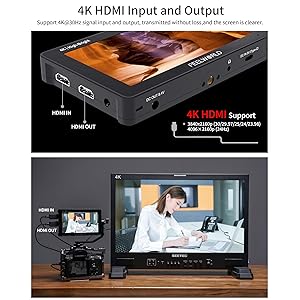
Image: Diagram illustrating the 4K HDMI input and output ports on the FEELWORLD F6 Pro monitor.
5.4 Powering On/Off
Press and hold the power button located on the top edge of the monitor to turn it on or off.
6. Operating Instructions
6.1 Touchscreen Interface and Menu Navigation
The F6 Pro features an intuitive touchscreen. You can pinch-to-zoom to inspect your shot. Tap the screen to access the main menu and navigate through settings and tools.

Image: A hand interacting with the FEELWORLD F6 Pro's touchscreen interface, showing menu options for various monitoring tools.
6.2 Professional Monitoring Tools
The monitor includes a suite of professional tools to assist with accurate focus and exposure:
- Waveform (RGB Parade, YUV Parade, Y Parade): Provides detailed luminance and chrominance information.
- Vectorscope: Displays color hue and saturation.
- Histogram: Shows the distribution of tones in your image.
- Peaking Focus Assist: Highlights in-focus areas (red, green, or blue).
- False Color: Helps evaluate exposure levels.
- 3D LUTs: Supports uploading up to 32 custom 3D LUTs via USB-C for real-time color grading preview.
- Other Tools: Check Field, Over Exposure, Anamorphic Mode, Zoom, Image Flipper, Vector, Embedded Audio, Pixel-to-Pixel, Frame Guides, Nine-Grid.
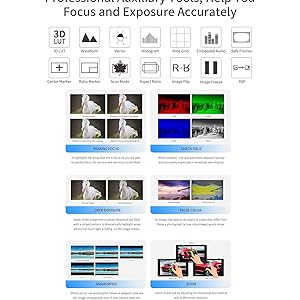
Image: Visual representation of various professional monitoring tools available on the FEELWORLD F6 Pro, such as waveform, vectorscope, and histogram.
6.3 F970 External Install and Power Kit
The F6 Pro features an integrated F970 external install and power kit on its rear. This allows you to mount and power external equipment like wireless video transmitters or LED lights using an NP-F970 battery, reducing clutter and weight.
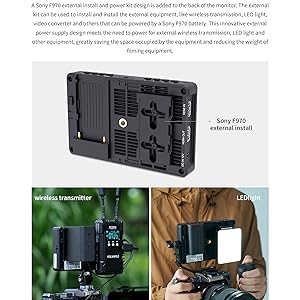
Image: The rear of the FEELWORLD F6 Pro showing the F970 external install and power kit, with examples of a wireless transmitter and LED light mounted.
6.4 Powering External Devices (DC OUT)
The monitor provides an 8.4V DC output (5.5x2.1mm barrel) that can power your DSLR or mirrorless camera using an optional dummy battery adapter cable, extending your camera's run-time.

Image: Diagram showing the FEELWORLD F6 Pro's DC OUT port connected to a DSLR camera via a dummy battery, providing auxiliary power.
7. Maintenance
7.1 Cleaning
To clean the monitor screen, use a soft, lint-free cloth. For stubborn marks, slightly dampen the cloth with water or a screen-cleaning solution. Do not use harsh chemicals or abrasive materials.
7.2 Storage
When not in use, store the monitor in its carry case in a cool, dry place away from direct sunlight and extreme temperatures. Remove the battery if storing for extended periods.
8. Troubleshooting
| Problem | Possible Cause | Solution |
|---|---|---|
| Monitor does not power on. | Battery is low or not installed correctly; power cable is loose. | Charge or replace battery; ensure battery is seated properly; check power cable connection. |
| No signal displayed. | HDMI cable is loose or faulty; camera output settings are incorrect. | Check HDMI cable connection; try a different HDMI cable; verify camera's HDMI output settings. |
| Touchscreen unresponsive. | Temporary software glitch; screen is dirty. | Restart the monitor; clean the screen with a soft cloth. |
9. Specifications
| Model Number | F6 Pro (Internal: F5 V4S01) |
| Display Size | 5.5 inches |
| Resolution | 1920x1080 (Full HD) |
| Brightness | 1600 nits |
| Contrast Ratio | 1000:1 |
| Viewing Angle | 160° (H/V) |
| Input/Output | HDMI In/Out (4K compatible) |
| Power Input | DC 5V (USB-C), DC 7-24V (Barrel) |
| Power Output | DC 8.4V (Barrel) |
| Battery Type | NP-F Series |
| Dimensions | 11.42 x 6.3 x 4.13 inches |
| Weight | 2.33 pounds |
10. Warranty and Support
For warranty information and technical support, please refer to the official FEELWORLD website or contact your local distributor. Keep your proof of purchase for warranty claims.
Official Website: www.feelworld.cn