
1. Introduction
Thank you for choosing the Retevis RB647 Portable Waterproof PMR446 Walkie Talkie. This device is designed for reliable two-way communication, featuring an IP67 waterproof rating, a compact design, and license-free operation on PMR446 frequencies. This manual provides essential information for safe and effective use of your walkie talkie.
2. Safety Information
Please read and understand all safety instructions before operating the device. Failure to do so may result in injury or damage to the product.
General Safety
- Do not operate the radio in explosive atmospheres (e.g., flammable gases, dust particles, metallic powders).
- Do not modify the radio. Unauthorized modifications may void your warranty and violate regulations.
- Keep the radio away from medical devices to avoid interference.
- Use only Retevis-approved accessories.
Battery Safety
- Do not short-circuit the battery terminals.
- Do not expose the battery to fire or extreme heat.
- If the battery is damaged, do not use it.
- Dispose of batteries according to local regulations.
Waterproof Rating (IP67)
The Retevis RB647 is rated IP67, meaning it is protected from dust and can withstand immersion in water up to 1 meter for 30 minutes. To maintain this rating, ensure all covers, especially the earpiece jack cover, are securely closed. If the waterproof cover of the earpiece jack is uninstalled or is fixed unstably, the walkie talkie may be damaged.

Image: The Retevis RB647 walkie talkie demonstrating its IP67 waterproof capability, suitable for use in wet conditions.
3. Package Contents
Please check the package carefully to ensure all items are present:
- 3 x Retevis RB647 Walkie Talkies
- 3 x Lithium-ion Batteries
- 3 x Belt Clips
- 3 x USB-C Charging Cables
- 3 x Charging Bases
- 1 x Multilingual User Manual
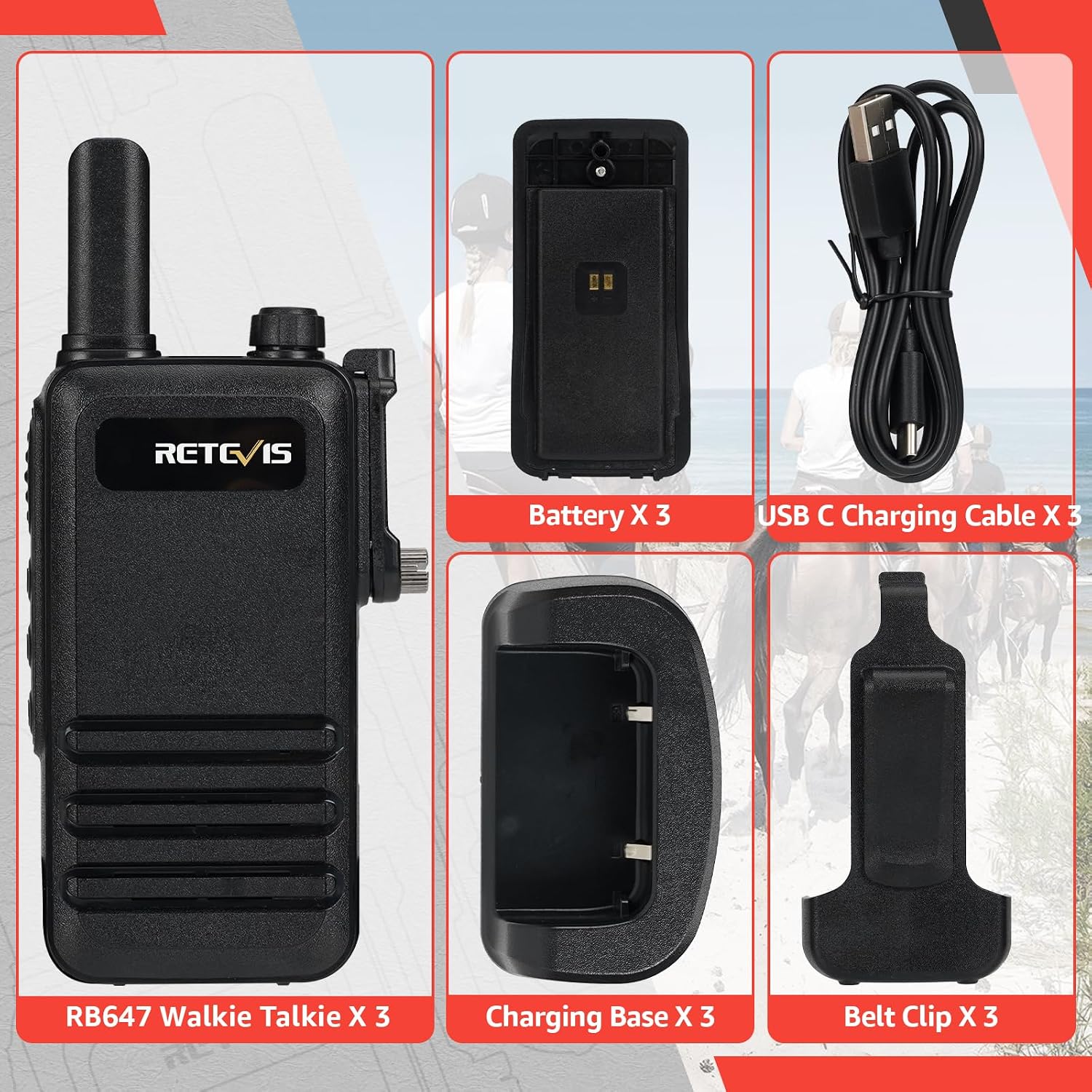
Image: A complete set of Retevis RB647 walkie talkie components, including the radios, batteries, charging accessories, and belt clips.
4. Product Overview
The Retevis RB647 is designed for portability and ease of use. Its ultra-thin profile makes it convenient to carry.

Image: The slim design of the Retevis RB647, measuring 23mm in thickness, for easy carrying.
Key Features:
- IP67 Waterproof: Ensures reliable operation in wet environments.
- Ultra-thin Design: Compact and lightweight for easy portability.
- PMR446 License-Free: Ready to use without additional licenses or fees.
- 16 Channels: Provides multiple communication options.
- VOX Function: Hands-free operation for increased efficiency.
- 1000mAh Battery: Offers extended usage time.
- Emergency Alarm: For distress signaling in critical situations.
5. Setup
5.1 Battery Installation
- Ensure the walkie talkie is powered off.
- Align the battery with the battery compartment on the back of the radio.
- Gently push the battery into place until it clicks securely.
5.2 Charging the Battery
Before first use, fully charge the battery. The 1000mAh battery provides extended operation.

Image: The 1000mAh battery ensures the walkie talkie can operate for an extended period, with a low battery alert feature.
- Connect the USB-C charging cable to the charging base.
- Plug the other end of the USB-C cable into a compatible USB power adapter (not included).
- Place the walkie talkie into the charging base. Ensure the charging contacts align.
- The indicator light on the charging base will show the charging status (e.g., red for charging, green for fully charged).
5.3 Attaching the Belt Clip
- Align the belt clip with the designated slots on the back of the radio.
- Secure the clip with the provided screws (if applicable) or slide it into place until it locks.
6. Basic Operation
6.1 Power On/Off and Volume Adjustment
- To power on, rotate the Power/Volume knob clockwise until you hear a click and the radio announces the current channel.
- To power off, rotate the Power/Volume knob counter-clockwise until you hear a click.
- Adjust the volume by rotating the Power/Volume knob.
6.2 Channel Selection
The RB647 operates on 16 PMR446 channels. To select a channel, rotate the Channel Selector knob located on the top of the radio. The radio will audibly announce the selected channel number.
6.3 Transmitting and Receiving
- To Transmit: Press and hold the Push-to-Talk (PTT) button on the side of the radio. Speak clearly into the microphone, holding the radio approximately 2-5 cm from your mouth. Release the PTT button to stop transmitting.
- To Receive: Ensure the PTT button is not pressed. The radio will automatically receive signals on the selected channel.
6.4 VOX Function (Hands-Free Operation)
The Voice Operated Exchange (VOX) function allows you to transmit without pressing the PTT button. When VOX is enabled, the radio will automatically transmit when it detects your voice.

Image: The VOX hands-free function allows for voice-activated transmission, enhancing operational efficiency.
Refer to the detailed multilingual manual for instructions on how to activate and adjust VOX sensitivity.
6.5 Emergency Alarm Function
In an emergency, you can activate the alarm function to send a distress signal.

Image: The emergency call feature provides both remote and local alarm capabilities for safety.
To activate, press and hold the designated side button (Side Key 2) for several seconds. The radio will emit an alarm tone. Refer to the full manual for specific button assignments.
6.6 Easy Pairing
The RB647 walkie talkies are designed for easy pairing and compatibility with other radios of the same model or compatible PMR446 devices.

Image: The Retevis RB647 supports easy pairing and strong compatibility with other radios for seamless communication.
7. Maintenance
7.1 Cleaning
- Wipe the radio's surface with a soft, damp cloth. Do not use harsh chemicals or abrasive cleaners.
- Ensure the charging contacts are clean and dry before charging.
7.2 Battery Care
- Avoid overcharging or completely draining the battery frequently.
- Store the radio and battery in a cool, dry place when not in use for extended periods.
7.3 Durability
The RB647 is built with durability in mind, designed to withstand typical outdoor use.

Image: The robust construction of the Retevis RB647 ensures durability and resilience against impacts.
8. Troubleshooting
| Problem | Possible Cause | Solution |
|---|---|---|
| Radio does not power on | Battery is low or not installed correctly. | Charge the battery or re-install it. |
| Cannot transmit or receive | Incorrect channel selected; out of range; battery low. | Verify channel; move closer to other radios; charge battery. |
| Poor audio quality | Weak signal; interference; volume too low. | Move to an open area; adjust volume. |
| VOX not working | VOX sensitivity too low; VOX disabled. | Adjust VOX sensitivity or enable VOX. |
9. Specifications
| Feature | Specification |
|---|---|
| Model Number | RB647 |
| Frequency Band | PMR446 |
| Channels | 16 |
| Waterproof Rating | IP67 |
| Battery Capacity | 1000mAh Lithium-ion |
| Dimensions (L x W x H) | 14.6 x 5.8 x 2.4 cm (approx. with antenna) |
| Thickness | 23 mm |
| Weight | 83 grams (approx. with belt clip) |
| Connectivity | 3.5mm audio jack |
| Power Source | Battery Powered |
| Country of Origin | China |
10. Warranty and Support
Warranty Information
Retevis offers a 2-year warranty for the radio body and a 1-year warranty for accessories from the date of purchase. Additionally, a 30-day no-reason return policy is provided.
After-Sales Service
Beyond the warranty period, Retevis continues to offer maintenance services. Buyers are responsible for any associated costs. For support or warranty claims, please contact Retevis customer service via Amazon. Responses are typically provided within 12 hours.


