Introduction
The FrSky TD SR12 is an advanced dual-band receiver designed for remote control applications, offering simultaneous 900MHz and 2.4GHz operation. It integrates a 12-channel configurable output, advanced stabilization functions, high-precision telemetry, and a basic black-box data record function. This manual provides essential information for the proper setup, operation, and maintenance of your TD SR12 receiver.
Safety Instructions
- Always ensure correct polarity when connecting power to the receiver. Incorrect connections can cause permanent damage.
- Verify all connections are secure before operation to prevent signal loss or component failure.
- Operate your RC model in a safe environment, away from people, animals, and obstacles.
- Regularly check the receiver and antenna for any signs of damage or wear.
- Keep the receiver away from moisture, dust, and extreme temperatures.
Product Overview
The FrSky TD SR12 receiver combines robust dual-band communication with integrated stabilization and telemetry capabilities. It is compatible with FrSky Tandem series radios and TD protocol capable RF modules.

Image: The FrSky TD SR12 Dual-Band Receiver, showcasing its compact design and triple antenna configuration (two 2.4GHz antennas and one 900MHz antenna).
Key Features:
- Simultaneous Working Dual-Band (900MHz/2.4GHz) TD Mode.
- Dual Power Balancing Consumption.
- Built-in Advanced Stabilization Functions.
- Built-in High-Precision Telemetry Sensor (Altitude, Vertical Speed, etc.).
- Basic Black-Box Data Record Function.
- Built-in Power Switch Function (match with different external switches, optional).
- 4ms Race Mode with Telemetry.
- Long Control Range (varies based on RF Power settings).
- 12 Configurable Channel Ports:
- CP1: PWM / SBUS Out / FBUS / S.Port / SBUS In (Redundancy Func.)
- CP2-12: PWM / SBUS Out / FBUS / S.Port
- FBUS / S.Port SBUS Out Port (Supports 16CH / 24CH mode).
- SBUS In Port (Supports Signal Redundancy).
- Over-The-Air (OTA) FW Update.
- Dual XT30 Power Input Connector.
- Triple Antenna Design (2x 2.4G & 1x 900M antennas).
Specifications
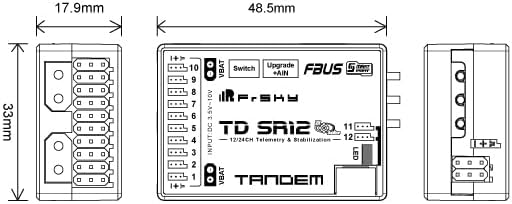
Image: Technical drawing illustrating the dimensions of the FrSky TD SR12 receiver (48.5mm x 33mm x 17.9mm).
| Specification | Value |
|---|---|
| Frequency | 900MHz & 2.4GHz |
| Dimension (L*W*H) | 48.5mm * 33mm * 17.9mm |
| Weight | 23g |
| Operating Voltage | 3.5-10V (Recommend 2S Li Batteries) |
| Operating Current | ≤170mA |
| Continuous Current (power device) | ≤20A |
| Instantaneous Current (power device) | ≤40A |
| Voltage Measurement Range via AIN (External device) | 0-35V (Battery Voltage Divider Ratio: 1:10) |
| Compatibility | Tandem series radio & TD protocol capable RF module |
| Channel Ports | 12 Configurable Ports |
| Antenna Design | Triple Antenna (2x 2.4G & 1x 900M) |
Setup
1. Binding Procedure
To establish communication between your FrSky Tandem series radio and the TD SR12 receiver, follow the binding instructions provided with your radio system. Ensure both the radio and receiver are in TD mode for proper operation.
2. Wiring Connections
The TD SR12 features dual XT30 power inputs for redundancy and 12 configurable channel ports. Connect your power source to the XT30 inputs, ensuring correct polarity. Connect servos, ESCs, or other devices to the channel ports (CP1-CP12) as required by your model's configuration. CP1 offers additional functionality including SBUS In for signal redundancy.

Image: Close-up view highlighting the dual XT30 power input connectors on the FrSky TD SR12 receiver, designed for robust power delivery and redundancy.
3. Antenna Installation
The TD SR12 utilizes a triple antenna design: two 2.4GHz antennas and one 900MHz antenna. For optimal signal reception and range, ensure antennas are mounted with clear line-of-sight and at a 90-degree angle to each other where possible. Avoid placing antennas near carbon fiber or metal parts that can shield the signal.

Image: Diagram illustrating the recommended orientation for the 900MHz receiver antenna, showing optimal signal reception patterns across X, Y, and Z axes.
4. Initial Configuration
After binding, access your radio's system settings to configure the receiver. This includes setting up channel assignments, failsafe parameters, and initial stabilization settings. Refer to your radio's manual for detailed navigation.
Operating
1. Race Mode
The TD SR12 supports a 4ms Race Mode, providing ultra-low latency for competitive flying. This mode can be enabled through your radio's RF System settings. Telemetry data remains available in Race Mode.

Image: Screenshot of an FrSky radio's RF System menu, showing options for Channel Range, Racing Mode, and receiver binding status.
2. Telemetry Functions
The receiver provides real-time telemetry data, including altitude, vertical speed, and external voltage (via AIN port). This data can be viewed on your FrSky radio. Perform a range check before each flight to ensure reliable communication.

Image: Screenshot of an FrSky radio's Range Check display, showing signal strength (VFR) and RSSI values for both 2.4GHz and 900MHz bands.
3. Black Box Data Recording
The TD SR12 includes a basic black-box data record function, which logs flight data for post-flight analysis. This feature can be accessed and managed through your radio's system settings.

Image: Screenshot of an FrSky radio's Flight Data Record menu, displaying options for resetting various flight event counters.
4. Advanced Stabilization Functions
The built-in stabilization functions assist in maintaining stable flight characteristics. These settings, including wing type, mounting type, and channel mode, are configurable via your radio.

Image: Screenshot of an FrSky radio's SRX Stable settings menu, showing options for enabling stabilization, self-check, quick mode, wing type, mounting type, and channel mode.
Maintenance
1. Over-The-Air (OTA) Firmware Update
The TD SR12 supports Over-The-Air (OTA) firmware updates, allowing you to update the receiver's firmware wirelessly through your FrSky radio. Regularly check the FrSky website for the latest firmware versions to ensure optimal performance and access to new features.
2. General Care
Keep the receiver clean and free from debris. Avoid exposing it to excessive vibrations or physical shocks. Store the receiver in a dry, cool place when not in use.
Troubleshooting
LED Status Indicators
The receiver uses LED indicators to communicate its status. Refer to the table below for an explanation of the different LED states:

Image: Table detailing the meaning of various Green, Blue, Red, and Yellow LED states on the FrSky TD SR12 receiver, indicating registration, binding, normal operation, failsafe, accelerometer calibration, and self-check status.
Common Issues:
- No Signal/Loss of Control: Check antenna connections and orientation. Ensure the receiver is properly bound to the radio. Verify the radio's RF power settings and perform a range check.
- Receiver Not Powering On: Check power supply connections and polarity. Ensure the operating voltage is within the specified 3.5-10V range.
- Stabilization Issues: Verify the stabilization settings in your radio. Ensure the receiver is mounted correctly and the self-check procedure is completed.
- Telemetry Data Missing: Confirm that telemetry is enabled on your radio and that all sensors are properly connected and configured.
Warranty and Support
FrSky products are covered by a manufacturer's warranty against defects in materials and workmanship. For detailed warranty information, technical support, or service inquiries, please visit the official FrSky website or contact your authorized FrSky dealer. Keep your proof of purchase for warranty claims.
Official FrSky Website: www.frsky-rc.com


