
1. Introduction
Thank you for choosing the COOAU AR-W606 5MP Outdoor Solar Security Camera. This manual provides detailed instructions for setting up, operating, and maintaining your camera to ensure optimal performance and security for your property. Please read this manual thoroughly before use.
2. What's Included
- Solar Powered Security Camera Body x1
- Solar Panel x1
- Mounting Stand x1
- Screws and Anchors x5
- USB Cable x1
- Drill Template Stickers x2
- User Manual (Japanese) x1
3. Setup
3.1 Initial Setup & App Connection
Before physical installation, complete the initial setup and connect the camera to the dedicated app. Reference videos for initial setup are available to guide beginners.
- Download the dedicated app (compatible with iOS/Android/tablet) from your device's app store.
- Follow the in-app instructions to pair your camera.
- Ensure the camera is within 15m of your Wi-Fi router for stable connection.
- Important: Format the SD card before inserting it into the camera.
3.2 Physical Installation
The camera comes with a versatile stand for both ceiling and wall mounting, offering high flexibility in installation location. Use the provided drill template stickers for accurate placement.

Image: Installation steps for the camera on both wall and ceiling, demonstrating the flexibility of the mounting options. The final image shows the camera successfully connected to the app.
The solar panel can be adjusted 360 degrees to maximize sunlight exposure, ensuring continuous power. A 3M cable allows for flexible placement of the solar panel away from the camera if needed.

Image: The COOAU AR-W606 camera is shown mounted on a wall, connected to its solar panel. This setup highlights the wireless nature of the camera and its stable Wi-Fi signal, indicated by the antenna icons.
Note: Ensure the installation environment is clear of interference from high-output electrical products or transformers.
4. Operating the Camera
4.1 Live View & PTZ Control
Access the live feed from your smartphone or tablet anytime, anywhere using the dedicated app. The camera features Pan (350°), Tilt (90°), and Digital Zoom functions, allowing you to monitor your property 360° without blind spots.
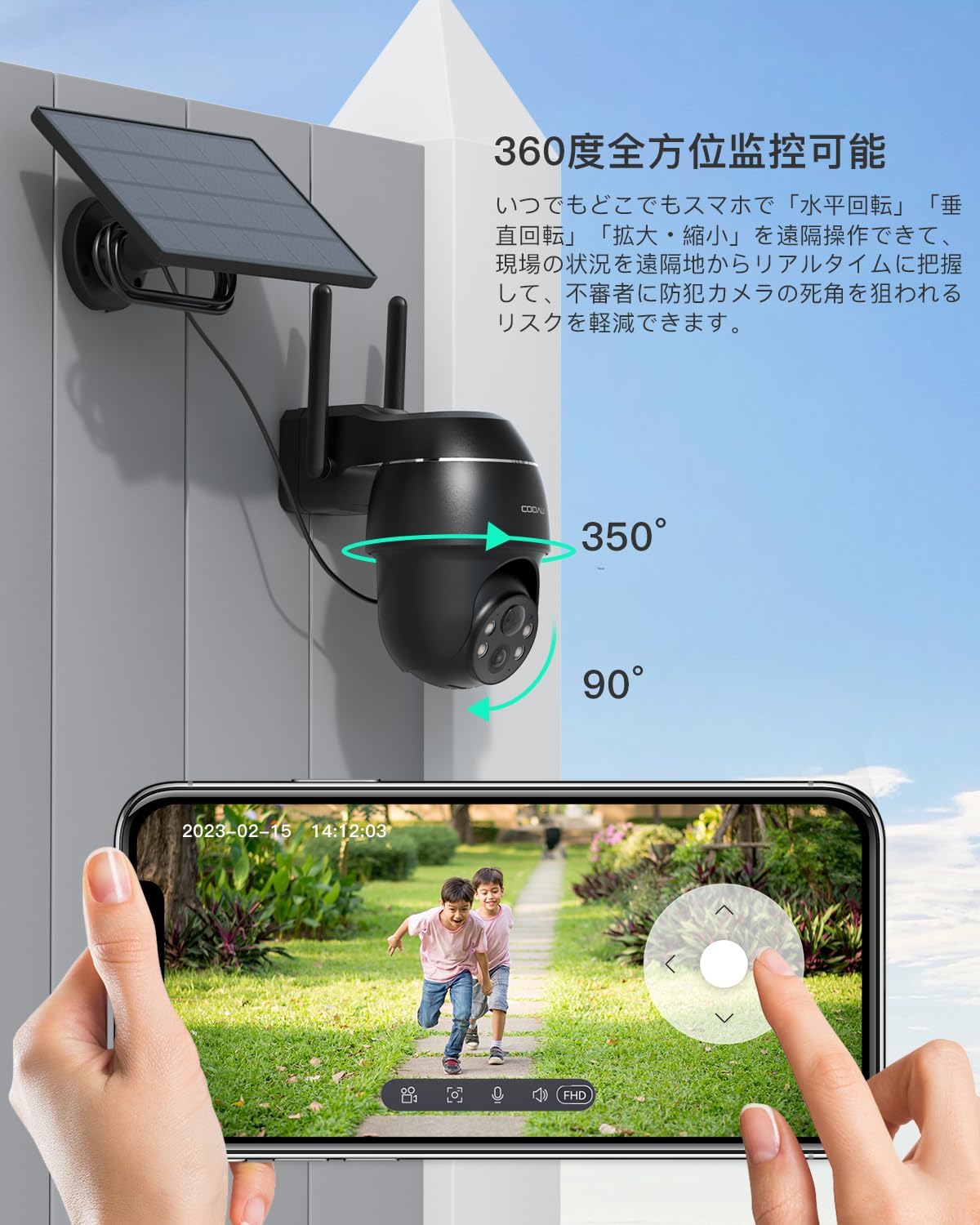
Image: A smartphone screen shows the live view from the COOAU AR-W606 camera, demonstrating its ability to pan 350 degrees and tilt 90 degrees for comprehensive coverage.
4.2 Night Vision Modes
The camera is equipped with four infrared lights and LED lights, offering both black-and-white and color night vision options. It captures clear images up to 15m in low light conditions.
- Infrared Night Vision: Provides clear black-and-white footage in complete darkness.
- Color Night Vision: Activates the LED lights to capture full-color images at night.
- Sound and Light Alarm Mode: Automatically warns intruders with a loud siren and floodlight at night.

Image: This image illustrates the three night defense modes: Floodlight Mode, Sound and Light Alarm Mode, and Siren Warning Mode, showing how the camera deters intruders with light and sound.
4.3 Motion Detection & Alerts
The PIR human sensor detects only human movement, sending immediate alert messages with snapshots to your smartphone. AI detection distinguishes between people, pets, cars, and packages, reducing false alarms.
- Sensitivity Adjustment: 10 levels of sensitivity are available.
- Detection Area Selection: Define specific areas for motion detection to avoid unnecessary alerts.

Image: The camera's PIR human detection feature is shown, where human movement triggers an alert and sends a snapshot to a smartphone, useful for both security and package delivery notifications.
4.4 Two-Way Audio
The built-in microphone and speaker allow for two-way communication. You can speak to visitors or deter intruders directly through the app.

Image: This image demonstrates the two-way audio function, where a user can speak to a delivery person at their door through the camera and smartphone app.
4.5 Recording & Storage
The camera supports two storage methods: microSD card (up to 128GB) and free 6-second cloud storage for one week. It features automatic overwrite recording for continuous surveillance.

Image: The image displays the two recording storage methods: microSD card (supporting up to 128GB) and cloud storage, with a visual representation of how recorded data is managed.
4.6 Multi-User Sharing & Alexa Integration
Easily share real-time camera access with friends and family by scanning a QR code. The camera is also compatible with Alexa, allowing voice commands like "Alexa, show me the entrance/garden" to view live feeds.

Image: This image illustrates the multi-user sharing capability, where different family members can access the camera's live feed from various locations using their smartphones or tablets.

Image: An Alexa-enabled smart display shows the live feed from the camera, demonstrating seamless integration for voice-controlled monitoring.
5. Specifications
| Feature | Specification |
|---|---|
| Product Model Number | AR-W606 |
| Product Dimensions (LxWxH) | 16 x 15 x 10 cm |
| Item Weight | 990 g |
| Video Capture Resolution | 1920p (5MP) |
| Connectivity Technology | Wireless (Wi-Fi) |
| Power Source | Solar Powered, Battery Powered (Lithium Ion) |
| Indoor/Outdoor Use | Outdoor Use |
| Mounting Type | Wall Mount |
| Compatible Devices | Smartphone (iOS/Android), Tablet |
| Waterproof Rating | IP66 |
| Storage | MicroSD Card (Max 128GB), Cloud Storage |
6. Maintenance
- Regularly clean the camera lens and solar panel to ensure optimal performance.
- Check the solar panel for any obstructions that might block sunlight.
- Ensure the camera's firmware is up to date through the app.
7. Troubleshooting
- No Power: Check solar panel connection and ensure sufficient sunlight exposure. Verify battery charge level in the app.
- Poor Wi-Fi Connection: Ensure the camera is within 15m of the router. Reduce interference from other electronic devices.
- False Alarms: Adjust PIR sensitivity and detection areas in the app.
- Image Quality Issues: Ensure the lens is clean. Check network speed for smooth streaming.
For further assistance, please refer to the support section of the dedicated app or contact customer support.
8. Warranty & Support
The COOAU AR-W606 camera comes with a 24-month warranty period. Additionally, a special 12-month extended warranty plan is available. The product has obtained technical standards certification for Radio Law (TELEC), ensuring its reliability.
For any inquiries before purchase, product questions, or in the unlikely event of a defect, new product exchange or refund is possible. Please feel free to contact COOAU's official email address. Business hours are Monday-Friday, 9:00-18:00. You can also contact the seller directly through your Amazon order history.
8.1 Reference Videos
Initial setup and installation reference videos are provided to assist beginners with the process.
Video: This video demonstrates the setup process, highlights the 5MP image quality, shows night vision capabilities, and illustrates the PTZ control via the smartphone app. It also shows how to set detection areas.


