1. Product Overview
The BANDAI Premium DX Memorial Laser Raise Riser is a highly detailed collectible item from the Kamen Rider Geats series. This memorial version features enhanced specifications, including upgraded transformation sounds and special attack sounds compared to the standard DX version. It is designed for fans aged 15 and up.
The set includes the Laser Raise Riser (Memorial Version) main unit and four unique Raise Riser Cards: Jean Raise Riser Card, Cune Raise Riser Card, Velour Raise Riser Card, and Kekera Raise Riser Card. Please note that the two "Black Raise Riser Card (Velova)" and "Black Raise Riser Card (Kekera)" are not included in this set.
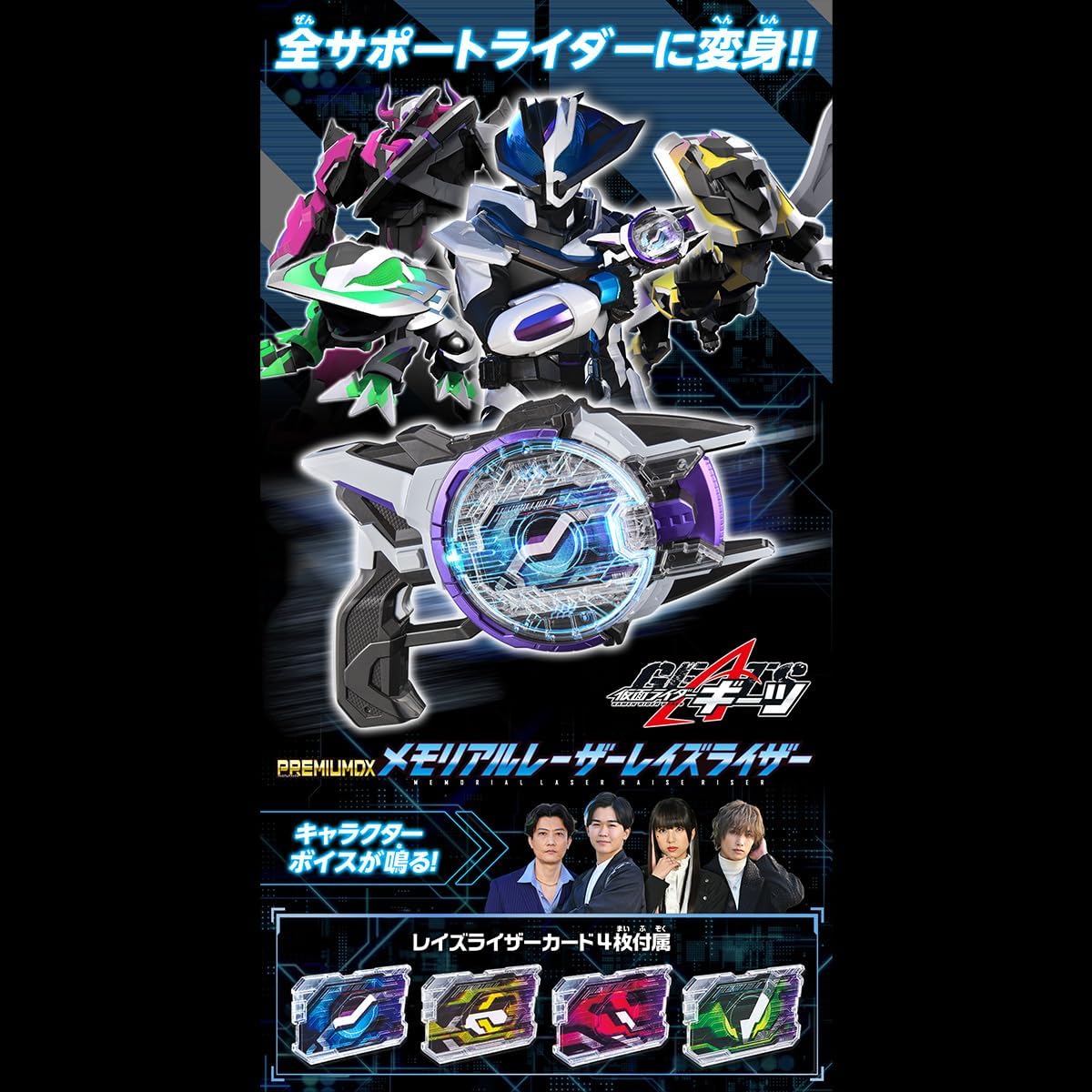
Figure 1.1: The BANDAI Premium DX Memorial Laser Raise Riser main unit, shown with the four included Raise Riser Cards and images of the associated characters.
The Memorial Version of the Laser Raise Riser has been upgraded to match theatrical specifications for transformation sounds and special tricks. It also features a more detailed physical design compared to the standard DX version.
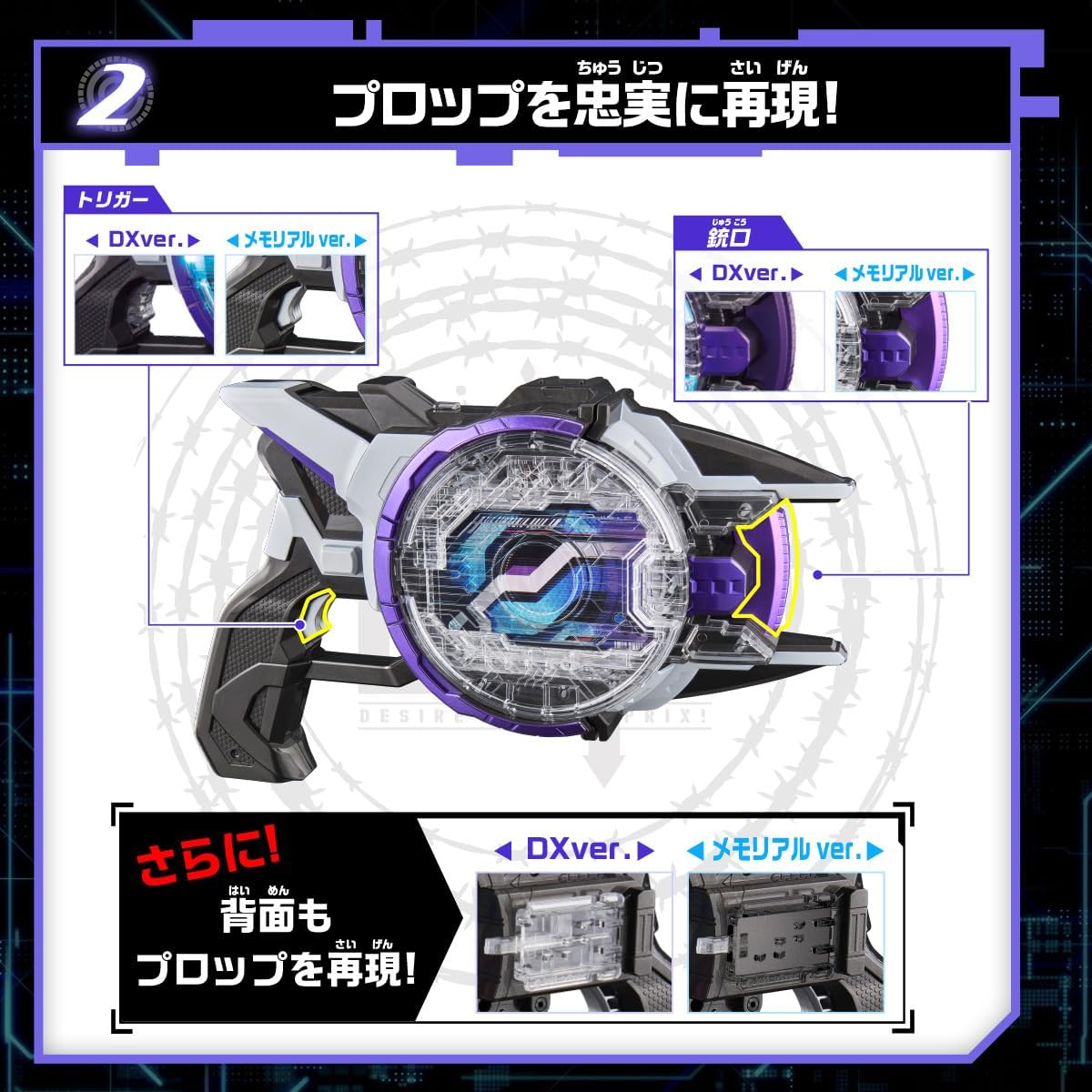
Figure 1.2: A visual comparison highlighting the detailed differences in the trigger, muzzle, and back sections between the DX version and the Memorial version of the Laser Raise Riser.
The Laser Raise Riser (Memorial Version) is designed to be linkable with various other compatible items, expanding play possibilities within the Kamen Rider Geats universe.
2. Setup
2.1 Battery Installation
The Laser Raise Riser (Memorial Version) requires three (3) LR44 batteries for operation. These batteries are not included in the package and must be purchased separately. The batteries included with the product are for testing purposes only and may have limited life.
- Locate the battery compartment on the main unit.
- Using a small Phillips head screwdriver, open the battery compartment cover.
- Insert three new LR44 batteries, ensuring correct polarity (+/-) as indicated inside the compartment.
- Replace the battery compartment cover and secure it with the screw.
Caution: Do not mix old and new batteries. Do not mix alkaline, standard (carbon-zinc), or rechargeable (nickel-cadmium) batteries. Dispose of used batteries responsibly.
2.2 Initial Assembly
No assembly is required for the main Laser Raise Riser unit. The product is ready for use after battery installation.
3. Operating Instructions
3.1 Power On/Off
Locate the power switch on the Laser Raise Riser unit. Slide the switch to the 'ON' position to power on the device. Slide it to the 'OFF' position when not in use to conserve battery life.
3.2 Using Raise Riser Cards
The core functionality of the Laser Raise Riser involves inserting the included Raise Riser Cards to activate various sounds and modes.

Figure 3.1: The four included Raise Riser Cards: Jean, Cune, Velour, and Kekera, which activate unique sounds when inserted into the Laser Raise Riser.
- Ensure the Laser Raise Riser is powered on.
- Select one of the four Raise Riser Cards (Jean, Cune, Velour, or Kekera).
- Insert the chosen card into the designated slot on the Laser Raise Riser.
- The device will activate the transformation sound corresponding to the inserted Support Rider.
- To change sounds, remove the current card and insert a different one.
3.3 Operating Modes
The Laser Raise Riser (Memorial Version) features two distinct operating modes:
- Normal Mode: This mode upgrades the transformation and special attack sounds from the DX version to theatrical specifications. It includes additional special attack sounds, such as gravity control effects.
- Serif Mode: In addition to the Normal Mode features, Serif Mode incorporates cast voices, including transformation phrases and other character lines.
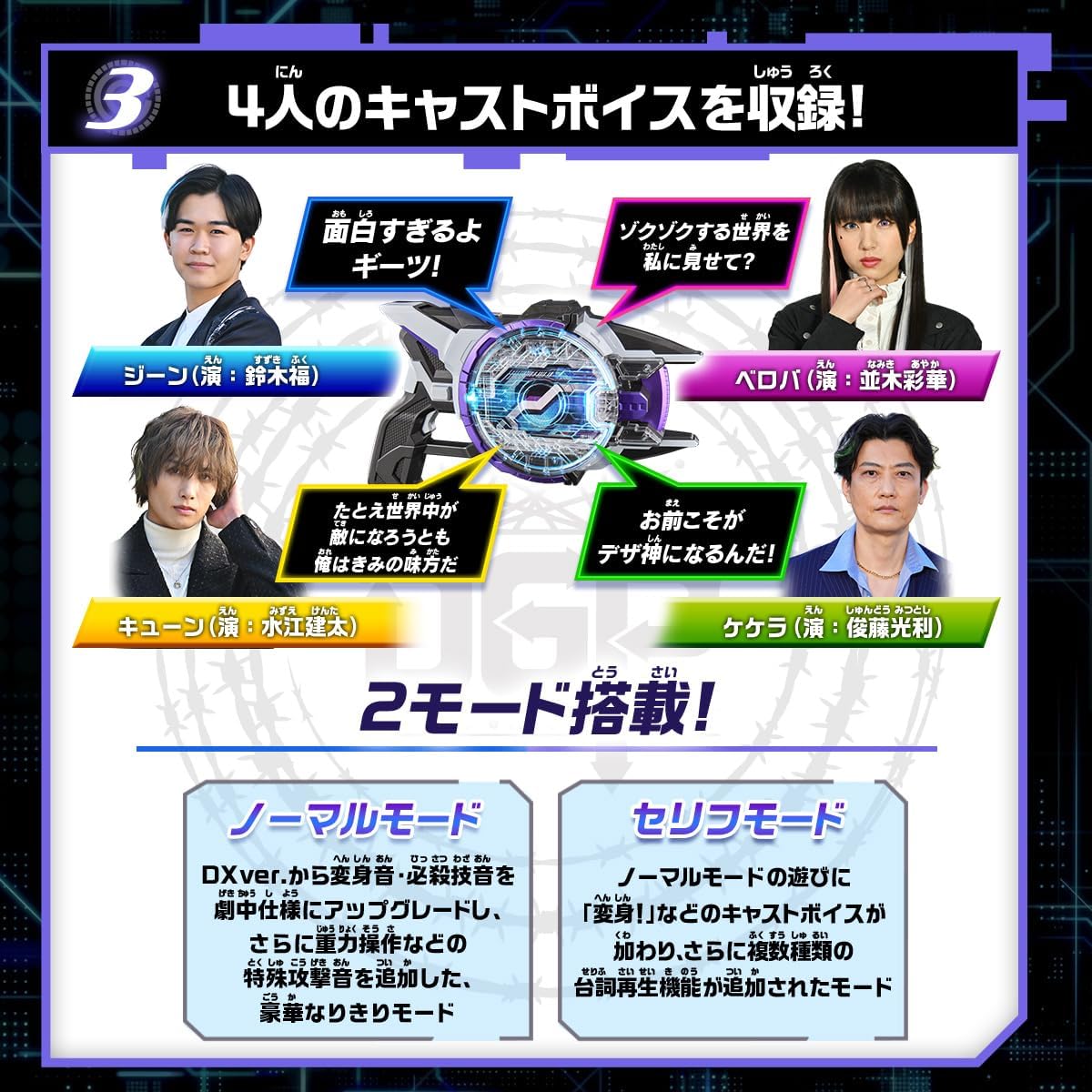
Figure 3.2: The two operating modes of the Laser Raise Riser: Normal Mode for upgraded sound effects and Serif Mode for character voice lines.
Switching between modes is typically done via a dedicated button or sequence of actions on the device. Refer to the physical instruction manual for specific details on mode selection.
3.4 Linking with Other Items
The Laser Raise Riser (Memorial Version) is designed to be compatible and linkable with various other items in the Kamen Rider Geats series. For details on specific linking functionalities and compatible products, please refer to the official BANDAI product information or the instruction manuals of the respective compatible items.
4. Maintenance
4.1 Cleaning
- Wipe the surface of the Laser Raise Riser and Raise Riser Cards with a soft, dry cloth.
- Do not use abrasive cleaners, solvents, or harsh chemicals, as these may damage the product's finish or electronic components.
- Avoid getting moisture into any openings or crevices of the device.
4.2 Storage
- Store the product in a cool, dry place away from direct sunlight and extreme temperatures.
- If storing for an extended period, remove the batteries from the Laser Raise Riser to prevent leakage and damage.
- Keep the product and its components away from excessive dust and moisture.
5. Troubleshooting
If you encounter issues with your Laser Raise Riser, please refer to the following common troubleshooting steps:
- No Power:
- Ensure the power switch is in the 'ON' position.
- Check if the batteries are installed correctly with the correct polarity.
- Replace the LR44 batteries with new ones.
- No Sound or Incorrect Sound:
- Verify that the Raise Riser Card is fully and correctly inserted into the slot.
- Ensure the batteries have sufficient power. Replace if necessary.
- Clean the contact points on both the cards and the device with a dry cloth.
- Device Not Responding:
- Try turning the device off and then on again.
- Remove and reinsert the batteries.
If these steps do not resolve the issue, please contact customer support as detailed in the Warranty & Support section.
6. Specifications
| Component | Dimension (H x W x D) | Material |
|---|---|---|
| Laser Raise Riser (Main Body) | Approx. 155 x 260 x 55 mm (6.1 x 10.2 x 2.2 inches) | ABS, PC |
| Raise Riser Card | Approx. 58 x 87 x 5 mm (2.3 x 3.4 x 0.2 inches) | PC, PET, PP |
- Recommended Age: 15 years and up
- Batteries Required: LR44 x 3 (not included)
- Assembly Required: No
- Manufacturer: BANDAI
- ASIN: B0CBLLKXJZ
- Release Date: December 29, 2023
7. Warranty & Support
7.1 Warranty Information
Specific warranty details for the BANDAI Premium DX Memorial Laser Raise Riser are typically provided by the retailer at the time of purchase or included with the product packaging. Please retain your proof of purchase for any warranty claims. For detailed warranty terms and conditions, refer to the documentation provided by your seller or contact BANDAI customer service directly.
7.2 Customer Support
For further assistance, technical support, or inquiries regarding your product, please contact BANDAI customer service. Contact information can usually be found on the official BANDAI website or on the product packaging.
You may also contact the retailer from whom you purchased the product for support.


