
1. Introduction
This manual provides instructions for the safe and effective operation of your iJoy Stitch Speaker. Please read this manual thoroughly before using the device and retain it for future reference.

Image 1.1: The iJoy Stitch Speaker, showcasing the Stitch Hula Dancing design. This portable Bluetooth speaker is designed for wireless audio playback and features a silicone loop for portability.
2. Package Contents
Verify that all items are present in the package:
- iJoy Stitch Speaker
- Owner's Manual (this document)
- Charging Cable (Micro USB)

Image 2.1: The iJoy Stitch Speaker alongside its retail packaging, illustrating the product and its box.
3. Product Features and Components
The iJoy Stitch Speaker is equipped with various features for versatile audio playback and portability.
3.1 Control Buttons
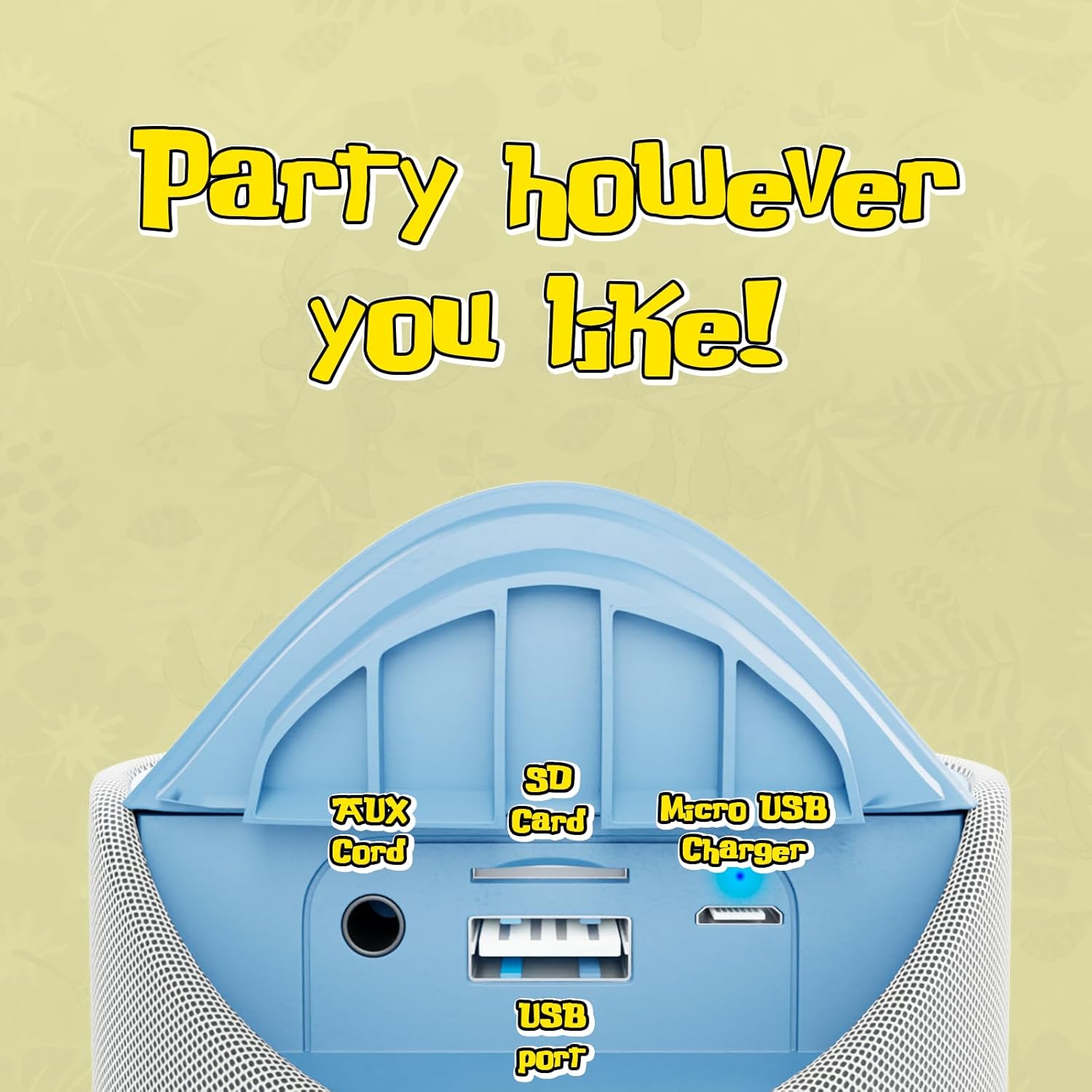
Image 3.1: Top panel of the speaker displaying the control buttons. These include Volume Down (-), Volume Up (+), Play/Pause/Call Answer, Mode Switch (M), and Power On/Off.
- Power Button (⏻): Press and hold to power the speaker on or off.
- Play/Pause/Call Button (⏸): Press to play or pause audio. Press to answer or end a phone call.
- Volume Down Button (−): Press to decrease volume.
- Volume Up Button (+): Press to increase volume.
- Mode Switch Button (M): Press to cycle through available modes (Bluetooth, FM Radio, SD Card, AUX).
3.2 Ports and Indicators

Image 3.2: Rear panel of the speaker revealing the various input ports. These include the AUX port, SD Card slot, USB port, and Micro USB charging port.
- AUX Port: For connecting external audio devices via a 3.5mm audio cable.
- SD Card Slot: For playing audio files directly from an SD memory card.
- USB Port: For playing audio files directly from a USB flash drive.
- Micro USB Charging Port: For charging the speaker's internal battery.
- LED Indicator: Indicates charging status and Bluetooth pairing status.
4. Setup and Charging
4.1 Charging the Speaker
- Connect the Micro USB end of the charging cable to the speaker's Micro USB charging port.
- Connect the USB-A end of the charging cable to a USB power adapter (not included) or a computer's USB port.
- The LED indicator will illuminate to show charging is in progress.
- Charging typically takes approximately 2 hours. The LED indicator will change or turn off once fully charged.
A full charge provides up to 3 hours of playtime.
4.2 Powering On/Off
- To power on: Press and hold the Power button (⏻) until the speaker indicates it is on (e.g., a sound prompt or LED illumination).
- To power off: Press and hold the Power button (⏻) again until the speaker indicates it is off.
5. Operating Instructions
5.1 Bluetooth Pairing
- Ensure the speaker is powered on and in Bluetooth mode. If not, press the Mode Switch (M) button until the speaker enters Bluetooth pairing mode (indicated by a flashing LED).
- On your device (e.g., smartphone, tablet), enable Bluetooth and search for available devices.
- Select "iJoy Stitch Speaker" from the list of found devices.
- Once paired, the speaker will indicate a successful connection (e.g., a sound prompt or solid LED).
- The Bluetooth range is approximately 30 feet (9 meters).
5.2 SD Card / USB Playback
- Insert a formatted SD card or USB flash drive containing audio files into the respective slot on the speaker.
- Press the Mode Switch (M) button to select SD Card mode or USB mode.
- The speaker will automatically begin playing audio files from the inserted media.
5.3 FM Radio
- Press the Mode Switch (M) button to select FM Radio mode.
- In FM mode, press the Play/Pause button (⏸) to automatically scan and save available radio stations.
- Use the Volume Up (+) and Volume Down (−) buttons to navigate between saved stations.
5.4 AUX Input
- Connect one end of a 3.5mm audio cable (not included) to the AUX port on the speaker.
- Connect the other end of the audio cable to the headphone jack or audio output of your external device.
- Press the Mode Switch (M) button to select AUX mode.
- Audio will now play through the speaker from your connected device.
5.5 Call Functions
- When a call is incoming while connected via Bluetooth, press the Play/Pause button (⏸) to answer the call.
- Press the Play/Pause button (⏸) again to end the call.
- To reject an incoming call, press and hold the Play/Pause button (⏸).
6. Maintenance
6.1 Cleaning
Wipe the speaker with a soft, dry cloth. Do not use abrasive cleaners or solvents.
6.2 Water Resistance
The speaker has an IPX4 water resistance rating, meaning it is protected against splashing water from any direction. It is not designed for submersion in water.
7. Troubleshooting
| Problem | Solution |
|---|---|
| Speaker does not power on. | Ensure the battery is charged. Connect the speaker to a power source using the Micro USB cable. |
| No sound from speaker. | Check the volume level on both the speaker and your connected device. Ensure the correct mode (Bluetooth, SD, FM, AUX) is selected. |
| Cannot pair via Bluetooth. | Ensure the speaker is in Bluetooth pairing mode (flashing LED). Make sure your device's Bluetooth is enabled and within 30 feet of the speaker. Try restarting both devices. |
| Poor FM radio reception. | Relocate the speaker to an area with better signal. Ensure automatic station scanning has been performed. |
8. Specifications

Image 8.1: Visual representation of the speaker's dimensions, indicating it is approximately 6.3 inches tall and 2.9 inches across.
| Feature | Detail |
|---|---|
| Model Name | Stitch Speaker |
| Brand | iJoy |
| Connectivity Technology | Bluetooth |
| Wireless Communication Technology | Bluetooth |
| Bluetooth Range | 30 Feet (9 meters) |
| Speaker Type | Portable Bluetooth Speaker |
| Speaker Maximum Output Power | 5 Watts |
| Audio Output Mode | Stereo |
| Power Source | Battery Powered |
| Battery Capacity | 800 Milliamp Hours |
| Charging Time | 2 Hours |
| Playtime | Up to 3 Hours |
| Water Resistance Level | IPX4 (Water Resistant) |
| Product Dimensions | 3"D x 3"W x 6"H (approx. 7.6cm D x 7.6cm W x 15.2cm H) |
| Item Weight | 8 Ounces (approx. 227 grams) |
| Material | Silicone |
| Control Method | Touch (Button Controls) |
| UPC | 810116713943 |
9. Warranty and Support
The iJoy Stitch Speaker comes with a 90-Day Manufacturer Warranty. For warranty claims or technical support, please contact the manufacturer, Quest USA Corp, or refer to the contact information provided with your purchase documentation.
For further assistance, please visit the iJoy Store on Amazon.