
Khptop V80 2X
Khptop Motorcycle Helmet Bluetooth Intercom Headset (Model: V80 2X)
User Instruction Manual
1. Introduction
This manual provides detailed instructions for the installation, operation, and maintenance of your Khptop V80 2X Motorcycle Helmet Bluetooth Intercom Headset. Please read this manual thoroughly before using the device to ensure proper function and safety.
The Khptop V80 2X is designed for motorcycle riders, offering reliable communication and entertainment features. Key features include:
- Two-rider intercom communication up to 500 meters.
- Universal pairing with other Bluetooth intercom headsets.
- Advanced CVC (Clear Voice Capture) and DSP noise reduction for clear audio.
- Bluetooth 5.0 for stable connectivity and stereo music.
- IP67 waterproof and dustproof rating.
- Long-lasting 1000mAh battery providing up to 32 hours of continuous use.
- Support for Siri voice assistant.
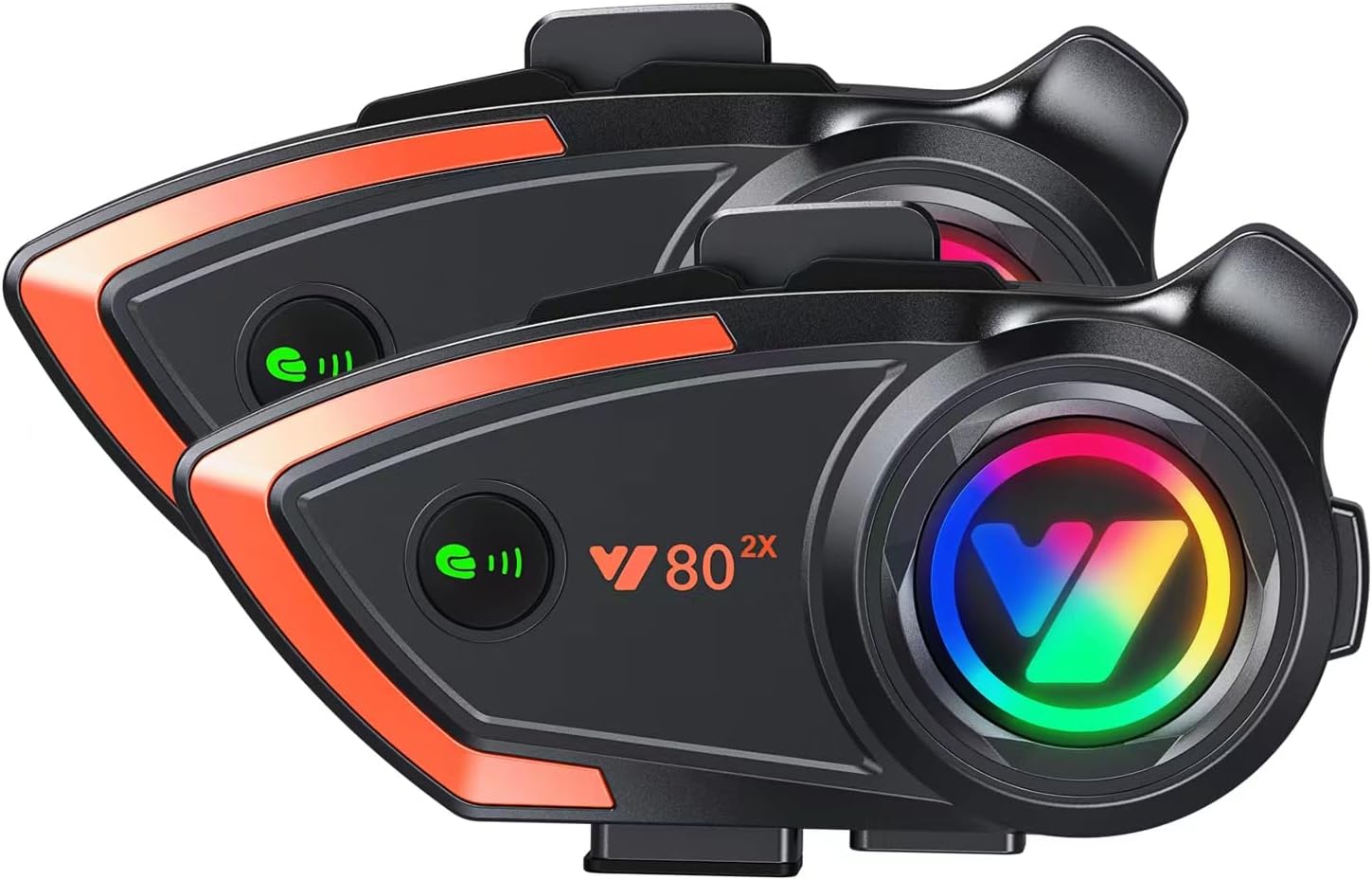
Image 1.1: Two Khptop V80 2X Bluetooth intercom headsets, showing their sleek design with orange accents and multi-color LED indicators.
2. Package Contents
Before installation, please verify that all items listed below are present in your package:
- Khptop V80 2X Host Unit (x1)
- Type-C Port Hose Headphones + Type-C Hard Tube Headset (x1 set)
- Manual (x1)
- Type-C Charging Line (x1)
- Clip-on Base (x1)
- Host Velcro (x2)
- Magic Stick Microphone Stick (x2)
- Speaker Velcro (x2)
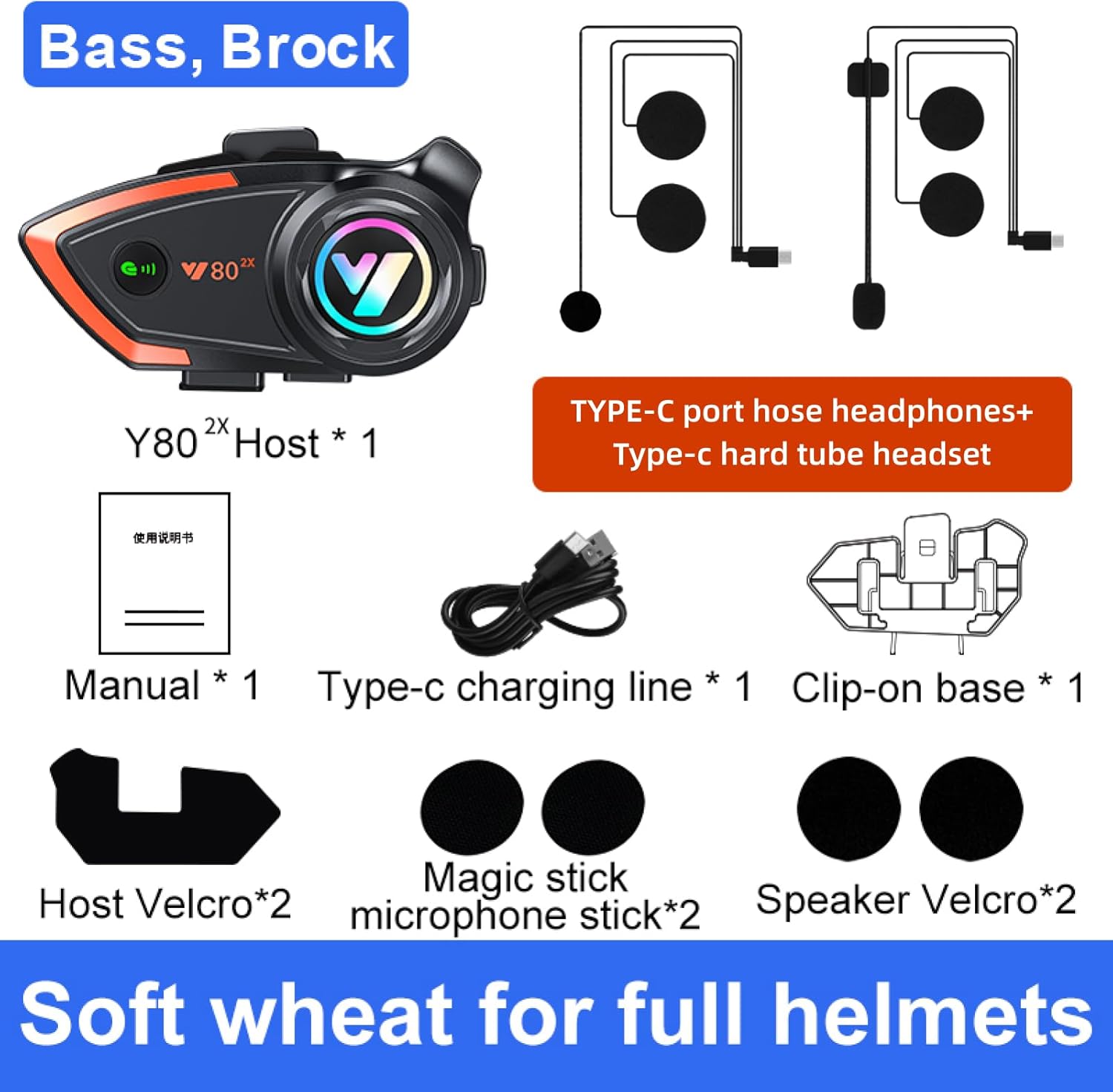
Image 2.1: Visual representation of the Khptop V80 2X package contents, including the main unit, various headset components, charging cable, and mounting accessories.
3. Setup and Installation
Follow these steps to properly install the Khptop V80 2X headset on your helmet.
3.1 Attaching the Host Unit
- Choose a suitable location on the left side of your helmet for the host unit.
- Secure the clip-on base to the helmet shell. Ensure it is firmly attached.
- Alternatively, use the provided host velcro to adhere the host unit directly to the helmet surface if the clip-on base is not suitable.
- Slide the Khptop V80 2X host unit onto the clip-on base until it clicks into place, or firmly press it onto the velcro.
3.2 Installing Speakers and Microphone
- Open the helmet's inner lining to access the ear pockets.
- Attach the speaker velcro pads inside the helmet's ear pockets.
- Place the speakers onto the velcro pads, ensuring they are positioned directly over your ears for optimal sound.
- Attach the microphone stick velcro inside the helmet, near your mouth.
- Connect the microphone to the host unit.
- Route the speaker and microphone cables neatly under the helmet lining to avoid interference and ensure comfort.

Image 3.1: The Khptop V80 2X headset mounted on the side of a motorcycle helmet, demonstrating its compact and integrated design.
4. Operating Instructions
4.1 Power On/Off
- Power On: Press and hold the Power button (usually the main function button) for approximately 3 seconds until the indicator light illuminates and you hear an audible prompt.
- Power Off: Press and hold the Power button for approximately 3 seconds until the indicator light turns off and you hear an audible prompt.
4.2 Bluetooth Pairing with Mobile Device
- Ensure the headset is powered off.
- Press and hold the Power button for approximately 5-7 seconds until the indicator light flashes red and blue alternately, indicating pairing mode.
- On your mobile phone, enable Bluetooth and search for available devices.
- Select "Khptop V80 2X" (or similar name) from the list.
- Once paired, the indicator light will flash blue slowly, and you will hear a confirmation tone.
4.3 Intercom Pairing (Two Riders)
The Khptop V80 2X supports intercom communication between two riders up to 500 meters.
- Ensure both headsets are powered on and not connected to any other Bluetooth devices.
- On one headset, press and hold the Intercom button (refer to device specific button layout in the manual) for approximately 5 seconds until the indicator light flashes rapidly.
- Repeat the same step on the second headset.
- The headsets will automatically search and pair with each other. Once connected, the indicator lights will flash slowly, and you will hear a confirmation tone.
- To initiate intercom conversation, briefly press the Intercom button on either unit. To end, press it again.

Image 4.1: Illustration of two motorcyclists using the Khptop V80 2X intercom system for clear communication while riding.
4.4 Phone Calls
- Answer Call: Briefly press the Power button when an incoming call is detected.
- End Call: Briefly press the Power button during a call.
- Reject Call: Press and hold the Power button for 2 seconds when an incoming call is detected.
- Redial Last Number: Double-press the Power button when in standby mode.
- Automatic Answering: The headset supports automatic answering of incoming calls after a few rings.
4.5 Music Playback
- Play/Pause: Briefly press the Power button to play or pause music.
- Next Track: Briefly press the Volume Up button.
- Previous Track: Briefly press the Volume Down button.
4.6 Volume Control
- Increase Volume: Press and hold the Volume Up button.
- Decrease Volume: Press and hold the Volume Down button.
4.7 Voice Assistant (Siri)
If your paired mobile device supports a voice assistant (e.g., Siri), you can activate it through the headset. Refer to your device's specific instructions for activating the voice assistant feature.
5. Features Overview
5.1 CVC Noise Reduction
The Khptop V80 2X incorporates CVC (Clear Voice Capture) and DSP (Digital Signal Processing) dual intelligent noise reduction technology. This system effectively filters out background noise, ensuring clear voice communication even at high speeds (e.g., over 100 km/h).

Image 5.1: A visual representation of the CVC noise reduction feature, showing how unwanted background noise is suppressed for clearer audio.
5.2 IP67 Waterproof and Dustproof
Utilizing Nano coating technology, the Khptop V80 2X is designed with an IP67 rating, making it highly resistant to dust and water ingress. This ensures reliable operation in various weather conditions, including rain and dusty environments, and can operate effectively in temperatures as low as -20°F.

Image 5.2: The Khptop V80 2X headset shown with water droplets, emphasizing its IP67 waterproof capabilities for use in challenging weather.
6. Maintenance and Battery
6.1 Charging the Battery
The headset is equipped with a built-in 1000mAh rechargeable Li-ion battery. To charge:
- Connect the provided Type-C charging cable to the charging port on the headset.
- Connect the other end of the cable to a USB power source (e.g., computer, USB wall adapter).
- The indicator light will typically show red during charging and turn blue or off when fully charged.
A full charge provides approximately 32 hours of continuous talking/playing time and up to 600 hours of standby time.

Image 6.1: The Khptop V80 2X headset with a graphic indicating its 32-hour long endurance battery life from a 1000mAh capacity.
6.2 Cleaning and Storage
- Wipe the headset's exterior with a soft, damp cloth. Do not use harsh chemicals or abrasive cleaners.
- Ensure the charging port cover is securely closed when not charging to maintain its waterproof integrity.
- Store the headset in a cool, dry place away from direct sunlight and extreme temperatures.
7. Troubleshooting
| Problem | Possible Cause | Solution |
|---|---|---|
| Device does not power on. | Low battery. | Charge the device for at least 2 hours. |
| Cannot pair with phone. | Headset not in pairing mode; Bluetooth off on phone; too many paired devices. | Ensure headset is in pairing mode (flashing red/blue). Turn phone's Bluetooth off and on. Clear old Bluetooth connections on phone. |
| Intercom not connecting. | Headsets not in intercom pairing mode; too far apart. | Ensure both headsets are in intercom pairing mode. Move closer to each other (within 500m, recommended 200m for optimal signal). |
| No sound or low volume. | Volume too low; speakers improperly positioned; loose connection. | Increase volume on both headset and phone. Adjust speaker position. Check all cable connections. |
| Poor sound quality / static. | Interference; microphone not positioned correctly. | Move away from sources of strong electromagnetic interference. Adjust microphone closer to mouth. |
8. Specifications
| Feature | Detail |
|---|---|
| Model | V80 2X |
| Bluetooth Version | 5.0 |
| Intercom Range | 200-500 meters (2 riders) |
| Battery Capacity | 1000mAh Li-ion |
| Talk/Music Time | Up to 32 hours |
| Standby Time | Up to 600 hours |
| Noise Reduction | CVC & DSP |
| Waterproof Rating | IP67 |
| Operating Temperature | Down to -20°F |
| Ear Placement | Over Ear |
| Impedance | 32 Ohm |
9. Warranty and Support
Specific warranty information for the Khptop V80 2X Motorcycle Helmet Bluetooth Intercom Headset is not provided in this manual. Please refer to the product packaging or contact the retailer/manufacturer directly for warranty details and customer support.
For technical assistance or further inquiries, please visit the official Khptop website or contact their customer service department.
10. Important Safety Information
- Always prioritize road safety. Do not operate the device in a way that distracts you from riding.
- Ensure the headset is securely mounted to your helmet before riding.
- Do not attempt to disassemble or modify the device, as this may void the warranty and cause damage.
- Keep the device away from extreme heat sources and open flames.
- Dispose of the battery and device according to local regulations.
Related Documents - V80 2X
 |
XINOWY Y80-2X Motorcycle Helmet Intercom Bluetooth Headset Quick Start Guide Quick start guide for the XINOWY Y80-2X motorcycle helmet intercom system. Learn how to pair, connect Bluetooth, use phone features, music, intercom, and voice assistant. |
 |
Kebidumei Y10-2X Motorcycle Helmet Intercom Headset User Manual Comprehensive user manual for the Kebidumei Y10-2X motorcycle helmet intercom headset, covering product overview, features, operation, installation, and safety precautions. |
 |
Y10-2X Motorcycle Intercom Headset Instruction Manual Comprehensive instruction manual for the Y10-2X motorcycle intercom headset by KEBIDUMEI, covering product overview, features, pairing, installation, and safety precautions. |
 |
Y10-2X Motorcycle Helmet Intercom System: Instruction Manual Comprehensive instruction manual for the Y10-2X motorcycle helmet intercom system, covering product overview, phone features, voice assistant, music intercom mixing, installation, pairing, music controls, and technical specifications. Includes FCC compliance information and usage precautions. |
 |
PHONEPACE Y10-2X Motorcycle Intercom Headset User Manual Comprehensive user manual for the PHONEPACE Y10-2X motorcycle intercom headset, covering setup, features, pairing, music, and safety instructions. |
 |
K16 2x Motorcycle Helmet Intercom Instruction Manual User manual and installation guide for the K16 2x Bluetooth motorcycle helmet intercom headset, covering installation, Bluetooth, FM, and intercom modes. |
Ask a question about this manual
Ask about setup, troubleshooting, compatibility, parts, safety, or missing instructions. Manuals+ will review the question and use this page’s manual context to help answer it.