
ZAZU ZA-BRODY-03
Zazu Brody the Bear Sleep Trainer / Night Light User Manual
Model: ZA-BRODY-03
Introduction
This manual provides essential information for the safe and effective use of your Zazu Brody the Bear Sleep Trainer and Night Light. Please read these instructions carefully before use and retain them for future reference.
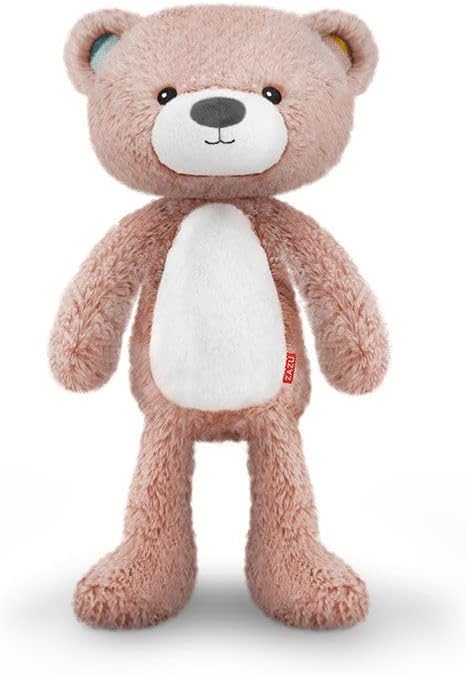
Image: Zazu Brody the Bear Sleep Trainer and Night Light. This is a soft, plush bear in a light pink color, designed to function as both a sleep trainer and a night light. It features a white oval patch on its belly, black button-like eyes, and a grey nose with a stitched mouth. The bear has small, rounded ears with light blue and yellow accents on the inside, and a small red ZAZU tag on its right side.
Product Overview
The Zazu Brody the Bear is a multi-functional device designed to assist children with sleep training and provide a comforting night light. Its soft, plush design makes it a friendly companion for bedtime routines.
Key Features:
- Sleep training functionality
- Integrated night light
- Soft, plush material
- Compact and portable design
Setup
Unpacking:
- Carefully remove the Brody the Bear Sleep Trainer from its packaging.
- Inspect the product for any signs of damage. If damaged, do not use and contact customer support.
- Retain packaging for future storage or transport.
Battery Installation:
The Zazu Brody the Bear requires batteries for operation. Batteries are not included.
- Locate the battery compartment, typically on the back or bottom of the product.
- Open the battery compartment cover using a small screwdriver if necessary.
- Insert the required number and type of batteries (e.g., AA or AAA, check product label for specifics) ensuring correct polarity (+/-).
- Close the battery compartment cover securely.
Note: Always use new batteries of the same type and brand. Do not mix old and new batteries, or different types of batteries. Remove batteries if the product is not used for an extended period.
Operating Instructions
Power On/Off:
Locate the power button, usually on the back or side of the bear. Press and hold for a few seconds to turn the unit on or off.
Night Light Function:
The night light feature provides a soft glow. Refer to the specific controls on your Brody the Bear to activate and adjust the brightness or color of the light. This may involve pressing a dedicated button or interacting with a sensor.
Sleep Trainer Function:
The sleep trainer uses visual cues to help children understand when it's time to sleep and when it's okay to wake up. Typically, the light changes color (e.g., red for sleep, green for wake-up) at pre-set times. Consult the product's internal settings or accompanying quick start guide for detailed instructions on setting wake-up and sleep times.
Sound Features (if applicable):
Some models may include lullabies, white noise, or other soothing sounds. Locate the sound control buttons to cycle through available sounds and adjust volume levels.
Maintenance
Cleaning:
- Ensure the unit is turned off and batteries are removed before cleaning.
- Wipe the surface of the bear with a soft, damp cloth.
- Do not immerse the product in water or use harsh cleaning agents, as this may damage the electronic components.
- Allow the product to air dry completely before re-inserting batteries or using.
Storage:
Store the Zazu Brody the Bear in a cool, dry place away from direct sunlight and extreme temperatures when not in use for extended periods. Remove batteries before storage.
Troubleshooting
| Problem | Possible Cause | Solution |
|---|---|---|
| Unit does not turn on. | Dead or incorrectly installed batteries. | Replace batteries with new ones, ensuring correct polarity. |
| Night light is dim or flickering. | Low battery power. | Replace batteries. |
| Sleep trainer function not working as expected. | Incorrect time settings or programming error. | Refer to the product's quick start guide or reset the device and re-program the settings. |
| No sound (if applicable). | Volume too low or sound feature not activated. | Increase volume. Ensure sound mode is selected. |
If troubleshooting steps do not resolve the issue, please contact ZAZU customer support.
Specifications
- Model: ZA-BRODY-03
- Product Dimensions: 5 x 5 x 12 cm
- Weight: 310 g
- Material: Plastic
- Battery Requirements: Yes (Batteries not included)
- Brand: ZAZU
Warranty and Support
ZAZU products are designed and manufactured to the highest quality standards. For information regarding warranty coverage, product registration, or technical support, please visit the official ZAZU website or contact their customer service department.
Official ZAZU Store: Visit the ZAZU Store on Amazon
Please have your model number (ZA-BRODY-03) and purchase details ready when contacting support.
Related documentsZA-BRODY-03


Ask a question about this manual
Ask about setup, troubleshooting, compatibility, parts, safety, or missing instructions. Manuals+ will review the question and use this page’s manual context to help answer it.