
1. Introduction
This manual provides essential instructions for the safe and effective use of your Meiyue 144W Adjustable Power Supply Adapter. This universal switching power adapter converts 100V-240V AC input to an adjustable DC output ranging from 3V to 24V, with a maximum current of 6A and a maximum power of 144W. It is designed for compatibility with a wide range of electronic devices requiring various DC voltages and currents up to 6A.
2. Safety Information
- Voltage Matching: Always verify the voltage and current requirements of your device before connecting the power adapter. Setting an incorrect voltage can damage your device.
- Polarity: The default polarity of this adapter is inside positive (+), outside negative (-). Use the included reverse polarity conversion cable if your device requires inside negative (-), outside positive (+). Incorrect polarity will damage your device.
- Current Limit: Ensure your device's current requirement does not exceed 6A.
- Indoor Use Only: This adapter is designed for indoor use in dry conditions. Do not expose to water, moisture, or high humidity.
- Ventilation: Ensure adequate ventilation around the adapter during operation to prevent overheating.
- Disconnection: Disconnect the power adapter from the wall outlet when not in use for extended periods.
- Children: Keep out of reach of children.
3. Package Contents
Please check the package for the following items:
- 1 x Meiyue 3V~24V Switch Power Adapter (Model AM-003)
- 14 x DC Output Connectors (various sizes)
- 1 x Reversed Polarity Conversion Cable

This image displays the 14 different DC output connectors included with the power adapter, along with the reverse polarity conversion cable. The connectors vary in size and type to ensure compatibility with a wide range of devices. The polarity conversion cable allows for flexible use with devices requiring either positive or negative center polarity.
4. Product Features
- Adjustable Output Voltage: Provides a flexible DC output from 3V to 24V, allowing compatibility with various electronic devices.
- High Power Output: Delivers a maximum of 144W power and 6A current, suitable for many home and office electronics.
- Visual Voltage Display: An integrated LED screen displays the real-time output voltage for precise adjustment and monitoring.
- Multiple DC Tips: Includes 14 commonly used DC output connectors (e.g., Micro-USB, Type-C, 5.5x2.1mm, 5.5x2.5mm, etc.) for broad device compatibility.
- Reverse Polarity Conversion: Comes with a cable to easily switch output polarity, accommodating devices with different power input requirements.
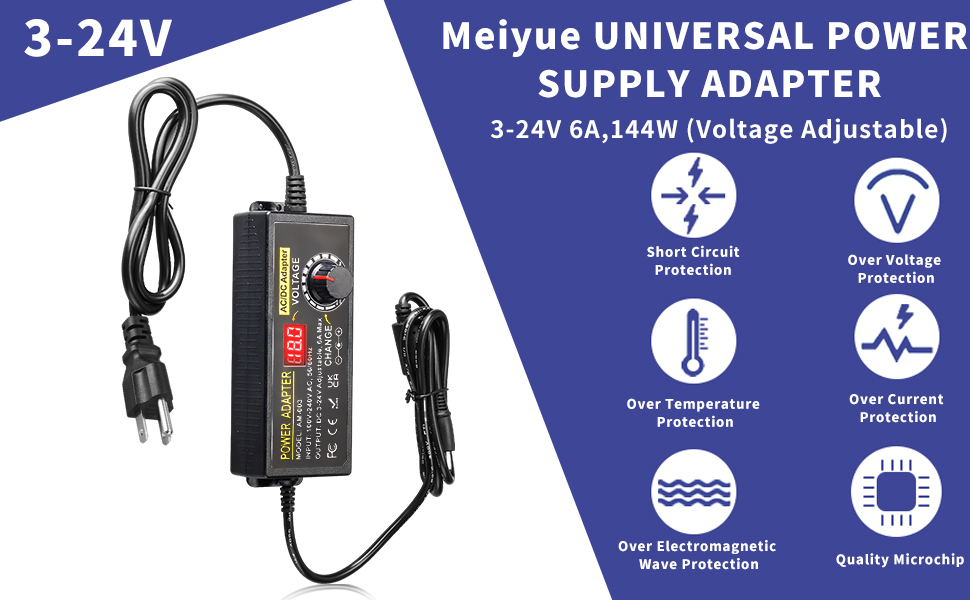
- Safety Protections: Built-in safeguards against overcurrent, overvoltage, overload, and short-circuit to ensure device safety and adapter longevity.

This image highlights the LED digital display on the power adapter, which provides a real-time visual readout of the set output voltage. This feature allows for accurate voltage adjustment before connecting to a device.

This image demonstrates the adjustable voltage range of the power adapter, from 3V to 24V, and showcases its wide applicability across different electronic devices such as LED strip lights, cameras, loudspeakers, wireless routers, printers, and massage equipment.
This video demonstrates the voltage adjustment capability of the Meiyue power adapter. It shows a user rotating the voltage knob and observing the corresponding voltage changes on both the adapter's LED display and an external multimeter, confirming the accuracy of the adjustable output.
5. Specifications
| Input Voltage | AC 100-240V, 50/60Hz |
| Output Voltage | DC 3V-24V (Adjustable) |
| Max Current | 6A |
| Max Power | 144W |
| Polarity | Inside positive (+), outside negative (-) (Reversible with included cable) |
| DC Connector (Original) | 5.5mm x 2.1mm |
| Number of Tips | 14 (various sizes including Micro-USB, Type-C) |
| Model Number | AM-003 |
| Certifications | FCC, CE, RoHS, UKCA |
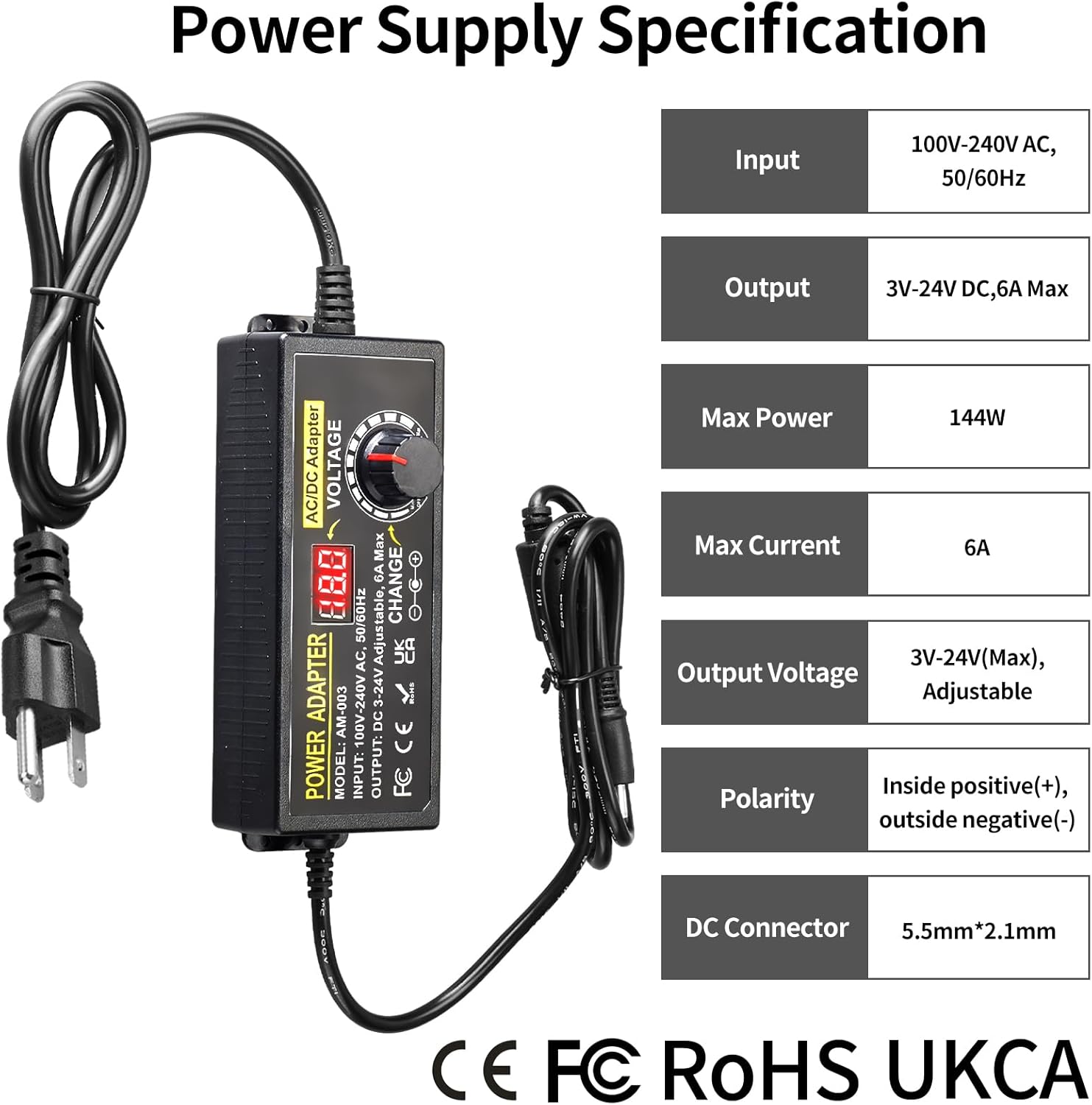
This image provides a clear overview of the power supply's technical specifications, including input, output, maximum power, current, polarity, and DC connector details, presented in an easy-to-read table.
6. Setup
- Identify Device Requirements: Before connecting, determine the exact voltage (V) and current (A) requirements of your electronic device. This information is usually found on the device itself, its original power adapter, or in its user manual.
- Select DC Connector: Choose the appropriate DC output connector from the 14 included tips that fits your device's power input port.
- Connect DC Connector: Firmly attach the selected DC connector to the output cable of the adjustable power adapter.
- Check Polarity: The default polarity is inside positive (+), outside negative (-). If your device requires the opposite polarity, use the provided reverse polarity conversion cable by connecting it between the adapter's output cable and the chosen DC connector.
- Set Voltage (BEFORE Connecting to Device): Plug the power adapter into a standard AC wall outlet. Rotate the voltage adjustment knob on the adapter to set the desired output voltage, as identified in step 1. Observe the LED digital display to ensure the voltage is set accurately.
- Connect to Device: Once the voltage and polarity are correctly set, connect the DC output connector to your electronic device.

This image illustrates the power adapter along with its array of interchangeable DC tips and the crucial reverse polarity conversion cable, demonstrating how to select and connect the correct tip and adjust polarity for your device.
This image emphasizes the real-time voltage display screen on the power adapter. It serves as a reminder to power on the supply and set the target voltage using the rotary knob before connecting any device, ensuring safe operation.
7. Operating Instructions
Once the setup is complete, operating the power supply is straightforward:
- Power On/Off: The voltage adjustment knob also features an 'OFF' position. Rotate the knob fully counter-clockwise to turn off the power supply without needing to unplug it from the wall. Rotate clockwise to turn on and adjust voltage.
- Voltage Adjustment: To change the output voltage, first disconnect the adapter from your device. Then, rotate the voltage knob to the desired setting, monitoring the LED display for accuracy. Reconnect to your device only after the voltage is stable at the correct level.
- Continuous Monitoring: The LED display continuously shows the output voltage, allowing you to confirm the operating voltage at any time.
8. Maintenance
- Cleaning: Disconnect the adapter from power and devices before cleaning. Use a soft, dry cloth to wipe the surface. Do not use liquid cleaners or solvents.
- Storage: Store the adapter and its accessories in a cool, dry place away from direct sunlight and extreme temperatures.
- Cable Care: Avoid bending or crimping the power cables excessively. Do not place heavy objects on the cables.
9. Troubleshooting
| Problem | Possible Cause | Solution |
|---|---|---|
| Device does not power on. | Incorrect voltage setting. | Verify and adjust the output voltage to match your device's requirements. |
| Incorrect polarity. | Check your device's polarity requirements and use the reverse polarity cable if necessary. | |
| Loose connection. | Ensure all cables (AC input, DC output, and tip) are securely connected. | |
| Device current exceeds adapter's limit. | Ensure your device requires 6A or less. If it requires more, this adapter is not suitable. | |
| Adapter LED display is off. | Adapter is not receiving power or is turned off. | Check if the adapter is plugged into a live wall outlet. Ensure the voltage knob is not in the 'OFF' position. |
10. Warranty and Support
This Meiyue Adjustable Power Supply Adapter comes with a 1-Year Warranty from the date of purchase, covering manufacturing defects. Please retain your proof of purchase for warranty claims.
For any inquiries, technical support, or warranty claims, please contact the seller directly through the platform where you purchased the product. Our support team is available to assist you with any questions or issues you may encounter.