
1. Introduction
This manual provides essential information for the installation, operation, and maintenance of your ETREPOW 5500W 48V Hybrid Pure Sine Wave Inverter. This multifunctional inverter integrates the functions of an inverter, solar charger, and battery charger to offer uninterruptible power support. Please read this manual thoroughly before installation and use to ensure optimal performance and safety.
The ETREPOW 5500W hybrid inverter features a built-in 100A MPPT solar charge controller, a maximum nominal power of 5.5 kW, and a maximum solar panel input power of 6000 W. It supports PV input voltage from 120-450 V DC and is compatible with various battery types, including lead-acid and lithium batteries.
2. Safety Information
WARNING: This section contains important safety instructions that must be followed during installation and operation of the inverter. Failure to follow these instructions may result in serious injury or death, and may damage the inverter.
- Ensure all wiring is performed by qualified personnel.
- Do not disassemble the inverter. There are no user-serviceable parts inside.
- Keep the inverter away from flammable materials, moisture, and direct sunlight.
- Ensure proper ventilation around the inverter to prevent overheating.
- Always disconnect all power sources (AC, PV, Battery) before performing any maintenance or wiring.
- Use appropriate circuit breakers and fuses as recommended for your system.
3. Product Overview
The ETREPOW 5500W Hybrid Inverter is designed to provide reliable power for various applications. It combines multiple functionalities into one compact unit.
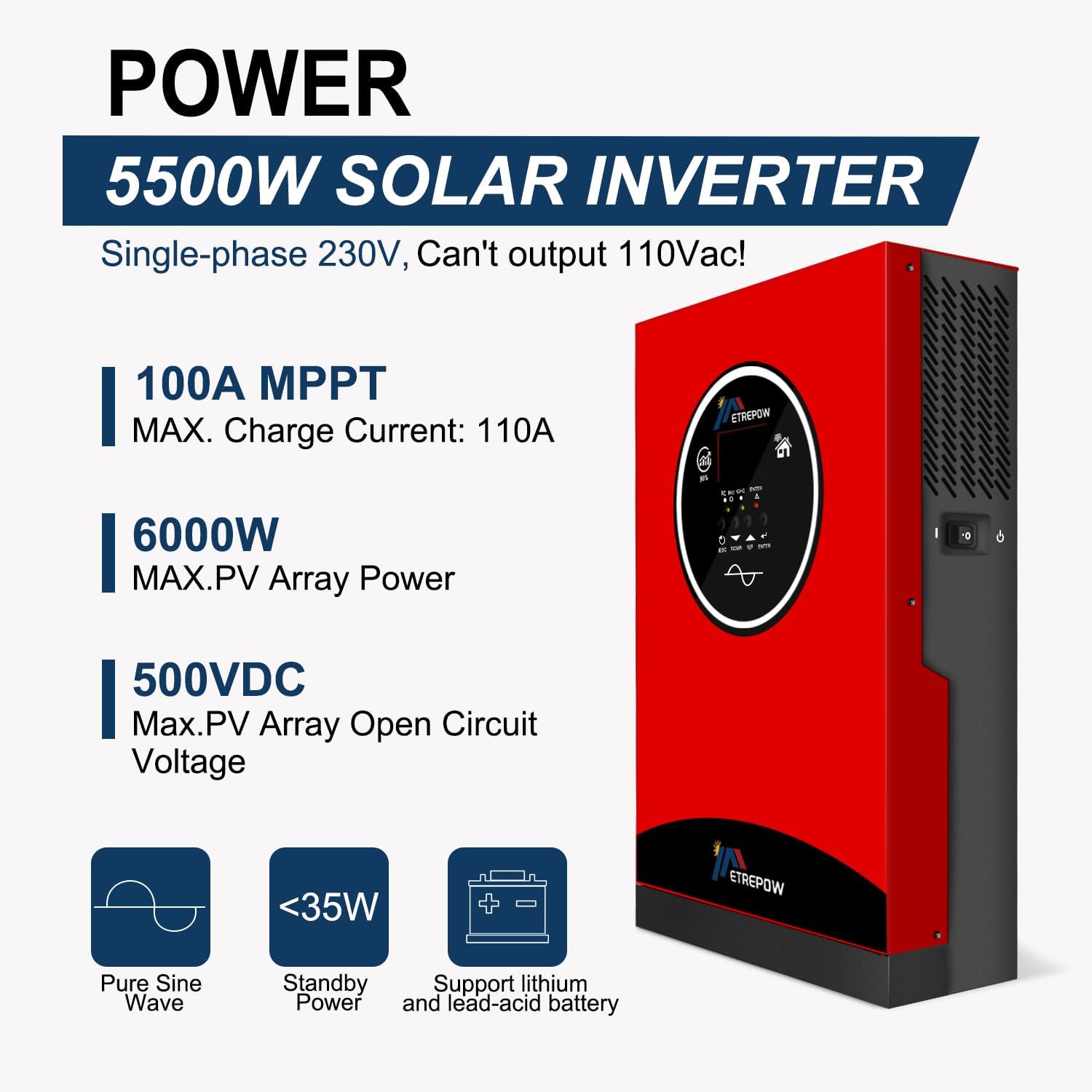
Image: Front view of the ETREPOW 5500W Solar Inverter, highlighting key specifications such as 100A MPPT, 6000W Max PV Array Power, and 500VDC Max PV Array Open Circuit Voltage. It also indicates Pure Sine Wave output, less than 35W standby power, and support for lithium and lead-acid batteries.

Image: Detailed diagram showing the power flow and connection points of the ETREPOW 5500W Inverter. It illustrates AC Input (230Vac), AC Output (230Vac ±5%), Battery Input (48V Lead-Acid & Lithium battery), and PV Input (6000W Power Max, 500Vdc, Input Current 18A Max, Charging Current 100A). Peak efficiency is 94% and surge capacity is 11000W for 5 seconds.
Key Features:
- Integrated MPPT Solar Charge Controller: 100A MPPT controller for efficient solar charging.
- High Power Output: 5500W nominal power, 11000W surge capacity for 5 seconds.
- Wide PV Input Range: Supports 120-450 V DC PV input, up to 6000W solar panel power.
- Pure Sine Wave Output: Ensures compatibility with sensitive electronics.
- Battery Compatibility: Adaptable to 48V lead-acid (AGM, GEL, FLD, SLD) and lithium batteries.
- Multiple Operating Modes: Offers various charging and output modes to suit different application needs.
- Comprehensive Protection: Includes overload, over-temperature, short-circuit protection, cold start function, and auto-restart.
4. Setup and Installation
Proper installation is crucial for the safe and efficient operation of the inverter. Ensure all local electrical codes are followed.
4.1 Mounting the Inverter
Mount the inverter in a well-ventilated area, away from direct sunlight, heat sources, and moisture. Ensure there is sufficient clearance around the unit for airflow. The inverter should be mounted vertically on a non-flammable surface.
4.2 Electrical Connections
Refer to the connection diagram for proper wiring. All connections must be secure and correctly polarized.

Image: Diagram illustrating the application of the ETREPOW 5500W Inverter in a home or office setting. It shows connections from Solar Energy, Generator, and Power Grid feeding into the inverter, which then charges Battery Packs and supplies power to Home Appliances like a coffee machine, washing machine, oven, refrigerator, and grinder.
4.2.1 Battery Connection
- Connect the 48V battery bank to the designated battery terminals on the inverter. Observe correct polarity (+ to + and - to -).
- Use appropriate cable gauges for the battery connections to handle the expected current.
- Ensure the battery bank voltage matches the inverter's 48V requirement.

Image: Graphic showing the ETREPOW 5500W Inverter's compatibility with various battery types, including AGM, LI (Lithium), GEL, SLD, and FLD batteries. It states "Compatible with 98% kinds of batteries".
4.2.2 Solar Panel (PV) Connection
- Connect the solar panel array to the PV input terminals. Ensure the total PV open circuit voltage does not exceed 500V DC.
- The maximum PV input power is 6000W.
- Verify correct polarity before connecting.
4.2.3 AC Input/Output Connection
- Connect the AC grid input (220V/230V AC) to the AC input terminals.
- Connect your loads (appliances) to the AC output terminals. The inverter provides a 220V/230V AC pure sine wave output.
- Ensure all AC connections are properly grounded.
5. Operating Instructions
5.1 Powering On/Off
- To Power On: Ensure all connections are secure. Turn on the battery breaker first, then the AC input breaker (if connected), and finally the PV input breaker (if connected). Press the power button on the inverter.
- To Power Off: Disconnect AC loads. Turn off the PV input breaker, then the AC input breaker, and finally the battery breaker. Press and hold the power button until the inverter shuts down.
5.2 Display Interface
The inverter features a display panel for monitoring system status and configuring settings. Use the navigation buttons (ESC, UP, DOWN, ENTER) to navigate through menus and adjust parameters.
5.3 Operating Modes
The inverter supports various charging and load output modes to optimize energy usage based on your preferences and available power sources.
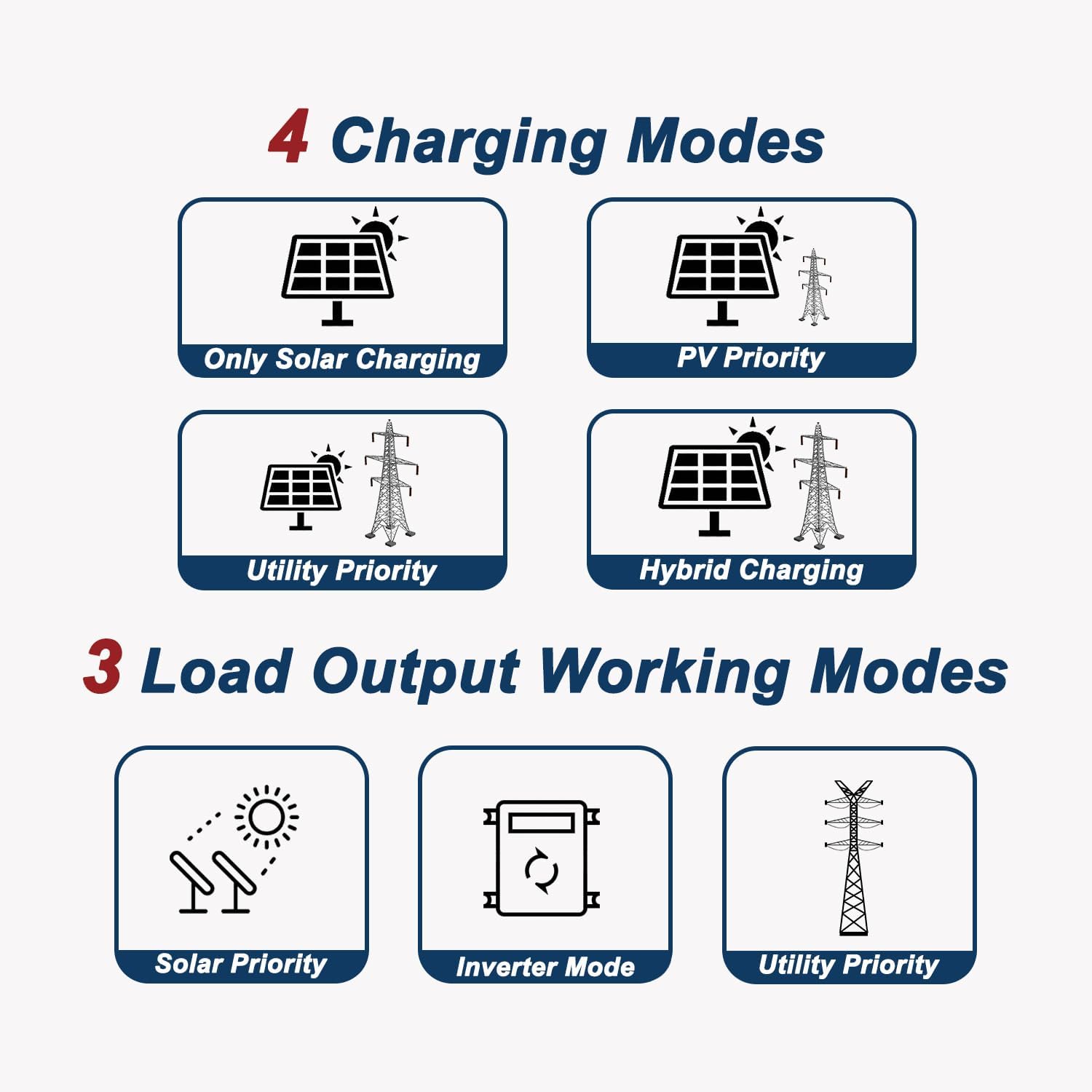
Image: Diagram illustrating the four charging modes and three load output working modes of the ETREPOW 5500W Inverter. Charging modes include Only Solar Charging, PV Priority, Utility Priority, and Hybrid Charging. Load output modes include Solar Priority, Inverter Mode, and Utility Priority.
5.3.1 Charging Modes (4 options):
- Solar Priority: Solar energy is the primary source for charging batteries. Grid power is used only if solar is insufficient.
- Utility Priority: Grid power is the primary source for charging. Solar energy is used when grid power is unavailable.
- Solar Only: Only solar energy is used for charging.
- Hybrid Charging: Combines solar and utility power for charging, prioritizing solar.
5.3.2 Load Output Modes (3 options):
- Utility Priority: AC loads are primarily powered by the utility grid. The inverter switches to battery/solar power if the grid fails.
- Solar Priority: AC loads are primarily powered by solar energy (via inverter). Utility grid is used as a backup.
- Inverter Mode: AC loads are continuously powered by the inverter from batteries/solar.
5.4 Battery Type Selection
The inverter allows selection of various battery types to ensure optimal charging and discharge cycles. Refer to the display menu to select the correct battery type (e.g., AGM, GEL, FLD, SLD, LI, USER-defined) that matches your connected battery bank.
6. Maintenance
Regular maintenance helps ensure the longevity and reliable operation of your inverter.
6.1 Cleaning
- Periodically clean the exterior of the inverter with a dry, soft cloth.
- Ensure ventilation openings are free from dust and debris. Do not use liquid cleaners.
6.2 Inspection
- Check all electrical connections for tightness and signs of corrosion.
- Inspect cables for any damage or wear.
- Monitor the inverter's display for any error codes or unusual behavior.
6.3 Storage
If storing the inverter for an extended period, ensure it is powered off, disconnected from all power sources, and stored in a cool, dry place.
7. Troubleshooting
This section provides solutions to common issues you might encounter. For problems not listed here, please contact customer support.
| Problem | Possible Cause | Solution |
|---|---|---|
| Inverter does not power on. | No battery connection; Battery voltage too low; Power button not pressed correctly. | Check battery connections and voltage; Ensure battery is charged; Press and hold the power button. |
| No AC output. | Overload; Short circuit; Inverter in standby mode; Battery low. | Reduce load; Check for short circuits; Verify operating mode; Charge battery. |
| Solar charging not working. | PV input voltage too low/high; Incorrect PV connection; MPPT controller fault. | Check PV voltage and connections; Ensure solar panels are receiving sunlight; Contact support if fault persists. |
| Over-temperature warning. | Insufficient ventilation; Overload; High ambient temperature. | Ensure proper airflow; Reduce load; Move inverter to a cooler location. |
8. Specifications
| Feature | Detail |
|---|---|
| Brand | ETREPOW |
| Model Number | MP55PEU48 |
| Power (Rated) | 5500 Watts |
| Voltage | 48 Volts (DC) |
| AC Output Voltage | 220V/230V AC Pure Sine Wave |
| Max PV Input Power | 6000 W |
| PV Input Voltage Range | 120-450 V DC |
| Max PV Disconnection Voltage | 500 V DC |
| Max Charging Current (PV) | 100 A |
| Battery Compatibility | 48V Lead-Acid (AGM, GEL, FLD, SLD) or Lithium |
| Standby Power Consumption | 35 W (Max) |
| Product Dimensions | 40L x 30W x 11H centimeters |
| Color | Red |
| Country of Origin | Switzerland |
9. Warranty & Support
9.1 Warranty Information
This ETREPOW inverter comes with a 1-year manufacturer's warranty. Please retain your proof of purchase for warranty claims.
9.2 Customer Support
For any questions, technical assistance, or warranty inquiries, please contact ETREPOW customer support. We aim to respond to all inquiries within 24 hours.
For further assistance, please visit the official ETREPOW website or contact your retailer.

