
1. Product Overview
The MECHEN EU-V02 is a versatile digital voice recorder designed for high-quality audio capture in various environments such as lectures, meetings, and classes. It features a built-in 64GB memory, advanced noise reduction, voice-activated recording, and robust security options like password protection. Its compact design and long battery life make it an ideal tool for reliable audio documentation.

Image 1.1: The MECHEN EU-V02 Voice Recorder shown with its accompanying earphones. This device is designed for clear audio capture and playback.
2. Package Contents
Before using your MECHEN EU-V02 Voice Recorder, please verify that all items are present in the package:
- 1 x MECHEN V02 Voice Recorder
- 1 x USB-C Cable
- 1 x Earphones
- 1 x User Manual (this document)

Image 2.1: An illustration of the MECHEN EU-V02 Voice Recorder and its standard accessories, including the USB-C cable, earphones, and user manual.
3. Setup
3.1 Charging the Device
The MECHEN EU-V02 Voice Recorder is equipped with a built-in rechargeable Lithium Polymer battery. Before first use, fully charge the device.
- Connect the included USB-C cable to the recorder's USB-C port.
- Connect the other end of the USB-C cable to a USB power adapter (not included) or a computer's USB port.
- The device will indicate charging status on its screen. A full charge typically takes approximately 2 hours.

Image 3.1: The MECHEN EU-V02 Voice Recorder connected to a laptop via its USB-C port, illustrating the charging process and faster data transfer capability.
3.2 Powering On/Off
To power on the device, press and hold the Power button (usually located on the side) until the screen illuminates. To power off, press and hold the Power button again until the device shuts down.
3.3 Initial Settings
Upon first power-on or after a factory reset, you may be prompted to set the language, date, and time. Navigate through the menu using the directional buttons and confirm selections with the Play/OK button.
4. Operating Instructions
4.1 Basic Recording
To begin a recording, ensure the device is powered on and in the main menu or recording standby mode.
- Press the REC button (red button) to start recording. The screen will display 'Recording' and a timer.
- To pause the recording, press the PLAY button. Press it again to resume.
- To stop and save the recording, press the STOP button. The recording will be saved automatically to the device's internal memory.
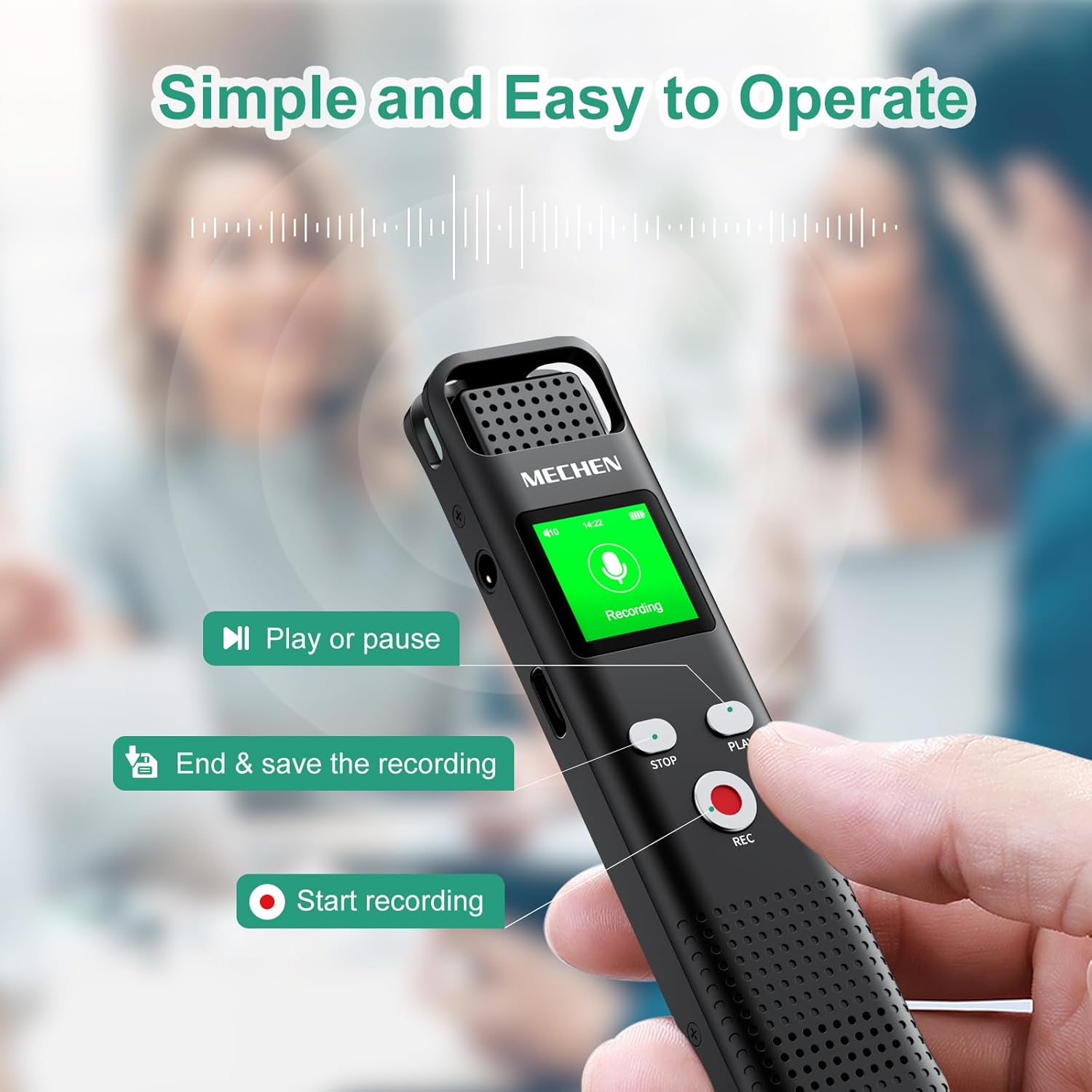
Image 4.1: Close-up view of the MECHEN EU-V02, highlighting the REC, STOP, and PLAY buttons for intuitive recording control.
4.2 Voice Activated Recording (VOR)
The VOR function allows the recorder to automatically start recording when sound is detected and pause when silence occurs, saving memory space and playback time.
- Navigate to the 'Settings' menu on the device.
- Select 'VOR Mode' or 'Voice Activation'.
- Choose your desired sensitivity level (typically 7 levels available). A higher level means the recorder will activate with softer sounds.
- Activate the VOR function. The device will now record only when sound is present.

Image 4.2: Visual representation of the Voice Activated Recording feature, showing how the device captures sound and skips silent periods, with adjustable sensitivity levels.

Image 4.3: A diagram illustrating the activation of the Voice Activated Recording (VOR) feature on the MECHEN EU-V02, indicated by a 'VOR' icon.
4.3 Noise Reduction
The device features 7 levels of noise reduction to ensure clear recordings even in noisy environments. This function utilizes a DSP intelligent noise cancellation technology.
- Access the 'Noise Reduction' setting in the menu.
- Select the appropriate level based on your recording environment. Higher levels provide more aggressive noise filtering.
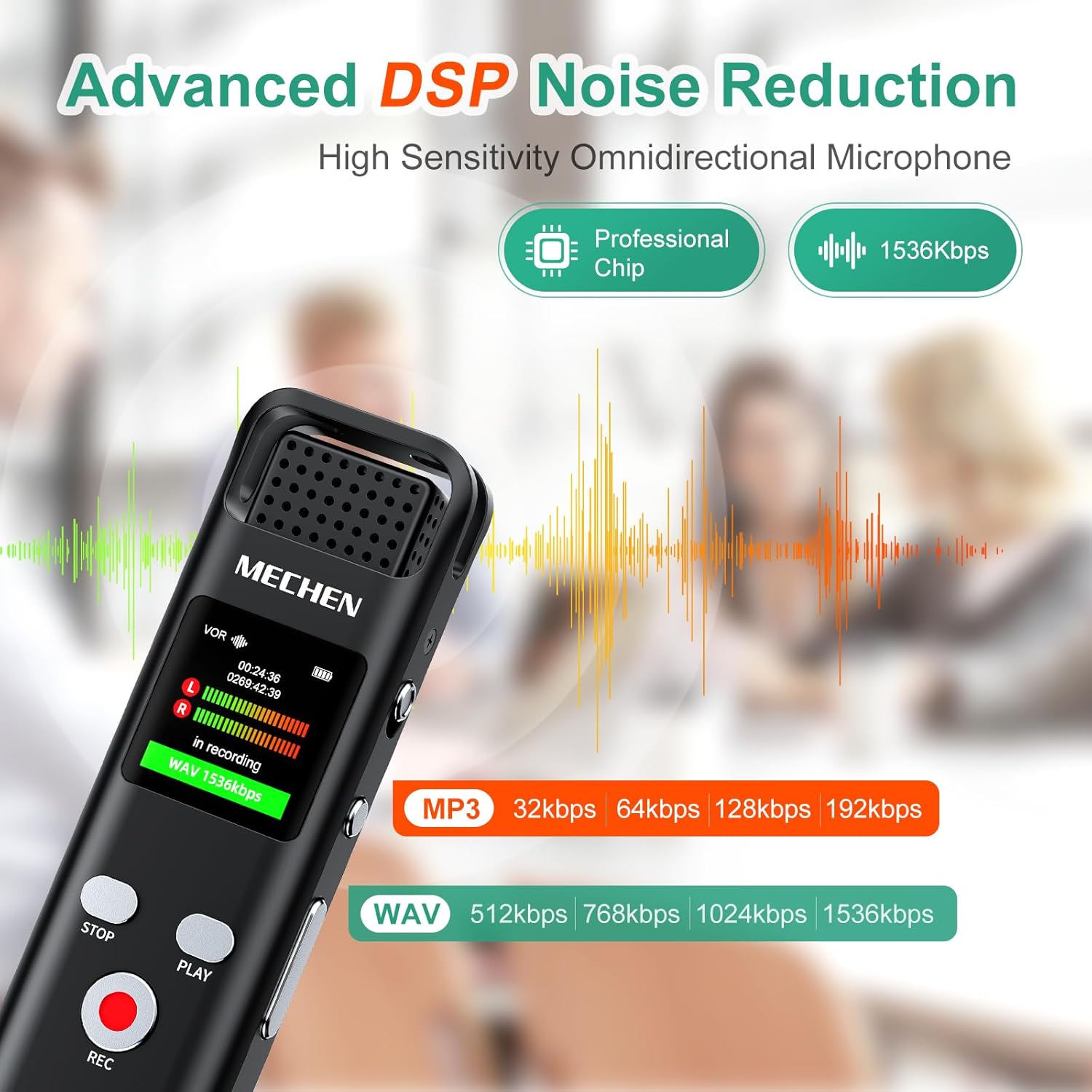
Image 4.4: Depiction of the Advanced DSP Noise Reduction technology, highlighting the professional chip and 1536kbps recording capability for superior audio clarity.

Image 4.5: An illustration detailing the DSP Noise Cancellation feature, emphasizing 360-degree sound pickup and 7-level noise reduction for clear audio.
4.4 Segment Recording
This feature allows you to divide long recordings into smaller, more manageable segments (e.g., 30, 60, 90, or 120 minutes). This simplifies file organization and playback.
- Access 'Segment Recording' in the device settings.
- Choose your preferred segment duration.

Image 4.6: A visual guide to the Segmented Recording feature, showing options for dividing recordings into 30, 60, 90, or 120-minute intervals.
4.5 Scheduled Recording (Auto Record)
Set the recorder to automatically start and stop recording at specific times, ensuring you don't miss important events.
- Go to 'Scheduled Recording' or 'Auto Record' in the settings.
- Configure the start time, end time, and frequency (e.g., once, daily, weekdays).

Image 4.7: An illustration of the Auto Record function, allowing users to schedule recording periods for convenience.
4.6 Recording Monitoring
Connect earphones to the 3.5mm headphone jack to monitor your recording in real-time, ensuring optimal audio quality.

Image 4.8: A user wearing headphones while operating the MECHEN EU-V02, demonstrating the real-time recording monitoring capability.
4.7 Line-in Recording
The device supports line-in recording, allowing you to record audio directly from external sources such as smartphones, MP3 players, or computers. An audio cable (not included) is required.

Image 4.9: The MECHEN EU-V02 connected to a smartphone for line-in recording, illustrating its compatibility with various audio sources.
4.8 Playback and Music Player
To play back recordings or music files:
- Navigate to the 'Recordings' or 'Music' folder on the device.
- Select the desired file using the directional buttons.
- Press the PLAY button to start playback.
- Use the volume buttons (usually +/- on the side) to adjust playback volume.

Image 4.10: Instructions for adjusting volume on the MECHEN EU-V02 by long-pressing MENU and short-pressing volume buttons.
4.9 A-B Repeat Function
This feature allows you to repeat a specific segment of an audio file. Ideal for studying or transcribing.
- During playback, press the A-B repeat button (refer to device interface for exact button).
- Press it once to set point A (start).
- Press it again to set point B (end). The segment between A and B will loop.
- Press it a third time to exit A-B repeat mode.

Image 4.11: A visual explanation of the A-B Repeat Function, demonstrating how to select and loop a specific portion of an audio recording.
4.10 File Management
Connect the recorder to a computer using the USB-C cable to manage your files. The device will appear as a removable disk.
- You can drag and drop files to and from the device.
- Recordings are typically saved in WAV or MP3 format.
- The device supports renaming, deleting, and moving files directly through its interface or via a connected computer.

Image 4.12: The MECHEN EU-V02 connected to a laptop, illustrating the ease of file management, including renaming, deleting, and moving recordings.
4.11 Security Features
The MECHEN EU-V02 offers password protection and a screen lock feature to secure your recordings and prevent accidental operation.
- Password Protection: Set a 4-digit password to protect access to your device and recordings. This can be configured in the 'Security' settings.
- Screen Lock: Long press a designated button (often the 'M' or 'Menu' button) to lock the screen, preventing unintended button presses. A short press will unlock it.

Image 4.13: A visual guide to setting a 4-digit password for enhanced security on the MECHEN EU-V02 Voice Recorder.

Image 4.14: Instructions for locking and unlocking the screen of the MECHEN EU-V02, showing the long press and short press actions.
5. Maintenance
Proper maintenance ensures the longevity and optimal performance of your MECHEN EU-V02 Voice Recorder.
- Cleaning: Use a soft, dry cloth to clean the device's exterior. Avoid using liquid cleaners or abrasive materials.
- Battery Care: To preserve battery life, avoid fully discharging the battery frequently. If storing the device for an extended period, charge it to about 50% and recharge every few months.
- Storage: Store the recorder in a cool, dry place away from direct sunlight, extreme temperatures, and high humidity.
- Avoid Drops: Protect the device from physical shocks and drops, which can damage internal components.
6. Troubleshooting
If you encounter issues with your MECHEN EU-V02, refer to the following common problems and solutions:
| Problem | Possible Cause | Solution |
|---|---|---|
| Device does not power on. | Low battery; device frozen. | Charge the device for at least 30 minutes. If still unresponsive, perform a reset (refer to manual for reset pinhole, if available, or hold power button for 10-15 seconds). |
| Poor recording quality. | High background noise; incorrect noise reduction setting; microphone obstructed. | Adjust noise reduction level. Ensure microphone is clear. Record in a quieter environment. |
| Cannot connect to computer. | Faulty USB cable; driver issue; incorrect connection mode. | Try a different USB-C cable. Ensure the device is powered on. Check computer's USB ports. Restart both devices. |
| Recordings not saving. | Memory full; device error. | Delete unnecessary files to free up space. Restart the device. |
| Password forgotten. | User forgot password. | Refer to the manufacturer's support for password reset procedures. A factory reset may be required, which will erase all data. |
7. Specifications
Key technical specifications for the MECHEN EU-V02 Voice Recorder:
- Model Number: EU-V02
- Internal Memory: 64 GB
- Battery: 1 Lithium Polymer battery (included)
- Product Dimensions: 10.9 x 1.2 x 2.63 cm
- Item Weight: 51 Grams
- Hardware Interface: USB Type C
- Microphone Form Factor: Built-In
- Recording Formats: WAV, MP3
- Headphone Jack: 3.5 millimeters
- Compatible Devices: Personal Computer
- Manufacturer: MECHEN
- Country of Origin: China
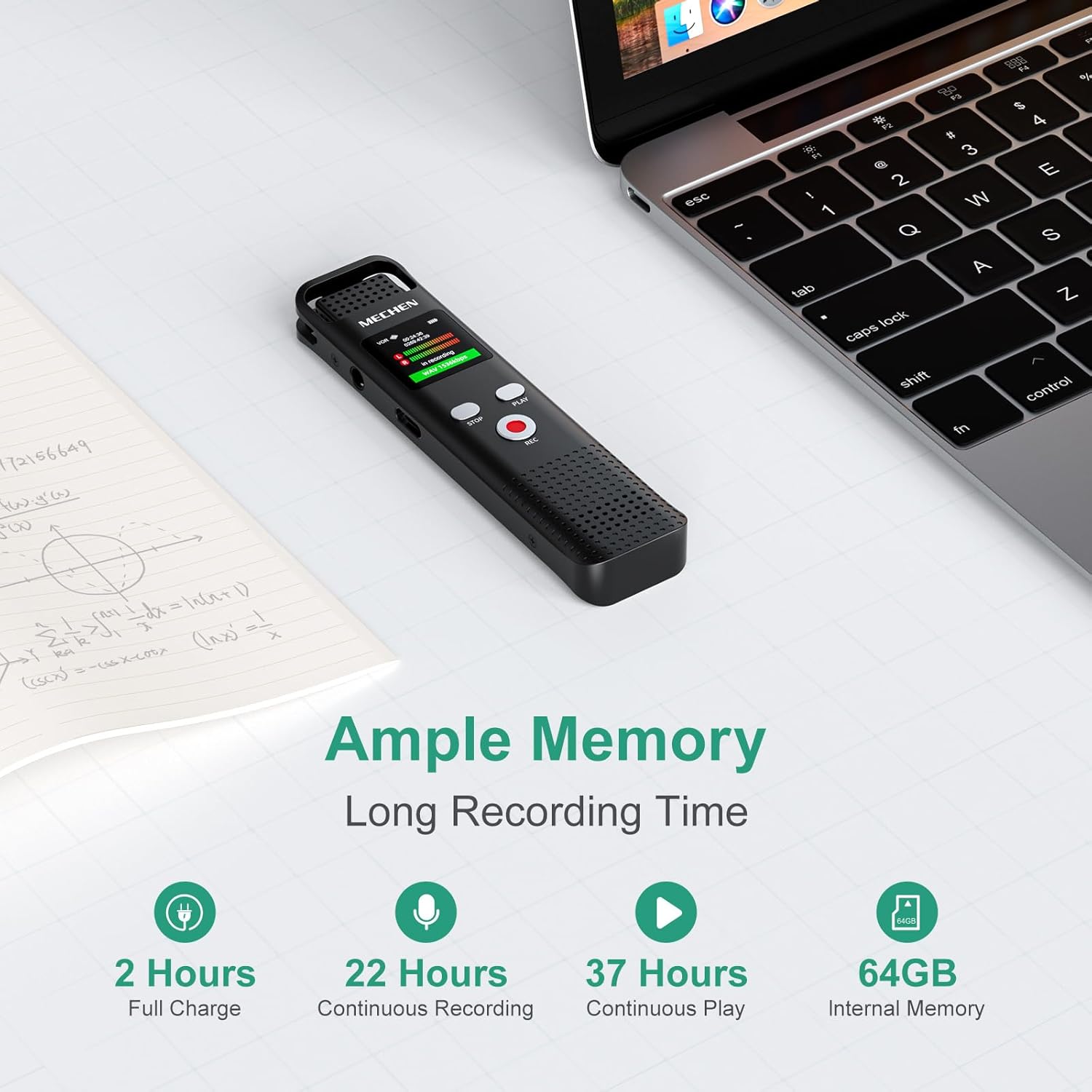
Image 7.1: An overview of the MECHEN EU-V02's ample memory (64GB) and impressive battery life, offering 22 hours of continuous recording and 37 hours of continuous playback on a 2-hour full charge.

Image 7.2: A table detailing approximate recording times based on MP3 and WAV formats and various bitrates, with noise reduction enabled.
8. Warranty and Support
For warranty information and customer support, please refer to the documentation provided with your purchase or visit the official MECHEN website. Keep your proof of purchase for warranty claims.