
PLUSBEAM Motorcycle Auxiliary Lights Model 08 User Manual
Model: 08 | Brand: PLUSBEAM
Introduction
Welcome to the user manual for your new PLUSBEAM Motorcycle Auxiliary Lights. These 40W mini LED headlights are designed to provide enhanced visibility and safety for a variety of vehicles. This manual provides detailed instructions for installation, operation, and maintenance to ensure optimal performance and longevity of your lights.
Product Features
- High-Quality Aluminum Design: The light's shell is constructed from durable aluminum, offering resistance to rust and corrosion. An integrated large heat sink ensures stable operation and efficient cooling, contributing to an extended lifespan of over 50,000 hours.
- IP68 Waterproof Rating: With an IP68 rating, these lights are fully protected against dust ingress and can withstand immersion in water up to one meter deep for 30 minutes, making them suitable for use in extreme weather conditions such as rain and snow.
- Adjustable Angle: The compact 2.8-inch driving fog light features a 180° adjustable mounting design, allowing for flexible positioning and angle customization during installation.
- Dual Color Functionality: Equipped with a unique chip layout, the lights offer two luminous modes: white light for high beam and amber light for low beam. This allows users to switch between colors to adapt to different driving environments and conditions.
- High Brightness Output: Delivering 6000LM brightness, these lights provide a wide and far-reaching illumination range, significantly improving road visibility, especially in dark or unlit areas.
- Easy Installation: The lights come with a complete set of mounting accessories and feature a straightforward three-wire connection system: yellow for low beam, red for high beam, and black for negative/ground.
- Universal Application: Designed to operate with DC 12-80V power systems, these auxiliary lights are compatible with a wide range of vehicles, including motorcycles, ATVs, UTVs, SUVs, trucks, e-bikes, marine vessels, and tractors.
Package Contents
- 2 x PLUSBEAM Motorcycle Auxiliary Light Units
- Mounting Accessories (brackets, screws, nuts)
Technical Specifications
| Specification | Detail |
|---|---|
| Brand | PLUSBEAM |
| Model | 08 (LENS08) |
| Wattage | 60 watts (total for pair) |
| Voltage | DC 12-80V |
| Light Color Modes | White (High Beam), Amber (Low Beam) |
| Brightness | 6000LM |
| Waterproof Rating | IP68 |
| Material | Aluminum alloy shell, Plastic lens |
| Lifespan | 50,000+ hours |
| Item Weight | 5.3 ounces |
| Dimensions | Approx. 2.77 x 1.48 x 1.2 inches (per unit) |
| Auto Part Position | Front |
| Specific Uses | Fog Lights, Driving Lights |
Safety Precautions
- Always ensure the vehicle's power is completely off and the battery is disconnected before beginning any installation or wiring work to prevent electrical hazards.
- Connect all wiring according to the instructions provided to avoid short circuits, electrical damage, or fire.
- Do not look directly into the light beam when the lights are active, as the high intensity can cause eye strain or temporary vision impairment.
- Ensure all mounting hardware is securely fastened. Loose lights can become a hazard during vehicle operation.
- If you are unsure about any part of the installation process, it is recommended to consult a qualified professional.
Installation Guide
Step 1: Prepare for Installation
Before starting, ensure your vehicle's ignition is off and the battery is disconnected to prevent any electrical hazards during the installation process.
Step 2: Mount the Lights
Attach the provided mounting brackets to each auxiliary light unit. Securely fasten the lights to your desired location on the vehicle, such as handlebars, crash bars, or bumper, using the included screws and nuts. The 180° adjustable design allows you to customize the light angle for optimal illumination.
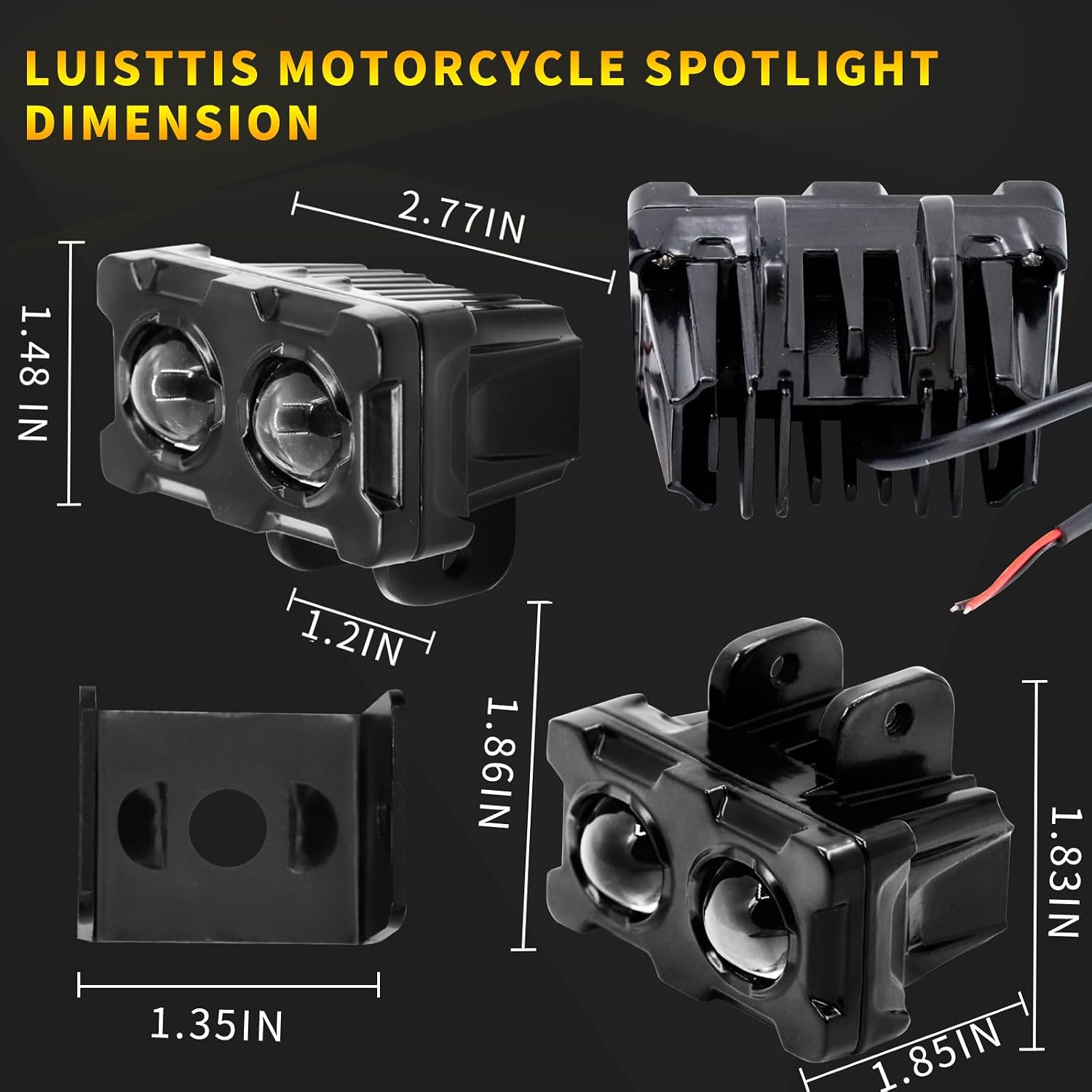
Image: Dimensions of the light unit and its adjustable bracket.

Image: Auxiliary light unit with mounting bracket.
Step 3: Wiring Connection
Identify the three wires extending from each light unit. Connect them as follows:
- Yellow Wire: Connect this wire to the low beam circuit of your vehicle. This will activate the amber light mode.
- Red Wire: Connect this wire to the high beam circuit of your vehicle. This will activate the white light mode.
- Black Wire: Connect this wire to the negative or ground terminal of your vehicle's electrical system.
Ensure all electrical connections are secure and properly insulated using electrical tape or heat shrink tubing to prevent short circuits and protect against moisture.

Image: Overview of the auxiliary lights, indicating connection points.
Step 4: Test Functionality
Once all connections are made, reconnect the vehicle battery and turn on the ignition. Test both the low beam (amber) and high beam (white) functions to ensure they operate correctly and illuminate as expected.
Operating Instructions
Switching Light Modes
The PLUSBEAM auxiliary lights offer dual-color functionality (white for high beam, amber for low beam). The method for switching between these modes depends on how they are integrated into your vehicle's electrical system:
- Separate Switches: If the yellow and red wires are connected to individual switches, use the respective switch to activate either the amber (low beam) or white (high beam) light.
- Single Switch with Sequential Switching: If wired to a single switch designed for sequential operation, rapidly cycle the switch (e.g., turn off then immediately on) to alternate between the amber and white light modes.

Image: White (High Beam) and Amber (Low Beam) light output.

Image: Visual comparison of amber low beam and white high beam illumination.
Care and Maintenance
- Cleaning: To maintain optimal light output and clarity, regularly clean the lens of the auxiliary lights with a soft, damp cloth. Avoid using abrasive cleaners or harsh chemicals that could damage the lens material.
- Inspection: Periodically inspect all mounting bolts and wiring connections. Ensure they remain tight and show no signs of wear, corrosion, or damage. Re-tighten any loose fasteners.
- Heat Dissipation: The integrated heat sink is crucial for the lights' longevity. Ensure the heat sink fins are kept clear of dirt, mud, and debris to allow for efficient cooling and prevent overheating.

Image: Illustration of the heat dissipation design.

Image: Detail of the aluminum alloy heat sink fins.
Troubleshooting
| Problem | Possible Cause | Solution |
|---|---|---|
| Lights do not turn on. | Loose wiring connection, blown fuse, incorrect wiring, insufficient power supply. | Check all wiring connections for tightness. Inspect vehicle fuses and replace if necessary. Verify wiring against the installation instructions. Ensure the power supply is within the 12-80V DC range. |
| Only one light mode works (e.g., only white or only amber). | Incorrect wiring for dual-color function, faulty switch. | Re-check the connections for the red (white light) and yellow (amber light) wires. If using a switch, test its functionality or try bypassing it temporarily to isolate the issue. |
| Lights flicker or appear dim. | Loose connection, low voltage from vehicle, damaged wiring, corrosion at terminals. | Inspect all connections for looseness or corrosion and clean if necessary. Verify the vehicle's voltage output. Check for any damaged or frayed wires. |
Warranty and Customer Support
PLUSBEAM products are manufactured to high standards for durability and performance. For any questions, technical assistance, or to inquire about warranty claims, please contact PLUSBEAM customer support through your original purchase platform or the official brand website.
Please retain your proof of purchase, such as your order number or receipt, as it may be required for warranty services.