Introduction
This manual provides detailed instructions for the assembly, operation, and maintenance of your Homall G-22 PRO Electric Height Adjustable Desk Frame. Please read this manual thoroughly before use to ensure proper function and safety.

Image: Homall G-22 PRO Electric Height Adjustable Desk Frame.
Safety Warnings
- Maximum Dynamic Load: The maximum dynamic load capacity for this desk frame is 130 kg. Do not exceed this weight.
- Assembly: Use the four-pin safety locking mechanism to mount the desktop securely.
- Height Adjustment: During height adjustment, be aware of the anti-collision function. It is designed to detect and avoid potential obstacles, automatically reversing a short distance before stopping.
- Positioning: Ensure the desk is correctly positioned and securely fastened, especially when children are nearby.
- General Safety: Keep hands and objects clear of moving parts during operation.
Package Contents
The Homall G-22 PRO desk frame includes all necessary components for assembly:
- G-22 PRO Desk Frame (Dual Motors)
- Control Unit with Memory Function and USB Port
- 4 Lockable Wheels
- 4 Stainless Steel Hooks
- Assembly Hardware
- Detailed Assembly Instructions (refer to this manual)
Setup and Assembly
The Homall G-22 PRO desk frame is designed for straightforward assembly, typically completed within 30 minutes.
- Unpack Components: Carefully remove all parts from the packaging and verify against the package contents list.
- Assemble Frame: Follow the detailed assembly instructions provided with the product. Ensure all screws and fasteners are tightened securely.
- Attach Desktop: Secure your chosen desktop to the frame using the four-pin safety locking mechanism. Ensure the desktop is centered and stable.
- Install Accessories: Attach the 4 lockable wheels for mobility or the fixed feet for stability. Install the 4 stainless steel hooks as desired for hanging items.
- Connect Power: Plug the power cord into a suitable electrical outlet.
Applicable Desktop Sizes: The frame's lateral extension range is 100 cm to 180 cm. This accommodates desktops with a width of 60 cm to 80 cm and a length of 120 cm to 200 cm.

Image: Desk frame dimensions and compatible desktop sizes.

Image: Replaceable lockable wheels and stainless steel hooks.
Operating Instructions
The Homall G-22 PRO features an intuitive control unit for easy height adjustment and memory functions.

Image: Control unit with touchscreen, child lock, and USB port.
Initial Setup / Reset
Before first use, or after a power interruption, a reset may be required. Refer to the specific instructions in your product's detailed manual for the exact reset procedure. (Typically involves holding down specific buttons until the desk reaches its lowest point and slightly rises).
Adjusting Height
- Use the Up (^) and Down (v) arrows on the control unit to manually adjust the desk height.
- The height is adjustable from 60 cm to 125 cm.
Memory Presets
- To Save a Height: Adjust the desk to your desired height. Press the "M" button, then press one of the numbered preset buttons (1, 2, 3, or 4) within a few seconds. The display will confirm the save.
- To Recall a Height: Simply press the corresponding numbered preset button (1, 2, 3, or 4). The desk will automatically move to the saved height.
Anti-Collision Function
The desk is equipped with an anti-collision system. If the desk encounters an obstacle during height adjustment, it will automatically stop and reverse slightly to prevent damage.
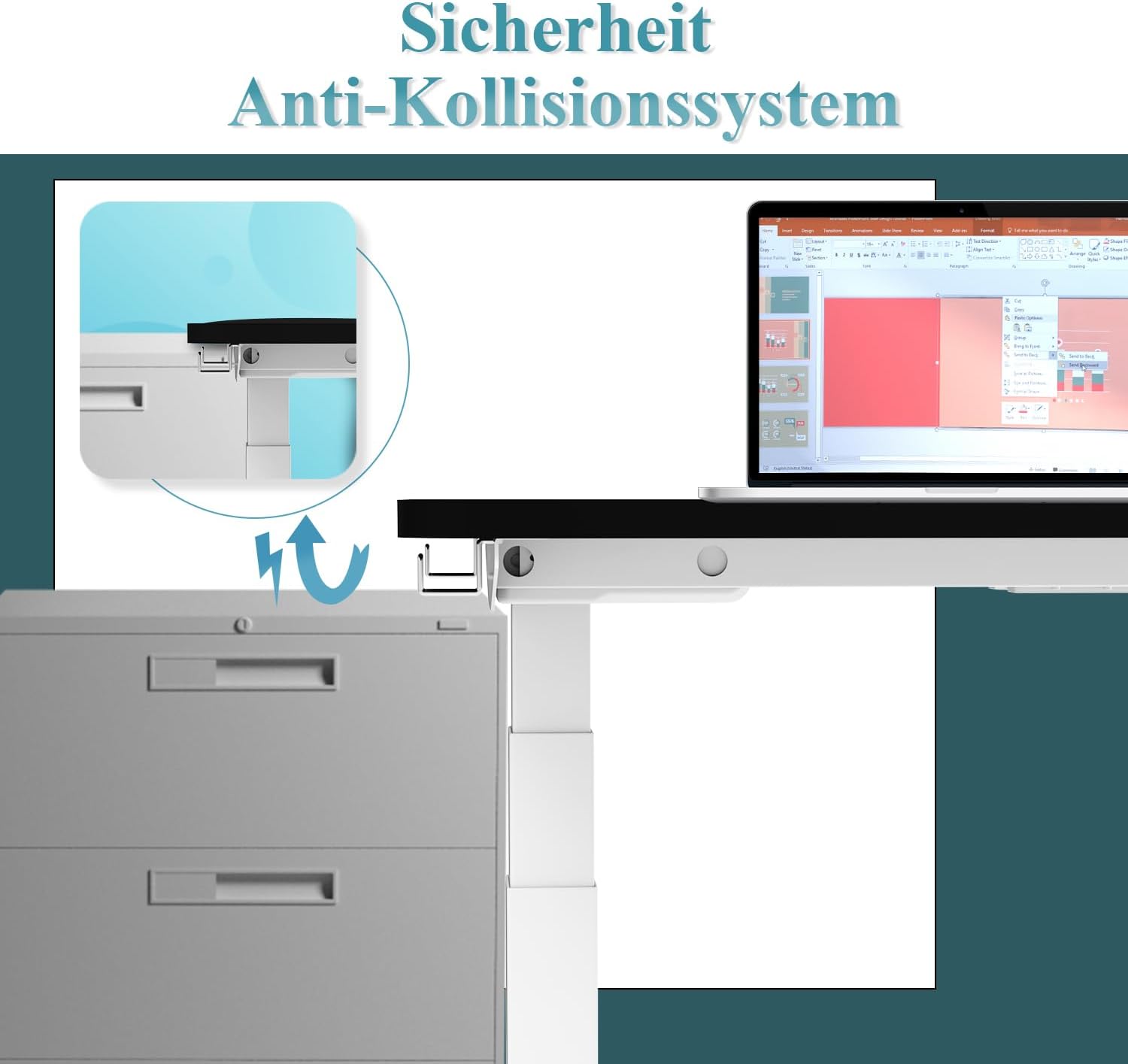
Image: Anti-collision system in action.
Child Lock
The control unit includes a child lock feature for added safety. Refer to your product's detailed manual for activation and deactivation instructions (typically involves holding specific buttons for 5 seconds).
Integrated USB Port
The control unit features an integrated USB port for convenient charging of your devices.
Features
- Dual Motor System: Equipped with two upgraded G-22 Pro motors for enhanced stability and a maximum dynamic load capacity of 130 kg.
- Height Range: Adjustable from 60 cm to 125 cm, suitable for users between 1m and 2.05m tall for both sitting and standing positions.
- Memory Presets: Four programmable height memory settings for quick adjustments.
- Anti-Collision System: Automatically detects and reverses upon encountering obstacles during movement.
- Child Lock: Provides additional safety by locking the control panel.
- Integrated USB Port: For convenient device charging.
- Accessories: Includes 4 lockable wheels for mobility and 4 stainless steel hooks for organization.

Image: Maximum load capacity of 130 kg.
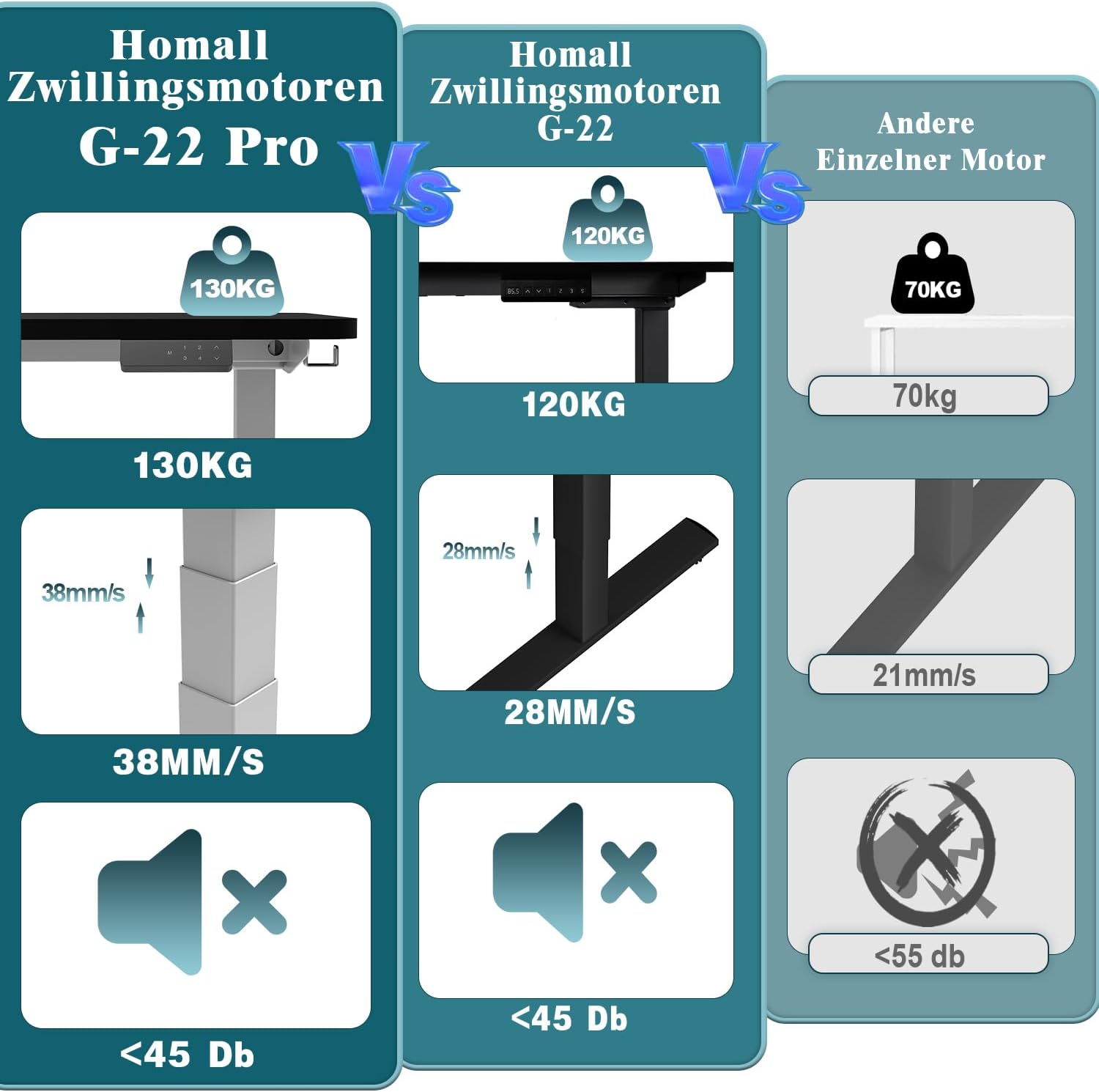
Image: Dual motor performance comparison.

Image: Guide for determining correct desk height.
Maintenance
- Cleaning: Wipe the desk frame with a soft, damp cloth. Avoid abrasive cleaners or solvents.
- Inspection: Periodically check all screws and connections to ensure they are tight.
- Cable Management: Ensure power cables are not pinched or tangled during height adjustments.
- Lubrication: No special lubrication is required for the motor mechanisms.
Troubleshooting
If you encounter issues with your Homall G-22 PRO desk frame, refer to the following common solutions:
Desk Not Moving / No Power
- Check if the power cord is securely plugged into both the desk and the wall outlet.
- Ensure the power outlet is functional.
- Perform a system reset (refer to "Initial Setup / Reset" in Operating Instructions).
Desk Stops During Adjustment
- The anti-collision system may have been activated. Check for any obstacles in the desk's path. Remove obstacles and try again.
- The desk may have reached its maximum or minimum height limit.
Uneven Movement
- Ensure the desk is not overloaded beyond its 130 kg capacity.
- Check that all assembly screws are tightened evenly.
- Perform a system reset.
Control Unit Unresponsive
- Check if the child lock is activated. Deactivate it if necessary.
- Disconnect and reconnect power to the desk to perform a soft reset.
If problems persist, please contact Homall customer support.
Specifications
| Feature | Specification |
|---|---|
| Brand | Homall |
| Model Number | G-22 PRO |
| Material | Metal (Alloy Steel) |
| Color | Black |
| Height Adjustment Range | 60 cm to 125 cm |
| Maximum Dynamic Load | 130 kg |
| Compatible Desktop Length | 120 cm to 200 cm |
| Compatible Desktop Width | 60 cm to 80 cm |
| Motors | Dual Motors |
| Special Features | Height Adjustable, Electric, Anti-Collision, Memory Presets, Child Lock, Integrated USB Port |
Warranty and Support
The Homall G-22 PRO desk frame comes with a comprehensive warranty and dedicated customer support.
- Return Policy: Enjoy a free return policy within the first 60 days, no questions asked.
- Warranty: A full 5-year warranty covers the machine.
- Technical Support: Free technical support is available 24 hours a day.
- Spare Parts: Free spare parts service is provided.
- Contact: For any questions or support needs, please contact Homall customer service.


