
Ranger DST-2420
Ranger DST-2420 Tire Balancer User Manual
Model: DST-2420
1. Introduction
This manual provides essential instructions for the safe and efficient operation, installation, and maintenance of the Ranger DST-2420 Tire Balancer. The DST-2420 is designed for accurate wheel balancing, featuring Digital Sensor Technology and a Direct-Axis drive system to ensure precise, vibration-free wheel balancing for various vehicle types.
Please read this manual thoroughly before operating the equipment. Retain this manual for future reference.
2. Safety Information
WARNING: Failure to follow these safety instructions may result in serious injury or equipment damage.
- Always wear appropriate personal protective equipment (PPE), including safety glasses and gloves.
- Ensure the balancer is installed on a level, stable surface capable of supporting its weight and the weight of the wheel being balanced.
- Disconnect power before performing any maintenance or service.
- Keep hands, hair, and loose clothing away from moving parts during operation.
- Do not operate the balancer if any parts are damaged or missing.
- Only trained and authorized personnel should operate this equipment.
- Keep the work area clean and well-lit.
3. Product Components and Features
The Ranger DST-2420 Tire Balancer includes the following key components and features:
- Control Panel: Digital display and input buttons for operation.
- Wheel Shaft: 40mm shaft for mounting wheels.
- Mounting Cone Package: Various cones to accommodate different wheel hub sizes.
- Tape Weight Feeder: Dispenser for adhesive wheel weights.
- Wheel Weight Starter Kit: Initial supply of wheel weights.
- Multi-directional Quartz Piezoelectric Load Sensors: For precise weight measurement.
- Direct-Axis Drive System: Ensures accurate and repeatable balancing.
- Protective Hood: Covers the wheel during rotation for safety.

Figure 3.1: Overview of the Ranger DST-2420 Tire Balancer with a wheel mounted.

Figure 3.2: Close-up of the control panel and integrated storage trays for wheel weights.

Figure 3.3: Detail of the tape weight feeder, designed for convenient access to adhesive weights.

Figure 3.4: Integrated storage rack for various mounting cones and accessories.
4. Setup and Installation
- Unpacking: Carefully remove the balancer from its packaging. Inspect for any shipping damage.
- Placement: Position the balancer on a solid, level concrete floor. Ensure adequate space around the machine for safe operation and maintenance.
- Anchoring: Secure the balancer to the floor using appropriate anchor bolts (not included) to prevent movement during operation.
- Power Connection: Connect the balancer to a dedicated electrical circuit as specified in the electrical requirements section (refer to specifications). Ensure the power supply matches the machine's requirements.
- Initial Calibration: Perform the initial calibration procedure as outlined in the separate calibration guide (if provided) or the on-screen prompts.
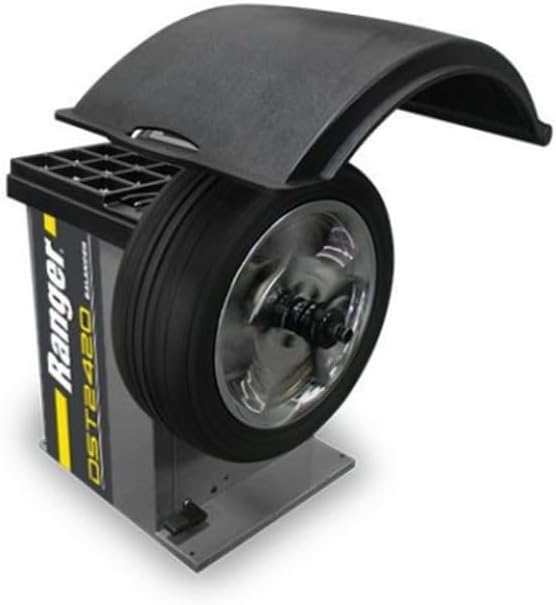
Figure 4.1: Side view of the balancer, illustrating its compact footprint for placement.
5. Operating Instructions
- Mounting the Wheel:
- Select the correct mounting cone for the wheel's center bore.
- Place the wheel onto the 40mm shaft, ensuring it is centered and snug against the cone.
- Secure the wheel with the quick-release wing nut or appropriate clamping device.
- Inputting Wheel Data:
- Manually input the wheel's diameter, width, and offset using the control panel buttons.
- Verify the entered data on the digital display.
- Starting the Balance Cycle:
- Lower the protective hood.
- Press the "START" button on the control panel. The machine will rotate the wheel to measure imbalance.
- Applying Wheel Weights:
- Once the cycle is complete, the display will indicate the required weight amount and location for both inner and outer planes.
- Rotate the wheel manually to the indicated position for weight placement.
- Select the appropriate weight from the wheel weight starter kit or tape weight feeder.
- Apply the weight to the designated area on the wheel rim.
- Re-checking Balance:
- Repeat the balance cycle by pressing "START" to confirm the wheel is balanced.
- Adjust weights as necessary until the display shows zero or minimal imbalance.
- Removing the Wheel:
- Raise the protective hood.
- Loosen the quick-release wing nut and carefully remove the balanced wheel from the shaft.
6. Maintenance
Regular maintenance ensures the longevity and accuracy of your Ranger DST-2420 Tire Balancer.
- Daily:
- Clean the machine, especially the shaft and mounting surfaces, to remove dirt and debris.
- Inspect the power cord for any damage.
- Weekly:
- Check all fasteners for tightness.
- Inspect the protective hood for cracks or damage.
- Monthly:
- Perform a calibration check using a known good test wheel.
- Lubricate moving parts as specified in the detailed service manual (if applicable).
- Annual:
- Have the machine inspected by a qualified service technician.
CAUTION: Always disconnect power before performing any maintenance.
7. Troubleshooting
| Problem | Possible Cause | Solution |
|---|---|---|
| Machine does not power on. | No power supply; tripped circuit breaker; damaged power cord. | Check power connection; reset circuit breaker; inspect/replace power cord. |
| Inaccurate balance readings. | Incorrect wheel data input; machine out of calibration; dirty shaft/cones; loose wheel mounting. | Verify wheel data; perform calibration; clean shaft/cones; re-mount wheel securely. |
| Wheel vibrates during spin. | Improper wheel mounting; damaged wheel/tire; machine malfunction. | Ensure secure mounting; inspect wheel/tire for damage; contact service if issue persists. |
| Error code displayed. | Specific internal issue. | Refer to the detailed error code list in the full service manual or contact technical support. |
8. Specifications
| Attribute | Value |
|---|---|
| Brand | Ranger |
| Model | DST-2420 |
| Manufacturer | Bendpak |
| Item Weight | 356 pounds (161.48 kg) |
| Product Dimensions (L x W x H) | 38 x 30 x 46 inches (96.5 x 76.2 x 116.8 cm) |
| Shaft Diameter | 40mm |
| Maximum Wheel Diameter Capacity | 30 inches (76.2 cm) |
| Item Model Number | 5140156 |
| Manufacturer Part Number | 5140156 |
9. Warranty Information
Specific warranty details for the Ranger DST-2420 Tire Balancer are provided by the manufacturer, Bendpak. Please refer to the warranty card included with your product or visit the official Ranger/Bendpak website for the most current and comprehensive warranty policy. Keep your proof of purchase for warranty claims.
10. Customer Support
For technical assistance, parts, or service inquiries regarding your Ranger DST-2420 Tire Balancer, please contact Bendpak customer support.
Manufacturer: Bendpak
Please visit the official Ranger Store on Amazon or the Bendpak corporate website for contact information and support resources.
Related documentsDST-2420


Ask a question about this manual
Ask about setup, troubleshooting, compatibility, parts, safety, or missing instructions. Manuals+ will review the question and use this page’s manual context to help answer it.