
Important Safety Information
This laser level is a Class II laser product with a maximum output of 1 Milliwatt. Always follow safety guidelines to prevent eye injury. Do not stare directly into the laser beam.
This product is primarily designed for indoor use. For outdoor applications, a model that includes an outdoor laser receiver is recommended to ensure optimal visibility and accuracy.

Image: A warning sign indicating that the product is for indoor use only, and an outdoor laser receiver is required for outdoor use.
Package Contents
Your WEIDDW 4D 16 Lines Laser Level package includes the following items:
- WEIDDW 4D 16 Lines Laser Level
- Lithium Ion Batteries (x2)
- Rotating Base (x1)
- Wall Mounting Bracket (x1)
- Lifting Platform (x1)
- Charging Cable (x1)
- Remote Control (x1)
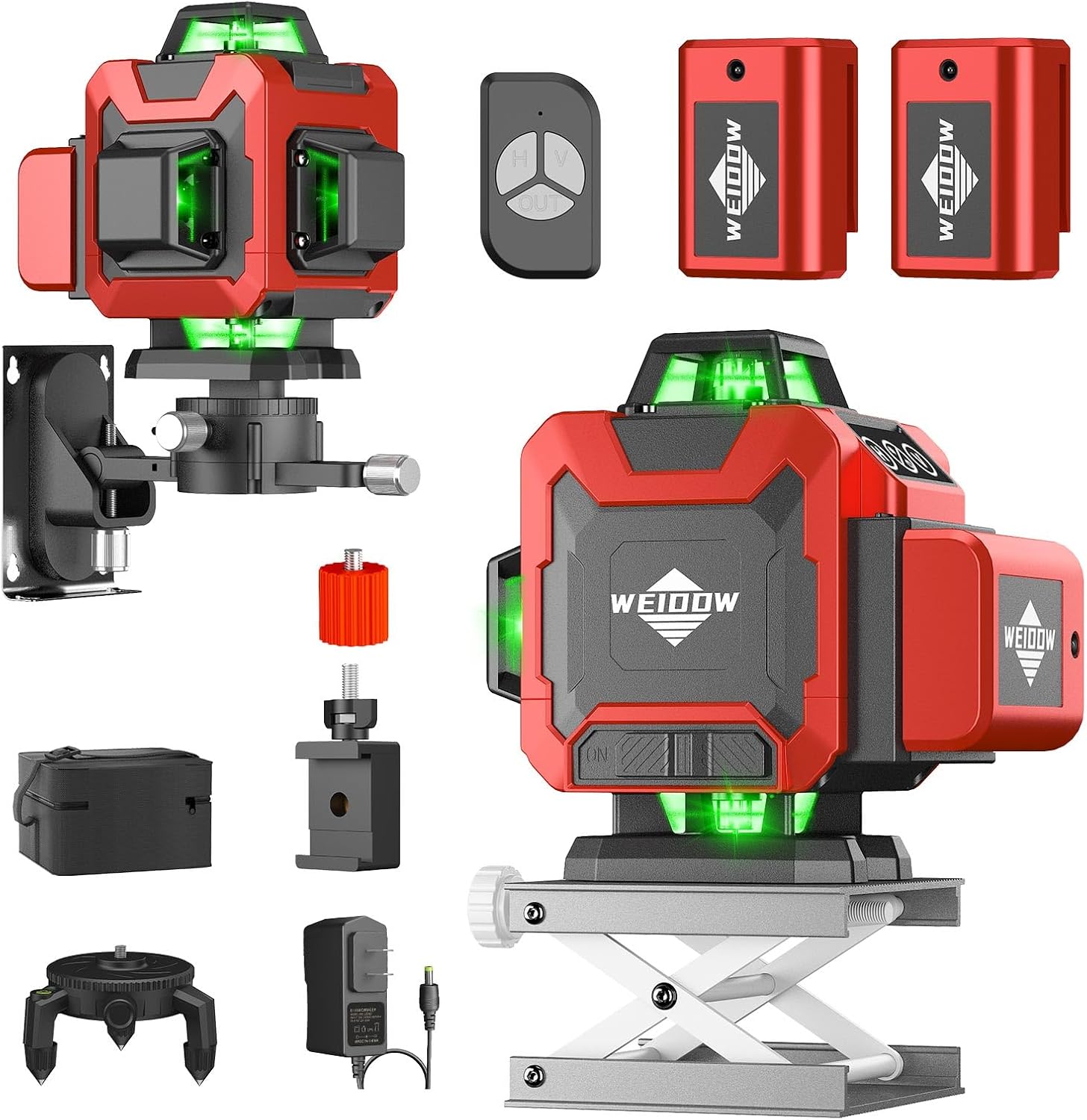
Image: The WEIDDW 4D 16 Lines Laser Level shown with all its components, including the laser unit, two batteries, remote control, wall mounting bracket, rotating base, lifting platform, and charging cable.

Image: A visual representation of the product's contents, including the laser level, batteries, remote, and various mounting accessories, displayed as "What's in the Box?".
Setup
1. Battery Installation
The laser level is powered by two Lithium Ion batteries. Ensure both batteries are fully charged before first use. The batteries can be charged using the provided charging cable.

Image: A cutaway diagram illustrating the internal components of the 2400mAh battery, highlighting its large capacity and fast charging capability, with text indicating "2 hours fast charging, 2 batteries lasting longer".
2. Attaching Accessories
The WEIDDW laser level offers multiple mounting options for versatile use:
Wall Mounting Bracket
The magnetic wall mounting bracket allows the laser level to be securely attached to metallic surfaces. It features adjustable screws for precise positioning (in/out, rotation, up/down).

Image: The laser level is shown mounted on a wall using its magnetic bracket, with a hand holding the remote control, demonstrating its wall-mounted and remote-controlled functionality.
Lifting Platform
For precise height adjustments, place the laser level on the lifting platform. Use the screw mechanism to raise or lower the platform to the desired height.
Rotating Base
The aluminum rotating base provides stability and allows for fine-tuning of the laser's horizontal alignment. It features adjustable feet to compensate for uneven surfaces.

Image: A detailed diagram illustrating the fine-tuning capabilities of the rotating base, highlighting its metal vertebral foot for height adjustment, 1/4" positive external thread, and 5/8" internal thread. It also shows the laser level projecting 2x360° horizontal and 2x360° vertical planes.
Operating Instructions
Powering On/Off
To power on the device, slide the main switch to the "UNLOCKED" position. To power off, slide the switch to the "LOCKED" position.
Self-Leveling Mode
When the main switch is in the "UNLOCKED" position, the laser level automatically enters self-leveling mode. If the surface tilt exceeds 4 degrees, the lasers will blink to indicate it's out of range.
Manual Mode
To activate manual mode (for projecting lines at any angle), slide the main switch to the "ON" side.
Line Selection
Use the buttons on the front panel to select desired laser lines:
- H Button: Press to cycle through horizontal lines (e.g., one horizontal, two horizontal).
- V Button: Press to cycle through vertical lines (e.g., one vertical, two vertical).
- Long Press H/V Button: Adjusts the thickness of the light and switches between indoor/outdoor mode.

Image: A visual guide demonstrating the self-leveling mode, showing how to slide the switch to "UNLOCK" and "LOCK" sides, and how the laser blinks if the surface tilt is more than 4 degrees. It also illustrates the remote control and magnetic bracket.

Image: A diagram explaining the manual mode, showing how to slide the switch to "ON", and how to use the H and V buttons to switch between 4 or 8 vertical lines and 4 or 8 horizontal lines. It also indicates that a long press adjusts light thickness and converts between indoor/outdoor mode, with a visual of 2x360° horizontal and 2x360° vertical planes.
Remote Control Operation
The included remote control allows for convenient operation from a distance:
- Left Button: Controls horizontal lines.
- Right Button: Controls vertical lines.
- Bottom Button: Adjusts laser brightness.
Maintenance
To ensure the longevity and accuracy of your WEIDDW Laser Level, follow these maintenance guidelines:
- Keep the device clean and free from dust and debris. Use a soft, dry cloth for cleaning.
- Store the laser level in its carrying case when not in use to protect it from impacts and environmental factors.
- Avoid exposing the device to extreme temperatures or direct sunlight for prolonged periods.
- Regularly check battery contacts for corrosion and clean if necessary.
Troubleshooting
Laser Lines Not Appearing
- Ensure the main switch is in the "UNLOCKED" or "ON" position.
- Check battery charge level. Recharge or replace batteries if low.
- Verify that the selected line mode (Horizontal or Vertical) is active.
Lasers Blinking
- In self-leveling mode, blinking lasers indicate the device is out of its ±4° self-leveling range. Adjust the position of the laser level until it is on a more level surface.
Inaccurate Lines
- Ensure the device is on a stable surface and within its self-leveling range.
- Check for any obstructions blocking the laser beam.
- If using manual mode, ensure the device is properly aligned for your specific application.
Specifications
| Feature | Detail |
|---|---|
| Brand | WEIDDW |
| Model Number | 360-1 |
| Laser Class | Class II |
| Wattage | 1 Milliwatt |
| Self-Leveling Range | ±4° |
| Power Source | Battery Powered (2 Lithium Ion batteries included) |
| Material | Rubber |
| Color | Red |
| Product Dimensions | 9.4"L x 8.26"W |
| Item Weight | 3.67 pounds |
Warranty and Support
WEIDDW offers a 2-year warranty on this laser level. For any questions, troubleshooting assistance, or usage tips, our dedicated support team is available 24/7.
Please refer to the contact information provided in your product packaging or visit the official WEIDDW store for further assistance.


