
1. Introduction
Thank you for choosing the intelamp Solar Fence Lights. These outdoor lights are designed to provide versatile and energy-efficient illumination for your backyard, patio, deck, steps, or stairs. Featuring 9 fixed colors and an RGB color-changing mode, these waterproof, solar-powered LED lights enhance your outdoor ambiance with ease of installation and remote control functionality.
Please read this manual thoroughly before installation and use to ensure optimal performance and longevity of your product.


2. What's in the Box
- intelamp Solar Fence Lights (2 units)
- Remote Control
- Mounting Hardware (screws, wall anchors)
- Instruction Manual (this document)
3. Specifications
| Feature | Detail |
|---|---|
| Brand | intelamp |
| Model Name | US004-3B |
| Power Source | Solar Powered |
| Material | Acrylonitrile Butadiene Styrene (ABS) |
| Light Colors | 9 fixed colors (Red, Yellow, Light Green, Green, Sky Blue, Blue, Purple, Pink, Warm White) & RGB Color Changing Mode |
| Control Method | Remote Control, On-device Button |
| Water Resistance Level | IP65 Waterproof |
| Product Dimensions | 6.7"L x 4.7"W x 4.1"H (approximate) |
| Solar Panel | 5V/120mA Monocrystalline Silicon |
| Battery | 3.2V/1200mAh Lithium Ion (included) |
| Charging Time | Approximately 9 hours in direct sunlight |
| Lighting Duration | Up to 20 hours (fully charged) |
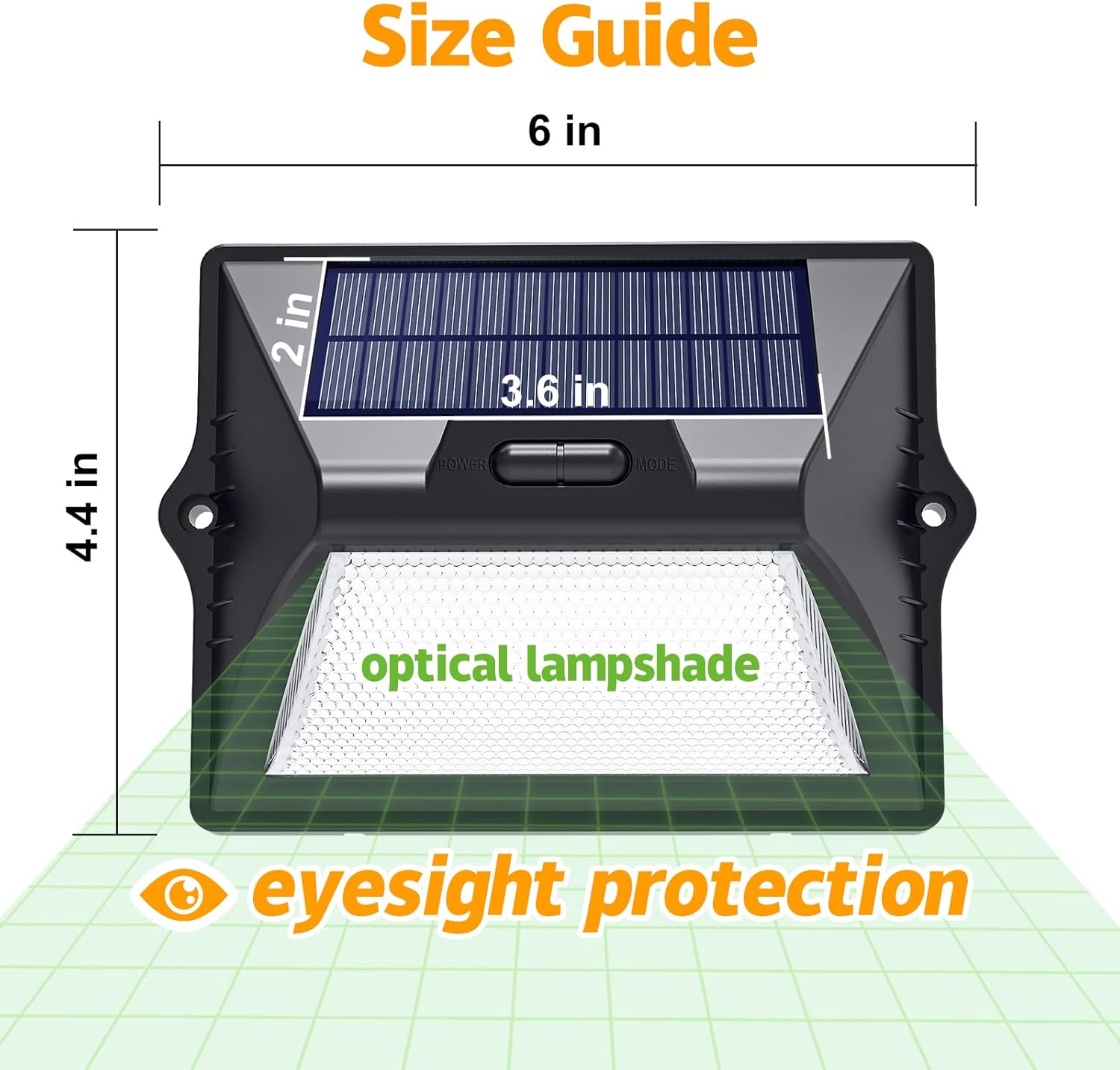

4. Setup and Installation
The intelamp Solar Fence Lights offer flexible installation options: adhesive mounting or screw fixation. No wiring is required.
4.1 Initial Activation and Charging
- Before first use, ensure the ON switch on the light is turned on. This is crucial for the light to function and charge.
- Place the solar light in a location where the solar panel receives at least 6-9 hours of direct sunlight daily.
- Allow the light to charge for a full day (approximately 9 hours) before its initial use to ensure the battery is fully charged.
4.2 Mounting Options

Adhesive Installation:
- Clean the desired surface thoroughly to ensure it is dry and free of dust or grease.
- Remove the protective backing from the adhesive strips on the back of the light.
- Press the light firmly onto the surface for at least 30 seconds. This method is suitable for smooth surfaces like glass, marble, wood, or stainless steel.
Screw Fixation:
- Choose a suitable location on a wall, fence, or deck.
- Mark the positions for the screw holes using the light as a template.
- Drill pilot holes if necessary, and insert wall anchors if mounting into masonry or drywall.
- Secure the light using the provided screws.
5. Operating Instructions
Your intelamp Solar Fence Lights can be controlled using the on-device button or the included remote control.
5.1 On-Device Control
- Locate the "POWER" and "MODE" buttons on the light unit.
- Press the "POWER" button to turn the light ON or OFF.
- Press the "MODE" button repeatedly to cycle through the available lighting modes and colors.
5.2 Remote Control Operation
The remote control provides comprehensive control over your solar lights.

- ON/OFF: Press the respective buttons to turn the lights on or off.
- Color Selection: Use the dedicated color buttons (e.g., Red, Yellow, Green, Blue, etc.) to select one of the 9 fixed colors.
- Warm White: Select this option for a standard warm white illumination.
- RGB Cycling Mode: Activate this mode for automatic color changes. The lights can cycle colors every 3 seconds or every 30 minutes, depending on the specific remote button pressed (refer to remote markings).
- Brightness Adjustment: Use the brightness +/- buttons to increase or decrease the light intensity.
- Timer Function: Set a timer for the lights to turn off automatically after a specified duration (e.g., 3H, 5H, 8H).
Note: The ON switch on the light unit must be in the "ON" position for both the on-device button and remote control to function properly and for the light to charge.
5.3 Dusk-to-Dawn Functionality
Once activated and charged, the solar lights are designed to automatically turn on at dusk and turn off at dawn, utilizing their built-in light sensor. This function operates automatically when the light is in the "ON" position.
6. Maintenance
Regular maintenance ensures the optimal performance and longevity of your solar lights.
- Clean Solar Panel: Periodically wipe the solar panel with a soft, damp cloth to remove dust, dirt, leaves, or snow. A clean panel ensures efficient charging.
- Clear Obstructions: Ensure no trees, bushes, or structures are blocking direct sunlight from reaching the solar panel, especially during peak charging hours.
- Battery Longevity: The integrated Lithium Ion battery is designed for long-term use. If the light's performance significantly degrades over time, it may indicate the battery is reaching the end of its lifespan. Battery replacement is generally not user-serviceable.
- Weather Resistance: The lights are IP65 waterproof, heatproof, and frost-resistant, designed to withstand various outdoor conditions. However, extreme weather events may still impact performance or require inspection.

7. Troubleshooting
| Problem | Possible Cause | Solution |
|---|---|---|
| Light does not turn on at night. |
|
|
| Light duration is shorter than expected. |
|
|
| Remote control is not working. |
|
|
8. Safety Information
- Do not attempt to disassemble or modify the product. This may void the warranty and cause damage.
- Keep the product away from open flames or extreme heat sources.
- Ensure the solar panel is not covered or obstructed during the day to allow for proper charging.
- Dispose of batteries according to local regulations. Do not dispose of batteries in household waste.
- This product is designed for outdoor use. Do not use indoors unless specified.
9. Warranty and Support
The intelamp Solar Fence Lights come with a Limited Warranty. Please refer to the warranty card included in your packaging for specific terms and conditions.
For any questions, technical support, or warranty claims, please contact intelamp customer service through the retailer where the product was purchased or visit the official intelamp website.
Manufacturer: INTELAMP