
1. Introduction
Thank you for choosing the TEEHO Keyless Entry Door Lock with 2 Handles. This manual provides detailed instructions for installation, operation, and maintenance to ensure optimal performance and security. Please read this manual thoroughly before installation and keep it for future reference.
Package Contents
- 1 Electronic Keypad Deadbolt
- 1 Door Lever Handle Set (2 handles)
- 1 Keypad Deadbolt Lock
- 4 AA Batteries
- Mounting Hardware
- User Manual
Key Features
- Keyless Entry: Supports up to 20 user access codes (4-10 digits) and one-time codes.
- Smart-Locking: Adjustable auto-lock feature (10-99 seconds) and one-touch auto-lock.
- Enhanced Security: ANSI Grade 3 smart door lock cylinder, anti-peeping password function, mute mode, vacation mode, and backlit keypad.
- Durable Design: Constructed from durable alloy with an IP54 weather resistance rating.
- Easy Installation: Designed for straightforward setup.
2. Safety Information
Please observe the following safety precautions to prevent injury or damage to the product:
- Do not attempt to disassemble or modify the lock. This may cause damage and void the warranty.
- Use only the specified AA batteries. Do not mix old and new batteries or different types of batteries.
- Keep all components out of reach of children.
- Protect the keypad from excessive moisture or direct water exposure.
- Ensure proper installation to prevent malfunction. If unsure, consult a qualified locksmith or installer.
3. Product Overview
The TEEHO Keyless Entry Door Lock system combines a keypad deadbolt with a door lever for comprehensive security and convenience.
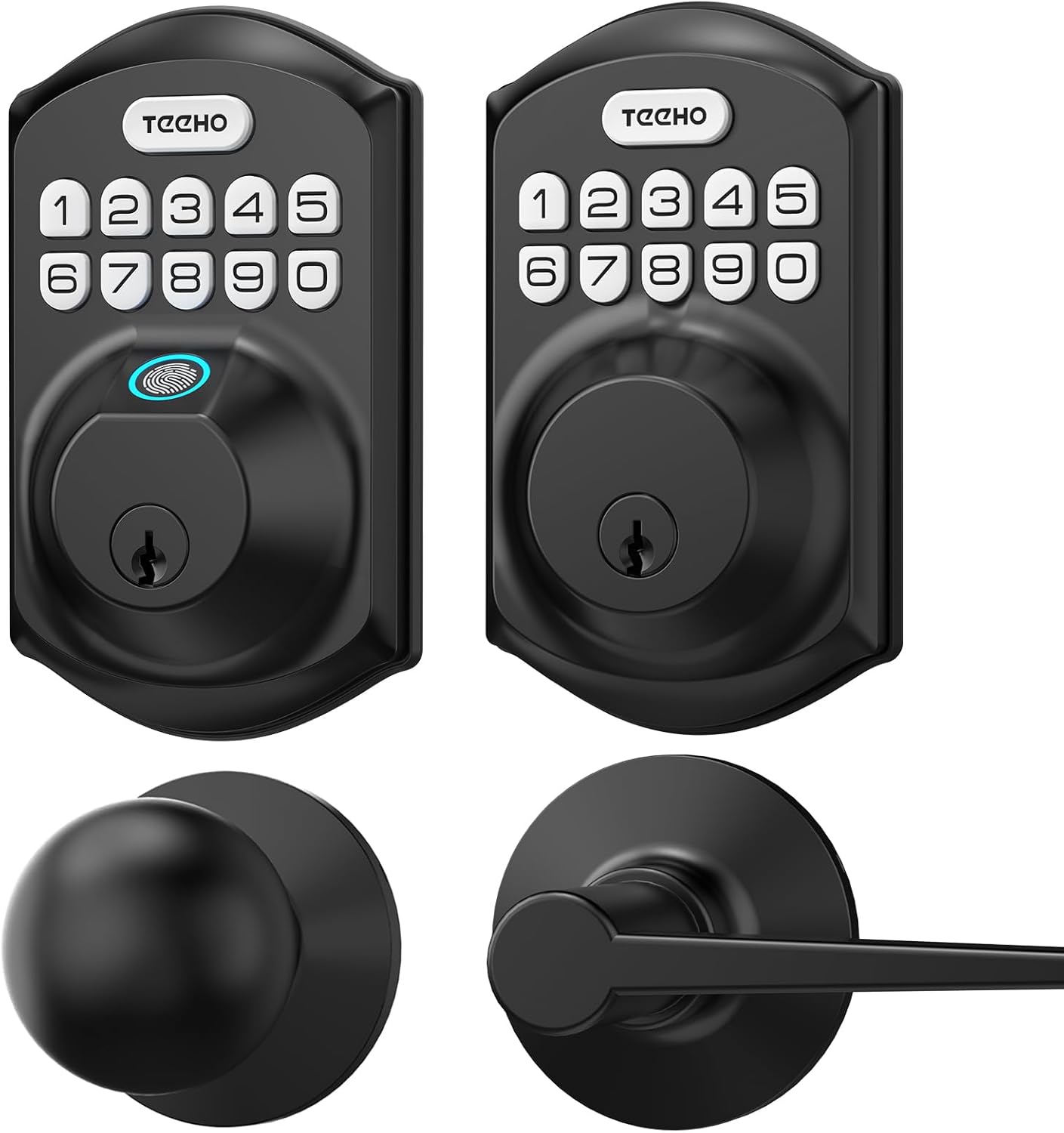
Image 3.1: Overview of the TEEHO Keyless Entry Door Lock components, including the electronic keypad deadbolt, a standard deadbolt, and two door lever handles, all in a matte black finish.

Image 3.2: The TEEHO Keyless Entry Door Lock installed on a white door, featuring the electronic keypad deadbolt above a matching door lever. The interior view shows the corresponding hardware.
4. Setup and Installation
The TEEHO Keyless Entry Door Lock is designed for easy installation. Follow these steps carefully.
4.1 Prepare the Door
- Ensure your door meets the required dimensions for installation (standard door thickness and backset).
- Remove any existing lock hardware.
4.2 Install the Deadbolt Latch
- Insert the deadbolt latch into the door edge. Ensure the “UP” marking is facing upwards.
- Secure the latch with screws.
4.3 Install the Exterior Keypad Assembly
- Feed the cable through the hole in the door.
- Align the exterior keypad assembly with the deadbolt latch and secure it to the door.
4.4 Install the Interior Mounting Plate
- Attach the interior mounting plate to the door, ensuring the cable passes through the plate.
- Secure the mounting plate with screws.
4.5 Connect Cables and Install Interior Assembly
- Connect the cable from the exterior assembly to the interior assembly.
- Mount the interior assembly onto the mounting plate and secure it with screws.
4.6 Install Batteries
- Remove the battery cover from the interior assembly.
- Insert 4 AA batteries, observing polarity (+/-).
- Replace the battery cover.

Image 4.1: An exploded view of the TEEHO Keyless Entry Door Lock components, illustrating the internal mechanism and how the exterior keypad, interior assembly, and deadbolt latch fit together during installation.
4.7 Install Door Lever Handles
- Install the latch mechanism for the door lever into the door edge.
- Attach the exterior and interior door lever handles, securing them according to the provided instructions.
5. Operating Instructions
Learn how to use the various features of your TEEHO Keyless Entry Door Lock.
5.1 Unlocking the Door
- Using a User Code: Enter your 4-10 digit user code on the keypad, then press the “Lock” button (or checkmark/enter button if present). The lock will retract.
- Using a Physical Key: Insert the physical key into the keyhole and turn to unlock.

Image 5.1: A person using the TEEHO Keyless Entry Door Lock, highlighting the keypad and a fingerprint sensor for quick unlocking. The image suggests a rapid identification and unlocking process.
5.2 Locking the Door
- Automatic Locking: If enabled, the lock will automatically engage after a set period (10-99 seconds) once the door is closed.
- One-Touch Locking: Press and hold any key on the keypad for 2 seconds to instantly lock the door.
- Manual Locking: From the interior, turn the thumb-turn to lock the deadbolt.

Image 5.2: A visual representation of the auto-lock and one-touch locking features of the TEEHO Keyless Entry Door Lock. It shows a timer icon indicating automatic locking after 10-99 seconds and a lock icon for the 2-second one-touch lock.
5.3 Anti-Peeping Password
To prevent others from guessing your code, you can enter random digits before or after your actual code. The lock will still recognize the correct sequence within the longer entry.

Image 5.3: An illustration of the anti-peep tactile keypad feature. It demonstrates how random digits can be added before or after the actual password to obscure it from onlookers, enhancing security.
5.4 Mute Mode
The lock can be set to mute mode to disable keypad tones for quiet operation.
5.5 Vacation Mode
Activate vacation mode for enhanced security when you are away for an extended period. This mode typically disables all user codes until manually deactivated.
6. Programming Codes
The lock supports up to 20 user codes and one-time codes.

Image 6.1: An infographic detailing the access options for the TEEHO Keyless Entry Door Lock, showing support for up to 20 user codes, one-time PIN codes, and two physical keys for unlocking.
6.1 Adding User Codes
- Press the “Program” button (usually located on the interior assembly).
- Enter the default master code (refer to quick start guide or factory settings).
- Follow the voice prompts or indicator lights to enter a new 4-10 digit user code.
- Confirm the new code.
6.2 Deleting User Codes
- Press the “Program” button.
- Enter the master code.
- Follow the prompts to select the option for deleting user codes.
- Enter the specific user code to be deleted or choose to delete all user codes.
6.3 Setting One-Time Codes
One-time codes are ideal for temporary access (e.g., for delivery personnel or service providers). Once used, the code is automatically deleted.
- Press the “Program” button.
- Enter the master code.
- Follow the prompts to select the one-time code option.
- Enter the desired one-time code.
7. Maintenance
7.1 Battery Replacement
The lock is powered by 4 AA batteries, providing over 1 year of use under normal conditions. Replace batteries when the low battery indicator appears or when the lock becomes unresponsive.
- Remove the battery cover on the interior assembly.
- Remove the old batteries.
- Insert 4 new AA batteries, ensuring correct polarity.
- Replace the battery cover.
7.2 Cleaning
Clean the lock's exterior with a soft, damp cloth. Avoid abrasive cleaners or solvents that could damage the finish or electronic components.
8. Troubleshooting
| Problem | Possible Cause | Solution |
|---|---|---|
| Lock does not respond to keypad entry. | Low batteries; incorrect code; keypad malfunction. | Replace batteries; re-enter code carefully; contact support if issue persists. |
| Auto-lock feature not working. | Feature disabled; incorrect time setting. | Ensure auto-lock is enabled and set to desired time in programming. |
| Lock is difficult to turn or operate. | Misalignment during installation; worn components. | Check installation alignment; lubricate moving parts if necessary; contact support for severe issues. |
| Keypad backlight not working. | Batteries low; setting disabled. | Replace batteries; check programming settings for backlight. |
9. Specifications
- Brand: TEEHO
- Model: Keyless Entry Door Lock with 2 Handles
- Lock Type: Keypad Deadbolt with Door Lever
- Special Feature: Keyless Entry, Auto-Lock, One-Time Code, Anti-Peep Password, Mute Mode, Vacation Mode, Backlit Keypad
- Security Rating: ANSI Grade 3
- Weather Resistance: IP54
- Power Source: 4 AA Batteries (approx. 1 year lifespan)
- Access Codes: Up to 20 user codes (4-10 digits)
- Control Method: Touch Keypad, Mechanical Key
10. Warranty and Support
TEEHO products are manufactured to high-quality standards. For warranty information, technical support, or assistance with your product, please refer to the warranty card included in your package or visit the official TEEHO website. Please have your product model and purchase date available when contacting support.