
1. Introduction and Overview
The NORTH EDGE ALPS is a robust digital watch designed for outdoor enthusiasts and daily wear. It features a pedometer, digital compass, stopwatch, countdown timer, metronome, three alarms, perpetual calendar, and an EL backlight. This watch operates independently, requiring no smartphone application or Bluetooth connection. Its 50-meter water resistance makes it suitable for rain, sweat, splashes, and hand washing, but it is not intended for diving, hot showers, or saunas.
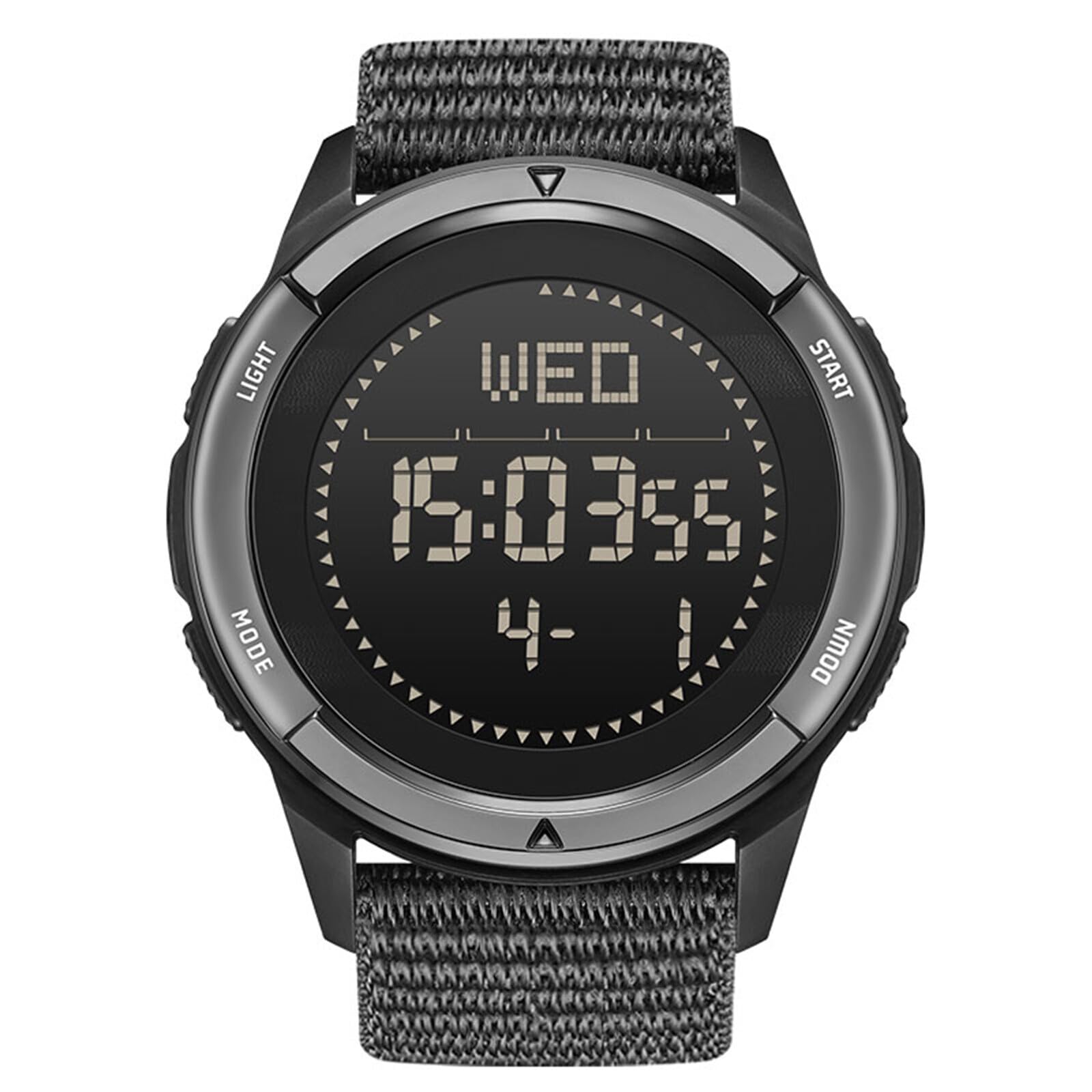
Image 1.1: Front view of the NORTH EDGE ALPS Digital Watch, showcasing its digital display and rugged design.
2. Watch Components and Buttons
Familiarize yourself with the watch's buttons and their primary functions:
- LIGHT Button (Top Left): Activates the EL backlight for visibility in low-light conditions.
- MODE Button (Bottom Left): Cycles through different watch modes (Time, Pedometer, Compass, Stopwatch, Countdown, Alarm, Metronome).
- START Button (Top Right): Used to start/stop functions in various modes (e.g., stopwatch, pedometer reset). Also used for setting adjustments.
- DOWN Button (Bottom Right): Used to adjust values downwards during settings or to switch display information.

Image 2.1: Diagram illustrating the watch dimensions (45mm diameter, 12.5mm thickness, 24mm strap width) and button locations.
3. Setup and Initial Configuration
3.1. Setting Time and Date
- In Time Mode, press and hold the MODE button until the seconds begin to flash.
- Press the START button to cycle through the setting options: seconds, hour, minute, year, month, day, 12/24-hour format.
- Use the DOWN button to adjust the flashing value.
- Once all settings are correct, press the MODE button to exit the setting mode.
3.2. Compass Calibration
For accurate readings, the compass must be calibrated before first use and periodically thereafter, especially after significant magnetic interference.
- Enter Compass Mode by pressing the MODE button until 'COMP' is displayed.
- Follow the on-screen instructions to perform the calibration. This typically involves rotating the watch horizontally in a figure-eight motion or rotating it 360 degrees on a flat surface.
- Ensure you are away from strong magnetic fields (e.g., large metal objects, electronics) during calibration.
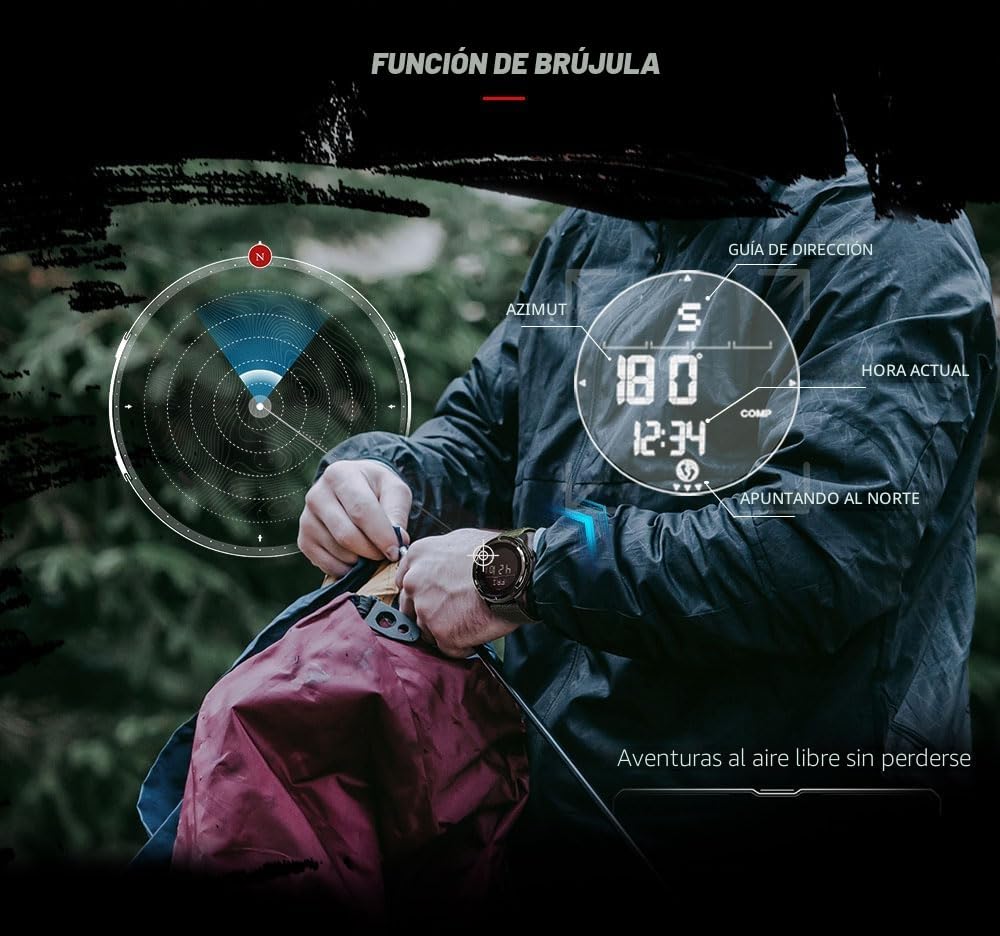
Image 3.1: Visual guide for compass calibration, showing the watch display with direction and azimuth.
4. Operating Instructions
4.1. Pedometer Function
The watch tracks steps, calories burned, distance, exercise time, and average speed without needing a smartphone app.
- Press the MODE button to navigate to the Pedometer Mode.
- The display will show your current step count.
- Press the START button to reset the pedometer data for a new activity.
- Use the DOWN button to cycle through other metrics like calories, distance, and exercise time.

Image 4.1: The watch displaying pedometer data, including steps, calories, distance, exercise time, and average speed.
4.2. Digital Compass
After calibration, the compass provides real-time directional information.
- In Compass Mode, the display shows the cardinal direction (N, S, E, W) and the azimuth angle.
- Hold the watch level for accurate readings.
4.3. Stopwatch
To use the stopwatch:
- Navigate to Stopwatch Mode using the MODE button.
- Press START to begin timing.
- Press START again to pause/resume.
- Press DOWN to record lap times (while stopwatch is running).
- To reset, ensure the stopwatch is paused, then press and hold START.
4.4. Countdown Timer
To set and use the countdown timer:
- Navigate to Countdown Mode using the MODE button.
- Press and hold START to enter setting mode.
- Use MODE to select hours, minutes, or seconds, and DOWN to adjust the values.
- Press START to confirm settings and exit.
- Press START to begin the countdown. An alarm will sound when the timer reaches zero.
4.5. Metronome
The metronome function helps maintain a consistent pace during activities.
- Navigate to Metronome Mode using the MODE button.
- Press and hold START to enter setting mode for beats per minute (BPM).
- Use DOWN to adjust the BPM.
- Press START to confirm and exit setting mode.
- Press START again to start/stop the metronome.
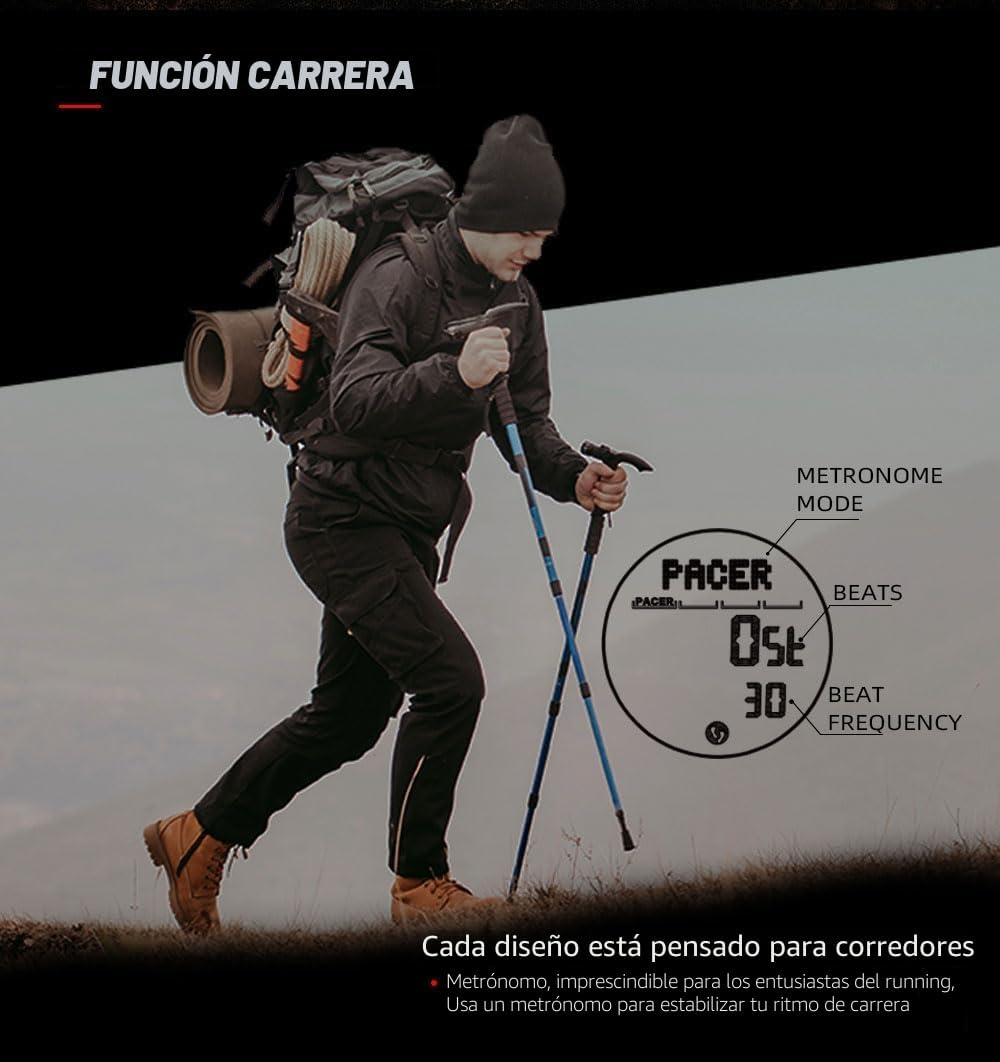
Image 4.2: The watch displaying the metronome function, showing beats per minute (BPM) for pacing during running or other activities.
4.6. Alarms
The watch supports three independent alarms.
- Navigate to Alarm Mode using the MODE button. Press DOWN to cycle through Alarm 1, 2, and 3.
- Press and hold START to enter setting mode for the selected alarm.
- Use MODE to select hours or minutes, and DOWN to adjust the values.
- Press START to confirm and exit setting mode.
- Press DOWN (while not in setting mode) to toggle the alarm ON/OFF.
4.7. EL Backlight
Press the LIGHT button (top left) to illuminate the display for a few seconds, allowing visibility in dark environments.

Image 4.3: The watch display clearly visible in low light conditions due to the EL backlight.
5. Maintenance
5.1. Cleaning
- Wipe the watch case and strap with a soft, damp cloth.
- For stubborn dirt, use a mild soap solution and rinse thoroughly with clean water.
- Ensure the watch is completely dry before storage or prolonged use.
5.2. Water Resistance
The watch is rated 5 ATM (50 meters) water resistant. This means it can withstand splashes, rain, and brief immersion in water, such as during hand washing. However, to maintain water resistance:
- Do not press any buttons while the watch is submerged in water.
- Avoid exposure to hot water, steam, or extreme temperature changes (e.g., hot showers, saunas), as this can compromise the seals.
- The watch is not suitable for diving or prolonged underwater activities.
5.3. Battery Replacement
The watch uses a CR2430 battery. When the battery is low, a low battery indicator may appear. Battery replacement should ideally be performed by a qualified technician to ensure proper sealing and water resistance.
6. Troubleshooting
- Inaccurate Compass Readings: Recalibrate the compass as described in Section 3.2. Ensure you are away from magnetic interference during calibration and use.
- Display Not Working/Flickering: Check for a low battery indicator. If present, replace the battery. If the issue persists, contact support.
- Buttons Unresponsive: Ensure the watch is not submerged in water. If dry and still unresponsive, a reset may be required (refer to the full manual if provided, or contact support).
- Water Inside Watch: Immediately stop using the watch and seek professional service. Do not attempt to open the watch yourself, as this will void the warranty.
7. Specifications
| Model Name | ALPS |
| Display Format | Digital |
| Movement Type | Quartz |
| Case Material | Carbon Fiber Composite |
| Strap Material | Nylon |
| Case Diameter | 45 mm |
| Case Thickness | 12.5 mm |
| Strap Width | 24 mm |
| Weight | Approx. 55 g |
| Water Resistance | 50 Meters (5 ATM) |
| Battery Type | 1 x CR2430 (included) |
| Special Features | Compass, Chronograph, Pedometer, EL Backlight, Timer |

Image 7.1: Overview of key features and technical specifications of the NORTH EDGE ALPS watch.
8. Warranty and Support
8.1. Warranty Information
The NORTH EDGE ALPS Digital Watch comes with a 1-year limited manufacturer's warranty. This warranty covers defects in materials and workmanship under normal use. It does not cover damage caused by misuse, accidents, unauthorized repairs, or normal wear and tear.
8.2. Customer Support
For technical assistance, warranty claims, or further inquiries, please refer to the contact information provided with your purchase or visit the official NORTH EDGE website. When contacting support, please have your watch model (ALPS) and purchase details readily available.


