1. Introduction
This user manual provides detailed instructions for the installation, operation, and maintenance of your Qiilu Bluetooth Auxiliary Audio Cable Adapter. This adapter is designed to seamlessly integrate Bluetooth audio streaming into your vehicle's existing RD4 car radio system, allowing you to enjoy wireless music from your smartphone or tablet through your car's speakers.
The product features a durable ABS and metal construction, ensuring longevity and reliable performance. It is specifically designed for music enthusiasts seeking a convenient wireless audio solution for compatible vehicles.
2. Vehicle Compatibility
This Bluetooth auxiliary audio cable adapter is compatible with various Citroen and Peugeot models equipped with Blaupunkt/VDO/RD4 car radio systems. Please ensure your vehicle's radio system is compatible before installation.
Compatible Citroen Models (2004+):
- Citroen C2 (2005+)
- Citroen C3 (2005+)
- Citroen C4 (2005+)
- Citroen C5 (2004+)
- Citroen C6 (2005+)
- Citroen C8 (2004+)
- Citroen Berlingo (2005+)
- Citroen Jumpy (2007+)
- Citroen Synergy (2005+)
Compatible Peugeot Models (2005+):
- Peugeot Expert (2007+)
- Peugeot 207 (2006+)
- Peugeot 307 (2005+)
- Peugeot 307SW (2005+)
- Peugeot 307CC (2004+)
- Peugeot 308 (2007+)
- Peugeot 407 (2005+)
- Peugeot 407SW (2005+)
- Peugeot 607 (2005+)

Figure 2.1: Visual representation of the adapter and its broad compatibility with various car models.
3. Installation Instructions
The installation of the Qiilu Bluetooth Auxiliary Audio Cable Adapter is straightforward. Follow these steps carefully to ensure proper functionality.
- Access the Car Radio: Carefully remove your car's radio unit to access the rear connectors. Refer to your vehicle's specific service manual for instructions on how to safely remove the radio.
- Locate the 12-Pin Connector Port: Identify the 12-pin connector port on the back of your car radio. This is where the main adapter plug will be inserted.
- Connect the Adapter Plug: Firmly insert the 12-pin connector of the Bluetooth adapter into the corresponding port on the back of the radio. Ensure it clicks securely into place.
- Connect Power Wires:
- Connect the red wire from the adapter to a 12V+ (positive) power source. This is typically an ignition-switched 12V line.
- Connect the black wire from the adapter to a 12V- (negative) or ground point in your vehicle.
Note: Proper wiring is crucial. If unsure, consult a professional car audio installer.
- Route Cables and Reassemble: Carefully route the adapter cable to a desired location, ensuring it does not interfere with vehicle operation. Reinstall the car radio unit and any trim panels removed during the process.

Figure 3.1: Illustration of connecting the 12-pin plug and power wires to the car radio.
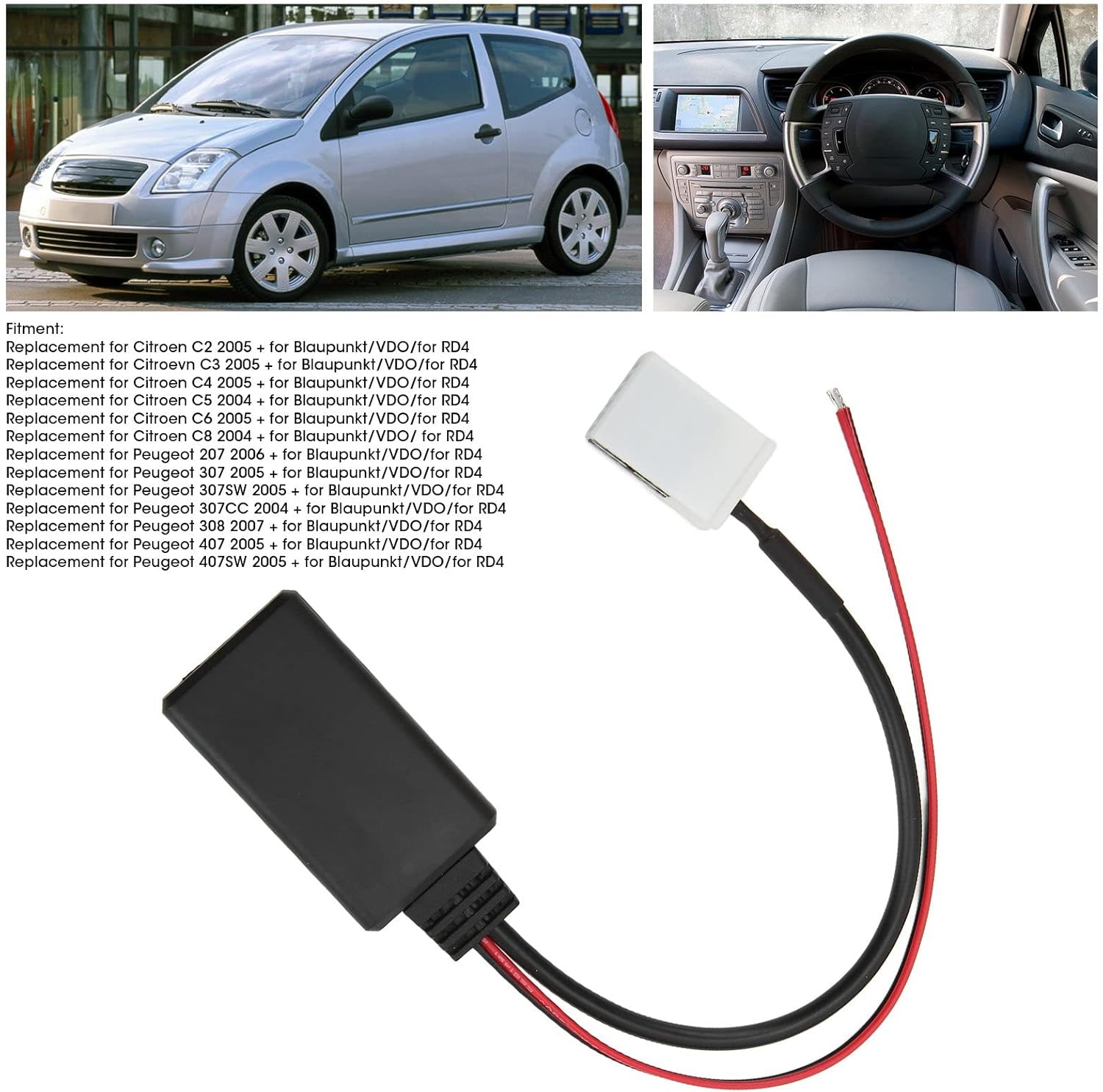
Figure 3.2: Detailed view of the adapter's connections for installation.
4. Operating Instructions
Once the adapter is correctly installed, you can begin streaming audio wirelessly.
- Turn on Car Ignition: Ensure your vehicle's ignition is on, providing power to the car radio and the Bluetooth adapter.
- Select AUX Input: On your car radio, select the AUX input mode. This may be labeled as "AUX", "CD Changer", or similar, depending on your specific radio model. The adapter functions by emulating a CD changer or auxiliary input.
- Enable Bluetooth on Your Device: On your smartphone, tablet, or other Bluetooth-enabled audio device, go to the Bluetooth settings and ensure Bluetooth is turned on.
- Pair with the Adapter: Search for available Bluetooth devices. The adapter should appear as a discoverable device (e.g., "Bluetooth Music" or similar). Select it to pair. No password is typically required.
- Start Music Playback: Once paired, open your preferred music application on your device and start playing audio. The sound will now be transmitted wirelessly through your car's speakers.
Important Notes:
- Volume Control: Adjust the volume primarily through your car's radio controls. You may also need to adjust the volume on your connected device for optimal sound levels.
- Track Control: This adapter is designed for audio streaming. Track skipping or playback control (play/pause) typically needs to be managed directly from your paired device, not through the car's steering wheel controls or radio buttons.
5. Maintenance
The Qiilu Bluetooth Auxiliary Audio Cable Adapter requires minimal maintenance to ensure its longevity and optimal performance.
- Keep Dry: Avoid exposing the adapter to moisture or liquids, as this can damage internal components.
- Clean Gently: If cleaning is necessary, use a soft, dry cloth. Do not use harsh chemicals or abrasive cleaners.
- Secure Connections: Periodically check that all connections (12-pin plug, power wires) remain secure and free from corrosion.
- Avoid Extreme Temperatures: Do not expose the device to extremely high or low temperatures, as this can affect its electronic components.
6. Troubleshooting
If you encounter issues with your Bluetooth adapter, refer to the following common problems and solutions:
| Problem | Possible Cause | Solution |
|---|---|---|
| No sound or low volume. |
|
|
| Cannot pair with Bluetooth. |
|
|
| Sound quality is poor or distorted. |
|
|
| Car steering wheel controls do not work for music. |
|
|
7. Specifications
| Feature | Detail |
|---|---|
| Product Type | AUX Audio Cable Adapter |
| Material | ABS + Metal |
| Color | Black |
| Input Voltage | 12 Volts (DC) |
| Connector Type | 12-pin (RD4 compatible) |
| Compatible Devices | Car Radio (RD4 systems), Bluetooth-enabled audio devices (smartphones, tablets) |
| Product Weight | Approx. 20g |
| Package Dimensions | 17.7 x 11.6 x 1.5 cm |
| Model Number | Qiiluhwp73cta5n-12 |
| Manufacturer | Qiilu |

Figure 7.1: Front view of the Qiilu Bluetooth Auxiliary Audio Cable Adapter.

Figure 7.2: Detailed view of the adapter's main unit.

Figure 7.3: Comparison of adapter types (New vs. Old), shipped randomly.
8. Warranty and Support
For information regarding product warranty, returns, or technical support, please refer to the purchase platform or contact the seller directly. Keep your proof of purchase for any warranty claims.
The manufacturer, Qiilu, is committed to providing quality products. For specific inquiries or assistance, please reach out to their customer service channels as provided at the point of sale.


