
Introduction
The Symcode USA-390-3TTL is an embedded barcode scanner and NFC reader module designed for integration into various systems. This compact device supports scanning of both one-dimensional (1D) and two-dimensional (2D) barcodes, including QR codes, and features an integrated NFC reader for contactless card functions. It is ideal for applications such as access control, turnstiles, lockers, self-service kiosks, and payment systems. The module offers plug-and-play functionality and an auto-induction trigger for efficient operation.
Setup
1. Unpacking and Inspection
Carefully remove the scanner module from its packaging. Verify that all components, including the scanner, user manual, and USB cable, are present and undamaged.
2. Connecting the Device
The Symcode USA-390-3TTL scanner is designed for plug-and-play operation via a USB connection, requiring no additional driver installation for basic functionality.

Figure 1: The Symcode scanner connected to a laptop via its USB cable, demonstrating its plug-and-play capability without requiring additional drivers.
Connect the provided USB cable to the scanner module and then to an available USB port on your computer or host device. The device will be recognized automatically.
3. Interface Pinout (for advanced integration)
For custom integrations or when using RS232/TTL interfaces, refer to the pinout diagram below. The scanner supports 6-pin, 5-pin, and 4-pin interfaces for secondary development.

Figure 2: Pinout diagram illustrating the connections for 6-pin, 5-pin, and 4-pin interfaces, including VBUS-5V, RS232-TX/TTL-TX, RS232-RX/TTL-RX, GND, USB-DP, and USB-DM. This is crucial for developers integrating the module into custom hardware.
Note: Ensure correct pin connections to prevent damage to the device. Incorrect wiring, particularly for power and data lines, can lead to malfunction or permanent damage. Always cross-reference with the provided documentation for your specific integration.
Operating Instructions
1. Barcode Scanning
The scanner features an auto-induction trigger, meaning it will automatically detect and scan barcodes presented within its field of view without requiring a manual trigger press. It has a wide compatibility for various barcode types.

Figure 3: The scanner demonstrating its ability to decode various 1D and 2D barcodes, including those that are blurred or incomplete, highlighting its robust decoding capabilities.
Supported Barcode Types:
- 2D Codes: QR Code, PDF 417, Data Matrix
- 1D Codes: Code128, EAN-13, EAN-8, Code39, UPC-A, UPC-E, Codabar, Interleaved 2 of 5, ISBN, Code 93, UCC/EAN-128, GS1 Databar, Industrial 2 of 5, Matrix 2 of 5, MSI
The scanner can read barcodes from both printed materials and mobile phone screens. For optimal scanning, position the barcode 1-3 inches away from the scanner's window.
2. NFC Reading
The integrated NFC reader allows for contactless card interactions, supporting various IC cards operating at 13.56MHz.

Figure 4: A user presenting an NFC card to the Symcode scanner, illustrating its contactless reading functionality for various applications.
Supported NFC Types:
- IC cards (13.56MHz contactless RFID)
- M1 cards (read and write sectors)
- NFC phones (serial number reading)
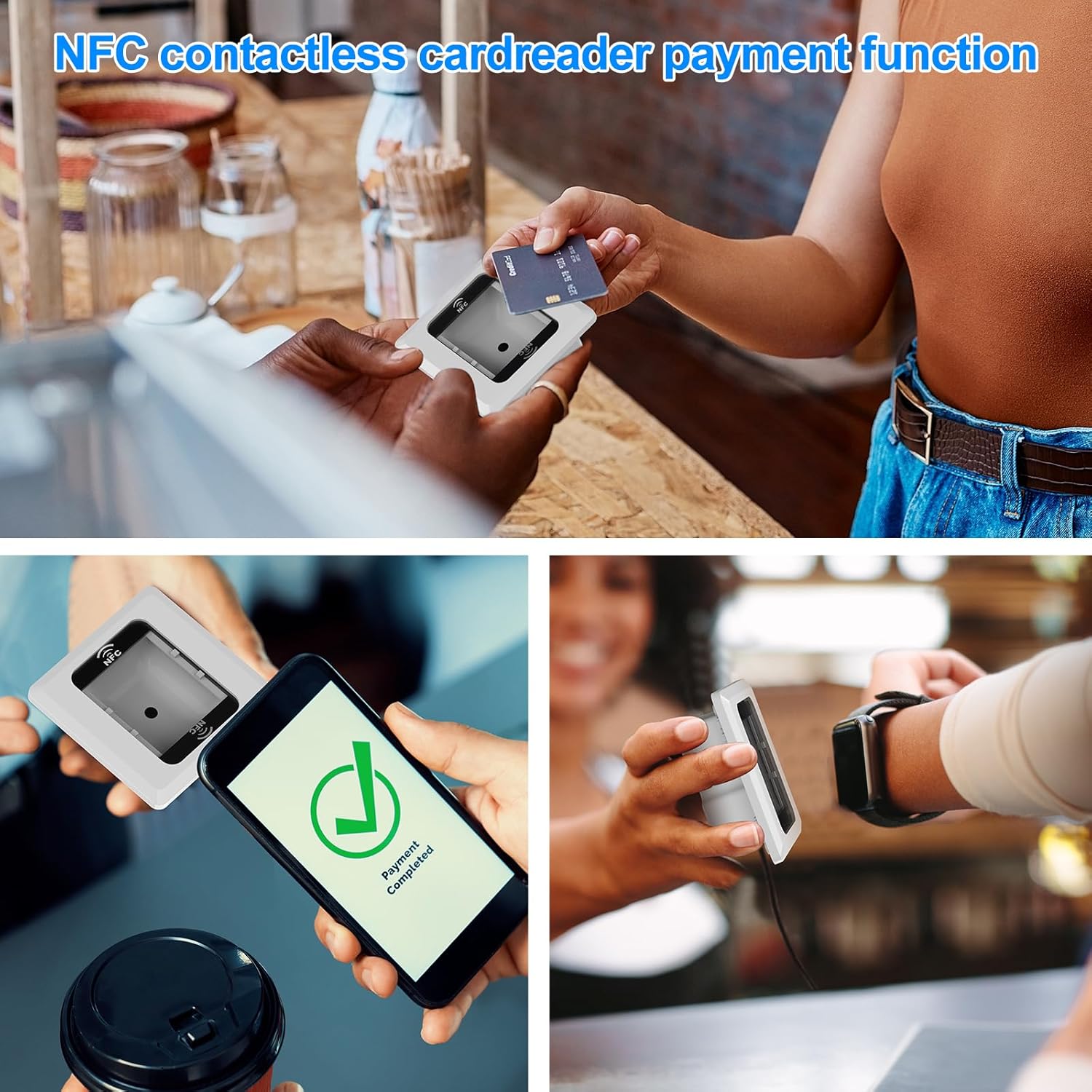
Figure 5: Various scenarios depicting the Symcode scanner facilitating NFC contactless payments, including card and mobile phone transactions, and integration into payment terminals.
3. Application Scenarios
The Symcode USA-390-3TTL is versatile and can be embedded in a wide range of terminal devices.

Figure 6: A collage illustrating the scanner's compatibility with diverse applications, including self-service kiosks, access control systems, and payment stations, demonstrating its fast barcode reading capabilities.
Common applications include:
- Access control systems
- Turnstiles
- Lockers
- Logistics express cabinets
- Independent card issuing machines
- Self-service ticket picking machines
- Automatic ticket checking machines
- Scan code payment terminals
Maintenance
1. Cleaning the Scanner Window
To ensure optimal scanning performance, keep the scanner's reading window clean. Use a soft, lint-free cloth lightly dampened with water or a mild, non-abrasive cleaning solution. Avoid harsh chemicals or abrasive materials that could scratch the surface.
2. General Care
- Avoid dropping the device. While designed with anti-shock features, excessive impact can cause damage.
- Do not expose the scanner to extreme temperatures or humidity.
- Ensure cables are not bent sharply or placed under heavy objects to prevent internal wire damage.

Figure 7: The Symcode scanner featuring an anti-shock design, indicating its durability and ability to remain functional after drops from a height of 1.5 meters (approximately 5 feet).
Troubleshooting
1. Scanner Not Reading Barcodes
- Check Distance: Ensure the barcode is positioned 1-3 inches from the scanner window. Scanning too close or too far can prevent proper focus and decoding.
- Barcode Quality: Verify the barcode is clear, not excessively damaged, or poorly printed.
- Lighting: Ensure adequate lighting, but avoid direct glare on the barcode or scanner window.
- Connectivity: Confirm the USB cable is securely connected to both the scanner and the host device.
2. Scanner Reads Barcodes Multiple Times
- This can occur if the barcode remains in the scanner's field of view after a successful read. Quickly remove the barcode after the scan confirmation (beep/LED indicator) to prevent re-triggering.
- Consult the full user manual for advanced configuration options, which may include settings to adjust scan delay or re-trigger sensitivity.
3. NFC Reader Not Detecting Cards
- Card Placement: Ensure the NFC card is placed directly over the NFC reading area of the scanner.
- Card Type: Verify that the card is a supported 13.56MHz IC card or M1 card.
- Interference: Remove any metallic objects or other RFID/NFC devices that might interfere with the signal.
4. Pinout Discrepancies (for custom integrations)
If experiencing issues during custom integration, particularly with RS232/TTL interfaces, carefully re-verify the pinout connections. There have been instances where pinout diagrams in some documentation may not perfectly match the physical product. Always test connections with a multimeter before applying power to prevent damage.
Specifications
Below are the detailed technical specifications for the Symcode USA-390-3TTL Embedded Barcode Scanner NFC Reader:

Figure 8: Dimensional drawing of the Symcode scanner, indicating its physical measurements: 3.4 inches (W) x 3.4 inches (D) x 1.3 inches (H).
| Feature | Specification |
|---|---|
| Model Number | USA-390-3TTL |
| Dimensions (D x W x H) | 1.3" x 3.4" x 1.3" (3.4 x 3.4 x 1.3 inches) |
| Weight | 110g |
| Light Source | 650nm~670nm visible laser |
| Scan Speed | 100 scans/sec |
| Read Precision | 0.1mm (4mil) |
| Print Contrast | 30% minimum |
| Depth of Field | 0~600mm (0.33mm, PCS 90%) |
| Scan Scope | 10mm~250mm |
| Reading Distance | 2.5~600mm (100% UPC/EAN) |
| Decode Capability | EAN-8/13, UPC-A/E, Code 39/93/128, EAN-128, Codabar, Industrial 2 of 5, Interleave 2 of 5, Matrix 2 of 5, MSI, QR Code, PDF 417, Data Matrix |
| Bit Error Rate | 1/5 million |
| Current Consumption | 85mA (working), 36mA (storage) |
| Interface | USB, TTL (3 TTL Interface) |
| Operating Temperature | 0℃~45℃ |
| Storage Temperature | -20℃~60℃ |
| Humidity | 5%~95% non-condensing |
| Material | ABS+PC |
| NFC Frequency | 13.56MHz |
| Optical Source | 650nm Visible red light diode |
| Indicator | Siren and LED light |
| Compatible Devices | Desktop, Laptop, Smartphone |
| Power Source | Battery Powered (via host device USB) |
| Operating Voltage | 5 Volts (DC) |
| Certifications | CE/FCC |
Warranty and Support
1. Warranty Information
The Symcode USA-390-3TTL Embedded Barcode Scanner NFC Reader comes with a 2-year quality assurance warranty. This warranty covers defects in materials and workmanship under normal use.
2. Customer Support
For any questions, technical assistance, or warranty claims, please contact our customer service. We offer 24-hour customer service to assist you with your needs.
Please refer to the product packaging or the official Symcode website for the most current contact information.