
1. Introduction
This user manual provides essential information for the safe and effective operation of your SEBRUANC LED Moving Head Light 19x15W, model ZQ02253US. This professional stage lighting fixture features 19 RGBW 4-in-1 LEDs, offering beam, wash, and zoom effects. It supports multiple control modes including DMX512, sound activation, and automatic programs. Please read this manual thoroughly before installation and use to ensure optimal performance and safety.
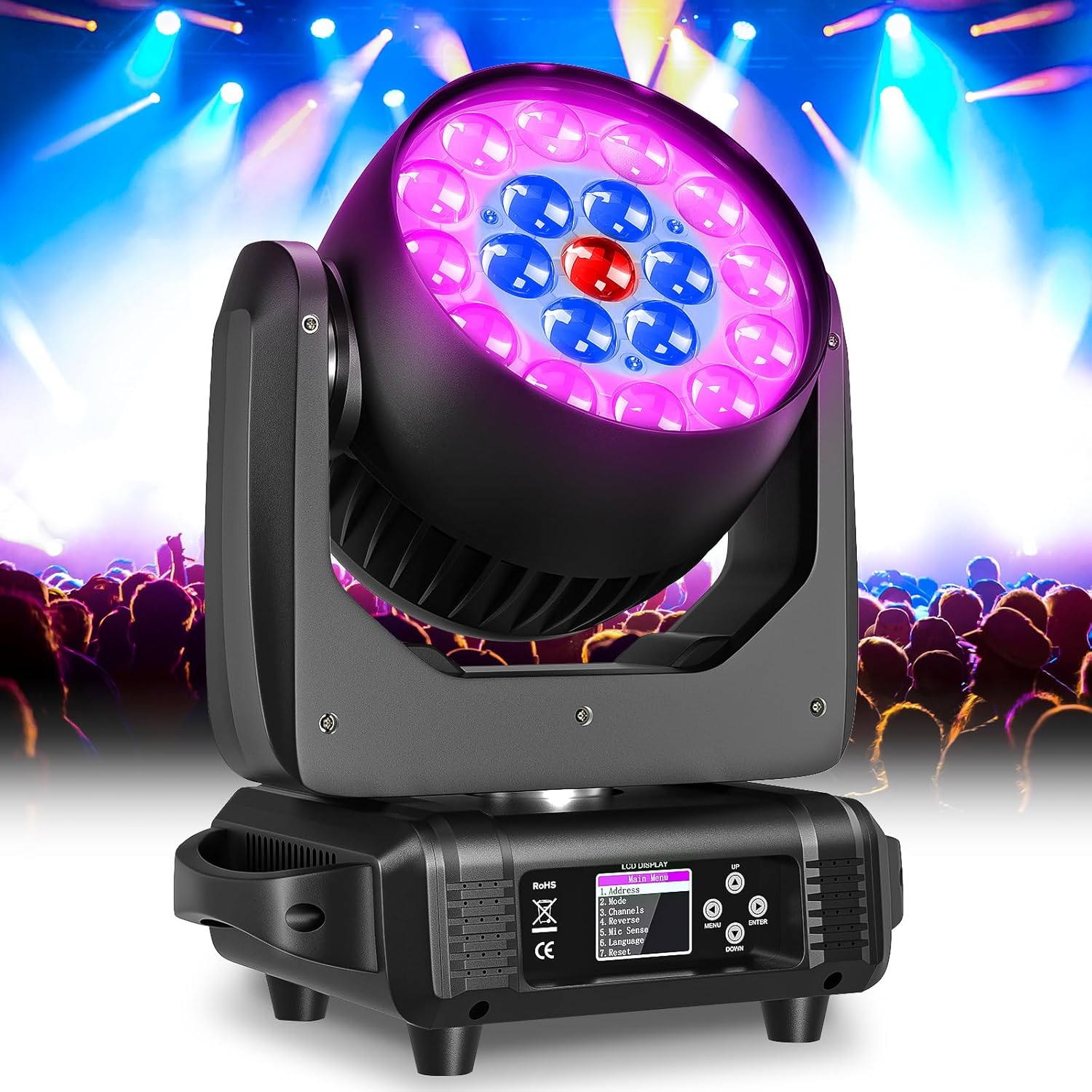
Figure 1.1: SEBRUANC LED Moving Head Light in a stage environment.
2. Safety Instructions
To prevent electric shock, fire, or injury, always observe the following safety precautions:
- Electrical Safety: Ensure the power supply voltage matches the specified requirements (AC 110V-240V, 50/60Hz). Always connect to a grounded outlet. Disconnect power before cleaning or servicing.
- Installation: Install the fixture in a well-ventilated area, away from flammable materials. Ensure secure mounting to prevent accidental falls. Maintain a minimum distance of 0.5 meters from any objects.
- Operation: Do not look directly into the light source. Avoid operating the fixture in extreme temperatures or high humidity. Do not attempt to repair or modify the unit yourself; refer all servicing to qualified personnel.
- Handling: Handle the fixture with care. Avoid dropping or subjecting it to strong impacts.
3. Product Overview
3.1 Key Features
- Powerful LED Output: Equipped with 19 RGBW 4-in-1 LEDs, each 15W, capable of producing a wide spectrum of colors.
- Versatile Effects: Integrates Beam, Wash, and Zoom functions for diverse stage lighting applications.
- Multiple Control Modes: Supports DMX512, Sound Activated, Automatic, Static Color, Strobe, and Master-Slave modes.
- Dynamic Movement: Features a unique swivel head design with 540° pan (X-axis) and 270° tilt (Y-axis) rotation.
- Adjustable Zoom: Offers a professional focusing function with an adjustable zoom angle from 5° to 60°.
- Efficient Cooling: Advanced heat dissipation design with a high-power fan ensures longevity and stable performance.

Figure 3.1: Key features of the LED Moving Head Light.
3.2 Package Contents
Upon unpacking, verify that all items listed below are present and undamaged:
- Moving Head Light (1 unit)
- Power Cord (1 unit)
- 3-Pin XLR Signal Cable (1 unit)
- Mounting Bracket (2 units)
- User Manual (1 unit)
3.3 Physical Description and Dimensions
The SEBRUANC LED Moving Head Light is constructed from durable Acrylonitrile Butadiene Styrene (ABS) and Aluminum, ensuring robustness for professional use. Its compact design allows for flexible installation.

Figure 3.2: Physical dimensions and movement range of the fixture.
- Dimensions (L x W x H): 18.3" x 10.6" x 14.6" (46.5cm x 26.9cm x 37.1cm)
- Item Weight: 18 lbs (8.1 kg)
- Pan Movement (X-axis): 540°
- Tilt Movement (Y-axis): 270°
4. Setup
4.1 Mounting
The fixture can be mounted on a ceiling, wall, or placed on a flat surface. Use the provided mounting brackets for secure overhead or vertical installations. Ensure the mounting surface or truss system can support the weight of the fixture and any additional equipment.
- Always use safety cables when mounting overhead.
- Ensure adequate clearance around the fixture for ventilation and movement.
4.2 Electrical Connection
Connect the provided power cord to the POWER-IN port on the fixture and then to a suitable grounded power outlet. The fixture supports daisy-chaining power to multiple units using the POWER-OUT port, provided the total current draw does not exceed the circuit's capacity.

Figure 4.1: Power-IN and Power-OUT connections.
4.3 DMX Connection
For DMX control, connect a 3-pin XLR DMX cable from your DMX controller's output to the DMX-IN port of the first fixture. To connect multiple fixtures, use DMX cables to link the DMX-OUT port of one fixture to the DMX-IN port of the next in a daisy-chain configuration.

Figure 4.2: DMX-IN and DMX-OUT connections.
5. Operating Modes
The fixture features an LCD display and control buttons (MENU, UP, DOWN, ENTER) for navigating settings and selecting operating modes.

Figure 5.1: LCD Control Panel Menu.
5.1 DMX512 Control Mode
This mode allows precise control over all fixture functions using an external DMX controller. The fixture supports 16, 24, or 32 DMX channels.
- Set DMX Address: Use the control panel to set a unique DMX address for each fixture. Navigate to 'Address' in the main menu and adjust the value.
- Select Channel Mode: Go to 'Channels' in the menu to select the desired DMX channel mode (16CH, 24CH, or 32CH) based on your controller's capabilities and desired level of control.
- Connect DMX: Ensure DMX cables are correctly connected as described in Section 4.3.
5.2 Automatic Mode
The fixture will run through pre-programmed light shows and patterns automatically.
- Navigate to 'Mode' in the main menu and select 'Auto'.
- Some models may offer different auto programs; use UP/DOWN to cycle through them if available.
5.3 Sound Activated Mode
The light will react to ambient sound or music, changing patterns and colors in sync with the beat.
- Navigate to 'Mode' in the main menu and select 'Sound'.
- Adjust the microphone sensitivity ('Mic Sense' in the menu) if the light is not reacting appropriately to sound levels.
5.4 Master-Slave Mode
In this mode, one fixture (the Master) controls other linked fixtures (Slaves), synchronizing their movements and effects without a DMX controller.
- Set Master: On the desired Master fixture, navigate to 'Mode' and select 'Master'. Alternatively, some units may require selecting 'Default' in the menu and confirming, which will set it as master and may temporarily change the language to Chinese. If this occurs, navigate to the second-to-last option in the main menu and press ENTER to switch back to English.
- Connect Slaves: Connect the DMX-OUT of the Master fixture to the DMX-IN of the first Slave fixture. Continue daisy-chaining to subsequent Slave fixtures.
- Set Slaves: On each Slave fixture, navigate to 'Mode' and select 'Slave'.
- The Slave units will now mirror the Master's operation.
6. Maintenance
Regular maintenance ensures the longevity and optimal performance of your moving head light.
- Cleaning: Periodically clean the lenses and exterior casing with a soft, lint-free cloth. For stubborn dirt, use a mild glass cleaner. Ensure the fixture is powered off and cool before cleaning.
- Fan and Ventilation: Ensure the cooling fan and ventilation openings are free from dust and debris. Blocked vents can lead to overheating and reduced lifespan. Use compressed air to gently clear dust.
- Cable Inspection: Regularly check power and DMX cables for any signs of wear, cuts, or damage. Replace damaged cables immediately.
- Storage: When not in use, store the fixture in a dry, dust-free environment, preferably in its original packaging or a protective case.
7. Troubleshooting
| Problem | Possible Cause | Solution |
|---|---|---|
| Fixture does not power on | No power supply; faulty cable; internal fuse blown. | Check power connection; test with another cable; contact support if fuse is suspected. |
| No DMX control | Incorrect DMX address; faulty DMX cable; incorrect channel mode; DMX termination missing. | Verify DMX address and channel mode; check DMX cable integrity; ensure DMX terminator is used on the last fixture in the chain. |
| Light output is dim or inconsistent | Overheating; dirty lenses; LED failure. | Ensure proper ventilation; clean lenses; contact support for LED issues. |
| Moving head not responding or moving erratically | Motor issue; DMX signal interference; incorrect DMX settings. | Check DMX connections and settings; perform a factory reset (via 'Reset' in menu); contact support. |
| Fan noise is excessive | Dust accumulation; fan malfunction; normal operating noise. | Clean fan and vents; if noise persists and is disruptive, contact support. Note that some fan noise is normal for cooling high-power LEDs. |
8. Specifications
| Specification | Detail |
|---|---|
| Model Number | ZQ02253US |
| Light Source | 19 x 15W RGBW 4-in-1 LEDs |
| Power Source | Corded Electric |
| Voltage | AC 110-240V, 50/60Hz |
| Light Source Wattage | 285 Watts (Max Compatible: 300 Watts) |
| Brightness | 4200 Lux |
| Color Temperature | 8500 Kelvin |
| Color Rendering Index (CRI) | 95 |
| Beam Angle | 5° - 60° (Adjustable Zoom) |
| DMX Channels | 16CH / 24CH / 32CH |
| Pan Movement (X-axis) | 540° |
| Tilt Movement (Y-axis) | 270° |
| Material | Acrylonitrile Butadiene Styrene (ABS), Aluminum |
| Product Dimensions | 18.3"L x 10.6"W x 14.6"H |
| Item Weight | 18 Pounds (8.1 kg) |
| Mounting Type | Ceiling Mount |

Figure 8.1: Zoom angle and light intensity chart.
9. Warranty and Support
SEBRUANC is committed to providing quality products and customer satisfaction. For any questions, technical assistance, or warranty inquiries regarding your LED Moving Head Light, please contact our customer support team. We aim to respond to all inquiries within 24 hours.
Please retain your proof of purchase for any warranty claims.