1. Product Overview
The Skechers Alta Digital Chronograph Watch (Model SR2140) is a versatile timepiece designed for an active lifestyle. It features a digital display, chronograph (stopwatch) functionality, alarm, hourly chime, and an EL backlight for low-light conditions. This watch is water-resistant up to 30 meters (100 feet), making it suitable for splashes or brief immersion, but not for swimming or showering.
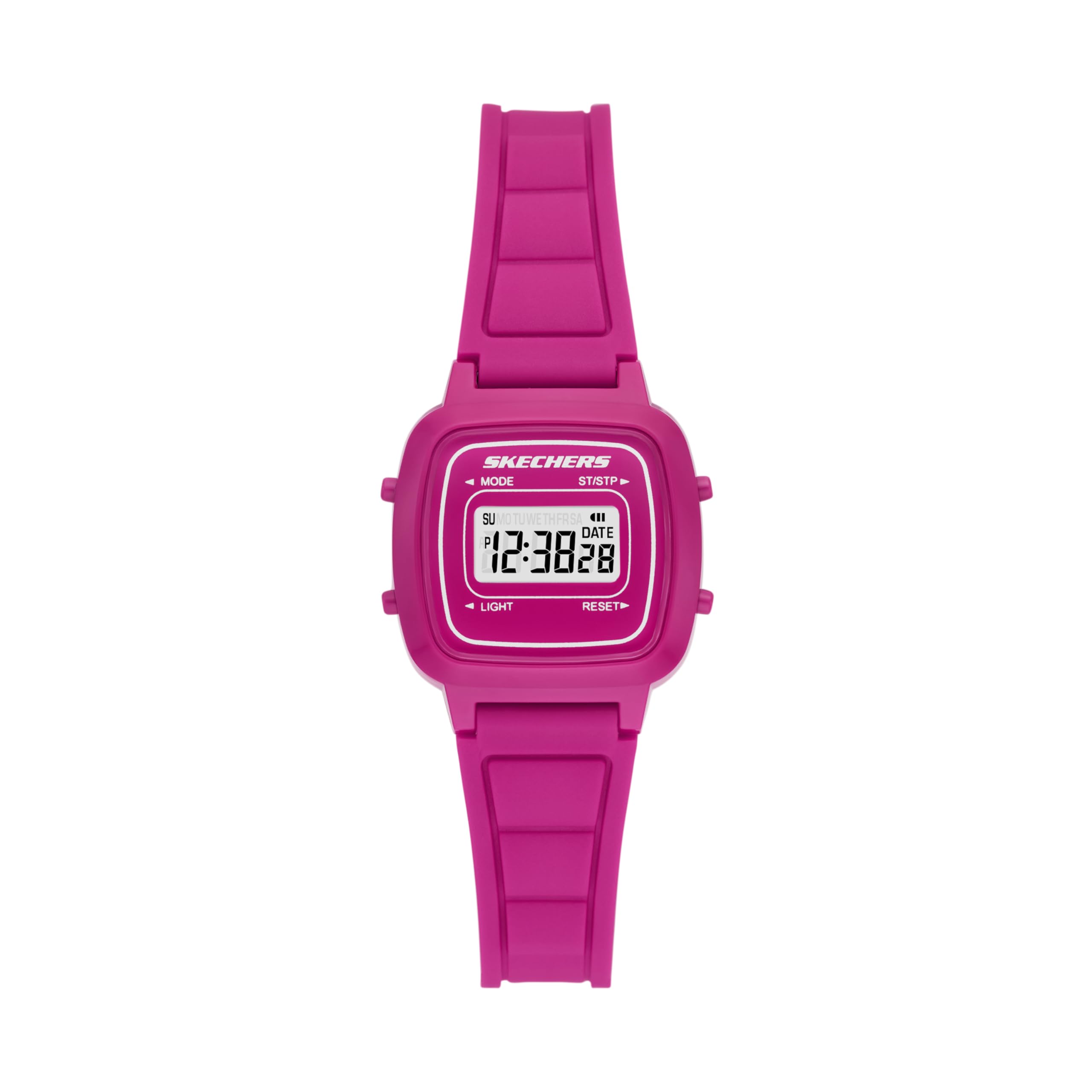
Figure 1: Front view of the Skechers Alta Digital Chronograph Watch, showcasing the digital display and overall design.

Figure 2: Detailed view of the watch face, indicating the functions of each button: MODE, ST/STP (Start/Stop), LIGHT, and RESET.
Key Features:
- Digital time display with 12/24 hour selectable format.
- Chronograph (stopwatch) function.
- Daily alarm and hourly chime.
- EL Backlight for visibility in low light.
- Calendar display.
- Water resistance up to 30 meters (3 ATM).
- Durable polycarbonate case and silicone band.
2. Setup and Initial Configuration
2.1 Button Functions
Refer to Figure 2 for button locations.
- MODE: Cycles through display modes (Time, Alarm, Stopwatch).
- ST/STP (Start/Stop): Starts/stops stopwatch, adjusts settings in setting mode.
- LIGHT: Activates the EL backlight.
- RESET: Resets stopwatch, cycles through options in setting mode.

Figure 3: Side view of the watch, highlighting the two control buttons on the right side of the case.
2.2 Setting Time and Date
- From the normal time display, press the MODE button three times to enter time setting mode. The seconds digits will flash.
- Press the RESET button to cycle through the setting options: Seconds → Hours → Minutes → Month → Date → Day of Week.
- Use the ST/STP button to adjust the flashing value.
- Press the MODE button once to exit setting mode and return to the normal time display.
2.3 12/24 Hour Format Selection
While in time setting mode (seconds flashing), press the ST/STP button to toggle between 12-hour and 24-hour formats. An "A" or "P" indicator will appear for 12-hour format (AM/PM).
3. Operating Instructions
3.1 Using the Backlight
Press the LIGHT button (bottom left) to illuminate the display for a few seconds. This feature is useful in dark environments.
3.2 Using the Stopwatch (Chronograph)
- From the normal time display, press the MODE button once to enter stopwatch mode. The display will show "00:00:00".
- Press the ST/STP button to start the stopwatch.
- Press the ST/STP button again to stop the stopwatch.
- To resume timing, press ST/STP again.
- To reset the stopwatch to zero, press the RESET button while the stopwatch is stopped.
- Press the MODE button to return to the normal time display.
3.3 Setting and Using the Alarm
- From the normal time display, press the MODE button twice to enter alarm setting mode. The hour digits will flash.
- Press the ST/STP button to adjust the hour.
- Press the RESET button to select the minute digits.
- Press the ST/STP button to adjust the minutes.
- Press the MODE button to exit alarm setting mode.
To turn the alarm ON/OFF: In normal time display, press and hold the RESET button, then press the ST/STP button. An alarm icon will appear/disappear to indicate its status.
3.4 Hourly Chime
To turn the hourly chime ON/OFF: In normal time display, press and hold the MODE button, then press the RESET button. All days of the week will appear/disappear to indicate the chime status.
4. Maintenance and Care
4.1 Water Resistance
The Skechers Alta Digital Watch is water-resistant to 3 ATM (30 meters or 100 feet). This means it can withstand splashes, rain, or brief immersion in water. It is not suitable for swimming, diving, or showering, as prolonged exposure to water pressure or hot water can compromise the seals.
4.2 Battery Replacement
The watch uses 1 Lithium Ion battery (included). When the display becomes dim or functions become erratic, the battery may need replacement. Battery replacement should ideally be performed by a qualified watch technician to ensure proper sealing and water resistance. Attempting to replace the battery yourself may void the warranty and compromise water resistance.
4.3 Cleaning
To clean your watch, wipe it gently with a soft, damp cloth. Avoid using harsh chemicals, solvents, or abrasive cleaners, as these can damage the case or strap. Ensure the watch is dry before storing or wearing.

Figure 4: Rear view of the watch, showing the stainless steel case back and the buckle closure on the silicone band.
5. Troubleshooting
- Display is dim or blank: The battery may be low or depleted. Replace the battery as described in Section 4.2.
- Time is incorrect: Re-set the time and date following the instructions in Section 2.2. Ensure the 12/24 hour format is correctly set.
- Buttons are unresponsive: Ensure the watch is not in a locked mode (if applicable, though this model typically does not have a lock). If the issue persists, the battery may be low, or there might be an internal malfunction.
- Water inside the watch: Immediately cease use and take the watch to a qualified technician. Water ingress can cause severe damage.
6. Specifications
| Feature | Detail |
|---|---|
| Model Number | SR2140 |
| Case Size | 27mm |
| Band Size | 12mm |
| Movement | Digital |
| Water Resistance | 3 ATM (30 meters / 100 feet) |
| Battery Type | 1 Lithium Ion battery (included) |
| Case Material | Polycarbonate |
| Band Material | Silicone |
| Country of Origin | China |
| Parcel Dimensions | 10.2 x 7.9 x 7.5 cm |
| Item Weight | 18 g |

Figure 5: Case size guide, illustrating different watch dimensions for reference.
7. Warranty Information
Skechers watches typically come with a limited manufacturer's warranty covering defects in materials and workmanship. The specific terms and duration of the warranty may vary by region and retailer. Please retain your proof of purchase for warranty claims. For detailed warranty information, refer to the warranty card included with your product or visit the official Skechers website.
8. Customer Support
If you encounter any issues or have questions regarding your Skechers Alta Digital Chronograph Watch that are not covered in this manual, please contact Skechers customer support. You can usually find contact information on the official Skechers website or through the retailer where you purchased the watch.


