
intelamp B0CB7L9YJB
INTELAMP Outdoor Solar Light User Manual
Brand: INTELAMP | Model: B0CB7L9YJB
Introduction
Thank you for choosing the INTELAMP Outdoor Solar Light. This manual provides detailed instructions for the installation, operation, and maintenance of your new solar light. Designed for outdoor use, this light features a powerful solar panel, motion detection capabilities, and multiple lighting modes to enhance the safety and ambiance of your outdoor spaces.
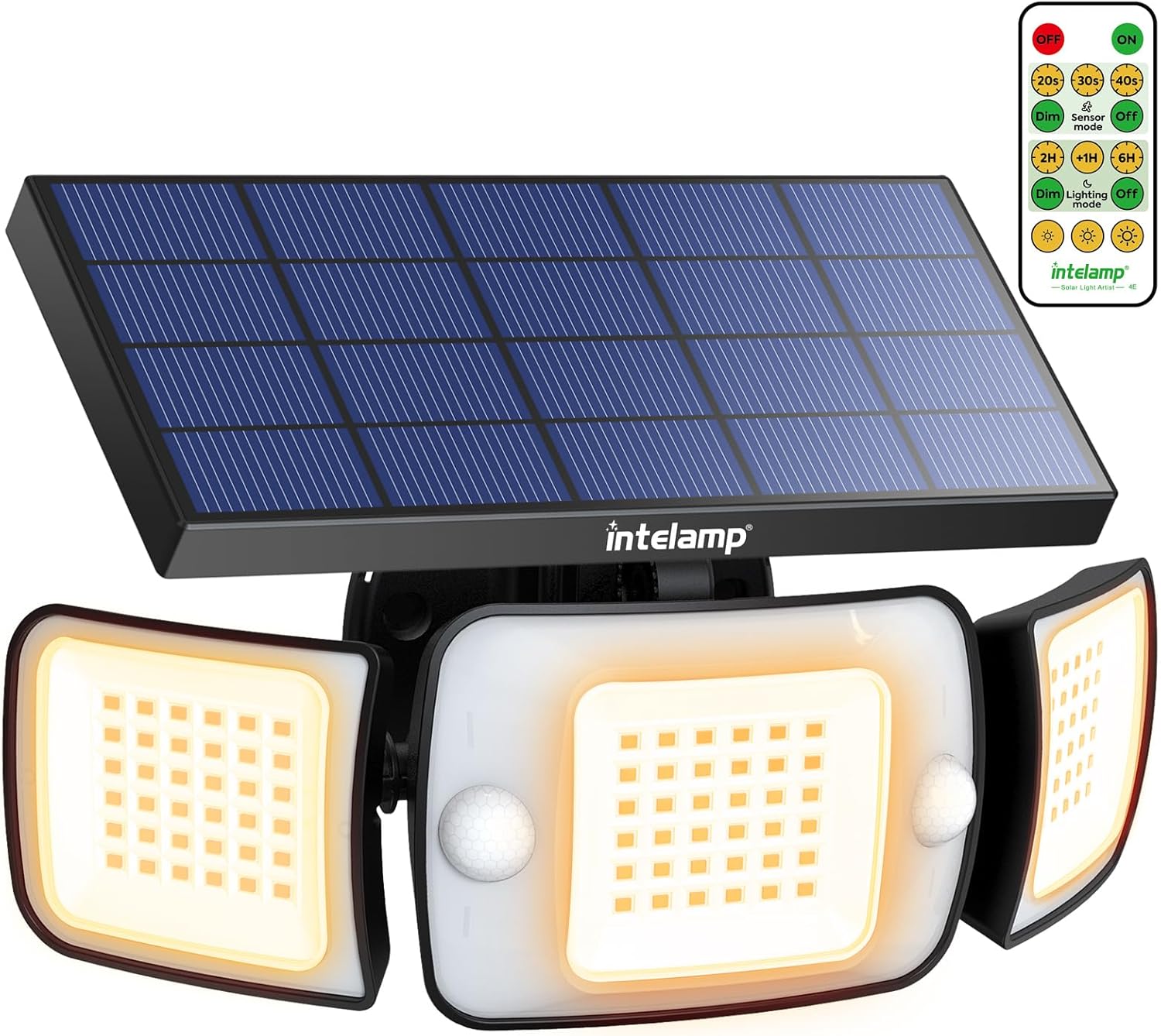
Figure 1: INTELAMP Outdoor Solar Light with included remote control.
The INTELAMP solar light is equipped with 108 high-brightness LED beads, delivering up to 1200 lumens of warm white light. Its unique design allows for a 270° wide-angle illumination, covering an area of approximately 70 square meters. With dual PIR sensors, it offers a broad 180° motion detection range up to 16 meters, ensuring comprehensive coverage. The light is built with IP65 waterproof ABS plastic, making it highly durable and resistant to various weather conditions.

Figure 2: Examples of the solar light in various outdoor applications, including illuminating a patio, driveway, and garden path.
Product Features
- Wide-Angle Illumination: Super bright warm white LED lights with 108 high-brightness beads, providing up to 1200 lumens and a 270° illumination angle when LED wings are unfolded.
- Dual PIR Sensors & 4 Lighting Modes: Features a dual-sensor design for 180° motion detection over a larger area (10-16 meters). Offers four distinct lighting modes to suit various needs.
- Convenient Remote Control: Includes a large, simple remote control for easy adjustment of operating parameters, including customizable highlight duration (20s, 30s, 40s).
- IP65 Waterproof & Durable: Constructed from IP65 waterproof ABS plastic, ensuring resistance to rain, snow, frost, and sun for reliable outdoor performance.
- High Efficiency & Energy Saving: Equipped with a large solar panel and a safe 6000 mAh lithium-iron phosphate battery, providing sufficient power for extended illumination after adequate sun exposure. Features a high 22% conversion rate silicone solar panel.

Figure 3: Key features highlighting the light's brightness, wide-angle coverage, and waterproof design.
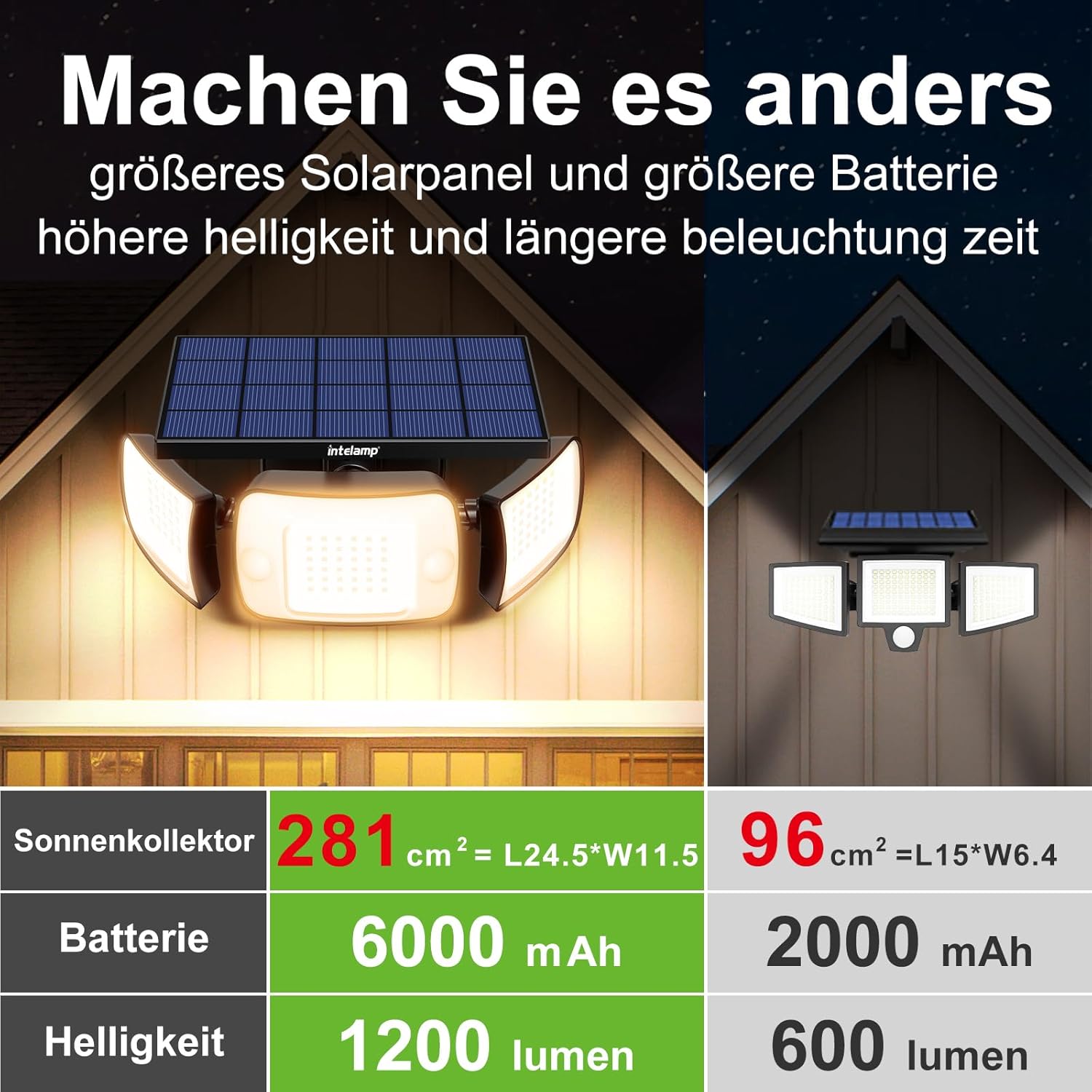
Figure 4: Performance comparison illustrating the superior specifications of this model.
Package Contents
Please check the package contents upon opening to ensure all items are present and undamaged:
- 1 x INTELAMP Outdoor Solar Light
- 1 x Remote Control
- Mounting Screws and Wall Plugs
- User Manual (this document)
Setup and Installation
1. Choosing a Location
Select a location that receives direct sunlight for at least 6-8 hours a day to ensure optimal charging of the solar panel. Avoid areas under eaves, trees, or other obstructions that might block sunlight or motion detection.
2. Mounting the Light
- Mark the desired drilling points on the wall using the light's mounting holes as a template.
- Drill holes at the marked positions. Insert the wall plugs into the drilled holes.
- Align the light with the holes and secure it firmly using the provided screws. Ensure the solar panel is facing upwards to maximize sun exposure.

Figure 5: Product dimensions and solar panel size for installation planning.
3. Initial Charge
Before first use, allow the solar light to charge in direct sunlight for at least 8-10 hours. This ensures the battery is fully charged and ready for optimal performance.

Figure 6: Charging and illumination duration.
Operating Instructions
Using the Remote Control
The included remote control allows you to easily switch between different lighting modes and adjust settings. Ensure the remote is pointed directly at the light for effective communication.
- ON/OFF: Turns the light on or off.
- Sensor Mode (20s/30s/40s): Sets the duration for which the light stays bright after motion is detected.
- Dim Mode: Activates a continuous dim light that brightens upon motion detection.
- Lighting Mode (2H/1H/6H): Sets the light to stay on continuously for a specified duration (2, 1, or 6 hours) regardless of motion.
- OFF Mode: Turns off all functions.
Understanding the 4 Lighting Modes
The INTELAMP solar light offers four distinct operating modes to cater to various security and illumination needs:
- Mode 1 (Motion Sensor with Dim Light): The light stays dim at night and brightens to full luminosity for 20/30/40 seconds when motion is detected. It then returns to dim light.
- Mode 2 (Motion Sensor Only): The light remains off at night and turns on to full luminosity for 20/30/40 seconds when motion is detected. It then turns off completely.
- Mode 3 (Constant Lighting): The light stays on at a constant brightness (e.g., 50% luminosity) throughout the night, regardless of motion. This mode can be set for 1, 2, or 6 hours.
- Mode 4 (Emergency Light): This mode is typically activated manually for continuous full brightness for a short period, often used for specific tasks or emergencies.

Figure 7: Motion sensor detection capabilities.
Maintenance
Regular maintenance ensures the longevity and optimal performance of your solar light.
- Cleaning: Periodically wipe the solar panel and LED lenses with a soft, damp cloth to remove dust, dirt, or debris. A clean solar panel ensures efficient charging.
- Battery Care: The integrated lithium-ion battery is designed for long life. For best performance, ensure the light receives adequate sunlight daily. Avoid prolonged periods of storage without charging.
- Environmental Protection: The IP65 rating protects against water jets and dust. However, avoid submerging the light in water.
Troubleshooting
If you encounter issues with your INTELAMP solar light, please refer to the following common problems and solutions:
| Problem | Possible Cause | Solution |
|---|---|---|
| Light does not turn on at night. | Insufficient solar charge. | Ensure the solar panel is in direct sunlight for 8-10 hours. Clean the solar panel. |
| Light flickers or is dim. | Low battery charge or dirty solar panel. | Allow more charging time. Clean the solar panel. |
| Motion sensor not working. | Sensor obstructed or incorrect mode. | Ensure the sensor is clear of obstructions. Check remote control settings to ensure it's in a motion-sensing mode. |
| Remote control not responding. | Remote battery low or not pointed correctly. | Ensure the remote is pointed directly at the light. Check if the remote's battery needs replacement (if applicable). |
Technical Specifications
| Brand | INTELAMP |
| Model Number | B0CB7L9YJB |
| Product Dimensions (L x W x H) | 24 x 12 x 12 cm |
| Item Weight | 790 grams |
| Battery Type | 1 Lithium-ion (included) |
| Battery Capacity | 6000 mAh |
| Number of LED Bulbs | 108 |
| Luminous Flux | 1200 lm |
| Wattage | 8 Watts |
| Color Temperature | 3300 Kelvin (Warm White) |
| Material | Acrylonitrile Butadiene Styrene (ABS) |
| Ingress Protection (IP) Rating | IP65 |
| Special Features | Motion Sensor, Timer, Remote Control |
| Power Source | Solar Powered |
| Installation Type | Wall Mount |
Warranty and Support
INTELAMP is committed to providing high-quality products. For any questions, technical support, or warranty claims, please contact our customer service. Please refer to your purchase receipt for specific warranty terms and conditions.
For further assistance, please visit the official INTELAMP website or contact the seller directly through the platform where you purchased the product.
Ask a question about this manual
Ask about setup, troubleshooting, compatibility, parts, safety, or missing instructions. Manuals+ will review the question and use this page’s manual context to help answer it.