
1. Introduction
Thank you for choosing the Modern Flames Orion Slim 52-Inch Linear Built-in Electric Fireplace. This manual provides essential information for the safe and efficient operation, installation, and maintenance of your new electric fireplace. Please read all instructions carefully before installation and use.
Key Features:
- HELIOVISION Flame Technology for a realistic flame display.
- Three flame patterns and six flame colors for customizable ambiance.
- Integrated 5,000 BTU heater, capable of providing supplemental heat.
- Variable heat and flame functions operate independently.
- App-enabled WiFi control for convenient operation via smartphone.
2. Important Safety Information
Always follow basic safety precautions when using electrical appliances to reduce the risk of fire, electric shock, and injury to persons.
- Read all instructions before using this fireplace.
- Do not operate any fireplace with a damaged cord or plug, or if the heater malfunctions or has been dropped or damaged in any manner.
- Keep combustible materials, such as furniture, pillows, bedding, papers, clothes, and curtains at least 3 feet (0.9 m) from the front of the fireplace.
- Do not insert or allow foreign objects to enter any ventilation or exhaust opening as this may cause an electric shock or fire, or damage the fireplace.
- To prevent a possible fire, do not block air intakes or exhaust in any manner. Do not use on soft surfaces, like a bed, where openings may become blocked.
- This fireplace is hot when in use. To avoid burns, do not let bare skin touch hot surfaces.
3. Package Contents
Upon unpacking, ensure all components are present and undamaged. If any parts are missing or damaged, do not attempt to assemble or operate the fireplace. Contact customer support immediately.
- Modern Flames Orion Slim 52-Inch Electric Fireplace Unit
- Remote Control
- Decorative Media (e.g., logs, crystals, or a combination)
- Mounting Hardware (if applicable for built-in installation)
- User Manual
4. Product Specifications
| Attribute | Value |
|---|---|
| Brand | Modern Flames |
| Model Name | OR52-SLIM |
| Size | 52 Inch |
| Product Dimensions | 6"D x 52"W x 20"H |
| Installation Type | Built In |
| Heat Output | 5000 British Thermal Units |
| Power Source | AC/DC |
| Material | Ceramic, Glass |
| Item Weight | 105 Pounds |
| Special Feature | Corded |
| Ventilation Type | Vent Free |
| UPC | 850011491324 |
For detailed dimensions, refer to the diagram below:

Figure 1: Technical dimensions of the OR52-SLIM fireplace.
5. Setup and Installation
The Modern Flames Orion Slim fireplace is designed for built-in installation. Professional installation is recommended.
5.1 Choosing a Location:
- Select a location that is dry, level, and away from direct sunlight or heat sources.
- Ensure there is a dedicated 120V, 15 Amp circuit available.
- Maintain proper clearances from combustible materials as specified in safety guidelines.
5.2 Preparing the Opening:
Construct a framed opening in the wall according to the product dimensions (refer to Figure 1). Ensure the opening is slightly larger than the fireplace unit for easy insertion.
5.3 Electrical Connection:
- Connect the fireplace to a grounded electrical outlet.
- Ensure the power cord is not pinched or routed under the unit.
5.4 Installing Decorative Media:
Carefully place the provided decorative media (logs, crystals, or a combination) into the designated media tray at the bottom of the fireplace viewing area.
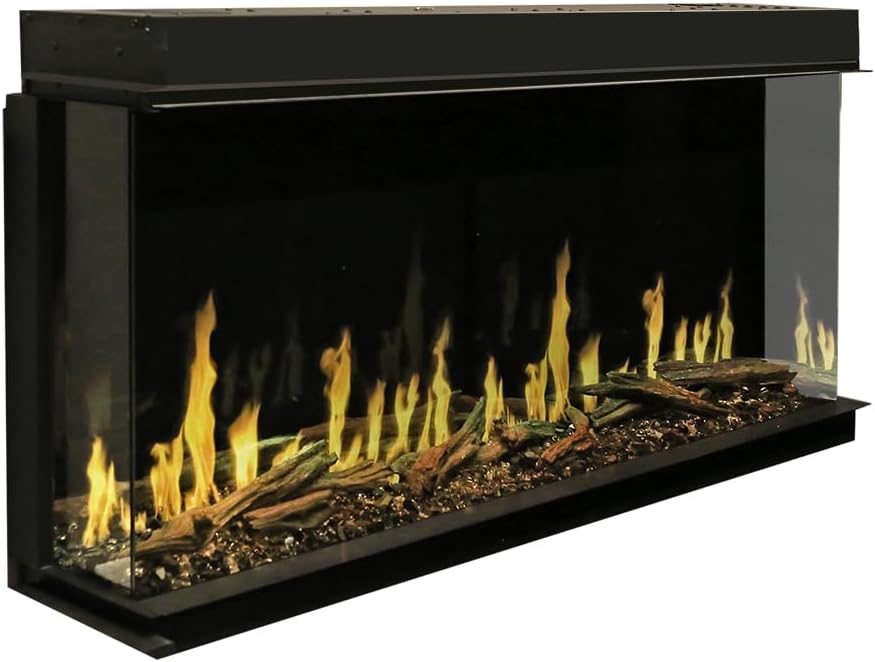
Figure 2: Modern Flames Orion Slim 52-Inch Electric Fireplace installed.
6. Operating Instructions
Your Modern Flames Orion Slim fireplace can be operated using the integrated control panel, the included remote control, or the dedicated smartphone app.
6.1 Power On/Off:
Press the power button on the control panel or remote to turn the fireplace on or off. The unit will typically start with the last used settings.
6.2 Adjusting Flame Settings:
The fireplace offers three flame patterns and six flame colors. Use the dedicated flame buttons on the remote or app to cycle through the options. The flame speed can also be adjusted.

Figure 3: Close-up of realistic flame effects.

Figure 4: Example of blue and purple flame colors.
6.3 Heat Function:
Activate the 5,000 BTU heater using the heat button. The heat function can be operated independently of the flame effects. Adjust the heat level as desired. The heat is emitted from a vent at the top of the unit.
6.4 App Control (WiFi):
Download the Modern Flames App to control your fireplace via WiFi. This allows for convenient adjustment of all settings from your smartphone.
7. Maintenance
Regular maintenance ensures the longevity and optimal performance of your electric fireplace.
7.1 Cleaning:
- Always disconnect power before cleaning.
- Clean the glass panel with a soft, damp cloth. Do not use abrasive cleaners.
- Gently vacuum the air intake and heat outlet vents to remove dust and debris.
7.2 General Care:
Avoid placing heavy objects on the fireplace. Do not obstruct the air vents. Store the remote control in a safe place when not in use.
8. Troubleshooting
If you encounter issues with your fireplace, refer to the following common problems and solutions:
| Problem | Possible Cause | Solution |
|---|---|---|
| Fireplace does not turn on. | No power, power switch off, remote batteries dead. | Check power outlet, ensure main power switch is on, replace remote batteries. |
| No flames displayed. | Flame effect turned off, internal error (e.g., "USB flash disk path not found"). | Ensure flame effect is activated. If an error message appears, try resetting the unit by unplugging for 5 minutes. If issue persists, contact customer support. |
| No heat output. | Heater function off, thermostat setting too low. | Activate heater function, increase thermostat setting. |
If troubleshooting steps do not resolve the issue, please contact Modern Flames customer support.
9. Warranty and Support
Your Modern Flames Orion Slim Electric Fireplace comes with an extended warranty. For specific terms and conditions, please refer to the warranty card included with your product or contact Modern Flames directly.
Customer Support:
For technical assistance, parts, or warranty inquiries, please contact Modern Flames customer support:
- Website: www.modernflames.com (placeholder)
- Email: support@modernflames.com (placeholder)
- Phone: 1-800-XXX-XXXX (placeholder)
Please have your model number (OR52-SLIM) and proof of purchase ready when contacting support.


