1. Introduction
Thank you for choosing the Luqeeg 1080P Wireless Reverse Hitch Camera. This system is designed to enhance visibility and safety when maneuvering vehicles such as RVs, trucks, trailers, and cars. It features a 150° wide-angle lens, 1080P resolution, infrared night vision, and smart detection capabilities. Please read this manual thoroughly before installation and operation to ensure proper use and optimal performance.
2. Package Contents
Verify that all items listed below are included in your package:
- Camera Body
- Mounting Buckle
- Data Cable (USB)
- User Manual

Image: The camera body, mounting buckle, USB data cable, and user manual are shown, representing the complete package contents.
3. Product Features
- 1080P High-Definition Video: Captures clear and detailed footage.
- 150° Wide-Angle Lens: Provides an expansive view behind your vehicle, aiding in hitching and reversing.
- Infrared Night Vision: Equipped with four infrared LED lights for clear visibility in low-light conditions.
- Wireless Connectivity: Establishes a direct peer-to-peer WiFi connection with your mobile device (up to 30 feet). No external network required.
- Motion and Voice Detection: Sends alert notifications to your phone upon detecting movement or sound. Captures three photos and records video to a memory card (not included). This feature must be enabled in the app.
- Mobile App Control: Compatible with both Android and iOS systems for remote viewing, recording, and settings adjustment.
- Magnetic and Adhesive Base: Offers versatile mounting options for various surfaces and applications.
- Built-in Rechargeable Battery: Provides portable power for flexible installation.
- Waterproof Design: Ensures reliable performance in diverse weather conditions.
- Local Storage: Supports memory cards up to 32GB (not included) for video recording.

Image: A visual representation of the camera assisting in hitching a trailer, demonstrating its wide-angle view.
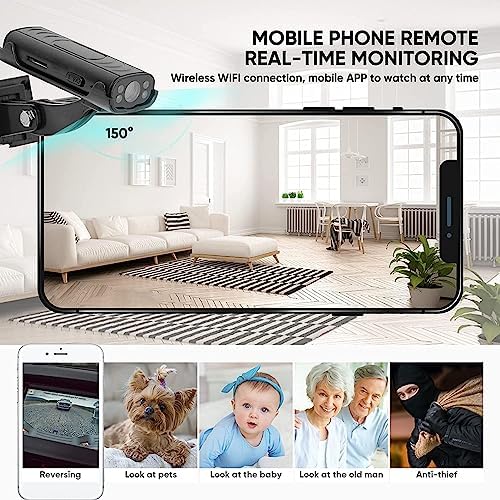
Image: The camera's live feed displayed on a mobile phone, illustrating its versatility for different monitoring needs.

Image: The camera's app interface, highlighting its intelligent motion and sound detection capabilities for security and monitoring.
4. Setup Guide
4.1 Charging the Camera
Before first use, fully charge the camera using the provided USB data cable. Connect the cable to the camera's charging port and a standard USB power source (e.g., computer, USB wall adapter). The charging indicator light will provide status.
4.2 Installing a Memory Card (Optional)
To enable video recording and storage, insert a memory card (up to 32GB, not included) into the designated slot on the camera. Ensure the card is inserted correctly according to the diagram in the manual.
4.3 Mounting the Camera
The camera comes with a magnetic and adhesive base for flexible mounting. Choose a location that provides a clear view for your intended use (e.g., near the hitch for trailer hookup, on the rear of the vehicle for general reversing). Ensure the surface is clean and dry before applying the adhesive base. The camera's angle can be adjusted for optimal viewing.
4.4 App Download and Connection
- Download the dedicated app (e.g., "IWFcam" or as specified in the included manual) from your device's app store (Android or iOS).
- Power on the camera.
- On your mobile device, go to WiFi settings and connect to the camera's direct WiFi network. The network name will typically start with a unique identifier for the camera.
- Open the app. The camera feed should appear automatically.
5. Operating Instructions
5.1 Powering On/Off
Locate the power button on the camera. Press and hold to power on or off. Refer to the camera body diagram in the included manual for exact button location.
5.2 Live View and Recording
Once connected via the app, you will see the live video feed. Use the app interface to:
- View Live Feed: Monitor the area behind your vehicle in real-time.
- Record Video: Tap the record button to start/stop video recording.
- Take Photos: Tap the camera icon to capture still images.
- Access Recorded Files: View stored videos and photos directly through the app.
5.3 Motion and Voice Detection Settings
To activate or adjust motion and voice detection features:
- Open the app and connect to the camera.
- Navigate to the settings menu within the app.
- Locate the 'Motion Detection' and 'Voice Detection' options.
- Enable these features and adjust sensitivity settings as desired.
When triggered, the camera will capture three photos, send an alert to your phone, and record video to the memory card.
Video: An official product video demonstrating the Luqeeg Reverse Hitch Guide Camera's features, including its 1080P resolution and night vision capabilities. This video is provided by the seller, Oumij1.
6. Maintenance
6.1 Cleaning
To maintain optimal image clarity, regularly clean the camera lens with a soft, lint-free cloth. Avoid using abrasive cleaners or solvents that could damage the lens or camera body.
6.2 Battery Care
Recharge the camera's built-in battery when the battery indicator shows low power. For long-term storage, ensure the battery is partially charged (around 50%) and store in a cool, dry place.
6.3 Storage
When not in use, store the camera in a protective environment away from extreme temperatures, direct sunlight, and moisture.
7. Troubleshooting
If you encounter issues with your Luqeeg Reverse Hitch Camera, please refer to the following common problems and solutions:
- Camera not connecting to phone:
- Ensure the camera is powered on and fully charged.
- Verify that your phone's WiFi is enabled and connected to the camera's direct WiFi network.
- Check the distance between the camera and your phone. The wireless connection is stable up to 20-30 feet. Obstructions can reduce this range.
- Restart both the camera and your phone, then attempt to reconnect.
- Ensure the app is updated to the latest version.
- "Live Video Failed" error:
- This often indicates a weak or interrupted WiFi connection. Move closer to the camera or reduce interference.
- Close and reopen the app.
- Check if other applications are consuming significant network resources on your phone.
- Poor image quality or blurry video:
- Clean the camera lens with a soft cloth.
- Ensure there is adequate lighting. While the camera has night vision, extreme darkness or glare can affect quality.
- Check for condensation or moisture on the lens.
- Motion/Voice Detection not working:
- Confirm that these features are enabled in the app's settings.
- Adjust the sensitivity settings within the app.
- Ensure a memory card is inserted for recording triggered events.
- Battery not holding charge:
- Ensure the charging cable and power source are functioning correctly.
- Allow sufficient time for a full charge.
- If the issue persists, the battery may require service.
8. Specifications
| Feature | Specification |
|---|---|
| Brand Name | Luqeeg |
| Model Number | Luqeegu7ya6wocsb |
| Item Weight | 4.6 ounces |
| Package Dimensions | 5.24 x 3.54 x 1.77 inches |
| Color | Black |
| Special Features | Motion Detection, Voice Detection |
| Photo Sensor Technology | CMOS |
| Video Capture Resolution | 1080p |
| Video Capture Format | AVI |
| Supported Audio Format | PCM, MP3 |
| Screen Size (for display, not camera) | 2.7 Inches (referring to typical display size for such devices) |
| Connectivity Technology | Peer to peer direct connection |
| Camcorder type | Video Camera |
9. Warranty and Support
9.1 Warranty Information
For specific warranty details, please refer to the warranty card included with your product or contact Luqeeg customer support. Keep your purchase receipt as proof of purchase for any warranty claims.
9.2 Customer Support
If you require further assistance, have questions, or encounter issues not covered in this manual, please contact Luqeeg customer support through the retailer's platform or the official brand website. Provide your product model number and a detailed description of the issue for efficient support.