
Introduction
The Ytuomzi USB Mini Disco Light is a compact, portable LED lighting device designed to project multi-colored light patterns. It features sound activation, allowing the light patterns to synchronize with music or ambient sounds. This manual provides instructions for the proper setup, operation, and maintenance of your disco light.

Image: Two Ytuomzi USB Mini Disco Lights, each with a USB connector and a green base, accompanied by various phone adapters (Type-C, Micro USB, and Lighting).
Package Contents
Verify that all items are present in your package:
- 2x Mini USB Disco Light
- 2x iPhone Adapter (Lightning)
- 2x Type-C Adapter
- 2x Android Micro Adapter
Setup Instructions
The Ytuomzi USB Mini Disco Light is designed for plug-and-play operation. Follow these steps to set up your device:
- Select the appropriate adapter: Identify the correct adapter for your device (Lightning for iPhone, Type-C for newer Android/other devices, Micro USB for older Android devices).
- Connect the adapter: Attach the chosen adapter to the USB connector of the Mini Disco Light.
- Plug into power source: Insert the assembled disco light (with adapter) into a compatible USB port. This can be a smartphone, tablet, power bank, portable charger, computer, or USB microphone. The light will activate automatically upon connection.
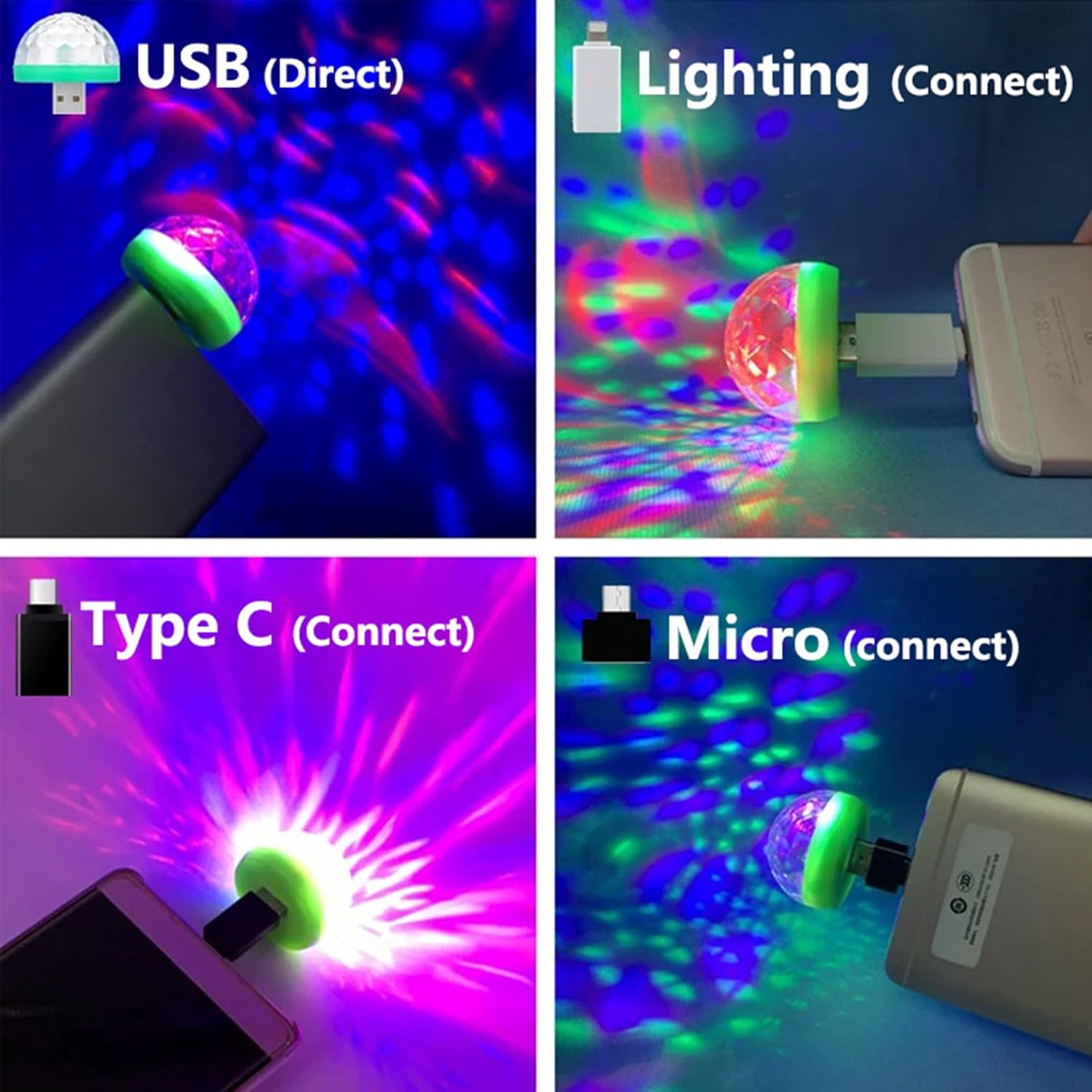
Image: Demonstrates connecting the disco light directly to a USB port, and via Lighting, Type-C, and Micro USB adapters to various devices, showing the projected light patterns.
Operating Instructions
The Ytuomzi USB Mini Disco Light operates automatically once connected to a power source.
- Automatic Activation: The light will turn on immediately when plugged into a powered USB port.
- Sound Activation: The disco light features a built-in sound beat sensor. The light patterns and colors will change and flash in response to music or ambient sounds, creating a dynamic visual effect.
- Multi-Color Projection: The device projects multiple colors (Green, Red, Blue, and combinations) to create various atmospheric effects.
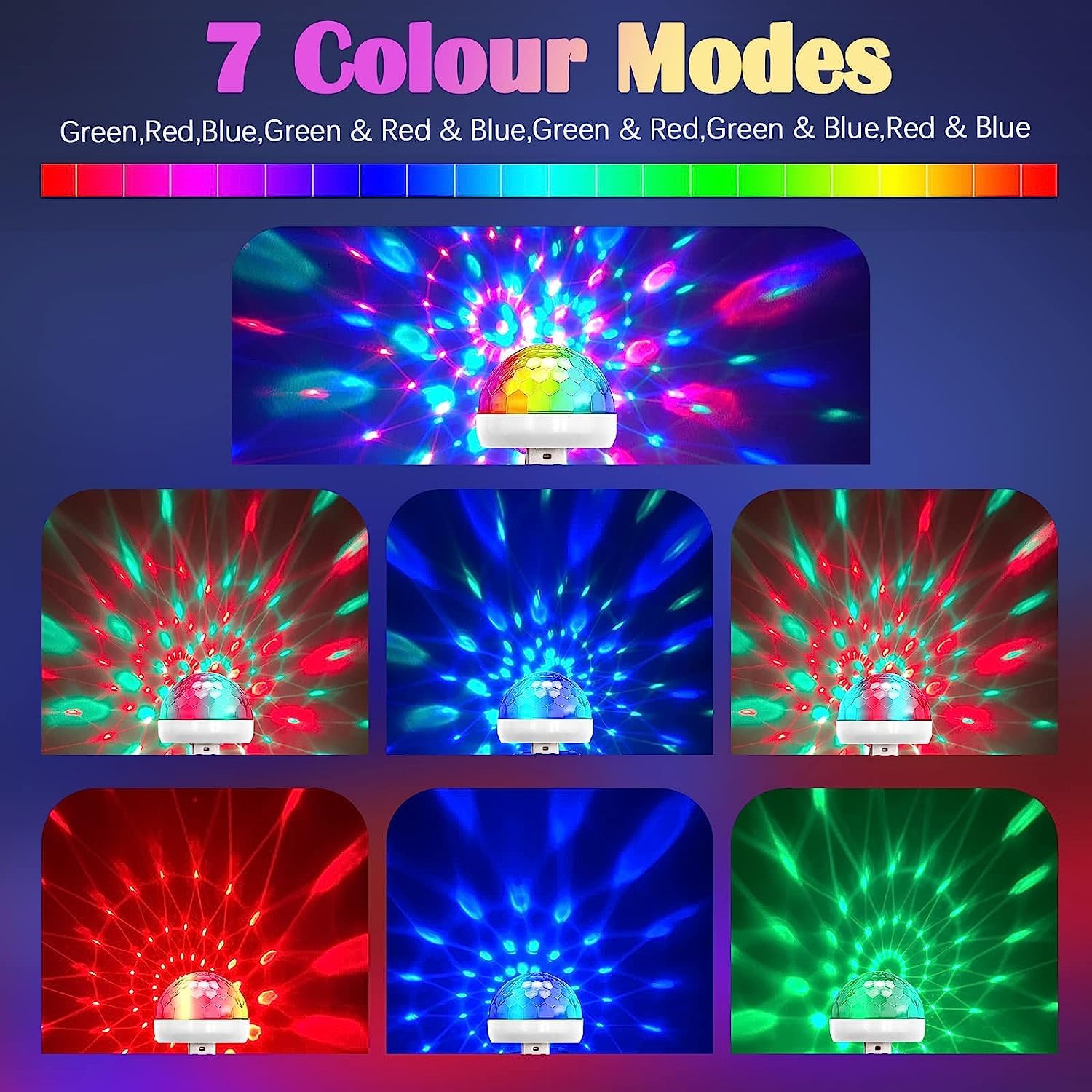
Image: Displays seven distinct color modes projected by the disco light, including green, red, blue, and various mixed color combinations.

Image: Illustrates the multi-color light patterns projected by the disco light inside a car, creating an atmospheric effect on the seats and ceiling.
Compatibility
The Ytuomzi USB Mini Disco Light is compatible with a wide range of devices using the included adapters:
- iPhone Adapter (Lightning): Compatible with most Apple devices such as iPhone 5 and later, iPad Mini, etc.
- Android Adapter (Micro USB): Compatible with most micro USB connector mobiles and tablets with OTG function, such as Samsung Galaxy or Note series phones and tablets.
- Type-C Adapter: Compatible with tablets and smartphones featuring a USB Type-C connector, including Galaxy S8, Lumia 950 XL, Nexus 6P, and similar devices.
- Direct USB Connection: Can be plugged directly into any standard USB output port, including power banks, portable chargers, computers, and karaoke microphones.
Note:
- A small number of mobile phones may not be compatible (e.g., some models of Galaxy S9+, iPhone 7 Plus, and iPhone 11).

Image: Illustrates the compatibility of the disco light with various devices, including cellphones, iPads, power banks, USB microphones, and PCs, using the provided Lighting, Type-C, and Micro USB adapters.
Specifications
| Feature | Detail |
|---|---|
| Model Number | Disco RGB Light 001 |
| Voltage | 5V |
| Power | 4W |
| Amperage | 0.9 Amps |
| Flash Range | 5-10 meters |
| Light Source Type | Light Emitting Diode (LED) |
| Bulb Features | Sound Activated |
| Material | Plastic |
| Product Dimensions | 1.64"L x 1.5"W x 1.5"H (approximately) |
| Item Weight | 1.76 ounces (approximately) |
| Lifespan | Up to 20,000 hours |
Maintenance
To ensure the longevity and optimal performance of your Ytuomzi USB Mini Disco Light, follow these simple maintenance guidelines:
- Cleaning: Use a soft, dry cloth to gently wipe the surface of the disco light. Avoid using abrasive cleaners or solvents, as these can damage the plastic housing and lens.
- Storage: When not in use, store the disco light and its adapters in a cool, dry place, away from direct sunlight and extreme temperatures.
- Handling: Handle the device with care. Avoid dropping it or subjecting it to strong impacts, which could damage internal components.
- Connectivity: When disconnecting the adapters from the main USB connection, pull directly on the adapter housing rather than the light itself to prevent damage to the socket.
Troubleshooting
If you encounter issues with your Ytuomzi USB Mini Disco Light, refer to the following common problems and solutions:
| Problem | Possible Solution |
|---|---|
| Light does not turn on. |
|
| Light does not react to sound/music. |
|
| Light is not compatible with my phone. |
|
| Light appears dim or flickers. |
|
Warranty and Support
Ytuomzi provides customer support for this product. If you have any questions or encounter issues with your USB Mini Disco Light, please contact us. We aim to respond to inquiries within 24 hours.
For warranty claims or technical assistance, please refer to the contact information provided at the point of purchase or visit the official Ytuomzi store page on Amazon: Ytuomzi Store.