
1. Introduction
The Retevis RT29D is a professional-grade DMR (Digital Mobile Radio) two-way radio designed for reliable and secure communication in various demanding environments. Featuring IP67 waterproofing, high power output for extended range, and a long-lasting 3200mAh battery, this radio is built to meet the needs of business, outdoor, and emergency service users. This manual provides essential information for setting up, operating, maintaining, and troubleshooting your RT29D radio.
What's in the Box
- 2x RT29 Two Way Radio and Antenna
- 2x 3200 mAh Battery
- 2x Desktop Charger and Adapter, Belt clip
- 2x English User Manual

Figure 1.1: Package Contents of the Retevis RT29D
2. Key Features
The Retevis RT29D incorporates several advanced features to ensure optimal performance and user convenience.
2.1 Digital (DMR) and Analog Modes
The RT29D supports both digital and analog modes, offering enhanced sound quality, improved communication security, and better battery life in digital mode. It maintains compatibility with existing analog radio fleets, working with Tier I & II walkie-talkies.

Figure 2.1: Digital and Analog Mode Compatibility
2.2 High Power and Long Range
Equipped with high power DMR technology, the RT29D provides extended communication distance, making it suitable for large areas and challenging terrains. It is designed to keep your team connected efficiently, whether in the field or at an event.

Figure 2.2: High Power for Extended Range
2.3 IP67 Waterproof and Dustproof
The RT29D boasts an IP67 rating, ensuring maximum robustness against water and dust ingress. This feature allows the radio to operate reliably in severe weather conditions, including rain and wind, making it ideal for outdoor and demanding work environments.
Video 2.1: Demonstration of the RT29D's IP67 Waterproof and Dustproof capabilities, showing its resilience in challenging conditions.
2.4 Durable and Sturdy Construction
Constructed from solid aluminum material, the RT29D is built to be rugged and withstand the rigors of daily use. Its robust design ensures maximum uptime and reliability for business and professional applications.

Figure 2.4: Durable and Sturdy Build
2.5 Long-Lasting 3200mAh Battery
The radio is powered by a high-capacity 3200mAh rechargeable battery, providing up to 14 hours of working time and an impressive 46 hours of standby time. This ensures all-day use without the need for frequent recharging.

Figure 2.5: 3200mAh Rechargeable Battery Performance
2.6 Secure Communication
The RT29D features 32-bit digital encryption, enhancing communication security and privacy. This makes it suitable for commercial or business environments where secure conversations are paramount.
3. Setup Guide
3.1 Battery Installation
To install the battery, align the battery pack with the grooves on the back of the radio. Slide the battery upwards until it clicks securely into place. Ensure the battery release latch is engaged to prevent accidental detachment.
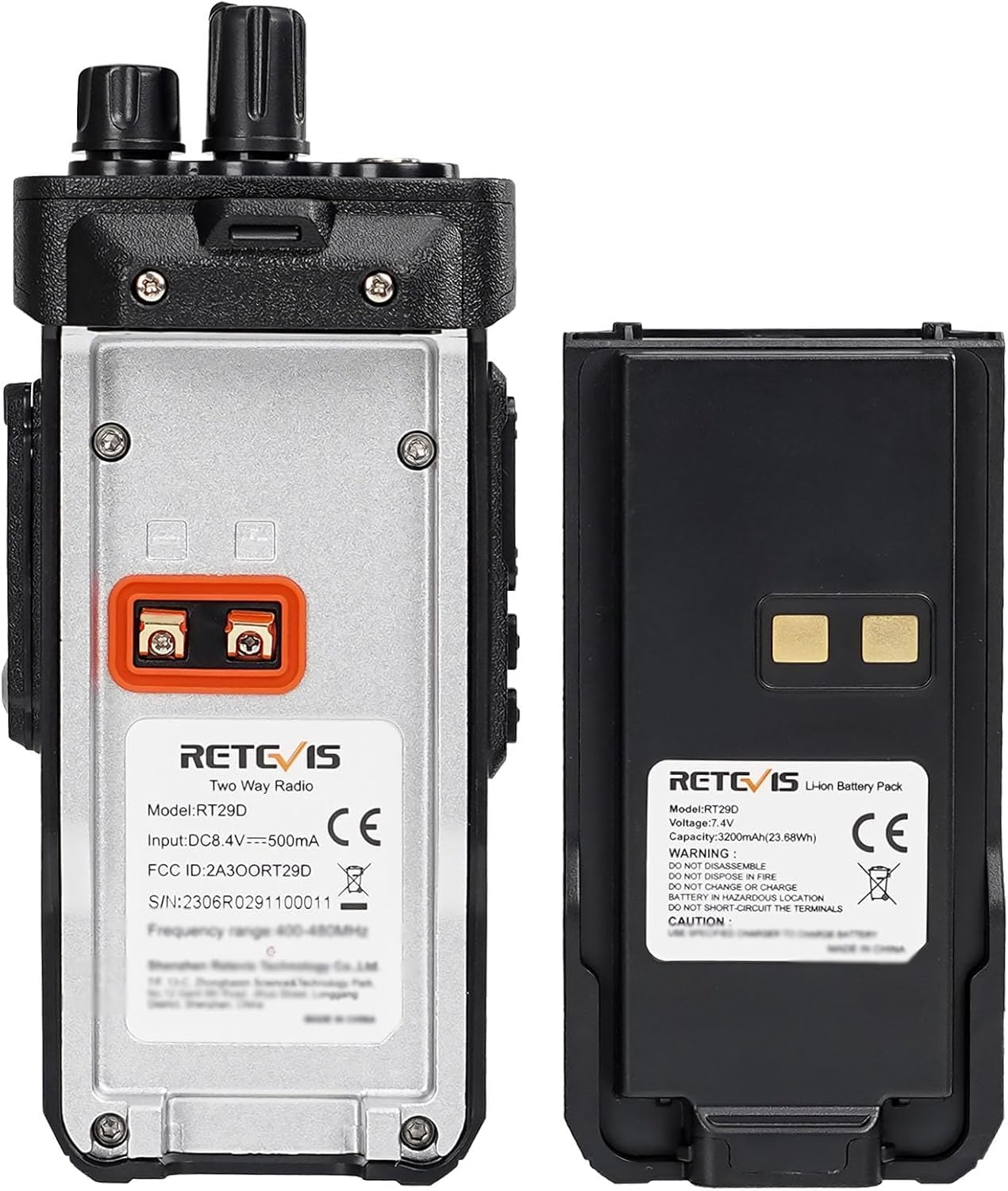
Figure 3.1: Battery and Radio Back Panel
3.2 Charging the Battery
Place the radio with the installed battery into the desktop charger. Ensure the charging contacts on the radio align with those on the charger. The charging indicator light on the charger will typically turn red while charging and green when fully charged. A full charge takes approximately 6 hours.

Figure 3.2: Convenient Charging Setup
3.3 Attaching the Antenna and Belt Clip
Screw the antenna clockwise onto the antenna connector on top of the radio until it is finger-tight. Attach the belt clip to the designated slots on the back of the radio for easy carrying.
4. Operating Instructions
4.1 Basic Controls
The RT29D features intuitive controls for ease of use:
- Power/Volume Knob: Located on top, rotate clockwise to power on and increase volume, counter-clockwise to decrease volume and power off.
- Channel Knob: Located on top, rotate to select desired communication channel.
- PTT (Push-to-Talk) Key: Located on the side, press and hold to transmit, release to receive.
- Side Keys (Programmable): Two side keys can be programmed for various functions (e.g., zone change, power adjustment) via programming software.
- Earpiece Jack: Located on the side, for connecting audio accessories.
4.2 Making a Call
Ensure your radio is powered on and set to the desired channel. Press and hold the PTT key to transmit your message. Speak clearly into the microphone. Release the PTT key to listen for a response.
4.3 Call Types
The RT29D supports various communication methods:
- Single Call: Direct communication with a specific individual radio.
- Group Call: Communication with a predefined group of radios.
- All Call: Broadcast message to all radios within range on the current channel.
4.4 Understanding Radio Range
The effective communication range of your RT29D radio is influenced by several factors, including radio power, signal type (digital vs. analog), horizon distance, atmospheric conditions, antenna quality, and most significantly, terrain and obstacles.
Video 4.1: An informative video explaining the factors that affect two-way radio range, including terrain, obstacles, and atmospheric conditions.
Terrain and obstacles, such as buildings, hills, and dense foliage, can significantly block radio signals, creating "dead zones" or reducing effective range. The radio horizon also limits line-of-sight communication. To maximize range, consider increasing transmission power (doubling power can extend range by approximately 1.4 times), improving receiver sensitivity (adjusting squelch and using high-gain antennas), transmitting from higher locations, and ensuring your battery is fully charged.
5. Maintenance
5.1 General Care and Cleaning
To ensure the longevity and optimal performance of your RT29D radio, regularly clean its exterior with a soft, damp cloth. Avoid using harsh chemicals or abrasive cleaners. Keep the earpiece jack and charging contacts free from dust and debris.
5.2 Battery Care
For best battery performance, fully charge and then fully drain the battery twice upon initial use. After this conditioning, regular charging is sufficient. Avoid overcharging or completely depleting the battery for extended periods. Store the radio and battery in a cool, dry place when not in use.
5.3 IP67 Waterproof Maintenance
While the RT29D is IP67 rated, it is important to ensure all covers (e.g., earpiece jack cover) are securely closed before exposing the radio to water or dust. After exposure to water, wipe the radio dry with a clean cloth. Do not attempt to charge a wet radio.
6. Troubleshooting
If you encounter issues with your Retevis RT29D radio, please refer to the following common problems and solutions:
| Problem | Possible Cause | Solution |
|---|---|---|
| Radio does not power on | Low or depleted battery; improperly installed battery | Charge the battery fully; ensure battery is correctly installed. |
| No signal or poor reception | Out of range; heavy obstacles; incorrect channel/frequency; weak battery | Move to an open area; check channel settings; ensure battery is charged. |
| Cannot communicate with other radios | Different firmware (RT29 vs RT29D); incompatible frequency/CTCSS/DCS settings | Ensure all radios are RT29D and have identical frequency and CTCSS/DCS settings. Note: RT29D is not directly compatible with RT29 due to different firmware. |
| Audio is distorted or too low | Volume too low; earpiece/microphone issue; weak signal | Adjust volume; check earpiece/microphone connection; move closer to other radios. |
7. Specifications
| Specification | Detail |
|---|---|
| Item Weight | 2.9 pounds |
| Product Dimensions | 1.58 x 2.61 x 5.95 inches |
| Country of Origin | China |
| Item model number | RT29D |
| Batteries | 2 Lithium Ion batteries required. (included) |
| Brand | Retevis |
| Color | Black |
| Number of Channels | 128 |
| Special Feature | IP67 Waterproof and dustproof; rugged walkie talkies, Single/group/all call, DMR radios; Analogue/Digital, High power long range 2 way radio, 3200mAh Large capacity battery |
| Talking Range Maximum | 5 Mile (Note: Actual range may vary significantly based on terrain and conditions) |
| Voltage | 7.4 Volts (DC) |
| Water Resistance Level | Waterproof |
8. Warranty & Support
8.1 Warranty Information
Retevis provides a 2-year warranty for the radio body and a 1-year warranty for accessories. Additionally, there is a 30-day no-reason return policy. Beyond the warranty period, maintenance services are still offered, with buyers responsible for associated costs.
8.2 Customer Support
For any questions, technical assistance, or warranty claims, please contact Retevis customer support through Amazon. They aim to reply within 12 hours to provide the most hassle-free service possible.


